1
07 BREAKPOINTS
There are multiple ways to set a breakpoint on a CUDA application. Those methods are described below. The commands to set a breakpoint on the device code are the same as the commands used to set a breakpoint on the host code.
If the breakpoint is set on device code, the breakpoint will be marked pending until the ELF image of the kernel is loaded. At that point, the breakpoint will be resolved and its address will be updated.
When a breakpoint is set, it forces all resident GPU threads to stop at this location when it hits that corresponding PC.
When a breakpoint is hit by one thread, there is no guarantee that the other threads will hit the breakpoint at the same time. Therefore the same breakpoint may be hit several times, and the user must be careful with checking which thread(s) actually hit(s) the breakpoint.
Symbolic Breakpoints
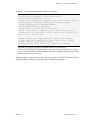
To set a breakpoint at the entry of a function, use the break command followed by the name of the function or method:
(cuda-gdb) break my_function
(cuda-gdb) break my_class::my_method
For templatized functions and methods, the full signature must be given:
(cuda-gdb) break int my_templatized_function<int>(int)
CUDA-GDB
DU-05227-042_v01 | 17