1
WELCOME TO
XFINITY ™ HOME
CONTENTS
Whether you’re home or away — at work or on-the-go —
XFINITY™ Home makes it easy for you to stay connected to
your home and family. This guide will help you get started right away.
System & service
specifications1
System Status Icons2
System & Zone Trouble Header
2
Touch Screen
Controller3
Introduction3
Home Screen
4
Touch Screen Controller
Quick Control Buttons
4
System & Zone Trouble Header
4
Arm5
Disarm5
Emergency5
Settings6
Home Management
6
Information, Media
& Entertainment
7
keychain remote
10
Introduction10
Checking System Status
11
Arming the System
11
Disarming the System
12
Sending an Emergency
Police Alarm
12
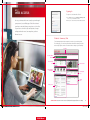
Web Access
13
Introduction13
Signing In
14
Website Summary Tab
14
Security15
Managing Keypad Codes
15
Managing Security Zones
16
Setting Up Your
Emergency Contacts
16
Cameras16
Viewing & Capturing Live
Video & Snapshots
17
Viewing Captured Images
17
Managing Thermostats
18
Managing Lights
18
Viewing History Reports
19
Managing Contacts
19
Managing Rules
20
Managing Touch Screen
Controller Apps
22
MOBILE Access
24
Introduction24
Home Screen
25
Security25
Cameras26
Lights27
Thermostats27
History28
browser requirements
29
Supported Operating
Systems & Browsers
29
Notes30
questions? customer.comcast.com/help-and-support/home-security
CST345_XHome_FOA_Manual_BR_EM.indd 2-3
1/24/13 5:35 PM
XHOME Manual