1
USB-2405
2
Getting Started
2.1 Unpacking the USB-2405
Before unpacking, check the shipping carton for any damage. If the
shipping carton and/or contents are damaged, inform your dealer
immediately. Retain the shipping carton and packing materials for
inspection. Obtain authorization from your dealer before returning
any product to ADLINK. Ensure that the following items are
included in the package.
Z
USB-2405
Z
Stand
Z
USB cable (2 meter)
Z
Rail mount kit
Z
ADLINK All-in-One CD
Z
Quick Start Guide
2.2 Connecting the USB-2405 Module
WARNING:
The appropriate driver must be installed before you can connect the USB DAQ to the computer system. Refer to
Section 1.6: Driver Support for Windows for driver support
information.
1. Turn on the computer.
2. Connect the USB-2405 module to one USB 2.0 port on
the computer using the included USB cable.
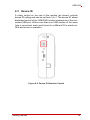
3. The first time the USB-2405 module is connected, a New
Hardware message appears. It will take around 6 seconds to load the firmware. When loading is complete, the
LED indicator on the rear of the USB DAQ module
Getting Started
17