1
Installation and Setup
Aligning The Dish
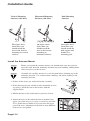
“ Ok, I moved it”
“ No Change”
“ OK, I moved it some more”
“ Hold it ... I see something on the meter ... , move it some more”
“ Ok I moved it some more, any change ?”
“ Yes ... It’s getting better”
... and so it goes
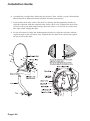
Slowly move the dish from side to side until you find the strongest signal. If you don’t
find it in the one direction rotate the antenna back to the marked position and carry out
the procedure again, this time with the same small movements in the opposite direction.
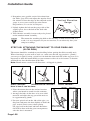
Tighten the mast clamp bolts just enough so the dish cannot be moved horizontally.
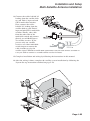
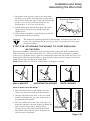
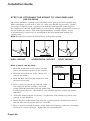
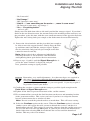
11. Loosen the elevation bolts and the pivot bolt just enough to
be able to move the support bracket. Slowly move the dish
up and down until you find the strongest signal. Tighten
the elevation bolts and pivot bolt just enough so the dish
cannot be moved vertically.
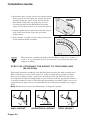
Mast Clamp
Bolts
Note: Make each of these adjustments individually,
loosening the bolts or screws before each movement
and tightening them again before the next movement.
12.Repeat steps 11 and 12 until the Signal Strength bar is
green, the word "Locked" is displayed, and you
have gained the strongest signal possible.
Remember: very small adjustments - less than one degree are required at
this point. You need to adjust the dish until your signal strength for
transponder 11 is at least 70%. If under clear skies you cannot consistently
get at least 70% signal strength on your transponder 11 you may require a
larger dish. Contact your dealer.
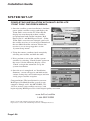
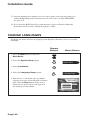
13.Confirm that you have a picture and the strongest possible signal strength on the
Point Dish and Signal Strength menu.
14.Tighten all the bolts to prevent movement of the satellite antenna.
15.We recommend that you mark the final locations on the mast and mounting bracket
with a permanent marker. This assists you later if you have to realign the antenna
because of movement due to wind or weather.
Note: Do not scratch the painted surfaces to mark them. This will cause rusting.
16. Select the Continue option on the screen. When the Continue option is selected,
another screen will appear that tells you not to disturb the receiver, and that it is
downloading software. The receiver is retrieving software from the satellite necessary
for it to run. You can select the Ok option, or you can just wait for the download to
finish. Other than selecting Ok, do not disturb the receiver until the download
finishes. This may take a few minutes.
Page I-47