1
combi.qxd
12/01/99 09:00
Page 29
User Manual
GARDTEC 800 Series
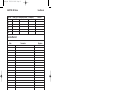
LED Display Glossary
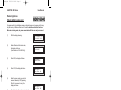
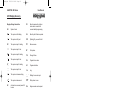
Displays During Normal Use
'Er'
Reset is required by a higher
level code or an error has
occurred whilst programming.
'Un'
System Unset.
'E='
The system is full setting.
'Ac'
Reset by Anti-Code is required.
' ='
The system is fully set.
'SE'
(flashing) Do you want to Set.
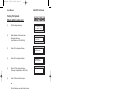
'E='
The system is part 1 setting.
'rE'
Remove zones.
' ='
The system is part 1 set.
'tE'
Test system.
'E '
The system is part 2 setting.
'Ch'
Change Chime.
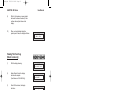
'
The system is part 2 set.
'Uc'
Program User codes.
'E_'
The system is part 3 setting
'dt'
Program date time.
' _'
The system is part 3 set
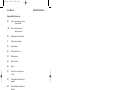
'Lo'
Log
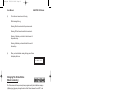
'c ='
The system is cleaner setting.
'_ _'
Waiting for numeric input.
'c ='
The system is cleaner set.
'W '
Wait, system in use.
'AL'
An alarm has occurred press NO
to view.
'En'
Engineer code reset required.
'Fb'
Fuse blown or battery volts low.
‘En’
(flashing) Call Engineer
'
'Cb'
Control box tamper.
'bb'
bell box tamper.
'E1'
Expander1 tamper (may show
1 to 8).
'PL'
Telephone Line fault (or coms
fail).
'Pc'
Power Cut.
't4'
Tamper keypad 4 (may show
1 to 4).
Page 29