1
Contents
1 Introduction
1 2 2.1 Getting Started
Achieving the Best Performance
2 2 3 3.1 3.2 Overview
Defining the VP-8x8 8x8 VGA/UXGA Matrix Switcher
Using the IR Transmitter
3 3 6 4 Installing in a Rack
7 5 5.1 5.2 5.3 5.4 5.5 5.6 Connecting the VP-8x8 8x8 VGA/UXGA Matrix Switcher
Connecting the VP-8x8 Rear Panel
Connecting a PC
Controlling via RS-485
Control Configuration via the Ethernet Port
Setting the DIP-Switches
Cascading Machines
8 8 9 10 11 13 15 6 6.1 6.2 6.3 6.4 6.5 Operating the VP-8x8 8x8 VGA/UXGA Matrix Switcher
Displaying Unit Characteristics
Confirming Settings
Storing/Recalling Input/Output Configurations
Locking the Front Panel
Updating the VP-8x8 Firmware
17 17 17 19 20 21 7 Technical Specifications
22 8 Table of Hex Codes for Serial Communication
23 9 Kramer Protocol 2000
24 Figures
Figure 1: VP-8x8 8x8 VGA/UXGA Matrix Switcher
Figure 2: VP-8x8 Underside View
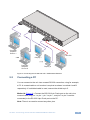
Figure 3: Connecting the VP-8x8 8x8 VGA / UXGA Matrix Switcher
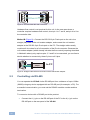
Figure 4: Crossed Cable RS-232 Connection
Figure 5: Straight Cable RS-232 Connection with a Null Modem Adapter
Figure 6: Local Area Connection Properties Window
Figure 7: Internet Protocol (TCP/IP) Properties Window
Figure 8: VP-8x8 DIP-switches
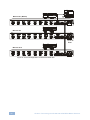
Figure 9: Control Configuration via RS-232 and RS-485
Figure 10: Storing and Recalling using the Input/Output Buttons
4 6 9 10 10 12 12 13 16 19 VP-8x8 – Contents
i