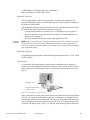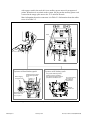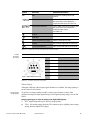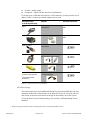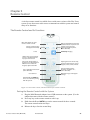
1
User Guide Type 1202 Flex Focus Ultrasound Systems English BB1756-M February 2014 For Professional Users Only LEGAL MANUFACTURER BK MEDICAL Mileparken 34 2730 Herlev Denmark Tel.:+45 4452 8100 / Fax:+45 4452 8199 www.bkmed.com Email: [email protected] The serial number of a BK Medical product contains information about the year of manufacture. To obtain the date of manufacture of a product, please contact your BK Medical representative or write to us at the email address above, including the product's serial number (SN number). BK Medical Customer Satisfaction Input from our customers helps us improve our products and services. As part of our customer satisfaction program, we contact a sample of our customers a few months after they receive their orders. If you receive an email message from us asking for your feedback, we hope you will be willing to answer some questions about your experience buying and using our products. Your opinions are important to us. You are of course always welcome to contact us via your BK Medical representative or by contacting us directly. If you have comments about the user documentation, please write to us at the email address above. We would like to hear from you. • • • Scanner Software NOT FAULT TOLERANT. THE SOFTWARE IS NOT FAULT TOLERANT. BK Medical HAS INDEPENDENTLY DETERMINED HOW TO USE THE SOFTWARE IN THE DEVICE, AND MS HAS RELIED UPON BK Medical TO CONDUCT SUFFICIENT TESTING TO DETERMINE THAT THE SOFTWARE IS SUITABLE FOR USE. EXPORT RESTRICTIONS. You acknowledge that Windows XP Embedded is of US-origin. You agree to comply with all applicable international and national laws that apply to Windows XP Embedded, including the U.S. Export Administration Regulations, as well as end-user, end-use and country destination restrictions issued by U.S. and other governments. For additional information on exporting Windows XP Embedded, see http:// www.microsoft.com/exporting/ The Flex Focus 1202 Ultrasound System is closed. Any modification of or installation of software to the system may compromise safety and function of the system. Any modification of or installation of software without written permission fromBK Medical will immediately void any warranty supplied by BK Medical. Such changes will also void any service contract and result in charges to the customer for restoration of the original Flex Focus 1202 Ultrasound System. Trademarks: DICOM is the registered trademark of the National Electrical Manufacturers Association for its standards publications relating to digital communications of medical information. FireWire is a trademark of Apple Computer, Inc. HistoScanning is a trademark of Advanced Medical Diagnostics SA. Microsoft and Windows are registered trademarks of Microsoft Corporation in the United States and other countries. © 2014 BK Medical Information in this document may be subject to change without notice. Contents Chapter 1 General Information . . . . . . . . . . . . . . . . . . . . . . . . . . . . . . . . . . . . . . . . . . . . . . . . . . . . . . . . 5 Chapter 2 Safety Information . . . . . . . . . . . . . . . . . . . . . . . . . . . . . . . . . . . . . . . . . . . . . . . . . . . . . . . . . 7 Safety Information. . . . . . . . . . . . . . . . . . . . . . . . . . . . . . . . . . . . . . . . . . . . . . . . . 7 Safety Symbols and Information on the Equipment . . . . . . . . . . . . . . . . . . . . . . . 7 CE Marks on Electrical Devices . . . . . . . . . . . . . . . . . . . . . . . . . . . . . . . . . . . . . . 9 General Safety Precautions . . . . . . . . . . . . . . . . . . . . . . . . . . . . . . . . . . . . . . . . . . 9 Mechanical Safety . . . . . . . . . . . . . . . . . . . . . . . . . . . . . . . . . . . . . . . . . . . . . . . . 10 Explosion Hazards. . . . . . . . . . . . . . . . . . . . . . . . . . . . . . . . . . . . . . . . . . . . . . . . 11 Electrical Safety. . . . . . . . . . . . . . . . . . . . . . . . . . . . . . . . . . . . . . . . . . . . . . . . . . 11 ESD Training . . . . . . . . . . . . . . . . . . . . . . . . . . . . . . . . . . . . . . . . . . . . . . . . 12 Interference . . . . . . . . . . . . . . . . . . . . . . . . . . . . . . . . . . . . . . . . . . . . . . . . . . . . . 12 Electrical Noise. . . . . . . . . . . . . . . . . . . . . . . . . . . . . . . . . . . . . . . . . . . . . . . 12 Electromagnetic Interference . . . . . . . . . . . . . . . . . . . . . . . . . . . . . . . . . . . . 12 RF (Radio Frequency) Interference . . . . . . . . . . . . . . . . . . . . . . . . . . . . . . . 13 Installation . . . . . . . . . . . . . . . . . . . . . . . . . . . . . . . . . . . . . . . . . . . . . . . . . . . . . . 13 Connecting Other Equipment . . . . . . . . . . . . . . . . . . . . . . . . . . . . . . . . . . . . . . . 14 Network Connection . . . . . . . . . . . . . . . . . . . . . . . . . . . . . . . . . . . . . . . . . . . . . . 14 Network Security . . . . . . . . . . . . . . . . . . . . . . . . . . . . . . . . . . . . . . . . . . . . . 15 Network Printing . . . . . . . . . . . . . . . . . . . . . . . . . . . . . . . . . . . . . . . . . . . . . 15 Connectors . . . . . . . . . . . . . . . . . . . . . . . . . . . . . . . . . . . . . . . . . . . . . . . . . . 15 HistoScanning. . . . . . . . . . . . . . . . . . . . . . . . . . . . . . . . . . . . . . . . . . . . . . . . 18 Using the System with a Lithotriptor . . . . . . . . . . . . . . . . . . . . . . . . . . . . . . 19 EMC Requirements . . . . . . . . . . . . . . . . . . . . . . . . . . . . . . . . . . . . . . . . . . . 19 Isolation of DICOM Network. . . . . . . . . . . . . . . . . . . . . . . . . . . . . . . . . . . . 20 Wireless Network (Wi-Fi) . . . . . . . . . . . . . . . . . . . . . . . . . . . . . . . . . . . . . . 20 Medical Equipment. . . . . . . . . . . . . . . . . . . . . . . . . . . . . . . . . . . . . . . . . . . . 23 Non-Medical Equipment . . . . . . . . . . . . . . . . . . . . . . . . . . . . . . . . . . . . . . . 23 Battery Support System. . . . . . . . . . . . . . . . . . . . . . . . . . . . . . . . . . . . . . . . . . . . 24 If the System Will Not Start . . . . . . . . . . . . . . . . . . . . . . . . . . . . . . . . . . . . . 25 Touch Screen . . . . . . . . . . . . . . . . . . . . . . . . . . . . . . . . . . . . . . . . . . . . . . . . . . . . 25 Remote Control . . . . . . . . . . . . . . . . . . . . . . . . . . . . . . . . . . . . . . . . . . . . . . . . . . 25 Computer Security. . . . . . . . . . . . . . . . . . . . . . . . . . . . . . . . . . . . . . . . . . . . . . . . 26 Service and Repair. . . . . . . . . . . . . . . . . . . . . . . . . . . . . . . . . . . . . . . . . . . . . . . . 26 Transducers . . . . . . . . . . . . . . . . . . . . . . . . . . . . . . . . . . . . . . . . . . . . . . . . . . . . . 26 During an Examination . . . . . . . . . . . . . . . . . . . . . . . . . . . . . . . . . . . . . . . . . . . . 27 Checking the Date . . . . . . . . . . . . . . . . . . . . . . . . . . . . . . . . . . . . . . . . . . . . 27 Verifying the Transducer Type. . . . . . . . . . . . . . . . . . . . . . . . . . . . . . . . . . . 27 Measurements. . . . . . . . . . . . . . . . . . . . . . . . . . . . . . . . . . . . . . . . . . . . . . . . 28 VFI – Vector Flow Imaging . . . . . . . . . . . . . . . . . . . . . . . . . . . . . . . . . . . . . 28 Puncture and Brachytherapy. . . . . . . . . . . . . . . . . . . . . . . . . . . . . . . . . . . . . 29 3D . . . . . . . . . . . . . . . . . . . . . . . . . . . . . . . . . . . . . . . . . . . . . . . . . . . . . . . . . 30 Picture in Picture . . . . . . . . . . . . . . . . . . . . . . . . . . . . . . . . . . . . . . . . . . . . . 31 Acoustic Output. . . . . . . . . . . . . . . . . . . . . . . . . . . . . . . . . . . . . . . . . . . . . . . . . . 31 General . . . . . . . . . . . . . . . . . . . . . . . . . . . . . . . . . . . . . . . . . . . . . . . . . . . . . 31 English source version BB1756-L 3 Monitor Display . . . . . . . . . . . . . . . . . . . . . . . . . . . . . . . . . . . . . . . . . . . . . . Thermal and Mechanical Indices . . . . . . . . . . . . . . . . . . . . . . . . . . . . . . . . . Acoustic Output Measurement . . . . . . . . . . . . . . . . . . . . . . . . . . . . . . . . . . . Functions Affecting Acoustic Output. . . . . . . . . . . . . . . . . . . . . . . . . . . . . . Default Acoustic Output. . . . . . . . . . . . . . . . . . . . . . . . . . . . . . . . . . . . . . . . Clinical Measurements: Ranges and Accuracies. . . . . . . . . . . . . . . . . . . . . . . . . Geometric Measurements . . . . . . . . . . . . . . . . . . . . . . . . . . . . . . . . . . . . . . . Time Measurements . . . . . . . . . . . . . . . . . . . . . . . . . . . . . . . . . . . . . . . . . . . Doppler Measurements. . . . . . . . . . . . . . . . . . . . . . . . . . . . . . . . . . . . . . . . . References . . . . . . . . . . . . . . . . . . . . . . . . . . . . . . . . . . . . . . . . . . . . . . . . . . . . . . Chapter 3 32 32 33 33 34 34 36 36 37 37 Adjusting the System . . . . . . . . . . . . . . . . . . . . . . . . . . . . . . . . . . . . . . . . . . . . . . . . . . . . . . 39 Calibrating the Touch Screen Alignment . . . . . . . . . . . . . . . . . . . . . . . . . . . . . . 39 Adjusting the Touch Screen . . . . . . . . . . . . . . . . . . . . . . . . . . . . . . . . . . . . . . . . 39 Chapter 4 Battery Support . . . . . . . . . . . . . . . . . . . . . . . . . . . . . . . . . . . . . . . . . . . . . . . . . . . . . . . . . . . 41 Before You Start . . . . . . . . . . . . . . . . . . . . . . . . . . . . . . . . . . . . . . . . . . . . . . . . . Imaging with Battery Support . . . . . . . . . . . . . . . . . . . . . . . . . . . . . . . . . . . . . . . Battery Pack Location . . . . . . . . . . . . . . . . . . . . . . . . . . . . . . . . . . . . . . . . . . . . . Power Supply. . . . . . . . . . . . . . . . . . . . . . . . . . . . . . . . . . . . . . . . . . . . . . . . . . . . Plugging in the System . . . . . . . . . . . . . . . . . . . . . . . . . . . . . . . . . . . . . . . . . Charging the Batteries . . . . . . . . . . . . . . . . . . . . . . . . . . . . . . . . . . . . . . . . . Battery Status. . . . . . . . . . . . . . . . . . . . . . . . . . . . . . . . . . . . . . . . . . . . . . . . . . . . Information Available on the Monitor . . . . . . . . . . . . . . . . . . . . . . . . . . . . . Information Available on Battery Pack . . . . . . . . . . . . . . . . . . . . . . . . . . . . Power Save Mode. . . . . . . . . . . . . . . . . . . . . . . . . . . . . . . . . . . . . . . . . . . . . Changing or Replacing a Battery . . . . . . . . . . . . . . . . . . . . . . . . . . . . . . . . . . . . Battery Life. . . . . . . . . . . . . . . . . . . . . . . . . . . . . . . . . . . . . . . . . . . . . . . . . . Battery Support Setup. . . . . . . . . . . . . . . . . . . . . . . . . . . . . . . . . . . . . . . . . . Connectors. . . . . . . . . . . . . . . . . . . . . . . . . . . . . . . . . . . . . . . . . . . . . . . . . . . . . . Cleaning and Disinfection . . . . . . . . . . . . . . . . . . . . . . . . . . . . . . . . . . . . . . . . . . Battery Charger Station (UA1247) . . . . . . . . . . . . . . . . . . . . . . . . . . . . . . . . . . . Recharging a Battery in the Battery Charger Station . . . . . . . . . . . . . . . . . . Cleaning and Disinfection . . . . . . . . . . . . . . . . . . . . . . . . . . . . . . . . . . . . . . . . . . Chapter 5 41 41 41 42 42 43 43 43 44 45 46 46 47 47 47 47 48 48 Remote Control . . . . . . . . . . . . . . . . . . . . . . . . . . . . . . . . . . . . . . . . . . . . . . . . . . . . . . . . . . . 49 The Remote Control and Its Functions . . . . . . . . . . . . . . . . . . . . . . . . . . . . . . . . Pairing the Remote Control with the System . . . . . . . . . . . . . . . . . . . . . . . . Sleep . . . . . . . . . . . . . . . . . . . . . . . . . . . . . . . . . . . . . . . . . . . . . . . . . . . . . . . Mouse Function . . . . . . . . . . . . . . . . . . . . . . . . . . . . . . . . . . . . . . . . . . . . . . Replacing Batteries . . . . . . . . . . . . . . . . . . . . . . . . . . . . . . . . . . . . . . . . . . . . . . . Cleaning and Disinfection . . . . . . . . . . . . . . . . . . . . . . . . . . . . . . . . . . . . . . . . . . 49 49 50 50 50 51 Chapter 6 Getting Started . . . . . . . . . . . . . . . . . . . . . . . . . . . . . . . . . . . . . . . . . . . . . . . . . . . . . . . . . . . 53 Chapter 7 Specifications and Indications for Use . . . . . . . . . . . . . . . . . . . . . . . . . . . . . . . . . . . . . . 55 Indications for Use . . . . . . . . . . . . . . . . . . . . . . . . . . . . . . . . . . . . . . . . . . . . . . . 55 Contraindications. . . . . . . . . . . . . . . . . . . . . . . . . . . . . . . . . . . . . . . . . . . . . . . . . 55 Index . . . . . . . . . . . . . . . . . . . . . . . . . . . . . . . . . . . . . . . . . . . . . . . . . . . . . . . . . . . . . . . . . . . . . . . . . . . . . 57 4 Chapter 1 General Information This user guide is for all versions of the Flex Focus 1202 Ultrasound System (scanner unit and dock) and the optional battery charger station (UA1247) from BK Medical. Intended use The system is a 2D and 3D ultrasound echo and flow imaging system for diagnosis, data processing and transfer and guidance of puncture and biopsy. NOTE: Some of the functionality and options described in this guide may not be available with your version of the system. Before using the equipment, please make yourself familiar with the information in the accompanying user information documents. Some documents are printed, and you will find the remaining documents on the accompanying User Documentation CD (BB1984). Make sure that you also read the transducer user guide and specifications for each transducer that you use. Document Information System User Guide Introductory information, safety information, getting started. Getting Started User interface, basic operating instructions. Note: this book is part of the system user guide. System Advanced User Guide Information about advanced functions, glossary. Product Data for system Specifications for the system, including disinfection methods that can be used. Indications for use for each transducer that can be used with the system. Technical Data (BZ2100) Acoustic output data, clinical measurements (ranges and accuracies), factory default power levels and data about EMC (electromagnetic compatibility) for all transducers. Pro Package calculation formulas. Care, Cleaning and Safety Cleaning, disinfection, sterilization, checking, storing and disposing of BK Medical equipment. Includes environmental limits. Transducer User Guide Specific instructions for the transducer and puncture attachments. Product Data for each transducer Specifications for the transducer, including disinfection methods that can be used. Table 1-1. User information documentation that accompanies the equipment. Improper use Failure to follow safety instructions or use for purposes other than those described in the user manuals constitutes improper use. Flex Focus 1202 User Guide (BB1756-M) General Information 5 6 Chapter 1 February 2014 Flex Focus 1202 User Guide (BB1756-M) Chapter 2 Safety Information The system can be used for continuous operation, but imaging duration for individual patients must not exceed 60 minutes. We recommend, however, that you turn off the system at the end of each workday. Safety Information This user guide contains cautions, warnings and other information about what you must do to ensure the safe and proper performance of the ultrasound system and the optional battery charger station (UA1247). You must also follow local government rules and guidelines at all times. WARNING Warnings contain information that is important for avoiding personal injury. Caution: Cautions contain information and instructions that must be followed to avoid damaging equipment, data, or software. NOTE: Notes contain information that you should be aware of. Safety Symbols and Information on the Equipment Table 2-1 contains brief explanations of the symbols and information used to label the equipment. (Some labels in the table may appear on the transducer.) BK Medical disclaims all responsibility for the operating safety, reliability and performance of the equipment if these symbols and warnings are disregarded in any way. Symbol Name Description Caution or Warning Consult accompanying user guides when you encounter this sign on the instrument, to avoid reducing its safety. Consult instructions Consult user guide or other instructions. for use 3D56 Pushing prohibited Do not use excessive force to push the system. Excessive force when pushing over uneven surfaces can cause the system to overbalance and tip. Manufacturer Legal manufacturer. UL Classification for Canada and US UL requirements are met for special conditions. Table 2-1. Symbols and information on the equipment. Flex Focus 1202 User Guide (BB1756-M) Safety Information 7 Symbol Name Description UL Recognized Component for Canada and US UL recognizes this as part of a UL-approved apparatus. Potential Equalization Terminal connected to the chassis. Should be connected to corresponding terminals on other equipment to eliminate potential differences. Ground (earth) Additional protective ground (earth). Type BF BF: Isolated from ground. Maximum patient leakage current under • Normal condition ≤100µA • Single-fault condition ≤ 500µA Type BF BF, defibrillator-proof Type B B: Maximum patient leakage current under • Normal condition ≤100µA • Single-fault condition ≤ 500µA Sealing Dust- and immersion-protected according to EN 60529 [1]. Standby Symbol on ON/Standby button on back of scanner unit – used to turn system on and off. Not watertight Plug may not be immersed (unless it is covered with a special watertight plug cover). ESD (electrostatic discharge) Do not touch pins in connectors with this symbol unless you follow ESD precautionary procedures. Specified Radio Equipment (On remote control UA1237.) This equipment conforms to Japanese Radio Law regulations concerning frequency and power. WEEE waste Within the EU, when you discard the equipment, you must send it to appropriate facilities for recovery and recycling. Battery waste (On battery UA1225.) Dispose of used batteries properly. When you dispose of the batteries, you must follow national rules. Within the EU, you must send them to appropriate facilities for recovery and recycling. LI-ION China ROHS 25 Years Environmentally Friendly Use Period for ROHS is 25 Lifetime years. Battery recycle (On battery UA1225.) Recycle used batteries properly. Internally Powered (On the battery pack.) The text “Internally powered or 100V~, 60Hz / 100V-230V~, 50 Hz” indicates that the system can also use batteries as a power source. Table 2-1. Symbols and information on the equipment. (continued) 8 Chapter 2 February 2014 Flex Focus 1202 User Guide (BB1756-M) CE Marks on Electrical Devices The European Union has introduced directives requiring b marks on devices. Non-medical devices marked with b comply with relevant directives, for example EEC Directive 2004/108/EC concerning Electromagnetic Compatibility. BK Medical devices marked with b or c comply with EEC Council Directive 93/42/EEC of 14 June 1993 concerning Medical Devices. b applies to Class I medical devices. c applies to Classes Im, IIa, IIb and III. BK Medical defines classes assuming imaging duration for individual patients does not exceed 60 minutes. General Safety Precautions The ultrasound system is designed and tested in accordance with EN/IEC 60601-1 [2] (Part 1: General requirements for safety) and EN 60601–2–37 [3] (Particular requirements for the safety of ultrasonic medical diagnostic and monitoring equipment). The ultrasound system and the optional battery charger station (UA1247) comply with requirements for Class 1 (protective earth) and – for systems that include the mobile battery keyboard dock – internally powered devices of EN/IEC 60601-1. They also comply with UL 60601-1 [4] and CSA C22.2 No. 601.1–M90 [5]. They fulfill the requirements for dust protection (IP20) for ordinary equipment specified in EN 60529 [1]. Physicians only Caution: Federal law in North America restricts this device to sale to, or on the order of, a physician. WARNING GS-1 Proper Training Before you attempt to use BK Medical equipment, you should be trained in ultrasonography or be under the supervision of someone who is trained in ultrasonography. You should also be thoroughly familiar with the safe operation of your ultrasound system: read all the user documentation that accompanies it. In addition, if your system interacts with other equipment directly or indirectly, you need to be trained in making sure the interactions are both safe and secure. No further training is required, but BK Medical offers training in how to use the system. Consult your BK Medical representative for information. WARNING GS-2 Equipment failure If at any time the system malfunctions, or the image is severely distorted or degraded, or you suspect in any way that the system is not functioning correctly: • Remove all transducers from contact with the patient. • Turn off the system. Unplug the system from the power source – and for systems that include the mobile battery keyboard dock, remove the batteries from the battery pack – to make sure it cannot be used until the system has been checked. • Do not try to repair the system yourself. • Contact your BK Medical representative or hospital technician. Flex Focus 1202 User Guide (BB1756-M) Safety Information 9 WARNING GS-3 Isolating the system The power supply cord connects the equipment to the line voltage. To isolate the equipment, you must unplug the power supply cord from the power source, and for systems that include the mobile battery keyboard dock, remove the batteries from the battery pack. Do this before you try to make any repairs to the system. Caution: Do not spill liquids on the equipment. Spilled liquids Condensation Caution: Large variations in temperature or humidity may cause water to condense inside the system. If this happens, the system may fail to operate properly. Always let the system come to room temperature before you plug it in. • Wait at least 2 hours after the system has been subjected to major changes in temperature or humidity. • If there is visible evidence of condensation, wait at least 8 hours. Before you use the equipment, make sure that all the safety requirements described in this chapter have been satisfied. Mechanical Safety Mechanical failure or unintended use of ultrasound equipment can result in physical injury to patients or operators. WARNING MS-1 Mechanical injury Be careful to avoid the following potential sources of injury: • Parts of the body can be pinched by moveable parts of the equipment, such as the control panel. • Tilting the system can cause it to be unstable and injure someone. Do not lean or sit on the control panel or any other part of the system. The control panel or monitor can break if subjected to heavy weights or impact. WARNING MS-2 All parts must be stable When parts of the equipment can be mounted individually (for example, for use in an operating room) each part must be securely mounted to a stable support so that it does not tip, fall or come loose and injure someone. WARNING MS-3 Don’t drop the scanner unit 10 Chapter 2 To avoid personal injury or damage to the system, if you handle the scanner unit by itself, make sure you have a firm grip so that you do not drop it. Note that it may be hot. February 2014 Flex Focus 1202 User Guide (BB1756-M) WARNING MS-4 Don’t push too hard To avoid injury and equipment damage, do not push the system too hard, especially when you roll the system over an uneven surface. Applying excessive force near the top could cause the system to overbalance and tilt. Explosion Hazards WARNING EH-1 Explosion hazards The equipment is not designed to be used in potentially explosive environments. It should not be operated in the presence of flammable liquids or gases, or in oxygen-enriched atmospheres. There is a possible explosion hazard if the equipment is used in the presence of flammable anesthetic. The system should be placed at least 25cm (10 inches) from the patient. The ultrasound system contains a lithium battery. Never remove or replace this battery. The lithium battery must not be removed except by a BK Medical service representative. Electrical Safety WARNING ES-1 Do not use a power strip Do not plug the equipment into an ordinary power strip. If the ground connection fails, this is dangerous because • the total leakage current for all the connected equipment can exceed the limits specified in EN/IEC 60601-1 [2] (Part 1: General requirements for safety). • the impedance of the ground connection could exceed the limits specified in EN/IEC 60601-1. WARNING ES-2 Leakage current When the equipment is used with 230V (and you believe the leakage current would be within the UL limit if you were using 120V), power to the equipment must come from an installation or supply unit with a center-tapped, 240V single-phase circuit. This will make sure that chassis leakage current during single fault condition fulfills the requirements specified in UL60601-1 [4] (limit of 300µA). If power is not supplied in the way specified, the leakage current can be as high as 500µA, the limit specified in EN/IEC 60601-1 [2] (Part 1: General requirements for safety). WARNING ES-3 Electrical shock You risk electrical shock if you try to get inside the equipment (other than opening a cover to access connectors or batteries described in the user guide). Do not allow anyone but qualified service personnel to service the equipment. Flex Focus 1202 User Guide (BB1756-M) Safety Information 11 ESD Training The ESD Symbol Anyone using the equipment must be able to recognize the ESD symbol and understand how to take the necessary precautionary procedures, as described in the caution below. ESD Caution: Do not touch pins in connectors that have the ESD symbol . Do not connect anything to them unless you follow these ESD (electrostatic discharge) precautionary procedures: • Discharge your body to ground before you touch the pins with your hand or a tool. For example, touch an unpainted metal part of the system cover. • You can use a wrist strap connected to the additional protective ground or potential equalization terminal on the system if that is more convenient. Interference The Flex Focus 1202 Ultrasound System and the optional battery charger station (UA1247) are suitable for use in all establishments, other than domestic establishments and those directly connected to the public low-voltage power supply network that supplies buildings used for domestic purposes. Electrical Noise WARNING EN-1 Electrical noise Electrical noise from nearby devices such as electrosurgical devices – or from devices that can transmit electrical noise to the AC line – may cause disturbances in ultrasound images. This could increase the risk during diagnostic or interventional procedures. Electromagnetic Interference Medical electrical equipment requires special precautions regarding EMC (electromagnetic compatibility) [6]. You must follow the instructions in this chapter when you install the system and put it into service. If the image is distorted, it may be necessary to position the system further from sources of electromagnetic interference or to install magnetic shielding. WARNING EMC-1 Other equipment nearby 12 Chapter 2 Do not use this equipment adjacent to other equipment. If you must place it next to or stacked with other equipment, verify that it operates normally there and neither causes nor is affected by electromagnetic interference. February 2014 Flex Focus 1202 User Guide (BB1756-M) EMC noise can reduce the usable image depth. Therefore, to avoid having to repeat an ultrasound examination, you must make sure beforehand that the ultrasound system can be used for the examination. Repeating an examination can be regarded as a potential risk that should be avoided, especially if the examination involves transducers used intracorporeally or transducers used for puncture. RF (Radio Frequency) Interference Portable and mobile RF (radio frequency) communication equipment can affect the system, but the system will remain safe and meet essential performance requirements. An ultrasound system intentionally receives RF electromagnetic energy for the purpose of its operation. The transducers are very sensitive to frequencies within their signal frequency range (0.3MHz to 80MHz). Therefore RF equipment operating in this frequency range can affect the ultrasound image. However, if disturbances occur, they will appear as white lines in the ultrasound picture and cannot be confused with physiological signals. Possible interference sources Use specified equipment only Caution: Other equipment may interfere with the system, even if that other equipment complies with CISPR (International Special Committee on Radio Interference) emission requirements. Caution: If you use accessories, transducers or cables with the system, other than those specified, increased emission or decreased immunity of the system may result. Installation WARNING I-1 Installation safety requirement To ensure safe performance, a qualified electrician or hospital safety personnel must verify that the equipment is correctly installed and that it complies with the following safety requirements: • Use only the original power supply cord. In the USA, this is fitted with a hospital grade three-prong grounded power plug. Never try to remove or change the plug on the power supply cord. • All equipment must only be connected to a grounded AC power supply (or wall outlet) that meets EN/IEC/NEC requirements or applicable local regulations. The examination room’s grounding system should be checked regularly by a qualified electrician or hospital safety personnel. • Never use extension cords. The increased length of the cord will increase the resistance of the protective ground conductor and may increase the equipment’s leakage current beyond an acceptable level. • Keep power cords, sockets and plugs clean and dry at all times. • Make sure that the power supply cord cannot be accidentally disconnected from the power source or the equipment. Flex Focus 1202 User Guide (BB1756-M) Safety Information 13 Original power cords If the original power cords are missing or damaged, you must order new ones from your local BK Medical representative. Additional Protective Ground and Potential Equalization An additional protective ground can be connected to the control panel, see Fig 2-1. terminal underneath the The potential equalization terminal underneath the control panel is connected to the system chassis. It can be connected to corresponding terminals on other equipment to eliminate potential differences. Do NOT use it for additional protective grounding. Figure 2-1. The terminals for potential equalization are underneath the control panel. and additional protective ground Connecting Other Equipment For connection to other equipment, BK Medical systems have a communication protocol on top of TCP/IP WARNING C-1 Connection guidelines Follow the guidelines in EN60601-1-1[7] (Safety requirements for medical electrical systems) when you connect the system to other equipment. Network Connection BK Medical’s range of ultrasound systems comply with the DICOM standard for handling, storing, printing and transmitting information in medical imaging. DICOM includes a file format definition and a network communication protocol which facilitates the exchange of data between electronic medical systems. For detailed information about: 14 Chapter 2 • • • network requirements network configuration workflow between devices • • technical specifications safety specifications February 2014 Flex Focus 1202 User Guide (BB1756-M) see BK Medical’s DICOM conformance statement at http://www.bkmed.com/DICOM_en.htm Network Security It is the responsibility of the on-site personnel or technician to maintain the ITnetwork and identify, analyze, evaluate and control new risks caused by a change in the network configuration. If the applicable network connection does not meet the required characteristics of the IT-network, the following hazardous situations may occur: • Corrupt patient data due to network errors, see Warning Exam-3 on page 27 • System is unable to use the network due to faulty or overloaded network, see Warning GS-1 on page 9 • Network guidelines System overloads the network causing other equipment to fail. NOTE: If your system interacts with other equipment directly or indirectly you must ensure that your network is properly dimensioned and that critical equipment is placed on a separate network. Otherwise you could risk overloading the network and your equipment failing. Network Printing For printing on network printers, BK Medical supports protocols PCL 5, PCL 6 and PS (Post Script). Connectors PC connectors for connecting the system to other equipment such as approved printers and video equipment are located in the neck of the system. To access them, unscrew the screw on the bottom of the neck and remove the connector cover. See Fig 2-2. Connector cover Unscrew here to remove connector cover Figure 2-2. Flex Focus connector cover. Some connectors are used by the system. Do not use connectors that are not labelled in Fig 2-3. For systems with a battery pack, the external power is plugged directly into the battery pack on the system stand. The system is then connected to the power source through a connection from the battery pack to the 12 V plug in the neck (see “Systems with battery pack” in Fig 2-3). Systems with a battery pack are delivered Flex Focus 1202 User Guide (BB1756-M) Safety Information 15 with a power cord in the neck; this is an auxiliary power source for an approved printer. When there is no printer on the system, the plug on the auxiliary power cord is stored in the empty space next to the 12 V outlet in the neck. More information about the connectors is in Table 2-2. Information about the cables to use is in Table 2-5. DVI-I Systems without battery pack Power supply cord goes here Auxiliary power outlet for approved printers only Systems with battery pack For systems without printer, auxiliary power cord plug (for approved printers only) is placed here for future use 12 V from battery pack goes in to power the system here Ground connector Push tab to release fuses. Click new ones in place Figure 2-3. Connectors in the neck of the Flex Focus system. 16 Chapter 2 February 2014 Flex Focus 1202 User Guide (BB1756-M) Symbol Connector Additional Information DVI-I DVI-I Connector for auxiliary DVI or VGA monitor. Composite/S-video In 7-pin S-video connector (see Table 2-3 for pin layout) that can be adapted to a composite video input (see Table 2-4). Composite/S-video Out 7-pin S-video connector (see Table 2-3 for pin layout) that can be adapted to a composite video output (see Table 2-4). Audio In Audio Out 4 USB 2.0 connectors, A-type 500mA current limit on each. FireWireTM Not currently supported. For future use. 10/100/1000 Ethernet LAN: 10/100/1000 LAN connector, RJ45. Table 2-2. Connectors in the neck of the Flex Focus system. S-Video connector pin layout 7-pin S-video MINI-DIN Female Pin Name Description 1 Y-GND Luminance Ground 2 C-GND Chrominance Ground 3 Y Luminance 4 C Chrominance 5 CVBS Composite Video 6 CVBS-GND Composite Video Ground 7 N.C. No connection Table 2-3. S-video connector pin layout. Video Output Although 4 different video output signal formats are available, the image quality is not the same for all of them. DVI gives best image quality To get the best image quality possible, connect your monitor or other video equipment using the output signal that gives the highest quality image. See the list below. Output signal types (in order of quality, with digital DVI highest) 1 2 DVI - digital output that gives the best image quality. VGA – this analog output from the DVI connector gives slightly poorer image quality than the digital DVI output. Flex Focus 1202 User Guide (BB1756-M) Safety Information 17 3 4 S-video – analog output Composite – signal with the most loss of information If you must use a cable that does not have a DVI connector, you may need to use an adapter. Table 2-4 shows you which adapters can be used. Cable Connectors (in order of preference) Adapter Flex Focus Connector Not needed. DVI-I DVI-D 15-pin (VGA) DVI to VGA adapter (2 views) DVI-I 4-pins (S-video) Not needed 7-pin S-video to Composite + BNC (female) to Phone (male) BNC (Composite) + Phono RCA (Composite) 7-pin S-video to Composite 2 connectors (S-video and composite) 7-pin S-video to S-video/Composite (same view on both connectors) Table 2-4. Video connectors and adapters. HistoScanning1 The scanner units to be used with HistoScanning™ systems from AMD have an extra connector on the back of the monitor, in the upper left corner. It is used to take raw data, before it has been converted to an image on the monitor, out of the system. To use the Flex Focus for HistoScanning, you must have a HistoScanning license installed. 1. HistoScanning has not been market cleared by the FDA or licensed by Health Canada. 18 Chapter 2 February 2014 Flex Focus 1202 User Guide (BB1756-M) Pull firmly to open, so you can attach the connecting cable Figure 2-4. Connector for HistoScanning. A cable (AO1385) is supplied to use with this connector. Using the System with a Lithotriptor Special considerations apply if you are using a lithotriptor with the system. • The lithotriptor must comply with the guidelines in EN 60601–1–1 [7] (Safety requirements for medical electrical systems). • • You must have a license installed to use a lithotriptor with the system. You must always follow instructions in the manufacturer’s user guide for the lithotriptor. WARNING LT-1 To avoid an inaccurate location of the crosshair cursor due to misalignment of recorded image and graphics, ensure the coordinate systems are synchronized. Power Connections Do NOT connect a lithotriptor to the auxiliary power outlet. Plug the system and the lithotriptor directly into independent wall power outlets. Connecting the System to the Lithotriptor Connect the lithotriptor to a USB connector on the system. If necessary, use a USB RS-232 adapter cable. Follow the connection instructions in the manufacturer’s user guide for the lithotriptor system. The connections must follow the guidelines given in EN 60601– 1–1 [7] (Safety requirements for medical electrical systems). EMC Requirements To fulfill EMC requirements, cables attached to the system must be shielded and no longer than 5 m. Flex Focus 1202 User Guide (BB1756-M) Safety Information 19 Connector name Cable type Type and length DVI-I Dual link Shielded, 5 m S-video/composite In S-video Shielded, 5 m S-video/composite Out S-video Shielded, 5 m Audio In Stereo, 3.5 mm jack Shielded, 5 m Audio Out Stereo, 3.5 mm jack Shielded, 5 m USB 1 USB, 2.0 Shielded, 5 m USB 2 USB, 2.0 Shielded, 5 m USB 3 USB, 2.0 Shielded, 5 m USB 4 USB, 2.0 Shielded, 5 m FW400 FireWire Shielded, 5 m 10/100/1000 Ethernet Network, CAT6E Shielded, 5 m HistoScanning/Research Interface MDR-26 Shielded, 3 m Table 2-5. List of cables used in testing for EMC compliance Do not attach transducers and other accessories unless the user guide for the transducer or accessory states that it can be used with this system. Attaching other equipment may cause an increase in electromagnetic emissions or may cause the system to be more sensitive to electromagnetic interference. Isolation of DICOM Network The system must not be galvanically connected to a computer network (DICOM ) that has not been isolated. If the network is not isolated, the system must be connected via a network isolator DP0925. ® Wireless Network (Wi-Fi)1 The system can be connected to a wireless network for printing and archiving data. This requires the optional wireless license for the system, and a Wi-Fi adapter that is supplied by BK Medical when you buy this option. The Wi-Fi adapter is inserted into one of the USB connectors located in the neck of the system (see Fig 2-3 on page 16). Caution: Do not use a USB extension cable to connect a Wi-Fi adapter to the system. If you do, the wireless network may become unstable due to electromagnetic interference. For information on how to install a license on the system, see Appendix C in the Flex Focus 1202 Advanced User Guide (BB1946). 1. Wi-Fi on flex Focus 1202 systems has not been licensed by Health Canada. 20 Chapter 2 February 2014 Flex Focus 1202 User Guide (BB1756-M) Connecting to a Wireless Network You must establish a secure wireless network at your hospital, clinic or institution, including a password for the network, before you can use the system’s Wi-Fi for printing and archiving. To use Wi-Fi on the system you need to install a license. When you have installed the license, a Wi-Fi logo is visible on the lower right of the main screen. Figure 2-5. Position of the Wi-Fi symbol on the screen. To connect to a wireless network, click the Wi-Fi logo, choose the appropriate network, and type in the password. Figure 2-6. Wi-Fi connection window. You only have to type in a password the first time you connect to a specific network. When you turn on the system an attempt is made to reconnect to the network that the system was connected to before it was turned off. Weak vs. strong signal No wireless connection The bars in the Wi-Fi logo represents the signal strength. The more lit bars in the logo, the stronger the signal. When the system is not connected to a wireless network, the Wi-Fi logo has a red ‘X’ over it. Flex Focus 1202 User Guide (BB1756-M) Safety Information 21 An advanced Wi-Fi setting option is available on the system using Windows configurations. Always follow the security procedures that have been established for your hospital, clinic or institution, as well as national guidelines. Contact your BK Medical service representative for more information. Additional characteristics Frequency band 2.412~2.4835 GHz Data throughput Max 150 Mbps Latency Depends on network setup Integrity Full integrity of archiving operations Security characteristics Support for WEP, WPA and WPA2 encryption. Enterprise encryption (802.1x) requires assistance from an authorized BK Medical technician. Spectrum management None required When you transmit data over a wireless network, some special considerations apply. In particular, the network connections must be set up correctly. See Warning GS-1 on page 9. NOTE: The system only supports one network at a time. If the system loses connection with the network while transmitting (for example, because it is moved out of range of the network during a transmission), the pending data is stored temporarily and re-transmitted when the connection is re-established. For information on saving and printing using the DICOM protocol, see the DICOM chapter in Flex Focus 1202 Advanced User Guide (BB1949). Caution: The network must be set up correctly so that data is sent to the correct location. Otherwise data can be lost or accessed by unauthorized people. Caution: A safe encrypted protocol for data transmission, approved by the hospital, must be used. This is to prevent unauthorized people from getting access to the data. 22 Chapter 2 February 2014 Flex Focus 1202 User Guide (BB1756-M) Medical Equipment WARNING ME-1 Power source Follow the guidelines in EN 60601–1–1 [7] (Safety requirements for medical electrical systems). Equipment that complies with the requirements of EN/IEC 60601–1 [2] (Part 1: General requirements for safety), UL 60601-1 [4] or CSA C22.2 No. 601.1–M90 [5] can be connected to the system, but one of the following conditions must be fulfilled: • Each piece of equipment is plugged directly into an independent wall power outlet. or • The system and other equipment are plugged into an external common isolation transformer to control the leakage current during a ground connection fault. If in doubt, contact your local BK Medical representative. WARNING ME-2 Printers and auxiliary power outlet ON/Standby button does not turn off outlet An approved printer, specified in the Product Data sheet, can be connected to the internal auxiliary power outlet on the system. Do not use the auxiliary power outlet on the Flex Focus 1202 for any other equipment. The auxiliary power outlet is still live even when the ON/Standby button on the system is turned off. To remove voltage from this outlet, you must unplug the power supply cord from the power source. Non-Medical Equipment WARNING NME-1 Follow the guidelines in EN 60601–1–1 [7] (Safety requirements for medical electrical systems). If you connect non-medical equipment (instruments that do not comply with safety requirements for medical equipment, such as a video monitor, video recorder, endoscopic camera control unit or other documentation device), this equipment must be placed outside the patient environment (1.5m from the bed, for example). The equipment must fulfill the relevant EN standard or other applicable national or international standard. One of the following conditions must be fulfilled: • The system and other equipment are plugged into an external common isolation transformer to control the leakage current during a ground connection fault. or • The system is grounded with an additional safety ground connection (see “Additional Protective Ground and Potential Equalization” on page 14). If in doubt, contact your local BK Medical representative. Flex Focus 1202 User Guide (BB1756-M) Safety Information 23 Battery Support System If you use a battery pack to supply power to the system, be sure to read the battery support chapter of this user guide. Also observe the following warnings for both the battery pack and the optional battery charger station (UA1247): WARNING BS-1 To ensure proper ventilation and avoid overheating, keep both ends of the battery pack (or optional battery charger station (UA1247)) clear. WARNING BS-2 To prevent damage to the equipment, use only the UA1225 battery set – check the number on the battery set before you insert it into the battery pack or recharge in the optional battery charger station (UA1247). WARNING BS-3 The batteries in the battery pack (or optional battery charger station (UA1247)) may present a risk of fire or chemical burn if mistreated. Do not disassemble, heat above the manufacturer’s maximum temperature limit, or incinerate. Replace battery with the UA1225 battery set only. Use of another battery may present a risk of fire or explosion. Battery disposal When you dispose of the batteries, you must follow national rules. Within the EU, you must send them to appropriate facilities for recovery and recycling. WARNING BS-4 Dispose of used batteries properly. Keep away from children. Do not disassemble and do not dispose of in fire. Information Printed on the Battery (UA1225) The following information, including Warning BS-5 below, is printed on one side of the battery (UA1225). WARNING BS-5 Charge only with a SMBUS complaint level 2 or 3 charger. Do not heat above 80°C. Do not open battery, dispose of in fire or short circuit – may ignite, explode, leak or get hot causing personal injury. Replace battery with same part number only. Use of another battery may present a risk of fire or explosion. Keep away from children. <100Wh Lithium ion rechargeable battery. 0% Hg, 0% Cd, 0%Pb. For optimal performance use BK Medical equipment for charging. Must be recycled or disposed of properly. Recycle facilities may not be available in all areas. Charge before use. To re-purchase contact your local BK Medical representative. Can be found on www.bkmed.com 24 Chapter 2 February 2014 Flex Focus 1202 User Guide (BB1756-M) If the System Will Not Start The batteries supplied for use with the system are called smart batteries, which means they have built-in safety features to prevent overloading. If, for unknown reasons, the batteries are overloaded and the safety feature is triggered, you may not be able to start the system, even if it is plugged in to a power source. To reset the batteries: 1 Unplug the system. 2 Open the door on the battery pack. 3 Pull out all 4 batteries approximately 1 cm so they are no longer connected inside the battery pack. 4 Wait approximately 1 minute. 5 Plug in the system. 6 Make sure that the fan is started. 7 Push all batteries into place and close the battery pack door. This procedure resets the safety feature and should resolve the issue. If the problem persists (for example, the fan does not start), contact your BK Medical representative. Touch Screen NOTE: This information applies to the Flex Focus 700 (order no. 1202-3) with touch screen. When using sterile covers available in some hospitals and clinics, make sure only the area with keyboard and screen controls are covered. No cover is necessary on the image area of the touch screen because it is not touch sensitive. WARNING TS-1 Touch screen must be clean To avoid misdiagnosis of an image, make sure the touch screen is clean before use. Remote Control If you use a wireless remote control UA1237 with the system, be sure to read the remote control chapter of this user guide. The remote control uses short wave radio waves to communicate with the system. WARNING RC-1 The remote control is active at a distance of at least 10 meters from the system, even if the system is in a different room. Caution: The remote control can be disrupted by other equipment operating at the same frequency of 2.5 GHz. Flex Focus 1202 User Guide (BB1756-M) Safety Information 25 This device complies with Part 15 of the FCC Rules. Operation is subject to the following two conditions: 1 This device may not cause harmful interference, and 2 This device must accept any interference received, including interference that may cause undesired operation. Computer Security When the Flex Focus is connected to a hospital network, BK Medical does not take any responsibility for computer viruses from the network that may infect the Flex Focus. Check external media Caution: You must perform a virus check on any external storage medium (USB device or DVD) to make sure that it is virus-free before you connect it to the system. Service and Repair WARNING SR-1 Service and repair of BK Medical electromedical equipment must be carried out only by the manufacturer or its authorized representatives. BK Medical reserves the right to disclaim all responsibility, including but not limited to responsibility for the operating safety, reliability and performance of equipment serviced or repaired by other parties. After service or repairs have been carried out, a qualified electrician or hospital technician should verify the safety of all equipment. Authorized personnel Transducers WARNING T-1 Electrical shock The transducer sockets contain terminals with 5V. Do not touch the patient while you are touching an uncovered socket. WARNING T-2 Type B transducers When using Type B (non-isolated) transducers, carefully check all electrical equipment within the patient area. Also, consider using additional protective grounding. WARNING T-3 Electrical burns Do not leave transducers in contact with the patient when using HF electrosurgical equipment. BK Medical transducers fulfill EMC requirements when they are outside as well as inside the patient’s body. 26 Chapter 2 February 2014 Flex Focus 1202 User Guide (BB1756-M) ¨ WARNING T-4 Surface temperature on array Do not turn the transducer on and allow it to scan into mid-air without ultrasound gel applied to the surface of the array. Doing so may cause the surface temperature on the array to heat up to 27 °C above room temperature (measured according to EN 60601–2– 37 [3] (Particular requirements for the safety of ultrasonic medical diagnostic and monitoring equipment)). To avoid this, freeze the image when the transducer is not used for imaging. ¨ WARNING C-J-1 CreutzfeldtJakob disease Do not use a transducer for neurosurgical applications if the patient is suspected of having Creutzfeldt-Jakob disease. If a neurosurgical transducer has been used on a patient suspected of or diagnosed as being Creutzfeldt-Jakob positive, the transducer must be destroyed, following approved procedures for your hospital. During an Examination Checking the Date Before you start imaging, verify that the date and time displayed on the monitor are correct. WARNING Exam-1 Date An incorrect date or time will make documentation of the image incorrect and may also cause some calculated values to be incorrect. WARNING Exam-2 Patient ID required You must enter a new patient ID before you image a new patient. Otherwise the documentation will not contain the correct patient identification, and you will not be able to capture images and clips. We recommend that you enter the complete name of the patient. WARNING Exam-3 Verify patient ID Verify that the patient name and ID are correct. Verifying the Transducer Type WARNING Exam-4 Type number displayed must match number on transducer Before you start to image, verify that the type number on the transducer matches the number displayed on the monitor. In case of any inconsistency, stop imaging, turn off the system, and contact your local BK Medical representative. Flex Focus 1202 User Guide (BB1756-M) Safety Information 27 Measurements Pay careful attention when you position cursors to make measurements on a scanned image or on a Doppler curve. WARNING M-1 Polygon measuring tool When you use the polygon measuring tool, if the sides of the polygon intersect (as in forming a curve like a figure eight, for example), the area calculation is incorrect. In this case, the calculated area of the polygon is the area of the bigger loop minus the area of the smaller loop. WARNING M-2 Using Doppler curves Drawings of Doppler curves, manual and automatic, are meant as tools for positioning cursors so that measurements based on the curves can be calculated automatically. The system has no facilities for checking whether the automatic measurements are reasonable. Curves drawn on very noisy spectra may lead to misplacement of measurement cursors. Make sure that measurement cursors are positioned so that the results are reasonable. If they are not, you must adjust the position of the cursors manually. Nuchal Translucency Nuchal translucency Caution: You must be adequately trained before you attempt to make nuchal translucency measurements. VFI – Vector Flow Imaging WARNING VFI-1 Artifacts Before you turn on VFI, check the B-mode image to make sure there are no artifacts visible in the blood vessel. If there are strong artifacts in the B-mode image, the arrows in VFI may be pulled to point in a more axial direction (toward or away from the transducer), especially in low flow situations with correspondingly low PRF. These artifacts will not affect the color mode (CFM) image, so it is important to check in B-mode. WARNING VFI-2 Arrow aliasing Check to make sure the VFI arrows are not aliasing before you activate the assisted Doppler gate placement. Otherwise, the Doppler gate will not be positioned correctly. WARNING VFI-3 Diameter markers 28 Chapter 2 Check to make sure that the diameter markers correspond to the inner vessel wall and that the connecting line between the markers is perpendicular to the direction of the vessel. Otherwise, the real-time volume flow measurement may not be precise. February 2014 Flex Focus 1202 User Guide (BB1756-M) WARNING VFI-4 Doppler gate large enough Check to make sure that the Doppler gate covers the entire vessel. Otherwise, the realtime volume flow measurement may not be precise. WARNING VFI-5 Doppler gate over only one vessel Check to make sure that the Doppler gate only covers one vessel. Otherwise, the real-time volume flow measurement may not be precise. WARNING VFI-6 Doppler spectrum aliasing Check to make sure that the Doppler spectrum does not alias. Otherwise, the real-time volume flow measurement may not be precise. Puncture and Brachytherapy WARNING P-1 Verify transducer type number Before you start to image, verify that the type number of the transducer matches the number displayed on the monitor. If they do not match, the puncture line on the monitor may not correspond to the true puncture path in the tissue. In case of any inconsistency, stop imaging, turn off the system, and contact your local BK Medical representative. WARNING P-2 Verify puncture guide type number Verify that the type number of the puncture guide displayed on the monitor corresponds to the puncture guide that you are actually using. If the number is incorrect, the puncture line on the monitor may not correspond to the true puncture path in the tissue. WARNING P-4 Watch the needle tip The puncture line on the image is an indication of the expected needle path. The needle tip echo should be monitored at all times so any deviation from the desired path can be corrected. NOTE: If the image depth is set very low (to see tissue close to the transducer with high magnification), the needle tip echo can be outside the displayed image area. To see the needle tip in this case, zoom out so the full needle path is visible or pan the image to the side (to keep the high magnification). WARNING P-3 Offset changes Changes you make to the offset of a programmable puncture guide or brachy matrix will affect ALL programmable puncture guides and brachy matrixes. This could lead to incorrect puncture lines or matrix positions for a different guide than the one you wanted to change. Flex Focus 1202 User Guide (BB1756-M) Safety Information 29 Brachytherapy and Prostate Transperineal Biopsy WARNING B-1 Verify matrix type and coordinates Verify that the matrix type and coordinates displayed on the monitor agree with the actual matrix template you are using. WARNING B-2 Verify userdefined matrix If you create a user-defined matrix, it is your responsibility to verify that the matrix that appears on the monitor corresponds to the physical matrix you are using. WARNING B-3 Verify matrix alignment Before you use the matrix for seed implantation or biopsy, check the matrix offset value to verify that it corresponds with the chosen matrix. Then check the matrix alignment. See Care, Cleaning & Safety for instructions. 3D Pay particular care to the following safety issues when operating the 3D system. WARNING 3D-1 3D measurements Measurements obtained with the 3D system and used in diagnosis must be carefully and thoughtfully performed to ensure accurate quantitative assessment. Before you perform a calculation, make sure that all necessary calibrations and measurements are made. If you suspect that the 3D system’s calibration is inaccurate (that is, the measurements are not as expected), contact your local BK Medical service representative to check and confirm the system’s proper operation. WARNING 3D-2 Untracked freehand You cannot make accurate measurements on a 3D data set acquired using the untracked freehand method. If you start to make a measurement on a 3D data set acquired using the untracked freehand method, the following warning appears on the monitor: Warning on monitor Symbol Description Measurement will not be accurate. 30 Chapter 2 February 2014 Flex Focus 1202 User Guide (BB1756-M) Picture in Picture WARNING PIP-1 PiP must not cover important information When you use Picture in Picture, do not cover critical information (such as TI or MI) on the monitor. Make sure that all important information will appear if you print or save the ultrasound image. Acoustic Output General Medical research has yet to prove whether or not ultrasound causes biological effects. Therefore, prudent use considerations require you to follow certain guidelines; see EN60601-2-37 [3] (Particular requirements for the safety of ultrasonic medical diagnostic and monitoring equipment). Prudent Use WARNING AO-1 Exposure level Always keep the exposure level (the acoustic output level and the exposure time) as low as possible. • Image patients only when clinical reasons make it necessary. • • Keep exposure time as short as possible. Be careful to prepare the patient correctly so that you get the best possible image. Start imaging at a low acoustic output level (see “Thermal and Mechanical Indices” on page 32) and increase the level only as much as necessary to obtain a satisfactory image. If you switch from an application requiring high acoustic output levels (see “Functions Affecting Acoustic Output” on page 33), to one that requires lower levels (fetal imaging, for example), be sure to reset the levels before you image. (For example, start in B-mode.) Take into account all the types of tissue that may be affected. For example, when imaging a breast, it may be appropriate to monitor the TI in bone rather than in soft tissue because the ribs will be subjected to ultrasound. • • • WARNING AO-2 Appropriate transducer Always use the transducer best suited to the examination. Acoustic output data for transducers used with the system are given in the Technical Data (BZ2100) that accompanies this user guide. The uncertainty level for each parameter is also listed. For definitions of the parameters, refer to the Food and Drug Flex Focus 1202 User Guide (BB1756-M) Safety Information 31 Administration (FDA) Guide [8] as well as EN 60601-2-37 [3] (Particular requirements for the safety of ultrasonic medical diagnostic and monitoring equipment) and AIUM/NEMA standards [9,10]. The routes (or tracks) available for clearance by the FDA are well-defined. Track 3 is for diagnostic ultrasound systems that follow the Output Display Standard [10]. Under Track 3, acoustic output will not be evaluated on an application-specific basis, but the maximum derated Spatial Peak–Temporal Average Intensity (ISPTA) must be ≤720mW/cm , the maximum Mechanical Index (MI) must be ≤ 1.9, and the maximum Thermal Index (TI) must be ≤ 6. All BK Medical transducers for use with the Flex Focus 1202 Ultrasound System are Track 3. 2 Monitor Display The Mechanical Index (MI) and Thermal Index (TI) can be viewed in all imaging modes. Thermal and Mechanical Indices The MI and TI indices are intended to allow users to implement the ALARA [11, 12] (As Low As Reasonably Achievable) principle using an indicator related to a potential bioeffect. The full details of the indices are given in references EN60601-2-37 [3] and AIUM/NEMA standard [10], but the formulas are given below. MI Formula P r0,3 ( z sp ) MI = -----------------------fc where the variables are defined in the table below. Variable Definition Pr0.3(zsp) Peak Rarefactional Pressure (MPa), derated by 0.3dB/cm·MHz, measured at zsp, the point on the beam axis where pulse intensity integral (PII0.3) is maximum fc measured center frequency (in MHz) TI Formula W0 TI = -----------W deg where the variables are defined in the table below. Variable Definition 32 Chapter 2 W0 time-averaged acoustic power of the source or other power parameter (W) Wdeg estimated power necessary to raise the temperature of the target tissue one degree Celsius (W/°C) February 2014 Flex Focus 1202 User Guide (BB1756-M) Blood perfusion and TI Fever As a rule of thumb, the Thermal Index (TI) indicates the highest expected temperature increase in degrees Celsius. It is based on an average level of blood perfusion. The displayed TI may underestimate the temperature rise in poorly perfused tissues; you must take this into account when deciding on the maximum TI you will allow. Conversely, in areas with a rich perfusion of blood the temperature increase will be less than the displayed TI indicates. A temperature increase of one degree Celsius increase in a patient with fever may cause complications in certain circumstances; it may be safer to delay the investigation. Acoustic Output Measurement All values are measured in water according to the EN 60601-2-37 [3] and AIUM/NEMA display standards [9, 10]. For some of the acoustic parameters, an estimated in situ derated value is given. This is derived assuming a tissue attenuation of 0.3 dB/(cm·MHz) when the estimated in situ derated value (I) is described by the following equation: I formula I = Iw exp ( – 0,069fz ) where the variables are defined in the table below. Variable Definition IW Intensity in water at the position where I is maximum f transducer frequency (in MHz) z distance (in cm) from the transducer face to the position where I is maximum It should be stressed that the in situ values given are only applicable when there is attenuating tissue between the transducer face and the focal point. Possibility of Adverse Effects Although it is believed that diagnostic ultrasound causes no significant biological effects in mammalian tissue [3, 10], the user should be aware of the hypothetical possibilities of adverse effects [11, 13, 14]. Fetal imaging Current scientific and clinical concern over possible adverse effects is particularly focused on fetal ultrasound imaging. It is due to the increased sensitivity of mammalian cells and organs at this phase of their development and the fact that such a risk could have profound implications on public health. If you use high acoustic output levels for some reason (see “Functions Affecting Acoustic Output”, below), be sure to return to B-mode alone and turn down the power level before you do any fetal imaging. Functions Affecting Acoustic Output The system has a control function that ensures that neither the ISPTA nor MI nor TI value exceeds the maximum allowable value. When necessary, the system will reduce the output voltage and/or PRF (pulse repetition frequency) to the transducer to comply with requirements. Flex Focus 1202 User Guide (BB1756-M) Safety Information 33 Some of the system functions can affect the acoustic output, as listed here. (Instructions for using these functions are given in the relevant sections of this user guide.) • • • • • • Sizing functions such as ROI (region of interest) – in general, smaller size results in higher acoustic intensity because the pulse repetition frequency (PRF) is higher or the ultrasound beam is more strongly focused. Focus – in general, strongly focusing the beam makes the acoustic intensity higher. Frame rate – higher frame rate results in higher acoustic intensity. Range – increasing the Doppler range increases the acoustic intensity by increasing the PRF. CFM Resolution – higher resolution increases the acoustic output. Color box size – narrowing the color box generally increases the acoustic output within it. The user can set a Thermal Index limit. This will provide an upper limit for acoustic output. Default Acoustic Output After the system has been turned off, the transducers will start in the default setup when the system is turned on again. The default setup may be factory-defined or defined by the user. The factory-defined default setup values of acoustic output for each transducer are listed in the Technical Data (BZ2100). These setups have been optimized to give the best compromise between low acoustic output and enough power to obtain the image features as quickly as possible. This is part of the ALARA principle. The factory default setup for all transducers is B-Mode to ensure the lowest acoustic output when you start imaging. When you enter a new patient ID, by default the transducer setup will be reset to the factory setup. Fetal imaging When you use transducers intended for fetal imaging, it is important to make sure that the default settings are appropriate and to reset to the default setting before imaging a new patient. Clinical Measurements: Ranges and Accuracies This section states the accuracies for measurements made using the BK Medical range of ultrasound systems. A table containing accuracies for specific transducers can be found in the Technical Data (BZ2100) that accompanies this user guide. 34 Chapter 2 February 2014 Flex Focus 1202 User Guide (BB1756-M) The measurement accuracies are based on the assumption of “ideal” tissue, that is, a tissue characterized by a sound velocity of 1540 m/s. When making clinical measurements with ultrasound, errors may arise which are not taken into account in this section. For example, • • • The sound velocity may vary from approximately 1450 m/s in fatty tissue to 1585 m/s in muscle. This can, in simple cases, give rise to errors of up to 6% for linear measurements. This inaccuracy may be further increased by refraction occurring at tissue boundaries. The user can introduce errors when using approximate formulas, when positioning the system’s calipers with respect to the ultrasound image and when outlining structures in the image. The ellipsoid volume approximation, described in this user guide, is only applicable when the cross section of the structure being studied approximates an ellipse (the circle being a special ellipse), and when the structure is roughly symmetrical about the selected axis of rotation NOTE: The choice of the axis of rotation is important for the calculation of the volume. A vertical axis gives a different volume than a horizontal axis. The minimum requirement is that the cross section outlined by the user should be convex. If the user draws a non-convex outline, an inaccuracy is introduced which is not taken into account in this section. In this case, the system calculates and displays the convex hull of the figure, that is, the smallest convex figure containing the nonconvex figure outlined by the user (see Fig 2-7). The system bases the calculation of the ellipsoid volume on the convex hull. Figure 2-7. The dotted line indicates the convex hull of the non-convex figure. Measuring volume using a stepping method produces an approximation caused by the finite number of steps in the measurement. The user must always try to assess how large an inaccuracy is introduced by the selected step size, that is, the distance between organ cross sections. Flex Focus 1202 User Guide (BB1756-M) Safety Information 35 Geometric Measurements 2D Measurements The geometric measurements performed by BK Medical ultrasound systems are distance, perimeter, area and ellipsoid volume. The accuracy of these measurements is influenced by the following factors: • Transducer geometry • • Rounding of results Resolution of digital image memory 3D Measurements The 3D volume is found by summing the marked area in the individual slices and multiplying by a factor that includes the distance between the slices and their relative orientation. To obtain the accuracies listed in the table in the Technical Data (BZ2100), you must ensure that the calculation is based on contributions from at least 10 slices for very regular shapes and more for irregular shapes. It must also be possible to discriminate the boundary of the object from the surrounding tissue. Volume accuracy The volume accuracy in the table is given as a percentage of the captured 3D volume starting with the first slice and ending with the last slice that intersects the object of interest. If the 2D ROI (region of interest) is set to be much larger than the object, the accuracy as a percentage of the object volume can be much worse (higher percent). NOTE: To ensure that the accuracy of your volume measurement is as high as possible, make sure that the object you are interested in fills the region of interest as much as possible. Distance and area accuracy The accuracy of a distance measurement on a 3D image will never be better than 6%; the accuracy of an area measurement on a 3D image will never be better than 6%. In the table in the Technical Data (BZ2100), the overall measurement accuracy for a full range measurement is given in the right-hand column for each measurement. The footnote below the table states the digital image resolution. Time Measurements In M-mode and spectral Doppler mode, data is displayed along a time axis. It is possible to measure time differences. The accuracy for a time difference measurement is • • 36 Chapter 2 Rounded to the nearest: 0.01s Accuracy: 0.01 x t where t is the full time scale of the image field. February 2014 Flex Focus 1202 User Guide (BB1756-M) Doppler Measurements In measuring blood flow velocity it is assumed that the measured power spectral distribution of the Doppler signal equals the blood cell velocity distribution. The measurement accuracy of blood flow velocity is heavily dependent on the angle θ between the ultrasound beam and the velocity vector of the blood cells. The velocity accuracies given in the Technical Data (BZ2100) are valid for θ = 55°. To find the percentage accuracy for other angles, multiply the stated accuracy by cos θ – cos ( θ + 1,8 ) -----------------------------------------------× 100 + 0,5 cos θ If the blood velocity exceeds the selected velocity range, aliasing occurs, corresponding to an overload condition of the measurement system. References [1] EN 60529:1991+A1:2000. Specification for degrees of protection provided by enclosures (IP code). [2] EN/IEC 60601-1:1990+A1:1993+A2:1995+A13:1996 Medical electrical equipment. Part 1: General requirements for safety. EN/IEC 60601-1:2006 3rd Ed. Medical electrical equipment. Part 1: General requirements for basic safety and essential performance. [3] EN 60601-2-37:2001+A1:2005+A2:2005 Medical electrical equipment – Part 2-37: Particular requirements for the safety of ultrasonic medical diagnostic and monitoring equipment. EN 60601-2-37:2008 Medical electrical equipment – Part 2-37: Particular requirements for the basic safety and essential performance of ultrasonic medical diagnostic and monitoring equipment. [4] UL 60601-1:2003 Medical Electrical Equipment – Part 1. General Requirements for Safety. [5] CSA C22.2 No. 601.1–M90 Medical Electrical Equipment – Part 1. General Requirements for safety. [6] EN 60601-1-2:2001 + A1:2006 Medical electrical equipment - Part 1-2: General requirements for safety. Collateral standard: Electromagnetic Compatibility-Requirements and tests. EN 60601-1-2:2007 Medical electrical equipment - Part 1-2: General requirements for basic safety and essential performance. Collateral standard: Electromagnetic Compatibility-Requirements and tests. [7] EN 60601–1–1:2001 Medical electrical equipment –Part 1-1: General requirements for safety. Collateral standard: Safety requirements for medical electrical systems. [8] Information for Manufacturers Seeking Marketing Clearance of Diagnostic Ultrasound Systems and Transducers. FDA Center for Devices and Radiological Health. September 2008. [9] Acoustic Output Measurement Standard for Diagnostic Ultrasound Equipment. AIUM/NEMA. 2004. [10] Standard for Real-Time Display of Thermal and Mechanical Acoustic Output Indices on Diagnostic Ultrasound Equipment. AIUM/NEMA. 2004. [11] Medical Ultrasound Safety. Second edition. AIUM. 2009. [12] ALARA Training Program. Ultrasound III Training. BK Medical. 1993. [13] Bioeffects considerations for the safety of diagnostic ultrasound. Journal of Ultrasound in Medicine, Vol. 7, No. 9 (supplement). September 1988. Flex Focus 1202 User Guide (BB1756-M) Safety Information 37 [14] The safety of diagnostic ultrasound. The British Institute of Radiology. 1987. AIUM: American Institute of Ultrasound in Medicine CSA: Canadian Standards Association EN: European Standards FDA: Food and Drug Administration (USA) IEC: International Electrotechnical Commission NEC: National Electrical Code NEMA: National Electrical Manufacturers Association UL: Underwriters Laboratories Inc., USA 38 Chapter 2 February 2014 Flex Focus 1202 User Guide (BB1756-M) Chapter 3 Adjusting the System Calibrating the Touch Screen Alignment If you have trouble activating the correct screen control when you tap it, you may need to recalibrate the alignment. This is simple to do. To align the touch screen: 1 Click the Keyboard tab. 2 Click Alt, then C. 3 Follow the directions on the screen. (You will have to tap each cross that appears and then confirm the process at the end.) NOTE: The tap is registered when you remove your finger from the screen, so don’t hold your finger down and try to press hard if you think nothing is happening. The touch screen is recalibrated. Adjusting the Touch Screen Viewing the image and other information on the monitor can be affected by lighting in the room. To avoid glare, you can tilt the monitor from its upright position (see Getting Started with Flex Focus). Hold the top of the monitor and the bottom of the monitor and push backward or forward for easy adjustment. The range for tilting the monitor is approximately 15°. If you adjust the angle of the screen, you should check the calibration of the touch screen to ensure accuracy. Flex Focus 1202 User Guide (BB1756-M) Adjusting the System 39 40 Chapter 3 February 2014 Flex Focus 1202 User Guide (BB1756-M) Chapter 4 Battery Support This chapter is only relevant if your system has battery support. The battery pack enables you to operate the system while it is not connected to an external electrical supply. Before You Start Be sure to read the battery support warnings (warnings with BS numbers) in “Battery Support System” on page 24. Also note the following: Plug imaging system into wall before inserting batteries NOTE: To ensure that batteries charge properly, you MUST connect the power supply cord to the line voltage BEFORE you insert any batteries in the battery pack. Be sure to read the rest of this chapter before you use the battery support system. To configure and customize the battery pack’s operation, see Flex Focus Advanced User Guide. Imaging with Battery Support This is an overview of the steps for using the battery support system to power the imaging system. 1 Make sure the batteries are charged. (If not, plug in the imaging system to use it or to change the batteries.) 2 Turn on the system. 3 When the batteries run down, you do not have to turn off the imaging system. Either • plug it into the wall to recharge the batteries while you run on power from the normal power supply or • plug it into the wall, change the batteries (see “Changing or Replacing a Battery” on page 46), unplug from the wall and run on battery power again. If you have an extra set of batteries that you charge with a battery charger station (UA1247), you can always have charged batteries ready to insert when needed. Battery Pack Location The battery pack is located in the bottom drawer of the backpack on the mobile battery keyboard dock. Flex Focus 1202 User Guide (BB1756-M) Battery Support 41 Battery pack Figure 4-1. System with battery support in the backpack. Power Supply Plugging in the System NOTE: Always plug in the system before inserting any batteries. On systems with a battery pack, the power supply cord plugs into the battery pack (instead of the neck of the system). The auxiliary power outlet (to be used only for approved printers) is in the neck of the system. Display Power supply Push tab to release fuses. Click new ones in place. Figure 4-2. The back of the battery pack. 42 Chapter 4 February 2014 Flex Focus 1202 User Guide (BB1756-M) Charging the Batteries Batteries automatically begin charging when the system is plugged into the power outlet. Charger station Charging new batteries Batteries can also be charged in the battery charger station where it takes approximately 2 hours and 45 minutes to recharge 4 batteries. See “Battery Charger Station (UA1247)” on page 47. The battery charger station is optional (see Accessories in the Flex FocusProduct Data sheet). New batteries are typically at a 50% charge. There is a built-in battery check on batteries for the battery pack. Always check before using for the first time. When using new batteries in the system, BK Medical recommends that you plug in the system for approximately 1.5 hours to charge the batteries fully. Caution: A minimum of 2 batteries is required to run the system on battery power. The system can only run on either 2 batteries or 4 batteries. This is true at all times. May need to discharge and recharge fully If the Batteries Appear Not to Charge to 100% After repeated use, the batteries may require a full discharge, full charge, and full discharge in order to recalibrate the electronic fuel gauge so that the indication of how much charge is left in the battery is accurate. Battery Status While the system is operating, battery status is visible both on the monitor (in the bottom right-hand corner) and on the display on the back of the battery pack (see Fig 4-2). • • When the system is plugged into a power outlet, battery status is shown as percent (%) of capacity remaining. When the system is running on the battery, battery status is shown as time remaining in “hours:minutes”. Information Available on the Monitor The battery status indicator appears in the bottom right-hand corner of the monitor. Figure 4-3. Battery level shown as % or as time available. A message appears on the monitor (Fig 4-8) when a battery reaches the end of its lifespan and needs replacing. For information about the disposal of depleted batteries, see page 24. Flex Focus 1202 User Guide (BB1756-M) Battery Support 43 Information Available on Battery Pack Battery pack display The display on the back of the battery pack shows % of battery capacity or time left. A display of :::: indicates there are no batteries in the battery pack. NOTE: The time displayed is an estimate based on typical use; for continuous imaging, the actual time available will be less than indicated on the display. Battery indicators When the door to the battery pack is open, you can see LED indicator lights showing the status of each individual battery (see Fig 4-4). The battery numbers refer to the position of the battery in the pack and are relevant for system messages about battery status. Batteries 1 2 Door latch 3 4 Pull tabs AC power indicator light Battery indicator light Figure 4-4. Front of a battery pack containing 4 batteries. LED Indicator Light Battery Status Green light Charged Red light Battery level is below 33% Off No battery in slot or battery is flat Low Battery When battery capacity is very low, 44 Chapter 4 • The system beeps • • • A message appears on the monitor The on-screen battery indicator turns red The display on the battery box blinks regularly February 2014 Flex Focus 1202 User Guide (BB1756-M) Figure 4-5. Low battery message. The low-battery message informs you that the battery level is low and that the system will shut down when the system monitor clock matches the time stamp in the message (shown here as 13:18:58). The display on the battery box begins to blink regularly when the low battery threshold is met, and it continues to blink even after the critical low battery threshold is met and the system has shut down. To set the level for the low battery message, see Flex Focus Advanced User Guide. Critical Low Battery The setting for critical low battery is set to 3 minutes by default. When the battery reaches the critical level, the system shuts down immediately. To set the level for the critical low battery message, see Flex Focus Advanced User Guide. AC power LED When the system is plugged in, the display on the battery box is lit and the AC Power indicator light (normally hidden by the door on the battery pack) is lit. See Fig 4-4. Power Save Mode Power save mode With power save mode, you can conserve battery power and reduce energy consumption when the system is not in active use. A message appears on the monitor to notify you when the system is about to go into power save mode. Figure 4-6. Power save message. To exit power save mode and restore the system to normal power, you can do one of the following: • • • Press a key on the keyboard Press the transducer button Move the trackball To enable and configure power save mode, see Flex Focus Advanced User Guide. Flex Focus 1202 User Guide (BB1756-M) Battery Support 45 Changing or Replacing a Battery Whether you are changing a battery that is low on charge or replacing a dead battery, you follow the same steps for removing and inserting batteries in the battery pack. A message on the monitor will alert you to the need to change batteries. NOTE: You must always replace 2 or 4 batteries at a time. To change batteries: 1 Plug in the power cord. 2 Press the latch on the back side of the battery pack to open the cover. 3 To disengage a battery, pull its tab and slide it completely out of the frame. 4 Slide charged batteries into the free slots. 5 Unplug the power cord. NOTE: See the battery disposal warning (BS-4) in “Battery Support System” on page 24. Battery Life The battery (UA1225) has a built-in check to indicate how much charge is available in the battery. Light-diodes mark when there is 25%, 50%, 75% or 100% charge on the battery. To check the charge on a battery (UA1225): 1 Press the round circle next to the word “Push” on the battery. 2 The light diodes indicate the charge level: • 25% charge: 25 is lit. • • • • 50% charge: 25 and 50 are lit. 75% charge: 25, 50 and 75 are lit. 100%: 25, 50, 75 and 100 are lit. No diodes are lit when the battery is flat. Figure 4-7. The built-in check button and diodes on the battery (UA1225). Typical vs. continuous use 46 Chapter 4 With typical use (which includes imaging and freezing), a fully charged battery pack containing 4 batteries provides approximately 4 hours of operation. With a fully charged battery pack, you can scan continuously for approximately 3 hours. February 2014 Flex Focus 1202 User Guide (BB1756-M) Battery lifespan When a battery reaches the end of its lifespan, the replace battery message appears on the monitor at start-up, informing you which of the 4 batteries must be replaced. Note that the batteries are referred to by number in the message, with 1 being the top battery and 4 being the bottom battery. Replace battery message When it is time to replace a battery, a message appears on the monitor telling you which batteries should be replaced. The battery numbers in the message refer to the numbering used in Fig 4-4. Figure 4-8. Message when a battery reaches the end of its lifespan. Battery lifespan On average, a battery will need to be replaced after approximately 300 recharge and discharge cycles – the battery lifespan. For information about the disposal of depleted batteries, see page 24. Battery Support Setup To customize the operation of the battery pack, see Flex Focus Advanced User Guide. Connectors PC connectors for connecting the system to other equipment such as approved printers and video equipment are located in the neck of the system. For information about the connectors to use, see “Connecting Other Equipment” on page 14. Cleaning and Disinfection The cleaning and disinfection instructions for the system in Care, Cleaning & Safety apply to the battery pack. Battery Charger Station (UA1247) NOTE: This section is only relevant if you have purchased the optional battery charger station (UA1247). See the Flex Focus Product Data sheet for ordering information. The battery charger station is a stand-alone device with the sole purpose of recharging batteries used by the system battery support that uses UA1225 batteries. Powering the battery charger station Charge time The battery charger station is powered when plugged into the power outlet. There is no power switch on the battery charger station for turning it on or off. It takes approximately 2 hours and 45 minutes hours to recharge 4 batteries in the station. Flex Focus 1202 User Guide (BB1756-M) Battery Support 47 The display on the back of the battery charger station shows % of battery capacity (see Fig 4-2). A display of :::: indicates there are no batteries in the battery charger station. Battery indicators When the door to the battery charger station is open, you can see LED indicator lights showing the status of each individual battery (see Fig 4-4). LED Indicator Light Battery Status Green light Charged Red light Battery level is below 33% Off No battery in slot or battery is flat Recharging a Battery in the Battery Charger Station To insert or remove batteries: 1 Press the latch on the back side of the battery charger station to open the cover. 2 Slide drained (or new) batteries into the empty slots. 3 When a battery is fully charged, pull its tab and slide it completely out of the frame. NOTE: See the battery disposal warning (BS-4) in “Battery Support System” on page 24. NOTE: See the warning about using only authorized UA1225 batteries (BS-2) in “Battery Support System” on page 24. Cleaning and Disinfection The cleaning and disinfection instructions for the system in Care, Cleaning & Safety apply to the battery charger station. 48 Chapter 4 February 2014 Flex Focus 1202 User Guide (BB1756-M) Chapter 5 Remote Control A wireless remote control is available for use with some versions of the Flex Focus system. It uses short wave radio waves to communicate with the system and control many of its functions. The Remote Control and Its Functions Blue diode. Blinks to show remote control is awake Change exam type (list will appear on monitor) Select Battery level. Blinks to warn that batteries must be replaced soon Capture an image to the system hard disk or print it. (User-definable) Start/Stop imaging Adjust value or size of zoom box, etc. Holding down the key repeats the action In B-mode, adjust Depth. If Doppler is on, adjust Doppler PRF. If Color is on but not Doppler, adjust Color PRF Start a default measurement (User-definable) User-defined Adjust gain for one mode only, the first in this list that is active: Doppler, Color, Power, B-mode Toggle imaging modes: B > Color > Doppler > B ... (User-definable) Optimize image and Doppler settings Hold down P and AUTO for three seconds when pairing with the system Figure 5-1. The remote control, with the location of its various controls. Pairing the Remote Control with the System 1 2 3 4 Plug the Mini Bluetooth Adapter into a USB connector on the system. (Use the adapter that came with the remote control.) Press any key on the remote control to wake it up. Hold down the P and AUTO keys on the remote control for three seconds. The remote control emits two beeps. Release the keys after the second beep. Flex Focus 1202 User Guide (BB1756-M) Remote Control 49 The blue diode starts blinking fast. A dialog box appears on the monitor. This may take up to two minutes. 5 Click Accept to pair the system with the remote control (indicated by its serial no.). The pairing process takes up to one minute. When pairing is done, the remote control emits a beep and the blue diode blinks to show the remote control is awake. NOTE: The pairing process may time out. Try again if this happens. NOTE: If the cursor starts drifting on the monitor, place the remote control in its holder and leave it for 30 seconds to recalibrate. If you have more than one remote control, be sure you know which system each is paired with; the system and remote control remain paired even if the remote control is taken away to be disinfected. Pairing lasts until you pair the remote control with another system or pair another remote control with the system. Therefore, it is important to keep track of which remote control is paired with which system. Before each use, verify that the remote control is working correctly. Sleep If the remote control is not used or moved for 5 minutes, it goes to sleep to save battery power. To wake it up, press any key. Mouse Function You can use the remote control as an air-tracking mouse to operate controls on the system monitor. To move the cursor, tilt the remote control; that is, move the front end up, down, or side-to-side. The mouse will not respond if you keep it level. NOTE: You do not need to point it at the monitor. The cursor responds to changes in the position of the remote control, not to the position itself. To select an object on the monitor, move the remote control so that the cursor is on the object, then press Select. Replacing Batteries 1 2 3 50 Chapter 5 Remove the battery cap. Insert 2 batteries LR6 size AA 1.5 volt. Screw the battery cap on tight until the arrow points to the area of the battery cap with a large gap between the ridges. When the battery cap is screwed on tight, the remote control is watertight and can be immersed. February 2014 Flex Focus 1202 User Guide (BB1756-M) Cleaning and Disinfection For details of cleaning and disinfecting the remote control, see Care, Cleaning & Safety. Flex Focus 1202 User Guide (BB1756-M) Remote Control 51 52 Chapter 5 February 2014 Flex Focus 1202 User Guide (BB1756-M) Chapter 6 Getting Started Getting Started with Flex Focus forms part of this user guide. Flex Focus 1202 User Guide (BB1756-M) Getting Started 53 54 Chapter 6 February 2014 Flex Focus 1202 User Guide (BB1756-M) Chapter 7 Specifications and Indications for Use Specifications for the system are included in the Product Data sheet for the system, which forms part of this user guide. See Table 1-1 on page 5. Indications for Use The system is intended for use by qualified physicians for ultrasound evaluation. Specific clinical applications and exam types include: • • • Abdominal Cardiac (not for direct use on the heart) Fetal • • • Intraoperative Intraoperative Neurological Musculoskeletal Conventional • • • • Musculoskeletal Superficial Neonatal Cephalic1 Obstetrics Pediatric • • • • • Peripheral Vascular Small Organ Transrectal Transurethral Transvaginal Indicated uses are different for different transducers. The Product Data sheet for the system contains a table listing the indicated uses for each transducer that can be used with the system. Contraindications The Flex Focus 1202 ultrasound system is not intended for ophthalmic use or any use causing the acoustic beam to pass through the eye. 1. Neonatal cephalic imaging on the Flex Focus 1202 has not been CE approved or licensed by Health Canada. Flex Focus 1202 User Guide (BB1756-M) Specifications and Indications for Use 55 56 Chapter 7 February 2014 Flex Focus 1202 User Guide (BB1756-M) Index Numerics 3D measurements warning 30 warning about untracked freehand and measurements 30 brachytherapy warning about checking matrix 30 warning about user-defined matrixes 30 warning to verify matrix type and coordinates 30 brightness, adjusting monitor. See Getting Started. A C accuracy 2D geometric measurements 36 3D distance 36 3D measurements 36 3D volume 36 clinical measurements explained 34 Doppler measurements 37 time difference measurements 36 acoustic output default 34 factors affecting 33–34 measurement 33 ALARA principle 32, 34 auxiliary power outlet 23 caution or warning, symbol 7 Cautions, about 7, 20 CE marks 9 center frequency 32 connectors for other equipment accessing 15 location 15, 47 picture 16 table 17 consult instructions for use (symbol) 7 Creutzfeldt-Jakob warning 27 B batteries and battery pack battery disposal 24 battery life 46 changing a battery 46 charge time for batteries 47 charging batteries 43, 48 charging new batteries 43 checking the charge on a battery 46 recycle symbol 8 recycling 8, 24 replacing a battery 46 troubleshooting 25 use of authorized UA1225 battery set 24 warnings 24 waste symbol 8 batteries and remote control battery level 49 replacing 50 battery charger station cleaning and disinfection 48, 51 warnings 24 battery pack battery status 43 cleaning and disinfection 47 configuring and customizing. See Advanced User Guide. 41 connectors 47 internally powered 8 must use 2 or 4 batteries 43 power save mode 45 replacing fuses 42 biopsy. See puncture. D DICOM conformance statement 15 connection if network is not isolated 20 network isolator 20 standard 14 disposing of the system 8 distorted image 12 Doppler measurements accuracies 37 warnings 28 Doppler mode fetal imaging 34 dust protection 9 E earth. See ground. electrical noise 12 electrical safety 13 electrical shock 11 electromagnetic compatibility. See EMC. electromagnetic interference 12 EMC attaching cables 19 data in BZ2100 5 noise, checking for 13 precautions 12 equipment failure 9 ESD precautions 12 symbol 8, 12 training 12 examination, performing basic. See Getting Started. examination, viewing. See Getting Started. explosion hazards 11 exposure level 31 57 extension cord, do not use 13 F fetal imaging, acoustic output settings for 34 fuses replacing 16 replacing (battery pack) 42 G ground (earth), additional protective adding 14 symbol 8 H height, adjusting. See Getting Started. HF electrosurgical equipment, warning 26 HistoScanning, connector for 18, 19 I image distortion 9, 12 indications for use 55 installation 13 Internally Powered (battery pack) 8 isolation from line voltage 10 K keys (basic), overview. See Getting Started. L leakage current 11, 23 liquids, do not spill on system 10 lithotriptor connecting system to 19 power connections 19 special considerations 19 using system with 19 warning 19 M magnetic shielding 12 manufacturer (symbol) 7 measurements, Doppler warnings 28 medical equipment connecting to system 23 MI (Mechanical Index) and ALARA 32 formula 32 Mini Bluetooth Adapter 49 monitor brightness, adjusting. See Getting Started. N network guidelines 15 isolator 20 printing, protocols for 15 network security guidelines 15 responsibility for 15 noise electrical 12 EMC 13 non-medical equipment, connecting to system 23 not watertight (symbol) 8 O on and off, turning system. See Getting Started. ON/Standby button symbol on 8 warning 23 overbalance and tipping warning 11 warning symbol 7 P pairing remote control 49 patient ID importance of entering 27 verifying 27 Peak Rarefactional Pressure 32 potential equalization symbol 8 terminal 14 power cord keep clean and dry 13 original 14 power plug 13 power strip, do not use 11 power supply cord accidental disconnection 13 use original 13 prostate transperineal biopsy warning about checking matrix 30 warning about user-defined matrixes 30 warning to verify matrix type and coordinates 30 prudent use 31 puncture warning about changing offset of programmable puncture guides or brachy matrixes 29 warning to verify puncture guide number 29 warning to verify transducer type number 29 pushing prohibited, symbol 7 R radio frequency interference. See RF interference. remote control keys and indicators 49 mouse function 50 pairing 49 replacing batteries 50 sleep and waking up 50 RF interference 13 S safety electrical 11, 13 transducer 26 saving to USB. See Getting Started. screen controls, basic, overview. See Getting Started. 58 sealing (symbol) 8 security, network. See network security. service and repair 26 Specified Radio Equipment, symbol (Japan) 8 standby (symbol) 8 standby button. See Getting Started. system isolation from line voltage 10 malfunction 9 T Technical Data (BZ2100) 5, 31, 34, 36 Thermal Index limit setting 34 Thermal Index limit, setting 34 TI (Thermal Index) and ALARA 32 blood perfusion and 33 time measurements 36 tipping and overbalance warning 11 warning symbol 7 touch screen, adjusting 39 training before using equipment 9 transducer sockets, warning about covering 26 transducer, electrical safety 26 transperineal biopsy warning about checking matrix 30 warning about user-defined matrixes 30 warning to verify matrix type and coordinates 30 turning system off and on, See Getting Started. Type B (non-isolated) transducers, warning about 26 Type B (symbol) 8 Type BF (symbol) 8 Type BF, defibrillator-proof (symbol) 8 U UA1225. See battery. UA1247. See battery charger station. UL (symbol) 7, 8 USB, saving to. See Getting Started. User Documentation CD 5 V VFI (Vector Flow Imaging), warnings about 28 viewing an examination. See Getting Started. virus checking external storage media 26 from network 26 W Warnings, about 7 waste disposal symbol 8 WEEE waste (symbol) 8 Wi-Fi adapter 20 connecting to 21 correct setup and safe protocol required (cautions) 22 network characteristics 22 password 21 signal strength 21 using 20 wireless network. See Wi-Fi. 59 60