1
1. CONTROL PANEL
1-1. Basic Operation
POWER
ALARM
3
4
5
ON LINE
1
FEED
2
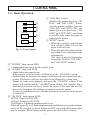
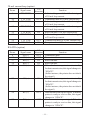
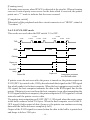
Fig. 1-1 Control panel
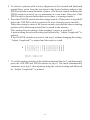
1 “ON LINE” switch
Switches the printer between “ON
LINE” and “OFF LINE”. Whenever the printer switches between
“ON LINE” and “OFF LINE”, the
buzzer gives one short beep (“ON
LINE” and “OFF LINE”, switching
is possible only when the paper is
loaded in the printer.)
2 “FEED” switch
• When this switch is pressed and
then released within 0.5 sec.,the
paper feeds one line.
• When this switch is depressed for
more than 0.5 sec.,the paper feeds
continuously.
(The above paper feed operation
is possible for both “ON LINE”
and “OFF LINE” modes.)
3 “POWER” lamp (green LED)
• Lights when the power for the printer is on.
4 “ALARM” lamp (red LED)
• Lights when the paper is out.
If the paper is out, load a new roll then press the “ON LINE” switch.
• Flashes when the front cover is open or a mechanical error (motor lock etc.)
occurs. The buzzer will give one short beep followed by a long beep.
Mount the front cover properly and press the “ON LINE” switch. If the
buzzer still sounds and the “ALARM” lamp flashes, this signifies that a
mechanical error has occurred. Locate the cause of the error and turn the
power for the printer off and back on again to reset the printer.
(In case of a mechanical error, the data will not be cleared even if the power
is turned off.)
5 “ON LINE” lamp (green LED)
LED lit: Printer is ON LINE
LED off: Printer is OFF LINE
LED flashes: Validation printing mode is set.
When all lamps 3 to 5 light simultaneously and the buzzer sounds continuously, a CPU error has occurred. In case of a CPU error, turn off the power then
turn it on again. When turning off the power, the data will be cleared.
–1–


























![User`s Manual DP8340II R SERIES [Serial]](http://vs1.manualzilla.com/store/data/005993516_1-f706d7540b19c5fecea062c6335f03cc-150x150.png)