1
SCENARIO SELECTION
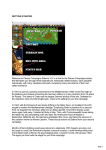
Insert the Danube Front CD,
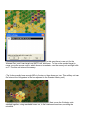
if you haven’t already, and after the introductory cinematic you will be taken to the File
Selection Dialog. Click the scenario #00_Started and then OK.
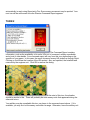
This takes you to the AI Selection Dialog where
you choose the side you wish to play. For the purposes of this tutorial select Warsaw Pact AI
"Manual" for yourself and "Automatic With FOW" (Fog of War) for NATO. Click OK to get the
game underway, you are now the Warsaw Pact commander. The Rules… button can be
used to choose optional rules or reset the optional rule selections to the default state, but for
now leave the rules set to the default set.