1
11.2
How to create ecu
Snapshot
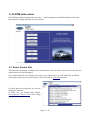
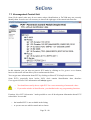
After connection to related control unit, click on
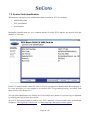
“Control Unit Identification”. In the following window
click on “Save ECU Information” button. Click on “No”
when asked whether you wish to save a full snapshot.
Choose a directory to save the file and confirm. Saving
may take a few minutes.
Full snapshots are required only at our special request.
Please send all support requests along with required data attached to [email protected]. Your
case will be assigned with unique ticket number in order to communicate efficiently with you.
Also feel free to contact us with any suggestions for improvements in the software on the same email address. Your feedback is greatly appreciated.
Page 39 / 40