1
Power on!
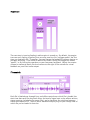
The next step is insuring Sapling’s audio engine is turned on. By default, the engine
turns on once Sapling is opened, but you may need to click “retrigger audio” the first
time you load each file. Thereafter, you can change the loaded file without having to
retrigger anything. Turn audio on and off by either clicking the toggle box under
“power,” or by hitting the spacebar on your computer keyboard. Adjust the master
volume to taste and watch the level meters to the right of the volume for visual
feedback on your files’ audio output.
File control:
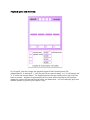
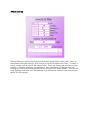
Each file is labeled one through four, and offers control over which file is loaded, the
start time that each file plays back from, the level of signal sent to the effects section,
stereo panning (or balance for mono files), and a check box for switching between
stereo and mono AIFFs. There is also a waveform display to give you a rough idea of
which file you’ve loaded in that slot.