1
2.2
Maintaining a Structured Deposit Product
You first need to set up Structured Deposit (SD) products to start the fund raising activity to
launch a Structured Deposit scheme. Subsequently, you can capture details of every SD fund
raising activity. You can initiate several fund raising activities using a single product.
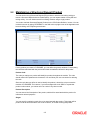
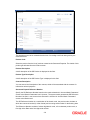
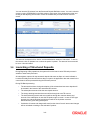
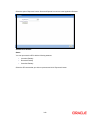
You need to maintain Structured Deposit Products in the ‘SD Product Definition’ screen. You can
invoke this screen by typing ‘SFDPRMNT’ in the field at the top right corner of the Application tool
bar and clicking on the adjoining arrow button.
For any product you create in FLEXCUBE, you can define the generic attributes. Consequently,
the contracts associated with the product will inherit the attributes defined for the product.
Product Code
The code you assign to a product will identify the product throughout the module. The code
should contain four alphanumeric characters. You can follow your own convention for devising
the code.
Since the code that you define is used to identify the product, it should be unique across the
modules of FLEXCUBE. For instance, if you have assigned the code ‘SD01’ to a particular
product in this module, you cannot use it as a code in any other module.
Product Description
You can enter a brief description of the product, which will be associated with the product for
information retrieval purposes.
Slogan
You can specify a marketing punch-line to be associated with the product. This slogan will be
printed on all the advices that are sent to the customer, for an SD involving this product.
2-5