1
UEFI Development PC
Setup User Manual
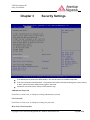
When Enabled, the BIOS displays a warning when any program (or virus) issues a Disk Format command, or
attempts to write to the boot sector of the hard disk drive. The options are Enabled and Disabled.
Secure Boot Control
When Enabled, Secure boot is enabled from the UEFI firmware. Secure Boot is possible only if the system runs in
User Mode. (Refer Security Key Database Management Demo). Disabled to Turn off the UEFI Secure Boot
feature. OpROM from Off Board cards are note launch when Secure Boot is enabled.
Secure Boot Policy
The following options set the Image Execution Policy on Security Violation. Allows to decide the when secure
boot is enabled, which kind of Images executed/Denied
Internal FV
The option is Always Execute.
Option ROM
The options are Always Execute, Always Deny, Allow Execute, Defer Execute, Deny Execute, and Query User.
Removable Media
The options are Always Execute, Always Deny, Allow Execute, Defer Execute, Deny Execute, and Query User.
Fixed Media
The options are Always Execute, Always Deny, Allow Execute, Defer Execute, Deny Execute, and Query User.
**If additional information is needed regarding Security Settings, please contact AMI to acquire it under NonDisclosure Agreement (NDA)
Copyright © 2012 American Megatrends Inc. ● Public Document (PUB)
Page 21 of 28