1
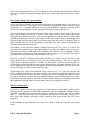
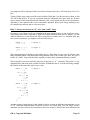
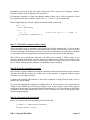
while (......) {
if (......) {
for (......) {
if (.......) {
/* This is easier to read. */
Rule 4: Limit your lines to 80 characters in length.
The original IBM punch cards could each store a single line of exactly 80 characters. Today,
different window sizes can accommodate various line lengths. If your code is displayed in a
window that is too narrow, long lines will be wrapped onto a new line. This makes code difficult to
read.
To prevent unwanted wrap-around, I recommend limiting lines to 80 characters in length, since that
is often the default size for windows displaying text. I don’t recommend counting characters on
each line—that is too bothersome—but I suggest breaking apart lines that are obviously longer than
80 characters.
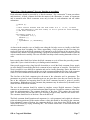
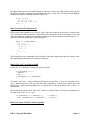
When breaking a long line into two, indent the second line a whole bunch to make it obvious that it
is a continuation line.
/* wrong */
x = a + b + c + d + e + f + g + h + i + j + k + l + m + n + o + p + q +
r + s;
/* right */
x = a + b + c + d + e + f + g + h + i + j + k + l + m + n + o + p + q +
r + s;
Rule 5: Indent continued lines to reveal their relationships.
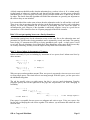
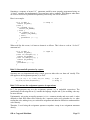
There are a couple of cases where a list of several items on a single line would be clearer if the items
in the list were lined up and placed of consecutive lines. Don’t hesitate to line things up when it
helps to show their structure. Here are a couple of examples:
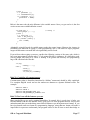
foo (x,
y + 23,
anotherRoutine (a + 1,
b + 2,
c + 3),
sqrt (z * x),
w - (u * v));
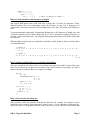
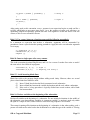
if ((x == ...) ||
(y == ...) ||
(z == ...)) {
printf (...);
}
Rule 6: Never use the tab character.
Some software (still!) has problems with the tab character. For example, the amount of space
implied by a tab is not fully agreed upon and—what is worse!—can be changed by different users.
Always use spaces. Your program will then look exactly the way you want. (You may assume that
OK to Copy and Distribute
Page 9