1
1
2
3
4
5
6
7
8
9
10
11
12
13
14
15
16
17
18
19
20
21
22
23
pesticides that are applied at the same time using the same application method. Functionally,
however, the utility will allow you to combine and any number of workbooks for any
combination of application methods.
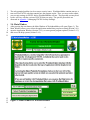
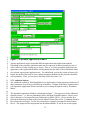
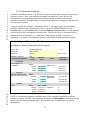
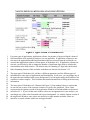
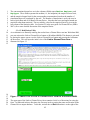
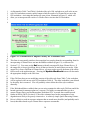
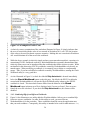
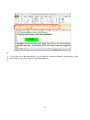
Activating the Combine HQs from Multiple Workbooks button will open up the
utility window, an example of which is given in Figure 20. In order for this utility to operate
properly, you must have only one EXCEL workbook open – i.e., the EXCEL workbook from
WorksheetMaker. If you have more than one EXCEL workbook open, a message window will
open indicating that you should close the other EXCEL workbooks.
The upper portion of the utility window, labeled Available Workbooks, lists the EXCEL files
with .xlsm extensions that are in the same directory as the EXCEL file that you have open.
Note that the utility does not check these files. If you have other EXCEL files that were not
created by WorksheetMaker, these files will be displayed in the upper portion of utility window
but you should not attempt to use these files.
The middle section of the utility window, labeled Selected Workbooks, initially contains only
the WorksheetMaker workbook that you have open. This workbook is always used in the
combination of HQs.
Figure 20: Combine HQs from Different Workbooks Utility
57