1
Chapter
9
Preferences
About Preferences
There are many IntelliCENTER Software preferences that can be specified for
the user's convenience. The default (factory supplied) values are acceptable
for most installations. But it is possible to modify them to a facility's specific
requirements. To find the Preferences section, click on Edit/Preferences in
the menu bar.
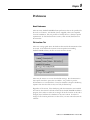
File Locations Tab
These two settings guide where the database data and the documentation data
are stored. If the default file locations were accepted when installing
IntelliCENTER software, the files are in the locations shown.
There may be reasons to not use these default settings. The documentation
may require more drive space than is available. It is possible to put the
documentation on a network drive. It may be desirable to keep the database(s)
separate from the other files so they can easily be 'backed-up.'
Regardless of the reason, if the database(s) and documentation were installed
in locations other than the defaults offered by the IntelliCENTER installation
program, this is where to make those changes. If the file location on this tab is
changed, there had better be a database in the new location! In order for
changes in file location preferences to take effect, one must exit and restart the
software.
1
Publication 2100-RM003B-EN-P - March 2003