1
Chapter
7
E3 Electronic Overload Relay Configuration
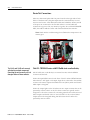
Using IntelliCENTER Software
The purpose of this lab is to configure advanced features on the E3 solid-state
overload relay.
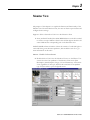
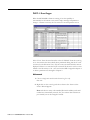
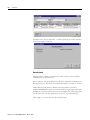
1. Double-click on Unit #1 to bring up the Monitor View for that unit.
2. The Data monitored should be:
Warning Status
Trip Status
Average %Fla (Percentage Full Load Amps)
Overload Time To Trip
3. The parameters monitored should be:
Fla (Full Load Amperage) Setting (3.5A)
Trip Class (10)
Trip Enable (Overload, Phase Loss, Comm Fault)
Warning Enable (Overload)
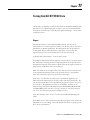
4. The Data and Parameters shown should agree with the illustration
above. To change the data, right click in the window (white box) for
that item and change the parameter shown. Left click on the
appropriate window and change parameter values as needed.
1
Publication 2100-RM003B-EN-P - March 2003