1
Expert Electronics
5. Getting Started
5.1 Requirements
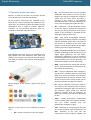
To start the Receiver you need:
• receiver power supply (supplied);
•
PC (not supplied);
•
LAN – computer network cable (supplied);
•
Antenna, which is tuned on the amateur bands
(not supplied).
ColibriDDC receiver
5.2 Program installation
Download installer version ExpertSDR2 for ColibriDDC
receiver form our web-site to the folder on your PC
Before starting the receiver check if your system meet
the requirements below:
•
Recommended power unit: should have
voltage 5V and current not less than 2 A;
•
PC or notebook: any modern configuration.
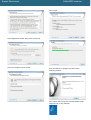
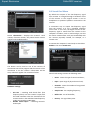
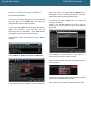
Double click on the installer to start the Setup Wizard.
Select the setup language.
Recommended configuration:
•
2 or 4 core processor Intel Core i3, Core i5 or
Core i7;
•
4 or more RAM;
•
40 gigabyte hard disk free space for the
receiver's
program
and
accompanied
programs;
•
15…27” monitor;
•
video card supporting OpenGL 1.5 and higher.
Program will work on less powerful PCs with
processors Core2Duo and Dual-Core, but it will bring to
the higher level of resources loading.
•
Press Next to continue or Cancel to exit Setup.
Operating system: Windows XP 32/64 bit,
Windows 7 32/64 bit or Windows 8/8.1 32/64
bit. The latest versions are preferable.
While buying the PC ask the shop assistant about the
OpenGL video card support.
•
LAN - computer network cable, connecting
the receiver with the PC by Ethernetconnection;
•
Antenna should have impedance 50 Ohm,
because of the receiver's input impedance 50
Ohm.
After checking your system requirements install the
program.
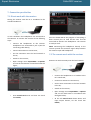
Accept the License Agreement. Press Next to
continue