1
US 7,061,468 B2
6
5
example, include using optical detectors to sense a change in
the intensity of the detected light to indicate that very little
These and other examples of most needed shortcuts for
the device are loaded or preprogrammed into the scroll
element menu before the device is used during a presenta
re?ected light is hitting the optical detector, as in, for
example, When the optical mouse is lifted from the tabletop.
Furthermore, the optical detector is con?gured to detect the
tion in its hand-held mode. Having preprogrammed the
difference betWeen a fast change in light intensity, as in
or her hand and Walk around during the presentation, sWitch
scroll element menu, the operator can hold the device in his
When the mouse is lifted from the table-top from the more
ing slides and/or selecting preloaded functions easily by
gradual case, Where the battery poWer level has been
depleted. The optical mouse embodiment houses an Agilent
using the scroll element of the device.
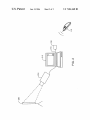
As shoWn in FIG. 2, the device 110 communicates With a
host computer 210 (e.g., to control an electronic slide shoW
application program) via a Wired connection or alternately
optical module, including an Agilent optical sensor.
Altemately, a manual sWitching betWeen a tabletop mode
and a handheld mode is achieved by indicating to the device
through a softWare program, Which invokes a setup program,
to recogniZe button and scroll functions corresponding to
either a tabletop computer mouse mode or a handheld 15
presentation device mode.
Furthermore, in addition to the manual sWitching and the
automatic sWitching betWeen the table top and handheld
modes, as described above, a module for detecting user input
for operating the input device in the ?rst mode (e. g. tabletop)
and a second mode (e.g. handheld) includes a softWare
driver con?gured to recogniZe a sWitch betWeen the ?rst
mode and the second mode, and treat user inputs initiated in
the ?rst mode and the second mode for processing by a
computer Which is connected With the computer input
20
embodiment, the protocol for Wireless communication
betWeen the device 110 and the host computer 210 via
receiver 212 is an implementation based on the BluetoothTM
Human Interface Device (HID) pro?le, and thus the device
25
device.
the receiver 212 serves as a bridge for host computers that
do not use the BluetoothTM HID pro?le using the host
30
used during the hand-held mode to control a presentation.
The scroll element is used to control more complex opera
tions than moving forWard and backWard, Which may be
carried out by the button clicks, as described above. For
example, the scroll element may be used to select from
35
various options While the device is held by the operator, and
Where it is inconvenient to revert to the ?rst mode (e.g., by
putting the device back on the tabletop). The options are
selected from a preprogrammed menu, Which is displayed
PCMCIA card.
40
mouse or tabletop mode, thus conserving battery poWer by
45
draWing poWer from the computer via the bus connection to
the computer. When the device is disconnected from the bus,
the device sWitches to a Wireless device. In an embodiment,
the shift from a Wired to a Wireless device, also sWitches the
device from its ?rst or mouse mode, to its second (e.g.
vates the scroll element to display a menu on the screen. The
operator chooses a menu item from the menu by using the
scroll element, and selects a menu option by clicking on it
using the scroll element or one of the buttons. One example
of a menu item includes volume control Where it is selected
by a Wheel click and the sound level is adjusted up or doWn
50
by turning the Wheel up or doWn respectively. Another
55
handheld) or presentation mode. This combined Wired and
Wireless capability provides the advantages of a Wireless
device When operated as a presentation controller With the
poWer saving feature of a Wired device, When operated as a
mouse.
Another alternate embodiment of the present invention is
a device that is used purely as a presentation controller. In
this embodiment the device is con?gured to function solely
example of a scroll menu item includes scroll speed pro
viding fast or sloW and a range of scroll speeds. Another
as a presentation controller and not also as computer input
device. In this embodiment, a Wheel is used as a scrolling
example includes sWitching to another application program
by clicking on “programs” and then choosing another pro
element. This embodiment is readily adopted by its operator
gram With the scroll element and selecting the chosen
to control a computer-based presentation, oWing to its simi
larity to a usual computer input device, such as, for example,
program With another click operation. Another example
includes selecting another presentation in essentially the
a mouse. The operator of such a device Will not need any
additional training in its use, since computer input devices
same manner as selecting another program, as described
above. Another example includes selecting “bookmarked”
amongst the sites With the scroll element scroll and selecting
a site by another scroll element click.
Altemately, the device is con?gured for operation in a
combined Wired and Wireless mode. In such an embodiment,
the device is preferably a Wired device When operating in the
initial device installation procedure.
To activate the preprogrammed menu, the operator acti
Web sites With a scroll element click and then choosing
computer’s bus, Which is, for example a USB bus. Blue
toothTM is a Wireless technology that offers cable replace
ment for personal electronic devices. As is knoWn to those
skilled in the art, other Wireless communications protocols,
including ?xed or spread spectrum Wireless communications
protocols are equally useable With the Wireless implemen
tation of the device 110 and the Wireless receiver 212. The
Wireless receiver may be implemented as an external or
internal receiver device, a USB dongle, a PCI card or a
on a presentation screen in response to the operator using the
scroll element While holding the device in its hand-held
mode. The preprogrammed menu is preferably a smaller
menu so as not to disrupt the presentation by shoWing a full
menu to the audience. The preprogrammed menu, Which is
modi?able, may be installed and con?gured as a part of the
110 Will be compatible With devices based on this HID
protocol. While certain host computers may include a Blue
toothTM HID pro?le and thus not require the receiver 212,
For example, When the device 110 is in its presentation
mode, button clicks are con?gured to advance a slide
forWard or backWard in a computer-based presentation.
Further, the scroll element on the device is con?gured to be
via a Wireless connection. The host computer 210 in con
nected With a presentation device 216 for projecting a
computer-based presentation onto a screen 220.
A Wireless device 110 alloWs its operator the freedom to
move freely beyond the range of a Wired presentation device
While controlling a computer-based presentation. In a Wire
less embodiment, the device 110 communicates With the
host computer 210 via a Wireless receiver 212 Which is
coupled to the host computer 210 via a bus 214. In an
65
have become a very common peripheral device. An operator
Will click a button and/or the Wheel and Will be presented
With the results of each click and thus the operator Will
intuitively learn to use the device. For example, the operator