1
6. Telephone Access
This section will guide you through telephone to control RPM.
Note: Please first check the “RPM Setting” in the web page if the
function is enabled.
1.
2.
3.
4.
5.
6.
7.
8.
9.
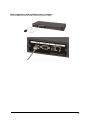
Dial up the RPM.
After three rings the RPM will respond by sending out two short beeps to the caller.
Then the RPM waits for the user to enter the password.
The user enters an access password (default password is 123456789#).
The RPM will send out 2 short beeps to confirm a successful login, or one long beep to
deny access.
Once logged in, the remote user can punch in 4-8 digits. The first two digits specify
which RPM, the next digit specifies which output receptacle and the next digit specifies
which command. The last four digits specify the amount of time:
i.
Command format: XXNA#:
ii.
XX - 01—16 is the RPM’s device number for a daisy chain, if there is no daisy
chain, then any number is accepted.
iii.
N - Outlet number: 1(A)—8(H), 9 controls all the outlets.
iv.
A - Action type: 0=off, 1=on, 2=reset.
v.
I.E. 0111# RPM01 turn on Outlet A.
vi.
I.E. 0120# RPM01 turn off Outlet B.
vii.
I.E. 0212# RPM02 reset outlet A.
viii.
I.E. 01113600# means turn A on after 3600 minutes.
ix.
I.E. 01103600# means turn A off after 3600 minutes.
x.
I.E. 01123600# means reset A after 3600 minutes.
xi.
Use a combination of 0111XXXX# or 0112XXXX# to get a different delay time.
XXXX max value is 9999, which is about 166 hours or 6.94 days.
Use the "*" key to cancel a command at any time.
To change the password. The default password is 123456789#. The user has to enter
the previous password in order to change their password.
i. NOTE: The Password has to have a minimum of 7 digits and can have a maximum
of 10 digits.
The user enters 888#. Then the RPM responds with long beeps acknowledging access
granted. The user then enters the new password as follows: 888XXXXXXXXXX#, and
the RPM acknowledges with 2 short beeps. Then user inputs 888XXXXXXXXXX# the
second time to re-confirm the new password. The RPM acknowledges with 4 short
beeps, indicating that the password has been changed.
Forgot telephone interface password? Please do the following steps to restore the
default password.
i. Dial up the RPM.
ii. After three sequence rings, the RPM will respond by sending out 3 short beeps to
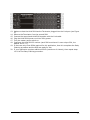
the caller and waiting for user to enter password. Then pressing the button A and
H simultaneously on the RPM within twenty seconds.
iii. When the LED A and H blinking, release the two buttons, the RPM will respond by
14