1
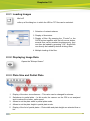
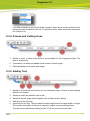
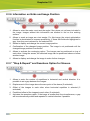
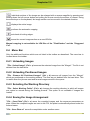
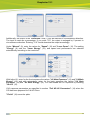
Grapholas 12.1 8.7.1 Creating a New Plate First select the desired medium "Plate Type" (1), then check "New" (2) and press "Next" (3) to go to the next menu: "Plate" – Flexo plates "Sleeve" – print sleeve of DuPont and Flint "Plate on Sleeve" – Flexo plates mounted on a print sleeve "Steel Base" – metal backing plate for magnetic drum "Film" – film If Grapholas 10.1 or higher is installed on the CDI, a plate database is shown. When the desired plate manufacturer "Brand" (4) or the plate type "Plate" (5) are not available, the option "other" can be selected: "Name" (7) determines the display name in the plate list and "Thickness" (7) the plate thickness. For sleeves, the circumference is entered in the "Circumference" field (7): 29