1
User Guide
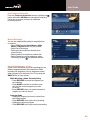
Access Favorites Lists
• While watching TV, press the FAV button to skip
to your next Favorite channel on the current list
• From TV Listings or Mini Guide, press the FAV
button to bring up a filtered guide of the channels
in your last accessed list. Press FAV button
again to scroll through all of your Favorites Lists –
the guide will have a tab with each list’s name
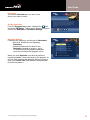
• From the Quick Menu select the
to bring up
your Favorites Lists. If you have not yet set up
any Favorites, simply follow the on-screen
prompts to begin a new list
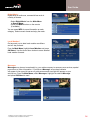
Add or Delete Channels to Favorites Lists
• From the Quick Menu – select the
Icon
• Select the Favorites List you want to edit
• Select the
Icon to add or remove favorite channels
• You can also rename, delete, or Lock your Favorites list
• Highlight a channel in the listings and press OK/Select or FAV to add to your favorites –
a
Icon will appear; Or, to remove the channel, press OK/Select or FAV and they will
be removed
• Press the
Icon to confirm your Favorites channel settings
19