1
js
images
Includes
nbproject
complete.php
dataviz.php
index.html
index.php
join.php
logdream.php
login.php
logout.php
profile.php
wakingdata.php
Step 2: Configuration
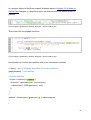
Includes/db.php contains settings that will need to be changed according to your local
MySQL user configurations
private $user = "SQL_USER";
private $pass = "SQL_PASSWORD";
private $dbName = "dreamdemo"; // or beta prototype
private $dbHost = "localhost";
AMEND:
SQL_USER
SQL_PASSWORD
For these parameters it is recommended that you add the username and password of
a user profile for your PHP installation that has root access rights
Step 3: Launch
navigate to localhost/project to proceed through the project.
You can log in with username test, and password test.
69