1
i
CONFIGURATION BY MEANS OF A PERSONAL COMPUTER
In order to configure the device using a personal computer you should:
•
•
•
Install Remote Switch Configurator
Connect VRT012 to a PC using a configuratin cable
Start Remote Switch Configurator
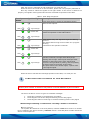
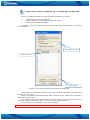
In picture 4. you can see the main window of Remote Switch Configurator. It is divided
into 3 sections
Configuration of relay
The list of numbers
Control buttons
Picture 4. The main window of Remote Switch Configurator
Configuration of relay allows choosing a way how the device will switch from ON to OFF
mode of the inner relay.
Device can switch modes automatically after a number of ms, which can be entered in
Relay Timeout (ms) field.
If an external source of a signal (button or other sensor) will be required in order to
switch the modes, you should place a tick at Enable External Disconnection.
You can add up to 500 numbers in the list of numbers.
Note: you should add „+“ sign in front of every number.
7