1
2 System Start-up
This manual is construed for the specific use of the ADCP on RV “Heincke” and focuses on
the most important parameters to be looked after during data acquisition. We recommend to
additionally read the VmDas Quick Start Guide and VmDas User Guide.
2.1 Switch on ADCP
1. Power up the ADCP operator PC (Figure 2, right).
For username and password please ask the captain.
2. Power up the deck unit in the server rack (Figure 2, right)
2.2 System Test (BBTalk)
Before you start a survey you should perform a hardware system test.
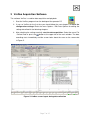
1. Start the BBTalk program from the desktop of the operator PC.
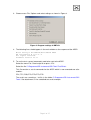
2. Connect to the ADCP unit by selecting the settings as shown in Figure 3.
Figure 3: Serial connection settings in BBTalk
Page 5 of 15