1
11/20/09
9:21 AM
Page 29
SECTION 6:Variable Frequency Drives
PID-1, PID-6 INTELLIDRIVE Series
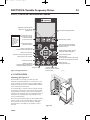
Pressure Setpoint: Press Auto Start, then follow steps 2-4
under “Changing a Parameter Value,” Page 26. Use the
directional arrows to change the pressure by 1 or 10 PSI
increments.
• NOTE: This parameter allows you to change either the
Internal or the External Setpoint, depending on which
one is referenced at the time you are making the
change.
• NOTE: To change the setpoint before starting the
pump, go to the Main Menu/Settings/Setpoints/
Internal Setpoint.
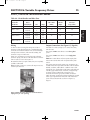
• NOTE: If this value is changed from the default value
of 60 PSI, you must adjust the tank pressure
accordingly (see Table 6-3, Page 24).
Language: Press Language; follow steps 2-4 under
“Changing a Parameter Value,” Page 26, using the UP or
DOWN arrows to scroll through the available languages
(English, French, or Spanish; default is English).
• NOTE: To change the setpoint before startup, go to the
Main Menu under “Settings”.
Main Menu Parameters
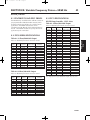
The Main Menu has six secondary menus (plus a Reset)
that allow access to the Advanced Programming
parameters: 1) SETTINGS, 2) MOTOR, 3) SENSOR, 4) PIPE
BREAK, 5) DRY RUN, 6) I/O. The basic structure and
navigation instructions are listed below. Use the UP and
DOWN arrows to scroll to the next secondary menu or
submenu, or to a parameter. Press Enter to go into a
Submenu or to edit a parameter.
1) SETTINGS: (HAS 5 SUBMENUS)
Time (2 parameters):
Hour: Allows you to change the time of day.
Date: Allows you to change the calendar day.
PID Control: Changing these parameters is NOT
recommended. These parameters control the drive’s
reaction to pressure changes in the system. They
should be considered as a group. If it seems necessary
to alter anything in this group, please call Pentek
Customer Service at 1-866-9PENTEK (1-866-9736835) BEFORE YOU START. Also, note that the last
item on the main menu resets ALL parameters to the
default values.
Sleep (5 parameters plus Reset):
Boost Differential: Raises the system pressure
slightly before going into sleep mode. Units are in
PSI. The default boost value is 3 PSI. (i.e., with
Boost Differential set to 3 PSI and Pressure Setpoint
set to 60 PSI, the system pressure will rise to 63 PSI
before the drive goes to sleep). Maximum is 10 PSI,
minimum is 3 PSI.
29
Boost Delay: The length of time (in seconds) that
the drive monitors the system before boosting the
pressure. Default is 60 seconds, maximum is 300
seconds, minimum is 30 seconds.
Wakeup Differential: The total pressure drop from
the setpoint that the drive must see to come out of
Sleep mode. The default setting is 5 PSI. (i.e., with
the Wakeup Differential set to 5 PSI, the drive will
wake up when the pressure in the system has
dropped 5 PSI below the system Pressure Setpoint.)
Maximum is 15 PSI, minimum is 5 PSI.
Wake Delay: The time it takes to ramp down to the
Wake Up pressure. Default is 15 seconds,
maximum is 120 seconds, minimum is 3 seconds.
Sleep 2 PSI: A setting to prevent Over-Pressure. If
the system pressure rises enough that the drive
reaches the Sleep 2 PSI setpoint, the drive will go
to sleep for one minute. Default pressure is 80 PSI,
maximum is ‘Max Sensor’ value minus 3 PSI,
minimum is 15 PSI.
• NOTE: If the Internal or External Setpoint is set to
a value that is near, at, or above the Sleep 2 PSI
setpoint, you may experience nuisance tripping.
In this case, raise the Sleep 2 PSI setpoint until
the nuisance tripping stops.
Reset to defaults: Default value is NO. Change to
YES to reset all Sleep parameters to their default
values.
Password (2 parameters):
Password Timeout: Sets the time (in minutes) that
the drive takes to lock out the password-protected
(blue) buttons on the keypad. The range is 1 – 360
minutes; the default is 60 minutes. When drive
programming is complete, a timer starts. Once it
reaches the time set in this parameter the buttons
automatically lockout.
Password: The Password locks or unlocks the blue
buttons on the keypad. The password is a number
(default is 7777) and can be changed to any 1- to
4-digit number.
Setpoints (2 Parameters):
Internal Setpoint: The main pressure setting used by
the drive. The default value is 60 PSI. Maximum is
the ‘Max Sensor’ value minus 3 PSI, minimum is
15 PSI.
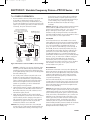
External Setpoint: The Drive’s pressure reference
when the External Input is set to External Setpoint
and the proper drive is connected to it (see I/O
section, Pages 28 and 29). Default is 40 PSI,
Maximum is ‘Max Sensor’ minus 3 PSI, minimum is
15 PSI.
PN793
VFD
PID-1, PID-6
PN793