1
5.0 KVM Hot Key Operation (980/990 Model Only)
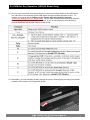
5.1 Hot key can be provides convenient short cut to access functions similar to the OSD menu.
You can have a full command of the KVM switch through a simple sequence of key. To
access, you must press the hotkey (default Caps Lock) twice within 2 seconds.
*980P/990P hotkey default is Scroll Lock. You will hear a beep sound confirming activation,
then pressing another command key to submit. If you do not press any command key 2
second afterward it will escape back to normal mode.
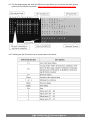
5.2 Alternately, you can manually directly change the port by selecting the pre-assign port button
located on the surface of the keyboard as well.
SMK 920/980/990 (P) Reference Manual
User’s Manual
13