1
Video Follow Spot - User Manual
0. VidFspot – VidFspot DMX - New features description
Two major functionality upgrade has been implemented in a system. They are:
1. DMX Input has been enabled.
2. Performer height correction has been implemented.
With DMX input enabled, system can receive DXM data from light desk or a light control software.
This way system is fully integrated in a show. Color, gobo, and all moving light dmx channels are
controlled with light desk, except pan and tilt values.
Setting the performer height correction enables the operator to follow the performer feet (for example)
but the performer is inside light beam. Here, operator is free to choose where a mouse pointer will be
pointing. Mouse pointer can be in center of beam, or it can be at the beam bottom edge, or beam upper
edge, or anywhere in between.
See manual for detail description of these two features.
1. System description
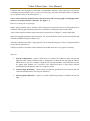
VidFspot is windows based system for remote control of one moving light to be used as follow spot.
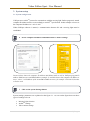
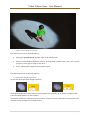
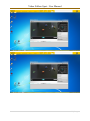
Basic system layout is presented in figure 1.1.
Figure 1.1 System description
System consists of a moving light, video or web camera, network switch and computer.
2. | P a g e