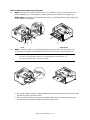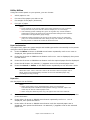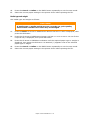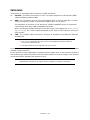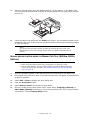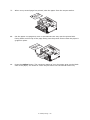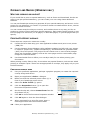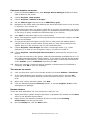
1
PREFACE
Every effort has been made to ensure that the information in this document is complete,
accurate, and up-to-date. The manufacturer assumes no responsibility for the results of
errors beyond its control. The manufacturer also cannot guarantee that changes in software
and equipment made by other manufacturers and referred to in this guide will not affect
the applicability of the information in it. Mention of software products manufactured by
other companies does not necessarily constitute endorsement by the manufacturer.
While all reasonable efforts have been made to make this document as accurate and helpful
as possible, we make no warranty of any kind, expressed or implied, as to the accuracy or
completeness of the information contained herein.
The most up-to-date drivers and manuals are available from:
www.okiprintingsolutions.com
07108301 Iss.04; Copyright © 2012 Oki Europe Ltd. All rights reserved.
OKI is a registered trademark of Oki Electric Industry Co., Ltd.
Hewlett-Packard, HP, and LaserJet are registered trademarks of Hewlett-Packard
Company.
Windows is a registered trademark of Microsoft Corporation.
ENERGY STAR is a trademark of the United States Environmental Protection Agency.
Apple, Macintosh, Mac and Mac OS are registered trademarks of Apple Inc.
Other product names and brand names are registered trademarks or trademarks of their
proprietors.
As an ENERGY STAR Program Participant, the manufacturer has determined
that this product meets the ENERGY STAR guidelines for energy efficiency.
This product complies with the requirements of the Council Directives 2004/
108/EC (EMC), 2006/95/EC (LVD),1999/5/EC (R&TTE), 2009/125/EC (ErP)
and 20011/65/EU RoHS, as amended where applicable, on the approximation
of the laws of the member states relating to Electromagnetic Compatibility,
Low Voltage, Radio & Telecommunications Terminal Equipment and Energy
Using Products, Restriction on the use of certain hazardous substances in electrical and
electronic equipment.
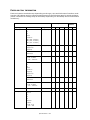
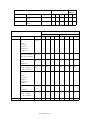
The following cables were used to evaluate this product to achieve EMC directive
2004/108/EC compliance and configurations other than this may affect that compliance.
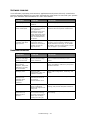
CABLE TYPE
LENGTH
(METRE)
CORE
SHIELD
1.8
8
8
5
8
9
Parallel
1.8
8
9
LAN
15
8
8
Power
USB
Preface > 2
EMERGENCY FIRST AID
Take care with toner powder:
If swallowed, give small amounts of cold water and seek medical attention. DO
NOT attempt to induce vomiting.
If inhaled, move the person to an open area for fresh air. Seek medical
attention.
If it gets into the eyes, flush with large amounts of water for at least 15
minutes keeping eyelids open. Seek medical attention.
Spillages should be treated with cold water and soap to help reduce risk of
staining skin or clothing.
MANUFACTURER
Oki Data Corporation,
4-11-22 Shibaura, Minato-ku,
Tokyo 108-8551,
Japan
IMPORTER TO THE EU/AUTHORISED REPRESENTATIVE
Oki Europe Limited
Blays House
Wick Road
Egham
Surrey TW20 0HJ
United Kingdom
For all sales, support and general enquiries contact your local distributor.
ENVIRONMENTAL INFORMATION
Emergency First Aid > 3
CONTENTS
Preface . . . . . . . . . . . . . . . . . . . . . . . . . . . . . . . . . . . . . . . . . . . . . . . . . . .2
Emergency First Aid . . . . . . . . . . . . . . . . . . . . . . . . . . . . . . . . . . . . . . . . .3
Manufacturer . . . . . . . . . . . . . . . . . . . . . . . . . . . . . . . . . . . . . . . . . . . . . . .3
Importer to the EU/authorised representative. . . . . . . . . . . . . . . . . . . . .3
Environmental information . . . . . . . . . . . . . . . . . . . . . . . . . . . . . . . . . . . .3
Contents . . . . . . . . . . . . . . . . . . . . . . . . . . . . . . . . . . . . . . . . . . . . . . . . . .4
Notes, Cautions and Warnings . . . . . . . . . . . . . . . . . . . . . . . . . . . . . . . . .6
About this manual . . . . . . . . . . . . . . . . . . . . . .
Online usage. . . . . . . . . . . . . . . . . . . . . . . . .
Printing Pages. . . . . . . . . . . . . . . . . . . . . . . .
Abbreviations used . . . . . . . . . . . . . . . . . . . .
.
.
.
.
.
.
.
.
.
.
.
.
.
.
.
.
.
.
.
.
.
.
.
.
.
.
.
.
. . . . . . . . . . . . . .7
............. 7
............. 7
............. 8
Printer components. . . . . . . . . . . . . . . . . . . . . . . . . . . . . . . . . . . . . . . . . .9
Getting started . . . . . . . . . . . . . . . . . . . . . . . . .
Switching on. . . . . . . . . . . . . . . . . . . . . . . . . .
Switching off. . . . . . . . . . . . . . . . . . . . . . . . . .
Energy saving settings . . . . . . . . . . . . . . . . . . .
Returning to standby mode . . . . . . . . . . . . .
.
.
.
.
.
.
.
.
.
.
.
.
.
.
.
.
.
.
.
.
.
.
.
.
.
.
.
.
.
.
. . . . . . . . . . . . .11
. . . . . . . . . . . . .11
. . . . . . . . . . . . .11
. . . . . . . . . . . . .11
. . . . . . . . . . . . .11
Operator panels. . . . . . . . . . . . . . . . . . . . . . . . .
LED indicators. . . . . . . . . . . . . . . . . . . . . . .
LCD . . . . . . . . . . . . . . . . . . . . . . . . . . . . . .
Online button . . . . . . . . . . . . . . . . . . . . . . .
Changing language . . . . . . . . . . . . . . . . . . .
Configuration tool . . . . . . . . . . . . . . . . . . . .
Menu functions . . . . . . . . . . . . . . . . . . . . . .
Printing menu settings . . . . . . . . . . . . . . . . .
B431d, B431dn . . . . . . . . . . . . . . . . . . . . . . . .
Operator panel . . . . . . . . . . . . . . . . . . . . . .
Panel elements . . . . . . . . . . . . . . . . . . . . . .
Menu functions . . . . . . . . . . . . . . . . . . . . . .
Printing menu settings . . . . . . . . . . . . . . . . .
.
.
.
.
.
.
.
.
.
.
.
.
.
.
.
.
.
.
.
.
.
.
.
.
.
.
.
.
.
.
.
.
.
.
.
.
.
.
.
.
.
.
.
.
.
.
.
.
.
.
.
.
.
.
.
.
.
.
.
.
.
.
.
.
.
.
.
.
.
.
.
.
.
.
.
.
.
.
. . . . . . . . . . . . .12
. . . . . . . . . . . . .12
. . . . . . . . . . . . .13
. . . . . . . . . . . . .13
. . . . . . . . . . . . .14
. . . . . . . . . . . . .14
. . . . . . . . . . . . .15
. . . . . . . . . . . . .21
. . . . . . . . . . . . .22
. . . . . . . . . . . . .22
. . . . . . . . . . . . .22
. . . . . . . . . . . . .23
. . . . . . . . . . . . .30
Paper recommendations . . . . . . . . . . . . . . . . . . .
Paper and envelope types . . . . . . . . . . . . . . . . .
Transparencies and adhesive labels . . . . . . . . . . .
Postcards . . . . . . . . . . . . . . . . . . . . . . . . . . . . .
Installing paper . . . . . . . . . . . . . . . . . . . . . . . . .
Paper Tray . . . . . . . . . . . . . . . . . . . . . . . . . .
Multi purpose tray and manual feed tray . . . . .
Paper feed, size and media setting . . . . . . . . . . .
B401dn, B411d, B411dn . . . . . . . . . . . . . . . .
B431d, B431dn . . . . . . . . . . . . . . . . . . . . . . .
.
.
.
.
.
.
.
.
.
.
.
.
.
.
.
.
.
.
.
.
.
.
.
.
.
.
.
.
.
.
.
.
.
.
.
.
.
.
.
.
.
.
.
.
.
.
.
.
.
.
. . . . . . . . . . . . .31
. . . . . . . . . . . . .31
. . . . . . . . . . . . .31
. . . . . . . . . . . . .32
. . . . . . . . . . . . .32
. . . . . . . . . . . . .32
. . . . . . . . . . . . .34
. . . . . . . . . . . . .35
. . . . . . . . . . . . .35
. . . . . . . . . . . . .36
Interfaces . . . . . . . . . . . . . . . . . . . . . . . . . . . . . . . . . . . . . . . . . . . . . . . .38
Printer drivers . . . . . . . . . . . . . . . . . . . . . . . . . .
Windows operating systems . . . . . . . . . . . . . . .
Installed options . . . . . . . . . . . . . . . . . . . . .
Macintosh operating systems . . . . . . . . . . . . . .
Installed options . . . . . . . . . . . . . . . . . . . . .
Choosing a Mac driver . . . . . . . . . . . . . . . . .
.
.
.
.
.
.
.
.
.
.
.
.
.
.
.
.
.
.
.
.
.
.
.
.
.
.
.
.
.
.
.
.
.
.
.
.
. . . . . . . . . . . . .39
. . . . . . . . . . . . .39
. . . . . . . . . . . . .39
. . . . . . . . . . . . .39
. . . . . . . . . . . . .39
. . . . . . . . . . . . .39
Operation . . . . . . . . . . . . . . . . . . . . . . . . . . . . . .
Printer settings in Windows . . . . . . . . . . . . . . . .
Printing preferences in Windows applications . .
PCL emulation. . . . . . . . . . . . . . . . . . . . . . . .
.
.
.
.
.
.
.
.
.
.
.
.
.
.
.
.
.
.
.
.
. . . . . . . . . . . . .40
. . . . . . . . . . . . .40
. . . . . . . . . . . . .40
. . . . . . . . . . . . .41
Contents > 4
PS emulation . . . . . . . . . . . . . . . . . . . . . . . . . . . . . . . . . . . . . . . . . .44
Setting from Windows control panel . . . . . . . . . . . . . . . . . . . . . . . . . .46
Printer settings in Macintosh . . . . . . . . . . . . . . . . . . . . . . . . . . . . . . . . . .49
2-sided printing . . . . . . . . . . . . . . . . . . . . . . . . . . . . . . . . . . . . . . . . . . .50
Auto duplex printing . . . . . . . . . . . . . . . . . . . . . . . . . . . . . . . . . . . . . . .50
Manual duplex printing using the paper tray (Windows only) . . . . . . . . . . .50
Manual duplex printing using the Manual Feed Tray (B401dn, B411d, B411dn) 52
Overlays and Macros (Windows only). . . . . . .
What are overlays and macros? . . . . . . . . . . .
Creating PostScript overlays . . . . . . . . . . . . . .
Creating the overlay image. . . . . . . . . . . . .
Create and download the project. . . . . . . . .
Test printing the overlay . . . . . . . . . . . . . .
Defining overlays . . . . . . . . . . . . . . . . . . .
Printing with PostScript overlays . . . . . . . . . . .
Creating PCL Overlays . . . . . . . . . . . . . . . . . .
Creating the overlay image. . . . . . . . . . . . .
Create and download macros . . . . . . . . . . .
Test printing the macro . . . . . . . . . . . . . . .
Defining overlays . . . . . . . . . . . . . . . . . . .
Printing with PCL overlays . . . . . . . . . . . . . . .
.
.
.
.
.
.
.
.
.
.
.
.
.
.
.
.
.
.
.
.
.
.
.
.
.
.
.
.
.
.
.
.
.
.
.
.
.
.
.
.
.
.
.
.
.
.
.
.
.
.
.
.
.
.
.
.
.
.
.
.
.
.
.
.
.
.
.
.
.
.
.
.
.
.
.
.
.
.
.
.
.
.
.
.
. . . . . . . . . . . . . .54
. . . . . . . . . . . . . .54
. . . . . . . . . . . . . .54
. . . . . . . . . . . . . .54
. . . . . . . . . . . . . .55
. . . . . . . . . . . . . .55
. . . . . . . . . . . . . .55
. . . . . . . . . . . . . .56
. . . . . . . . . . . . . .57
. . . . . . . . . . . . . .57
. . . . . . . . . . . . . .57
. . . . . . . . . . . . . .58
. . . . . . . . . . . . . .58
. . . . . . . . . . . . . .59
Consumables and maintenance. . . . . . . . . . .
When to replace the toner cartridge . . . . . . .
Replacing the toner cartridge . . . . . . . . . . . .
When to replace the image drum . . . . . . . . .
Replacing the image drum.. . . . . . . . . . . . . .
Cleaning. . . . . . . . . . . . . . . . . . . . . . . . . . .
...the unit casing . . . . . . . . . . . . . . . . . . .
...the paper feed rollers . . . . . . . . . . . . . .
...the LED head . . . . . . . . . . . . . . . . . . . .
.
.
.
.
.
.
.
.
.
.
.
.
.
.
.
.
.
.
.
.
.
.
.
.
.
.
.
.
.
.
.
.
.
.
.
.
.
.
.
.
.
.
.
.
.
.
.
.
.
.
.
.
.
.
.
.
.
.
.
.
.
.
.
. . . . . . . . . . . . . .60
. . . . . . . . . . . . . .60
. . . . . . . . . . . . . .60
. . . . . . . . . . . . . .63
. . . . . . . . . . . . . .63
. . . . . . . . . . . . . .65
. . . . . . . . . . . . . .65
. . . . . . . . . . . . . .65
. . . . . . . . . . . . . .67
Troubleshooting . . . . . . . . . . . . . . . . . . . . . . .
Status and error messages . . . . . . . . . . . . . . .
Paper jams . . . . . . . . . . . . . . . . . . . . . . . . . .
Input jam . . . . . . . . . . . . . . . . . . . . . . . . . . .
Feed jam or exit jam . . . . . . . . . . . . . . . . . . .
Print quality problems . . . . . . . . . . . . . . . . . .
Paper feed problems . . . . . . . . . . . . . . . . . . .
Software problems . . . . . . . . . . . . . . . . . . . .
Hardware problems . . . . . . . . . . . . . . . . . . . .
.
.
.
.
.
.
.
.
.
.
.
.
.
.
.
.
.
.
.
.
.
.
.
.
.
.
.
.
.
.
.
.
.
.
.
.
.
.
.
.
.
.
.
.
.
.
.
.
.
.
.
.
.
.
. . . . . . . . . . . . . .68
. . . . . . . . . . . . . .68
. . . . . . . . . . . . . .68
. . . . . . . . . . . . . .69
. . . . . . . . . . . . . .69
. . . . . . . . . . . . . .74
. . . . . . . . . . . . . .75
. . . . . . . . . . . . . .76
. . . . . . . . . . . . . .76
Installing options . . . . . . . . . . . . . . . . . . . . . .
Installation procedure . . . . . . . . . . . . . . . . . .
Setting the driver device options . . . . . . . . . . .
Windows . . . . . . . . . . . . . . . . . . . . . . . . .
MAC OS X. . . . . . . . . . . . . . . . . . . . . . . . .
.
.
.
.
.
.
.
.
.
.
.
.
.
.
.
.
.
.
.
.
.
.
.
.
.
.
.
.
.
.
.
.
.
.
.
. . . . . . . . . . . . .77
. . . . . . . . . . . . .77
. . . . . . . . . . . . .77
. . . . . . . . . . . . .77
. . . . . . . . . . . . .78
Specifications . . . . . . . . . . . . . . . . . . . . . . . . . .
General . . . . . . . . . . . . . . . . . . . . . . . . . . . . .
Paper and tray information . . . . . . . . . . . . . . . .
Notes/symbols/terms. . . . . . . . . . . . . . . . . .
.
.
.
.
.
.
.
.
.
.
.
.
.
.
.
.
.
.
.
.
.
.
.
.
. . . . . . . . . . . . .79
. . . . . . . . . . . . .79
. . . . . . . . . . . . .80
. . . . . . . . . . . . .82
Index . . . . . . . . . . . . . . . . . . . . . . . . . . . . . . . . . . . . . . . . . . . . . . . . . . . .84
Oki contact details. . . . . . . . . . . . . . . . . . . . . . . . . . . . . . . . . . . . . . . . . .85
Contents > 5
NOTES, CAUTIONS AND WARNINGS
NOTE
A note provides additional information to supplement the main text.
CAUTION!
A caution provides additional information which, if ignored, may
result in equipment malfunction or damage.
WARNING!
A warning provides additional information which, if ignored, may
result in a risk of personal injury.
For the protection of your product, and in order to ensure that you benefit from its full
functionality, this model has been designed to operate only with genuine original toner
cartridges. Any other toner cartridge may not operate at all, even if it is described as
“compatible”, and if it does work, your product's performance and print quality may be
degraded.
Specifications subject to change without notice. All trademarks acknowledged.
Notes, Cautions and Warnings > 6
ABOUT THIS MANUAL
This manual is the user’s guide (check the Oki Printing Solutions website,
www.okiprintingsolutions.com, for the most up-to-date version) for your printer and forms
part of the overall user support listed below:
>
Quick Set-up Guide: to describe how to unpack, connect and power up your
printer.
>
Installation Safety booklet: provides information for safe use of your product.
This is a paper document that is packaged with the product.
>
This User’s Guide: to help you to operate your printer and make the best use of its
many features. Also included are guidelines for troubleshooting and maintenance to
ensure that it performs at its best. Additionally, information is provided for adding
optional accessories as your printing needs evolve.
>
Network Guide: helps you become familiar with the functionality of the built in
network interface card.
>
Installation Guides: accompany consumable items and optional accessories to
describe how to install them.
>
Online Help: online information associated with the printer driver and Status
Monitor software.
This manual has been written using more than one printer as a model and the illustrations/
screenshots reflect this. What you see will be appropriate to the model you are using.
ONLINE USAGE
This manual is intended to be read on screen using an Adobe Acrobat Reader. Use the
navigation and viewing tools provided in Acrobat.
You can access specific information in two ways:
>
In the list of bookmarks down the left hand side of your screen, click on the topic of
interest to jump to the required topic. (If the bookmarks are not available, use the
Table of Contents.)
>
In the list of bookmarks click on Index to jump to the Index. (If the bookmarks are
not available, use the Table of Contents.) Find the term of interest in the
alphabetically arranged index and click on the associated page number to jump to
the page containing the subject.
PRINTING PAGES
The whole manual, Individual pages, or sections may be printed. The procedure is:
1.
From the toolbar, select File > Print (or press the Ctrl + P keys).
About this manual > 7
2.
3.
Choose which pages you wish to print:
(a)
All pages, for the entire manual.
(b)
Current page for the page at which you are looking.
(c)
Pages from and to for the range of pages you specify by entering their page
numbers.
Click OK.
ABBREVIATIONS USED
The following abbreviations are used in this manual:
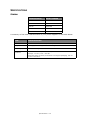
ABBREVIATION
MEANING
Ctrl
Control
dpi
dots per inch
DIMM
Dual In-line Memory Module
d
duplex
n
network card installed
LED
Light Emitting Diode
NIC
Network Interface Card
PCL
Printer Control Language
PS
PostScript (emulation)
PSE
PostScript Emulation
RAM
Random Access Memory
About this manual > 8
PRINTER COMPONENTS
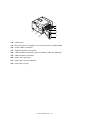
Apart from the Operator panels, which are described in the next chapter, the B401dn,
B411d, B411dn, B431d, B431dn printers look similar from the outside. The important
components are identified in the representations below. For illustration purposes the
B431dn model is shown.
3
2
4
10
12
5
6
9
13
11
1
7
8
1.
Operator panel
2.
Output Stacker (150 sheets, face down)
3.
Output Stacker extension
4.
Top cover release button
5.
Multi Purpose Tray (only for B431d, B431dn; 100 sheets)(shown in open position)
6.
Multi Purpose Tray extension
7.
Paper Tray 250 sheets
8.
ON/OFF switch
9.
LED array
10.
Fuser unit
11.
Toner cartridge
12.
Image drum
13.
Top cover
Printer components > 9
22
21
20
14
19
18
15
16
17
14.
Cooling fan
15.
Memory panel (to upgrade your printer’s memory RAM DIMM)
16.
Power cable connection
17.
Parallel interface connection
18.
LAN interface connection (only for B401dn, B411dn, B431dn)
19.
USB interface connection
20.
Paper Tray extension
21.
Rear Face Up Tray extension
22.
Rear Face Up Tray
Printer components > 10
GETTING STARTED
SWITCHING ON
1.
Plug the power cable into the power socket of your machine.
2.
Plug the power cable into the electric socket.
3.
Press the power switch ON.
SWITCHING OFF
Press the power switch off.
ENERGY SAVING SETTINGS
POWER SAVING MODE
If you do not use the machine for a while, it will enter the power saving mode to control
the power consumption of the device.
RETURNING TO STANDBY MODE
To return the machine to standby mode from power save, press the Online button.
NOTE
When your machine receives a print job, it automatically returns to standby
mode.
Getting started > 11
OPERATOR PANELS
This chapter describes the function of the operator panel on your printer. It is useful to
describe the Configuration Tool at this point as it provides the B401dn, B411d, B411dn, the
equivalent of the menu control panel on the B431d, B431dn (See “Printer drivers” on page
43 for installation of the Configuration Tool).
B401DN, B411D, B411DN
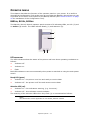
The B401dn, B411d, B411dn operator panel consists of 2 indicating LEDs, an LCD (3) and
an Online (4) button. The LEDs indicate Ready (1) and Attention (2).
3
4
1
2
LED INDICATORS
The LED indicators show the status of the printer and have three operating conditions as
follows:
>
Indicator off
>
Indicator on
>
Flash
Both LED indicators come on momentarily when power is switched on using the main power
switch.
Ready LED (green)
>
Indicator on - the printer is on-line and ready to receive data.
>
Indicator off - the printer is off-line and cannot receive data.
Attention LED (red)
>
Indicator on - this indicates a warning, (e.g. low toner).
>
Indicator off - this indicates normal condition.
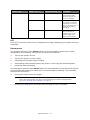
The meaning of the indicator LEDs when they flash (x) is summarised as follows:
NOTE
The table below is also applicable for the B431d, B431dn models.
Operator panels > 12
FLASH TYPE
READY LED (1)
Flash
x
ATTENTION LED (2)
MEANING
The printer is receiving
and processing data
during printing or the
printer is resetting.
x
x
There is a printing error,
for example, a problem
with paper, the cover is
open or the paper tray is
empty while a job is
processing.
x
There is a minor error
with the printer, for
example, toner is low
and the image drum
needs to be changed.
LCD
The LCD (3) has two rows of up to 16 alphanumeric digits, displaying print status and error
messages.
ONLINE BUTTON
The primary functions of the Online button (4) are activated by pressing the switch
momentarily and releasing. The primary functions are as follows:
>
Turning the printer off-line.
>
Turning the printer on-line (ready).
>
Resuming printing after page overflow.
>
Interrupting data processing when the printer is receiving and processing data.
>
Resuming data processing.
The secondary functions of the Online button are activated after turning the printer off line,
then pressing and holding the switch for four seconds before releasing. The secondary
functions are as follows:
>
Printing the demo and menu pages.
NOTE
Demo and menu pages can also be printed using the printer’s Configuration
Tool. See “Printing menu settings” on page 21.
>
Printing any data held in the buffer after printing has been cancelled.
Operator panels > 13
CHANGING LANGUAGE
The default language used by your printer for display messages and for report printing is
English. If required, this can be changed to:
German
Danish
French
Dutch
Italian
Turkish
Spanish
Portuguese
Swedish
Polish
Russian
Greek
Finnish
Czech
Hungarian
Norwegian
NOTE
1. The Operator Panel Language Setup Wizard will run automatically when
you install the printer driver. Follow the instructions provided by this
utility to set your chosen language.
2. The list above is neither conclusive nor exhaustive.
CONFIGURATION TOOL
Installation of the Configuration Tool can be found on the Drivers/Utilities DVD under the
Utilities folder. Follow the on-screen instructions to complete the Configuration Tool
installation. This Configuration Tool is used to control and change the various printer
settings.
Using the Configuration Tool
Viewing or changing the printer settings are carried out as follows:
Click on Start > All Programs > Okidata > Configuration Tool and select the
Configuration Tool.
Operator panels > 14
MENU FUNCTIONS
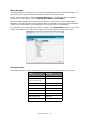
The Configuration Tool allows you to view and change the printer’s internal settings. You
can think of this as the software equivalent of the LCD operator panel.
In the Configuration Tool, click the Device Setting tab. The settings are grouped into
categories or “User Menu” such as Information Menu or Print Menu.
Some of these settings are similar to those found in your printer driver or application
software. The settings that you can change using this software act as the printer’s defaults.
These can be overridden by the settings in your printer driver or application.
For example, if you have set the number of copies in the Print Menu settings to one, this
will be overridden if you select three copies of your document in the printer driver.
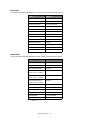
Information menu
This menu provides a quick method of listing various items stored within the printer.
ITEM
ACTION
PRINT MENU MAP
EXECUTE
NETWORK
EXECUTE
B401dn, B411dn only
DEMO1
EXECUTE
PRINT FILE LIST
EXECUTE
PRINT PCL FONT
EXECUTE
PRINT PPR FONT
EXECUTE
PRINT FX FONT
EXECUTE
PRINT ERROR LOG
EXECUTE
USAGE REPORT
EXECUTE
Operator panels > 15
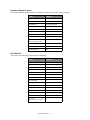
Print menu
This menu provides adjustment of various print job related functions.
ITEM
DEFAULT
COPIES
1
DUPLEX
OFF
DUPLEX LAST PAGE
SKIP BLANK PAGE
MANUAL
OFF
PAPER FEED
TRAY1
AUTO TRAY SWITCH
ON
TRAY SEQUENCE
DOWN
MEDIA CHECK
ENABLE
RESOLUTION
600DPI
TONER SAVE MODE
DISABLE
ORIENTATION
PORTRAIT
LINES PER PAGE
64 LINES
EDIT SIZE
CASSETTE SIZE
Media menu
This menu provides adjustment to suit a wide range of print media.
ITEM
DEFAULT
TRAY1 PAPERSIZE
A4
TRAY1 MEDIATYPE
PLAIN
TRAY1 MEDIAWEIGHT
MEDIUM
TRAY2 PAPERSIZE1
A4
When Tray2 is installed
TRAY2 MEDIATYPE1
PLAIN
When Tray2 is installed
TRAY2 MEDIAWEIGHT1
MEDIUM
When Tray2 is installed
MN PAPERSIZE
A4
MN MEDIATYPE
PLAIN
MN MEDIAWEIGHT
MEDIUM
UNIT OF MEASURE
MILLIMETER
X DIMENSION
210 MILLIMETER
Y DIMENSIONS
297 MILLIMETER
1. Not B401
Operator panels > 16
System configuration menu
This menu adjusts general printer settings to suit the way you prefer to work.
ITEM
DEFAULT
POW SAVE TIME
1 MIN
AUTO POWER OFF TIME
6 HOURS
PERSONALITY
AUTO EMULATION
CLRABLE WARNING
ONLINE
AUTO CONTINUE
ON
MANUAL TIMEOUT
60 SEC
TIMEOUT INJOB
40 SEC
TIMEOUT LOCAL
40 SEC
TIMEOUT NET
90 SEC
B401dn, B411dn only
LOW TONER
CONTINUE
JAM RECOVERY
ON
ERROR REPORT
OFF
PCL Emulation
This menu controls the printer’s PCL emulation.
ITEM
DEFAULT
FONT SOURCE
RESIDENT
FONT NO.
I0
FONT PITCH
10.00 CPI
SYMBOL SET
PC-8
A4 PRINT WIDTH
78 COLUMN
WHITE PAGE SKIP
OFF
CR FUNCTION
CR
LF FUNCTION
LF
PRINT MARGIN
NORMAL
PEN WIDTH ADJUST
ON
TRAY ID#
PCL MNID
2
PCL T0ID
4
PCL T1ID
1
PCL T2ID
5
When Tray2 is installed
Operator panels > 17
PPR Emulation
This menu controls the printer’s PPR emulation.
ITEM
DEFAULT
CHARACTER PITCH
10 CPI
FONT CONDENSE
12CPI TO 20CPI
CHARACTER SET
SET-2
SYMBOL SET
IBM-437
LETTER O STYLE
DISABLE
ZERO CHARACTER
NORMAL
LINE PITCH
6 LPI
WHITE PAGE SKIP
OFF
CR FUNCTION
CR
LF FUNCTION
LF
LINE LENGTH
80 COLUMN
FORM LENGTH
11.7 INCH
TOF POSITION
0.0 INCH
LEFT MARGIN
0.0 INCH
FIT TO LETTER
DISABLE
TEXT HEIGHT
SAME
FX Emulation
This menu controls the printer’s FX emulation.
ITEM
DEFAULT
CHARACTER PITCH
10 CPI
CHARACTER SET
SET-2
SYMBOL SET
IBM-437
LETTER O STYLE
DISABLE
ZERO CHARACTER
NORMAL
LINE PITCH
6 LPI
WHITE PAGE SKIP
OFF
CR FUNCTION
CR
LINE LENGTH
80 COLUMN
FORM LENGTH
11.7 INCH
TOF POSITION
0.0 INCH
LEFT MARGIN
0.0 INCH
FIT TO LETTER
DISABLE
TEXT HEIGHT
SAME
Operator panels > 18
Parallel menu
This menu controls the operation of the printer’s parallel data interface.
ITEM
DEFAULT
PARALLEL
ENABLE
BI-DIRECTION
ENABLE
ECP
ENABLE
ACK WIDTH
NARROW
ACK/BUSY TIMING
ACK IN BUSY
I-PRIME
3 MICRO SEC
USB menu
This menu controls the operation of the printer’s USB data interface.
ITEM
DEFAULT
USB
ENABLE
SOFT RESET
ENABLE
SPEED
480 Mbps
SERIAL NUMBER
ENABLE
Network menu
This menu controls the operation of the printer’s 10Base-T/100Base-TX network interface.
NOTE
This is applicable only to the B401dn & B411dn model.
ITEM
DEFAULT
TCP/IP
ENABLE
IP VERSION
IPv4
NETBEUI
DISABLE
NETBIOS OVER TCP
ENABLE
NETWARE
ENABLE
ETHERTALK
ENABLE
FRAMETYPE
AUTO
IP ADDRESS SET
AUTO
IP ADDRESS
xxx.xxx.xxx.xxx
SUBNET MASK
xxx.xxx.xxx.xxx
GATEWAY ADDRESS
xxx.xxx.xxx.xxx
WEB
ENABLE
TELNET
DISABLE
FTP
DISABLE
Operator panels > 19
ITEM
DEFAULT
SNMP
ENABLE
NETWORK SCALE
NORMAL
HUB LINK SETTING
AUTO NEGOTIATE
TCP ACK
TYPE1
FACTORY DEFAULTS
EXECUTE
Maintenance menu
This menu provides access to various printer maintenance functions.
ITEM
DEFAULT
MENU RESET
EXECUTE
SAVE MENU
EXECUTE
RESTORE MENU
EXECUTE
POWER SAVE
ENABLE
AUTO POWER OFF
AUTO CONFIG
PAPER BLACK SET
0
DARKNESS
0
SMR SETTING
0
BG SETTING
0
NOTE
RESTORE MENU is displayed only when SAVE MENU is executed.
Usage menu
This menu is for information only, and provides an indication of total usage of the printer
and the expected life left in its consumable items. This is particularly useful if you do not
have a full set of replacement consumables to hand and you need to know how soon you
will need them.
ITEM
DEFAULT
REMARKS
TRAY1 PAGE COUNT
nnnnnn
An indication of the number of pages
printed from Tray1.
TRAY2 PAGE COUNT
nnnnnn
An indication of the number of pages
printed from Tray2. (When Tray2 is
installed.)
MN PAGE COUNT
nnnnnn
An indication of the number of pages
printed from the Manual Feed Tray.
DRUM LIFE
REMAINING nnn%
An indication of the remaining drum
life.
TONER (n.nK)
REMAINING nnn%
An indication of how much toner is left
in the cartridge.
Operator panels > 20
PRINTING MENU SETTINGS
The menu settings can be printed as a menu map as follows.
Using the Online button
1.
Press the Online button to take the printer off-line.
2.
Press and hold down the Online button for at least four seconds, but less than
seven seconds.
3.
The printer prints a list of the menu settings and a demo print page. See “Online
button” on page 13.
Using the Configuration Tool
1.
Select Start > All Programs > Okidata > Configuration Tool > Configuration
Tool.
The Configuration Tool page is displayed.
2.
Select this printer displayed under the Registered Device table.
3.
Click Device Setting tab.
4.
Click Menu Setting. You can check Expand All menu items or click User Menu.
5.
Expand the Information Menu.
6.
To print a demo page or Menu Map, select either Demo1 or Print Menu Map and
click Execute.
Operator panels > 21
B431D, B431DN
1
2
3
4
5
6
7
8
OPERATOR PANEL
The B431d, B431dn operator panel consists of a menu driven control panel, an LCD display
and two LED indicators.
PANEL ELEMENTS
1.
Liquid crystal display. (LCD) panel. Two rows of up to 16 alphanumeric digits
displaying print status, menu items in menu mode and error messages.
2.
Menu Scroll Buttons. Press briefly to enter the MENU mode. Press briefly again to
select the next menu. Press for more than 2 seconds to scroll through the different
menus.
3.
Back button. Press briefly to return to the previous higher level menu item or exit
the menu when in MENU mode. In the ONLINE or OFFLINE mode/MENU mode: when
pressed for 4 seconds, the printer starts to shutdown.
4.
OK button. In the ONLINE or OFFLINE mode: press this briefly to enter the MENU
mode. In the MENU mode: press this briefly to select the menu or setting indicated on
the LCD.
NOTE
When pressed with DATA displayed (press and hold for five seconds), it forces
the printer to print out the remaining data in the printer.
5.
Online button. Press to switch between ONLINE and OFFLINE status.
Press to exit the menu and displays ONLINE, when in the MENU mode.
NOTE
When pressed in Menu mode, the Online button returns the printer to ONLINE
status. Also when there is an error indicating wrong paper size, pressing the
Online button forces the printer to print.
When manually feeding paper, pressing the Online button will start the
printing.
Operator panels > 22
6.
Cancel button. When printing press to cancel a print job (press the button for 2 sec
or less). Press to exit the MENU mode and go ONLINE, when in the MENU mode.
NOTE
When there is an error, and there are print jobs in queue, pressing the Cancel
button deletes the first job in the queue.
7.
Ready indicator (green). ON indicates ready to receive data. FLASHING
indicates processing data. OFF indicates Offline.
8.
Attention indicator (red). ON indicates a warning (e.g. low toner). FLASHING
indicates an error, (e.g. toner empty). OFF indicates normal condition.
MENU FUNCTIONS
The Printer Menu allows you to view and change the printer’s internal settings.
The settings are grouped into categories or “menus” such as Information Menu or Print
Menu.
Some of these settings are similar to those found in your printer driver or application
software. The settings that you can change using this software act as the printer’s defaults.
These can be overridden by the settings in your printer driver or application.
For example, if you have set the number of copies in the Printer Menu settings to one, this
will be overridden if you select three copies of your document in the printer driver.
Factory default settings are shown in the following tables.
Information menu
This menu provides a quick method of listing various items stored within the printer.
ITEM
ACTION
PRINT MENU MAP
EXECUTE
NETWORK
EXECUTE
B431dn only
DEMO 1
EXECUTE
PRINT FILE LIST
EXECUTE
PRINT PSE FONT
EXECUTE
PRINT PCL FONT
EXECUTE
PRINT PPR FONT
EXECUTE
PRINT FX FONT
EXECUTE
PRINT ERROR LOG
EXECUTE
USAGE REPORT
EXECUTE
Shutdown menu
This menu shuts down the printer.
ITEM
ACTION
SHUTDOWN START
EXECUTE
Operator panels > 23
Print menu
This menu provides adjustment of various print job related functions.
ITEM
DEFAULT
COPIES
1
DUPLEX
OFF
DUPLEX LAST PAGE
SKIP BLANK PAGE
PAPER FEED
TRAY1
AUTO TRAY SWITCH
ON
TRAY SEQUENCE
DOWN
MP TRAY USAGE
DO NOT USE
MEDIA CHECK
ENABLE
RESOLUTION
600DPI
TONER SAVE MODE
DISABLE
ORIENTATION
PORTRAIT
LINES PER PAGE
64 LINES
EDIT SIZE
CASSETTE SIZE
Media Menu
This menu provides adjustment to suit a wide range of print media.
ITEM
DEFAULT
TRAY 1 PAPERSIZE
A4
TRAY 1 MEDIATYPE
PLAIN
TRAY 1 MEDIAWEIGHT
MEDIUM
TRAY2 PAPERSIZE
A4
When tray 2 is installed.
TRAY2 MEDIATYPE
PLAIN
When tray 2 is installed.
TRAY2 MEDIAWEIGHT
MEDIUM
When tray 2 is installed.
MPT PAPERSIZE
A4
MPT MEDIATYPE
PLAIN
MPT MEDIAWEIGHT
MEDIUM
UNIT OF MEASURE
MILLIMETER
X DIMENSION
210 MILLIMETER
Y DIMENSION
297 MILLIMETER
Operator panels > 24
System configuration menu
This menu adjusts general printer settings to suit the way you prefer to work.
ITEM
DEFAULT
POW SAVE TIME
1 MIN
AUTO POWER OFF TIME
6 HOURS
PERSONALITY
AUTO EMULATION
PARA PS-PROTOCOL
ASCII
NET PS-PROTOCOL
RAW
B431dn only
USB PS-PROTOCOL
RAW
CLRABLE WARNING
ONLINE
AUTO CONTINUE
OFF
MANUAL TIMEOUT
60 SEC
TIMEOUT INJOB
40 SEC
TIMEOUT LOCAL
40 SEC
TIMEOUT NET
90 SEC
B431dn only
LOW TONER
CONTINUE
JAM RECOVERY
ON
ERROR REPORT
OFF
START UP
OFF
Operator panels > 25
PCL Emulation
This menu controls the printer’s PCL emulation.
ITEM
DEFAULT
FONT SOURCE
RESIDENT
FONT NO.
I0
FONT PITCH
10.00 CPI
SYMBOL SET
PC-8
A4 PRINT WIDTH
78 COLUMN
WHITE PAGE SKIP
OFF
CR FUNCTION
CR
LF FUNCTION
LF
PRINT MARGIN
NORMAL
PEN WIDTH ADJUST
ON
TRAY ID#
PCL T0ID
4
PCL T1ID
1
PCL T2ID
5
When tray 2 is installed.
PPR Emulation
This menu controls the printer’s PPR emulation.
ITEM
DEFAULT
CHARACTER PITCH
10 CPI
FONT CONDENSE
12CPI to 20CPI
CHARACTER SET
SET-2
SYMBOL SET
IBM-437
LETTER O STYLE
DISABLE
ZERO CHARACTER
NORMAL
LINE PITCH
6 LPI
WHITE PAGE SKIP
OFF
CR FUNCTION
CR
LF FUNCTION
LF
LINE LENGTH
80 COLUMN
FORM LENGTH
11.7 INCH
TOF POSITION
0.0 INCH
LEFT MARGIN
0.0 INCH
FIT TO LETTER
DISABLE
TEXT HEIGHT
SAME
Operator panels > 26
FX Emulation
This menu controls the printer’s FX emulation.
ITEM
DEFAULT
CHARACTER PITCH
10 CPI
CHARACTER SET
SET-2
SYMBOL SET
IBM-437
LETTER O STYLE
DISABLE
ZERO CHARACTER
NORMAL
LINE PITCH
6 LPI
WHITE PAGE SKIP
OFF
CR FUNCTION
CR
LINE LENGTH
80 COLUMN
FORM LENGTH
11.7 INCH
TOF POSITION
0.0 INCH
LEFT MARGIN
0.0 INCH
FIT TO LETTER
DISABLE
TEXT HEIGHT
SAME
Parallel menu
This menu controls the operation of the printer’s parallel data interface.
ITEM
DEFAULT
PARALLEL
ENABLE
BI-DIRECTION
ENABLE
ECP
ENABLE
ACK WIDTH
NARROW
ACK/BUSY TIMING
ACK IN BUSY
I-PRIME
DISABLE
OFFLINE RECEIVE
DISABLE
USB menu
This menu controls the operation of the printer’s USB data interface.
ITEM
DEFAULT
USB
ENABLE
SOFT RESET
DISABLE
SPEED
480Mbps
OFFLINE RECEIVE
DISABLE
SERIAL NUMBER
ENABLE
Operator panels > 27
Network menu
This menu controls the operation of the printer’s 10Base-T/100Base-TX network interface.
NOTE
This is applicable only to the B431dn model.
ITEM
DEFAULT
TCP/IP
ENABLE
IP VERSION
IPv4
NETBEUI
DISABLE
NETBIOS OVER TCP
ENABLE
NETWARE
ENABLE
ETHERTALK
ENABLE
FRAMETYPE
AUTO
IP ADDRESS SET
AUTO
IP ADDRESS
xxx.xxx.xxx.xxx
SUBNET MASK
xxx.xxx.xxx.xxx
GATEWAY ADDRESS
xxx.xxx.xxx.xxx
WEB
ENABLE
TELNET
DISABLE
FTP
DISABLE
SNMP
ENABLE
NETWORK SCALE
NORMAL
HUB LINK SETTING
AUTO NEGOTIATE
TCP ACK
TYPE1
FACTORY DEFAULTS
EXECUTE
Operator panels > 28
Maintenance menu
This menu provides access to various printer maintenance functions.
ITEM
DEFAULT
MENU RESET
EXECUTE
SAVE MENU
EXECUTE
RESTORE MENU
EXECUTE
POWER SAVE
ENABLE
AUTO POWER OFF
AUTO CONFIG
PAPER BLACK SET
0
DARKNESS
0
SMR SETTING
0
BG SETTING
0
NOTE
RESTORE MENU is displayed only when SAVE MENU is executed.
Usage menu
This menu is for information only, and provides an indication of total usage of the printer
and the expected life left in its consumable items. This is particularly useful if you do not
have a full set of replacement consumables to hand and you need to know how soon you
will need them.
ITEM
DEFAULT
REMARKS
TRAY1 PAGE COUNT
nnnnnn
An indication of the number of pages
printed from Tray1.
TRAY2 PAGE COUNT
nnnnnn
An indication of the number of pages
printed from Tray2. (When Tray2 is
installed.)
MPT PAGE COUNT
nnnnnn
An indication of the number of pages
printed from the MPT.
DRUM LIFE
REMAINING nnn%
An indication of the remaining drum
life.
TONER (n.nK)
REMAINING nnn%
An indication of how much toner is left
in the cartridge.
Operator panels > 29
PRINTING MENU SETTINGS
Current menu settings can be confirmed by printing a Menu Map, using the control panel.
NOTE
This is applicable only to B431d, B431dn models.
1.
Press the Menu UP arrow or DOWN arrow button until the INFORMATION MENU is
available, then press the OK button.
2.
Press the UP arrow or DOWN arrow button until PRINT MENU MAP EXECUTE is
displayed.
3.
Press the OK button to print the menu map.
4.
Press the Cancel or Online or the BACK button repeatedly to exit the MENU mode.
Operator panels > 30
PAPER RECOMMENDATIONS
For guidance on the media you can use with your printer, which input tray and which
ejection method to use, see the section entitled “Paper and tray information” in the
“Specifications” chapter.
NOTE
The reference to Manual Feed Tray is for the B401dn, B411d, B411dn models
and the Multi Purpose Tray is for the B431d, B431dn models.
PAPER AND ENVELOPE TYPES
The manufacturer of this printer recommends the following guidelines when selecting paper
and envelopes for use in your printer:
>
Paper and envelopes should be stored flat and away from moisture, direct sunlight
and heat sources.
>
Use a smooth finished paper such as copier or laser type paper with a Sheffield
(smoothness) rating of 250 or less. If in doubt, please ask your paper supplier.
>
Use paper and envelopes that are designed for use in laser type printers.
>
The use of heavily laid or textured paper will seriously impact on the life of the
image drum.
>
Do not use very smooth, shiny/glossy paper.
>
Do not use heavily embossed headed paper.
>
Do not use specially treated papers such as carbon paper, non-carbon paper,
thermal paper and impact paper.
>
Avoid using paper with perforations, cut-outs and ragged edges.
>
Do not use envelopes with windows or metal clasps.
>
Do not use envelopes with self sealing flaps.
>
Avoid using damaged or curled envelopes.
TRANSPARENCIES AND ADHESIVE LABELS
The manufacturer of this printer recommends the following guidelines when selecting
transparencies and adhesive labels for use in your printer:
>
Always manually feed single sheets using a Manual Feed Tray or Multi Purpose Tray.
>
Always use rear output.
>
Media must be designed for use in laser printers or photocopiers and must be able to
withstand 200°C for 0.1 sec.
>
Do not use media designed for use in colour laser printers and photocopiers.
>
Labels should cover entire carrier sheet.
>
Carrier sheet or adhesive must not be exposed to any part of the printer.
NOTE
You can use Thermal resistant transparencies used for Over Head Projectors.
Paper recommendations > 31
POSTCARDS
The manufacturer of this printer recommends the following guidelines when selecting
postcards for use in your printer:
>
Always manually feed single postcards using the Manual Feed Tray or Multi Purpose
Tray, depending on your printer model.
>
Use unfolded double postcards.
>
Use postcards designed for use in laser type printers
>
Do not use postcards used for ink jet printers.
>
Do not use stamped or picture postcards.
INSTALLING PAPER
PAPER TRAY
NOTE
If you are topping up the paper in a paper tray, it is recommended that you
remove the remaining paper from the tray first then add the new paper stock
followed by the paper you removed. This ensures that the oldest paper is used
first to help prevent paper jams.
1.
Remove the paper tray from the bottom of the printer and place plain paper (1) in
the tray, keeping the level of the paper in the tray below the paper full guide
arrowheads shown on the paper guides (2).
NOTE
Load letter headed paper face down and top edge towards the front of the
paper tray (3).
1
3
2
Paper recommendations > 32
2.
Adjust the rear paper support (4) to the size of paper you are using by gripping the
lug, tilting and sliding the support forwards or backwards as necessary.
3.
Adjust the paper guides (5) by gripping the lug and moving it backwards or forwards
to match the size of the paper used. It is important to adjust the paper guides
correctly to ensure that the paper is not skewed in the print process. Paper jams
may occur if this operation is not carried out correctly.
4.
Replace the tray in the printer.
NOTE
If you have the optional second paper tray (Tray 2) and you are printing from
the first (upper) tray (Tray 1), you can pull out the second (lower) tray to
reload it. However, if printing from the second (lower) tray, do not pull out the
first (upper) tray as this will result in a paper jam.
Face up and face down printing
For face down printing, make sure the Rear stacker is closed (the paper exits from the top
of the printer). The Output Stacker on the top of the printer stacks printed pages face down,
capacity 150 sheets of weight 80g/m². Pages printed in reading order (page 1 first) will be
sorted in reading order (last page on top, facing down).
The face up stacker should be opened and the tray extension pulled out when required for
use. (With the face up stacker either opened or closed, the driver setting of face down will
successfully direct prints to the face down stacker.)
The face up stacker can hold up to 100 sheets 80g/m² standard paper.
Always use this stacker in conjunction with the Manual Feed Tray, Multi Purpose Tray or for
heavyweight stocks to reduce the possibility of paper jams.
See “Paper and tray information” on page 80.
Automatic feed sequence
With no optional feed trays installed, the Autotray function in the Print Menu is set by
default to ON and the Tray sequence function is set to DOWN. In this way, if a tray runs
out of paper, automatic feed will take place in the order Tray 1, Tray 2 (if fitted), Multi
Purpose Tray or the Manual Feed Tray, provided that these trays are set up for identical
media. Also, configure the media size and media weight for the respective trays in the
operator panel or Configuration Tool, depending on your printer model.
Paper recommendations > 33
MULTI PURPOSE TRAY AND MANUAL FEED TRAY
1.
B431: Pull down the Multi Purpose Tray (1), extend the tray (2) and fold out the
paper supports (3), and adjust the paper guides to the width of the paper (4).
B401/B411: Pull down the Manual Feed Tray (1), and adjust the paper guides (2)
to the width of the paper.
5
1
2
4
2
1
3
B431
2.
B401/B411
B431: Load the paper into the Multi Purpose Tray and push the set button (5).
Ensure that the paper is loaded below the arrow level (6) to avoid paper jam.
NOTE
Do not exceed the paper capacity of approximately 100 sheets or 10
envelopes depending on the media weight.
B401dn/B411: Load single sheet at a time into the Manual Feed Tray.
6
B431
B401/B411
> For single-sided printing on headed paper load the paper with the pre-printed side
up and top edge into the printer.
> For two-sided (duplex) printing on headed paper, load the paper with the preprinted side down and top edge away from the printer.
Paper recommendations > 34
> Envelopes should be loaded flap down, face up with the top edge to the left and
short edge into the printer.
NOTE
Do not select Duplex printing on envelopes.
> Load Transparencies face up and top edge into the printer.
> For heavyweight paper or cardstock open the rear stacker to collect the printed
output. This will give the paper a nearly straight path through the machine,
avoiding paper jams and damage to the paper.
3.
B431: If required, set the media size and orientation in the media menu using the
control panel, then issue the print command.
B401/B411: If required, set the media size and orientation in the Configuration
Tool, then issue the print command.
CAUTION!
Damage to the printer may occur if the incorrect paper setting is
used when printing on a different media.
NOTE
> You can also set the media type in your printer driver. However, the
printer driver settings will override the settings on the control panel or
Configuration Tool.
> Remember to reset the printer for normal paper after printing on a
different media.
PAPER FEED, SIZE AND MEDIA SETTING
The process used to fuse (fix) the printed image to the paper involves a mixture of pressure
and heat. Too much heat will cause lightweight paper to crease or curl and corrugations in
transparencies. Too little heat will cause the image not to fuse fully into heavyweight paper.
NOTE
Although media properties can be set in the printer driver for particular jobs,
when filling a tray with media it is recommended that you manually set the
printer to match the media as described here.
B401DN, B411D, B411DN
You can change the media type as follows:
1.
Start the Configuration Tool.
2.
Expand the User Menu to list the options.
3.
Expand the Media Menu to list the options.
4.
Click on the paper tray being used. Adjust the media type to the required setting
and, if necessary, the paper size to the size of the paper being used.
5.
Click Save to Device
6.
Click OK.
icon, to save the new settings.
Paper recommendations > 35
B431D, B431DN
Using the control panel on your printer, you can choose:
>
which paper to use
>
the size of the paper you wish to use
>
the weight of the paper (thickness)
>
the type of paper
NOTE
> If the settings in the printer differ from those selected on your computer,
the printer will not print and the LCD will display an error message.
> The following printer settings are given as a guide only. Some software
applications require the paper feed, size and media settings to be selected
from within the application (page setup).
> Although media properties can be set in the printer driver for particular
jobs, it is recommended that when filling a tray with media you manually
set the printer to match the media as described here.
Paper feed selection
The paper feed, paper size, paper weight and media type can be set manually on the printer
using the control panel as follows.
1.
Press the Menu UP arrow or DOWN arrow button repeatedly until PRINT MENU is
displayed, then press the OK button.
2.
Press the UP arrow or DOWN arrow button until PAPER FEED is displayed, then press
the OK button.
3.
Press the UP arrow or DOWN arrow button until the required paper feed is displayed.
4.
Press the OK button. An asterisk (*) appears next to the selected paper feed.
5.
Press the Cancel or Online or the BACK button repeatedly to exit the MENU mode.
NOTE
When the AUTO TRAY SWITCH is set to ON and more than one paper tray is
fitted, paper feed automatically switches to the next available paper tray,
providing non-stop printing.
Paper size
Set the paper size as follows.
NOTE
> When using paper trays, standard paper sizes are recognised
automatically with CASSETTE SIZE (default setting) selected. Paper size
need only be set for custom paper sizes.
> When using the Multi Purpose Tray, the paper size has to be selected.
1.
Press the Menu UP arrow or DOWN arrow button until PRINT MENU is displayed, then
press OK button.
2.
Press either UP arrow or DOWN arrow button repeatedly until EDIT SIZE is
displayed, then press OK button.
3.
Press either UP arrow or DOWN arrow button until the required paper size is
displayed, then press the OK button. An asterisk (*) appears next to the selected
paper size.
Paper recommendations > 36
4.
Press the Cancel or Online or the BACK button repeatedly to exit the MENU mode.
5.
Select the correct paper settings in the printer driver before printing the file.
Media type and weight
Set media type and weight as follows:
CAUTION!
If media type or media weight are not correctly set, print quality
deteriorates and the fuser roller may be damaged.
1.
Press the Menu UP arrow or DOWN arrow button until MEDIA MENU is displayed, then
press the OK button.
2.
Press the UP arrow or DOWN arrow button until MEDIA TYPE or MEDIA WEIGHT for the
required tray is displayed, then press OK button.
3.
Press the UP arrow or DOWN arrow button until the required paper type or weight is
displayed, then press the OK button. An asterisk (*) appears next to the selected
paper type or weight.
4.
Press the Cancel or Online or the BACK button repeatedly to exit the MENU mode.
5.
Select the correct paper settings in the printer driver before printing the file.
Paper recommendations > 37
INTERFACES
Your printer is equipped with a selection of data interfaces:
1.
Parallel – For direct connection to a PC. This port requires a bi-directional (IEEE
1284 compliant) parallel cable.
2.
USB – For connection to a PC running Windows 2000 or later or Mac OS X or later.
This port requires a cable conforming to USB version 2.0 or above.
The operation of a printer is not assured if a USB compatible device is connected
concurrently with other USB-compatible machines.
When connecting multiple printers of the same type, they appear as *****, *****
(2), ***** (3), etc. These numbers depend on the order of connecting or turning on
each printer.
3.
LAN – For network cable connection. This port is standard on the B401dn, B411dn
and B431dn.
NOTE
> It is not recommended that you connect serial/USB and parallel cables to
the printer simultaneously.
> Interface cables are not supplied with your printer.
If you are connecting your printer directly to a stand alone computer proceed to the chapter
entitled “Printer Drivers”.
If your printer is to be installed as a network printer, please refer to the relevant section in
the Guide for the network interface card for further details on how to configure the network
connection before installing the printer drivers.
NOTE
Administrator’s authority is required when installing a network connection.
Interfaces > 38
PRINTER DRIVERS
This chapter describes how to install a printer driver on two types of operating system –
Windows and Macintosh.
The printer drivers are all contained on the printer driver DVD. Please refer to the readme
file on this DVD for the latest information on printer driver installation.
WINDOWS OPERATING SYSTEMS
1.
With Windows running, insert the printer driver DVD into your DVD-ROM drive.
2.
If the DVD does not run automatically, use Start > Run... and enter E:\setup (where
E is your DVD-ROM drive) in the Open field.
3.
Click on OK.
4.
Select your printer model.
5.
Click on Driver Installation > Install Printer Driver and follow the on-screen
prompts to complete your printer driver installation.
6.
For the B401dn, B411d, B411dn only, once the driver has been installed, install the
Configuration tool. Follow the on-screen instructions to complete the Configuration
Tool installation.
NOTE
Take time to note the facilities available on the DVD. For example, the Help
facility briefly describes each of the Software Utilities.
7.
For the B431d, B431dn once the driver has been installed, the operator panel
language switching utility will run automatically. Choose your preferred operating
language. See “Changing language” on page 14.
INSTALLED OPTIONS
Certain options may have been installed in your printer. For those that are installed, check
that they appear enabled on the Menu Map.
Ensure that your options are set up in the printer driver(s) by making the appropriate
settings on the Device Options tab (PCL emulation) and/or Device Settings tab (PS
emulation) described in the chapter entitled “Operation”.
MACINTOSH OPERATING SYSTEMS
Please refer to the readme file on DVD for details on installing the appropriate Macintosh
drivers.
INSTALLED OPTIONS
Ensure that any installed options are enabled in the printer driver.
CHOOSING A MAC DRIVER
The B401/B411 models allow you to use only a PCL Mac driver.
The B431 models can also use a PS driver on Macintosh operating systems.
Printer drivers > 39
OPERATION
This chapter provides a broad outline of how to operate your printer from either a Windows
or a Macintosh environment. In the former, while PCL emulation is available on all printer
models, PS emulation is optional on the B431d, B431dn models.
PRINTER SETTINGS IN WINDOWS
NOTE
The illustrations in this guide relate to Windows XP PCL and PS emulations –
other operating system windows may appear slightly different but the
principles are the same.
The operator panel controlled menus and Configuration Tool (described in the chapter
entitled “Operator panels”) provide access to many options.
The Windows printer driver also contains settings for many of these items. Where items in
the printer driver are the same as those in the operator panel and Configuration Tool
menus, and you print documents from Windows, the settings in the Windows printer driver
will override those settings in the operator panel and Configuration Tool menus.
PRINTING PREFERENCES IN WINDOWS APPLICATIONS
When you choose to print your document from a Windows application program a Print
dialogue box appears. This dialogue usually specifies the name of the printer on which you
will print your document. Next to the printer name is a Properties button.
When you click Properties a new window opens which contains a short list of the printer
settings available in the driver, which you can choose for this document. The settings
available from within your application are only those which you may want to change for
specific applications or documents. Settings you change here will usually only last for as
long as the particular application program is running.
Operation > 40
PCL EMULATION
The tabs available are the Setup Tab, the Job Options Tab and the Image Tab.
Setup tab
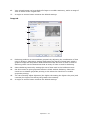
1.
Paper size should be the same as the page size of your document (unless you wish
to scale the printout to fit another size), and should also be the same as the size of
paper you will feed into the printer.
2.
You can choose the source of the paper to feed, which may be Tray 1 (the standard
paper tray), Manual Feed Tray (B401dn, B411d, B411dn), Tray 2 (if you have the
optional second paper tray installed) or the Multi Purpose Tray (B431d, B431dn).
You can also click on the appropriate part of the screen graphic to select your
preferred tray.
3.
A variety of document finishing options can be selected, such as normal one page
per sheet, or N-up (where N can be 2 or 4) for printing scaled down pages at more
than one page per sheet.
4.
Under 2-sided Printing, you can choose from auto or manual. Under manual 2-sided
Printing you can choose to print on one side of a sheet only or to use 2-sided
printing (duplex printing). Your printer allows you to carry out manual duplex
printing, meaning you must pass the paper through the printer twice. For more
information, see “2-sided printing” on page 50. The Duplex Help button also offers
guidelines on how to carry out manual duplex printing.
5.
If you have changed some printing preferences before and saved them as a set, you
can recall them to avoid having to set them individually each time you need them.
6.
A single on-screen button restores the default settings.
Operation > 41
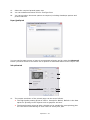
Job options tab
Printing Preferences
4
5
1
6
2
3
7
1.
The output resolution of the printed page can be set as follows.
> The ProQ1200 setting for B401dn, B411d and B411dn prints at 2400 x 600dpi.
This setting requires the most printer memory and takes the longest to print.
Your printed pages can be scaled to fit larger or smaller stationery. It is the best
option for printing photographs.
> The High Quality setting prints at 1200 x 600dpi for B401dn, B411d, B411dn and
1200 x 1200dpi for B431d, B431dn is the best option for printing vector objects
such as graphics and text.
> The Normal setting prints at 600 x 600dpi and is suitable for most printing jobs.
> The Draft setting prints at 300 x 300dpi and is suitable for printing draft
documents that contain mainly text. You can select Toner Saving to save toner
for some print jobs.
2.
Page orientation can be set to either portrait (tall) or landscape (wide). Both views
can be rotated by 180 degrees.
3.
You can print watermark text behind the main page image. This is useful for marking
documents as draft, confidential, etc.
If you would like to print on special stationery, such as forms and letterhead, but do
not want to use pre-printed stationery, you can create your own using Overlays (for
B431d, B431dn). For more information on Overlays and Macros refer to “Overlays and
Macros (Windows only)” on page 54. The Overlays button also offers guidelines on
how to carry out manual duplex printing.
4.
In Raster (bitmap) mode, processing of the page image is done in the computer
leaving little processing for the printer to do, although the file size may be large. In
Vector mode, file sizes may be smaller and so transmission over a network, for
example, may be faster. These effects are more pronounced for graphics printing
than for text printing.
5.
You can select up to 999 copies to print consecutively, although you will need to top
up the paper tray during such a long print run.
Operation > 42
6.
Your printed pages can be scaled to fit larger or smaller stationery, within a range of
25% to 400% of the original size.
7.
A single on-screen button restores the default settings.
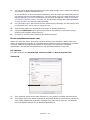
Image tab
1
2
3
4
5
1.
Dithering produces an intermediate greyscale by adjusting the combination of dots
used in printing. Selecting a setting determines the degree of detail with which a
graphics image will be printed. Mesh determines that a screen of dots is used for
dithering while Line Art determines that an array of lines is used for dithering.
2.
Select dithering texture by setting the size of dots used in the halftone screen.
3.
Set this control to print greyscale effects in black without dithering. Select the
check-box to disable greyscale printing or de-select the check-box to enable
greyscale printing.
4.
You can manually adjust lightness (the higher the setting the lighter the print) and
contrast (the higher the setting the greater the contrast).
5.
A single on-screen button restores the default settings.
Operation > 43
PS EMULATION
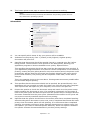
The tabs available are the Layout Tab, the Paper/Quality Tab and the Job Options Tab.
Layout tab
My Printer Printing Preferences
1
2
3
4
5
1.
Page orientation can be set to portrait (tall), landscape (wide) or landscape rotated
by 180 degrees.
2.
Print on both sides (duplex printing) can be set to long edge or short edge of the
document.
3.
Printed page order can be set as front to back or back to front of the document.
4.
Set the number of pages to be printed on a single sheet. You can also set it to print
a booklet.
5.
Click the Advanced button to be able to set further document options as follows:
My Printer Advanced Options
1
2
3
Operation > 44
1.
Select the required printed paper size.
2.
You can substitute another font for TrueType Font.
3.
You can set other document options as required, including PostScript options and
printer features.
Paper/Quality tab
You can set the paper source or leave it as automatic selection and by using the Advanced
button you have access to the same set of options as described above for the Layout Tab.
Job options tab
3
4
1
5
2
6
1.
The output resolution of the printed page can be set as follows.
> The High Quality setting prints at 1200 x 1200dpi for B431d, B431dn is the best
option for printing vector objects such as graphics and text.
> The Normal setting prints at 600 x 600dpi and is suitable for most printing jobs.
You can select Toner Saving to save toner for some print jobs.
Operation > 45
2.
You can print watermark text behind the main page image. This is useful for marking
documents as draft, confidential, etc.
If you would like to print on special stationery, such as forms and letterhead, but do
not want to use pre-printed stationery, you can create your own using Overlays (for
B431d, B431dn). For more information on Overlays and Macros, refer to “Overlays
and Macros (Windows only)” on page 54. The Overlays button also offers guidelines
on how to carry out manual duplex printing.
3.
You can select up to 999 copies to print consecutively, although you will need to top
up the paper tray during such a long print run.
4.
Your printed pages can be scaled to fit larger or smaller stationery.
5.
Using the Advanced button gives you access to the facility to set mirror image
printing and negative image printing.
6.
A single on-screen button restores the default settings.
SETTING FROM WINDOWS CONTROL PANEL
When you open the driver properties window directly from Windows, rather than from
within an application program, a somewhat more extensive range of settings is provided.
Changes made here will generally affect all documents you print from Windows
applications, and will be remembered from one Windows session to the next.
PCL emulation
The main tabs are the General Tab, Advanced Tab and Device Options Tab.
General tab
1
2
3
1.
This area lists some of the main features of your printer, including optional items.
2.
This button opens the same windows as described earlier for items which can be set
from within application programs. Changes you make here, however, will become
the new default settings for all Windows applications.
Operation > 46
3.
This button prints a test page to ensure that your printer is working.
NOTE
The above features are provided by the Windows XP operating system and will
vary with other operating systems.
Advanced tab
My Printer Properties
1
2
3
4
5
6
7
8
10
9
1.
You can specify which times of day your printer will be available.
2.
Indicates current priority, from 1 (lowest) to 99 (highest). Highest priority
documents will print first.
3.
Specifies that documents should be spooled (stored in a special print file) before
being printed. The document is then printed in the background, allowing your
application program to become available more quickly. Options follow:
This specifies that printing should not start until the last page has been spooled. If
your application program needs a lot of time for further computation in the middle of
printing, causing the print job to pause for more than a short period, the printer could
prematurely assume that the document has finished. Selecting this option would
prevent that situation, but printing will be completed a little later, as the start is
delayed.
This is the opposite choice to the one above. Printing starts as soon as possible after
the document begins spooling.
4.
This specifies that the document should not be spooled, but printed directly. Your
application will not normally be ready for further use until the print job is complete.
This requires less disk space on your computer, since there is no spool file.
5.
Directs the spooler to check the document setup and match it to the printer setup
before sending the document to print. If a mismatch is detected, the document is
held in the print queue and does not print until the printer setup is changed and the
document restarted from the print queue. Mismatched documents in the queue will
not prevent correctly matched documents from printing.
6.
Specifies that the spooler should favour documents which have completed spooling
when deciding which document to print next, even if completed documents are lower
priority than documents which are still spooling. If no documents have completed
spooling, the spooler will favour larger spooling documents over shorter ones. Use
this option if you want to maximise printer efficiency. When this option is disabled
the spooler chooses documents based only on their priority settings.
Operation > 47
7.
Specifies that the spooler should not delete documents after they are completed.
This allows documents to be re submitted to the printer from the spooler instead of
printing again from the application program. If you use this option frequently it will
require large amounts of disk space on your computer.
8.
Specifies whether advanced features, such as pages per sheet, are available,
depending on your printer. For normal printing keep this option enabled. If
compatibility problems occur you can disable the feature. However, these advanced
options may then not be available, even though the hardware might support them.
9.
This button provides access to the same setup windows as when printing from
applications. Changes made via the Windows Control Panel become the Windows
default settings.
10.
You can design and specify a separator page that prints between documents. This is
particularly useful on a shared printer to help each user find their own documents in
the output stack.
NOTE
The above features are provided by the Windows XP operating system and will
vary with other operating systems.
Device options tab
In this window you can select which optional upgrades are installed on your printer. See
the chapter entitled “Installing options”.
Operation > 48
PS emulation
The main tabs are the General Tab, Advanced Tab and Device Settings Tab. The
General and Advanced tabs are the same as for PCL emulation described earlier.
Device settings tab
1
2
3
1.
You can set the desired paper sizes in each of the available paper feed trays.
2.
You can make a variety of font settings depending on your application.
3.
You can set which optional upgrades are installed on your printer. See the chapter
entitled “Installing options”.
PRINTER SETTINGS IN MACINTOSH
Refer to the readme file on the drivers DVD, and the online help provided in the driver
software.
Operation > 49
2-SIDED PRINTING
The duplex unit adds the function of two-sided printing, using less paper and making large
documents easier to handle. It also enables booklet printing, which uses even less paper.
You can print using Auto Duplex or Manual Duplex function.
NOTE
The steps in the process relate to Windows XP PCL. Other operating system
windows may appear slightly different, but the principles are the same.
AUTO DUPLEX PRINTING
This printer provides automatic two-sided printing only for Letter, A4, B5, Executive Legal
13, 13.5 and 14, using paper stocks from 60 - 122g/m².
To carry out Auto Duplex Printing:
1.
Select File > Print and click the Properties button.
2.
Select the input tray (Tray1, Tray2 (optional B411d, B411dn, B431d, B431dn), Multi
Purpose Tray (B431d, B431dn) or Manual Feed Tray (B401dn, B411d, B411dn))
from the Source drop down.
3.
In the Duplex printing drop down menu, select either Long Edge (Auto) or Short
Edge (Auto) according to your printing preferences.
4.
If you require further information, click the Duplex Help button.
5.
Click the Print button.
MANUAL DUPLEX PRINTING USING THE PAPER TRAY (WINDOWS ONLY)
NOTE
Manual Duplex printing is available only for Windows PCL Driver.
To carry out 2-sided, or Manual Duplex Printing you must pass paper through the printer
twice. You can carry out 2-sided printing using the Paper Tray or the Manual Feed Tray
(B401dn, B411d, B411dn) or the Multi Purpose Tray (B431d, B431dn). You can use A4, A5,
A6, B5, Letter, Legal 13, 13.5 and 14, Statement, Executive and Custom paper sizes, using
paper stocks from 60 - 122g/m².
NOTE
> You cannot use A6 paper size for printing from Tray 2 (option).
> You can print on Legal 13.5 paper only from Tray1, optional Tray2 and
when using Auto Duplex function.
1.
Ensure that there is enough paper in the Paper Tray to carry out the print job.
2.
Select File > Print and click the Properties button.
3.
Select Tray1 from the Source drop down.
2-sided printing > 50
4.
In the 2-sided printing drop down menu, select either Long Edge (Manual) or
Short Edge (Manual) according to your printing preferences. If you require further
information, click the Duplex Help button. Then, Click the Print button.
5.
Every second page (1) of your document is printed first. When this is complete, a
message appears on screen prompting you to take the paper, flip it and replace it in
the Paper Tray.
1
3
2
6.
Open the Paper Tray (2).
2-sided printing > 51
7.
Take the printed paper from the Output Stacker (3) and place it in the Paper Tray,
ensuring that the printed side is facing up and the bottom of the page facing into the
printer (4).
4
5
8.
Close the Paper Tray and press the Online (5) button. The message window should
disappear from your screen and the document finishes printing the remaining pages
of your document.
NOTE
You must press the Online button to start the printing for other side. The
default time is set to one minute, failing which, the data is deleted and not
printed.
MANUAL DUPLEX PRINTING USING THE MANUAL FEED TRAY (B401DN, B411D,
B411DN)
NOTE
> When using the Manual Feed Tray, feed pages one sheet at a time.
> Use the Multi Purpose Tray for Manual Duplex Printing for B431d, B431dn,
but the principles are the same, See “Multi purpose tray and manual feed
tray” on page 34.
1.
Position the paper guides on the Manual Feed Tray according to the paper size.
2.
Place paper one sheet at a time in the Manual Feed Tray. The paper is automatically
gripped in position.
3.
Select File > Print to display the Print dialog box.
4.
Click the Properties button.
5.
Select Manual Feed from the Source drop down.
6.
On the 2-sided printing drop down menu, select either Long Edge (Manual) or
Short Edge (Manual) according to your printing preferences. If you require further
information, click the Duplex Help button.
2-sided printing > 52
7.
When every second page has printed, take the paper from the output stacker.
8.
Set the paper one page at a time in the Manual Feed Tray with the printed side
facing down and the top of the page facing into the printer. Ensure that the paper is
gripped in place.
9.
Press the Online button. The remaining pages of your document print on the blank
side of the paper, one sheet at a time as you feed it into the Manual Feed Tray.
2-sided printing > 53
OVERLAYS AND MACROS (WINDOWS ONLY)
WHAT ARE OVERLAYS AND MACROS?
If you would like to print on special stationery, such as forms and letterhead, but do not
want to use pre-printed stationery, you can create your own using these advanced
features.
You can use PostScript overlays to generate all your special stationery and store it in the
printer for use whenever you need it. If you have chosen to install the PCL driver, macros
perform a similar function.
You can create several overlays or macros, and combine them in any way you like to
produce a variety of forms and other special stationery. Each image can be printed on just
the first page of a document, on all pages, on alternate pages, or just the pages that you
specify.
CREATING POSTSCRIPT OVERLAYS
Three steps are required to create an overlay:
1.
Create the form data using your own application software and print it to a printer
(.PRN) file.
2.
Use the Storage Device Manager utility software supplied on DVD with your printer
to create a “project file,” import the.PRN file(s), and download the generated filter
(.HST) file to the printer. The project file will contain one or more overlay images
which are functionally related, such as the cover page and the continuation page
images for business letters.
3.
Use downloaded files to define your overlays ready for use when printing your
documents.
When printing overlay files to disk, do not select any special features, such as two-sided
printing or multiple copies. These are not appropriate to overlays, they apply only to your
final documents.
CREATING THE OVERLAY IMAGE
1.
Use your preferred application, perhaps a graphics program, to create the required
overlay image and save it.
2.
Open your application’s Print… dialogue.
3.
Make sure that the selected printer name (1) is
that of your PostScript printer driver.
4.
Select the Print To File (2) option.
5.
Click the Properties button (3) to open the
Document Properties window.
6.
On the Overlay tab, choose Create Form from the
drop-down list (4).
7.
Click OK to close the Document Properties window.
8.
Click OK again to close the Print dialogue.
9.
When prompted for a print file name, enter a
meaningful name with the extension.PRN.
10.
Close your application.
1
3
2
4
Overlays and Macros (Windows only) > 54
CREATE AND DOWNLOAD THE PROJECT
1.
From the Windows Start menu, start Storage Device Manager (SDM) and allow
SDM to discover the printer.
2.
Choose Projects > New Project.
3.
Choose Projects > Add File to Project.
4.
Set the Files of Type drop-down list to PRN Files(*.prn).
5.
Navigate to the folder where the.PRN files are stored and select one or more of these
to include in your overlay set.
You can have more than one printer (.PRN) file in a project. For example, one for top
pages and another for continuation pages. Use standard Windows techniques (Shift
or Ctrl keys) to select multiple files simultaneously if you need to.
6.
Click Open to add these files to the current project.
7.
When a message box appears confirming that a filter file has been created, click OK
to clear the message.
8.
The project window will display one.HST file for each printer file added. Make a
careful note of each of these names. Ensure that you note them exactly as they
appear, they are case sensitive, and you will need them later.
9.
Choose Projects > Save Project and enter a meaningful name (e.g. “Letter
Stationery”) so that you can recognise it later if you want to modify it.
10.
Choose Projects > Send Project Files to Printer to download the project to the
printer.
If you have a hard disk in the printer, SDM will automatically download files to it. If
not, SDM will download files to flash memory. If you have a hard disk but still prefer
to download to flash memory, double-click the file name in the Project window and
under Volume, type in %Flash0% and then click OK.
11.
When the message “Command Issued” appears confirming that the download is
complete, click OK to clear the message.
TEST PRINTING THE OVERLAY
1.
Click on the printer icon for the relevant printer and choose Printers→Test Form.
2.
In the Test PostScript Form window, to test each overlay select it and click OK.
There will be a short pause while the printer processes the form, and then it will
print.
3.
When each overlay has been tested, click Exit.
4.
Click the standard Windows Close (X) button, or choose Projects > Exit to close
Storage Device Manager.
DEFINING OVERLAYS
This is the final step before the new overlays are ready for use.
1.
Open the Printers (called “Printers and Faxes” in Windows XP) window via the Start
menu or the Windows Control Panel.
2.
Right-click on the Relevant PostScript printer icon and choose Printing
Preferences from the pop-up menu.
3.
On the Overlay tab, click the New button.
Overlays and Macros (Windows only) > 55
4.
5.
In the Define Overlays window, enter a suitable name (2)
for this overlay and choose which page(s) (3) of your
documents will use this overlay.
2
3
Enter the name of the overlay file (4) exactly as it appeared
in the Storage Device Manager project window. Remember 4
5
that this name is case sensitive.
If you forgot to note the overlay names when you created
them, you can find them using Storage Device Manager to
view the project file, or the printer’s Information Menu to
print a file list and identify them from there.
6.
Click Add (5) to add this overlay into the defined overlays list.
7.
Click OK to close the Define Overlay window.
The new overlay now appears in the Defined Overlays list in the printer properties
window.
8.
Repeat the above procedure if you wish to define more overlays.
9.
When done, click OK to close the printer properties window.
Your new overlays are now ready and available to be used for any future documents you
wish.
PRINTING WITH POSTSCRIPT OVERLAYS
Once you have defined your overlays you are ready to use them for any documents you
wish. The example illustrated here uses two overlays for business letters. The first prints
on just the top page, and the second prints on any or all subsequent pages.
1.
Prepare your document in the normal way using your own application software.
Remember, if necessary, to format the document so that it will fit within the
appropriate space.
2.
Open your application’s Print… dialogue and choose any options you will require,
ensuring that the target printer is your PostScript printer driver in which the
overlays have been defined.
3.
Click the Properties button to open the Printing Preferences window.
4.
On the Overlays tab, choose Use Overlay from the
drop-down list (1).
5.
Click on the first overlay (2) you wish to use. In this
example it is the Cover Page overlay. Then click the
Add button (3).
1
3
2
6.
If you want to use another overlay, in this case it is the
4
Continuation page, click the second overlay (4) and
then click the Add button (3) again.
7.
When you have selected all the overlays you want to
use for this document, click OK.
8.
Finally, in your application’s print dialogue, click OK to begin printing.
Overlays and Macros (Windows only) > 56
CREATING PCL OVERLAYS
Three steps are required to create an overlay:
1.
Create the form data using your own application software and print it to a printer
(.PRN) file.
2.
Use the Storage Device Manager utility software supplied on DVD with your printer
to create a “project file,” import the .PRN file, and download the generated filter
(.BIN) files to the printer.
3.
Use downloaded files to define your overlay ready for use with any future document.
When printing files to disk, do not select any special features, such as two-sided
printing or multiple copies. These are not appropriate to macros, they apply only to
your final documents.
CREATING THE OVERLAY IMAGE
1.
Use your preferred application, perhaps a graphics program, to create the required
image and save it.
2.
Open your application’s Print… dialogue.
3.
Make sure that the selected printer name (1) is that of 1
your PCL printer driver.
4.
Select the Print To File (2) option.
5.
When prompted for a print file name, enter a
meaningful name with the extension .PRN .
6.
Close your application.
3
2
CREATE AND DOWNLOAD MACROS
1.
From the Windows Start menu, start Storage Device Manager (SDM) and allow
SDM to discover the printer.
2.
Choose Projects > New Project to start a new project.
3.
Choose Projects > Filter Macro File. The Filter Printer Patterns dialogue box
appears. Make any adjustments in the settings that you need and then click OK.
Example: If you create a black oval in MS Paint and leave all the colour command
filters checked, the black oval will print as a black rectangle when the overlay is used.
To maintain the oval shape, turn off (deselect) the “Configure Image Data,” “Palette
ID” and “Palette Control” filters.
4.
Set the Files of Type drop-down list to PRN Files(*.prn).
5.
Navigate to the folder where the overlay .PRN files are stored and select one or more
of these to include in your overlay set.
You can have more than one macro file in a project. For example, one for top pages
and another for continuation pages. Use standard Windows techniques (Shift or Ctrl
keys) to select multiple files simultaneously if you need to.
6.
Click Open to add these files to the current project. (You can also drag and drop
files from Windows Explorer directly into the project window if you prefer.) When a
message box appears confirming that a filter file has been created, click OK to clear
the message.
7.
The project window will display one .BIN file for each printer file added. Make a
careful note of the name and ID number for each of the files. You will need them
later.
Overlays and Macros (Windows only) > 57
If you wish to edit the names or ID numbers, double-click the file entry and edit the
details.
Note that the names are case sensitive.
8.
Choose Projects > Save Project and enter a meaningful name (e.g. “Letter
Stationery”) so that you can recognise it.
9.
Choose Projects > Send Project Files to Printer to download the project to the
printer.
10.
When the message “Command Issued” appears confirming that the download is
complete, click OK to clear the message.
TEST PRINTING THE MACRO
1.
Choose Printers > Test Macro.
2.
In the Test Macro window, enter its ID number and click OK. After a short pause the
printer will print the macro.
3.
When each macro has been tested, click Exit.
4.
Click the standard Windows Close (X) button, or choose Projects > Exit to close
Storage Device Manager.
DEFINING OVERLAYS
This is the final step before the new overlays are ready for use.
1.
Open the Printers (called “Printers and Faxes” in Windows XP) window via the Start
menu or the Windows Control Panel.
2.
Right-click on the Relevant PostScript printer icon and choose Printing
Preferences from the pop-up menu.
3.
On the Job Options tab, click the Overlay button.
4.
In the Overlay window, Click the Define Overlays
button (1).
1
5.
In the Define Overlays window, enter the name (a) and
ID (b) of the required overlay, and define which
page(s) (c) of your documents will use this overlay. Then
click the Add button (3) to add this overlay to the list of
defined overlays. Repeat for any other related overlays.
When done, click the Close button (4) to close the
window.
The example illustrated shows two overlays defined, one for
a cover page and one for continuation pages.
3
a
b
c
4
Remember that names and IDs of overlay files must be entered exactly as they
appeared in the Storage Device Manager project window. Remember also that names
are case sensitive.
If you forgot to note the overlay name or ID when you created them, you can find
them using Storage Device Manager to view the project file, or the printer’s
Information Menu to print a file list and identify them from there.
Overlays and Macros (Windows only) > 58
The new overlays will now appear in the Defined Overlays list in the printer properties
window.
6.
When done, click OK to close the printing preferences window.
Your new overlays are now ready and available to be used for any future documents you
wish.
PRINTING WITH PCL OVERLAYS
Once you have defined your overlays you are ready to use them for any documents you
wish. The example illustrated here uses two overlays for business letters. The first prints
on just the top page, and the second prints on any or all subsequent pages.
1.
Prepare your document in the normal way using your own application software.
Remember, if necessary, to format the document so that it will fit nicely within the
plain areas on your letterhead overlay.
2.
Open your application’s Print… dialogue and choose any options you will require,
ensuring that the target printer is your PCL printer driver in which the overlays have
been defined.
3.
Click the Properties button to open the Printing Preferences window.
4.
On the Overlay tab, check the Use active overlays
checkbox (1).
5.
In the Defined Overlays list, click on the first overlay (2)
you wish to use, and click the Add button (3) to add it to
the Active Overlays list. (If you want a reminder of how
this overlay looks, click the Test Print button.)
1
3
2
4
6.
If you want to use another overlay with this document, in
this example it is the “Continuation Page” overlay, click
this overlay (4) in the list of defined overlays, and then
click the Add button (3) again to add the second overlay to the list of active
overlays.
7.
When the list of active overlays contains all the items you want to use, click OK.
8.
Finally, click the Print button in your application’s Print dialogue to begin printing
your document.
Overlays and Macros (Windows only) > 59
CONSUMABLES AND MAINTENANCE
This section deals with the replacement of the toner cartridge and image drum and general
maintenance.
WHEN TO REPLACE THE TONER CARTRIDGE
When the toner is running low, TONER LOW is displayed in the operator panel LCD. After
Toner Low displays, the printer will print about 100 more pages then display Toner Empty
and stop printing. Printing will resume after a new toner cartridge has been installed.
REPLACING THE TONER CARTRIDGE
WARNING!
>
Never expose a toner cartridge to an open flame. It can cause
an explosion and you can be burned.
>
Be sure to switch off and unplug the machine before accessing
the interior of a machine for cleaning, maintenance or fault
clearance. Access to a live machine’s interior can cause electric
shock.
It is recommended that you clean the LED array at the same time as you change the toner
cartridge.
The toner used in this printer is a very fine dry powder contained in the toner cartridge.
Have a sheet of paper handy so that you have somewhere to place the used cartridge while
you install the new one.
Dispose of the old cartridge responsibly, inside the pack that the new one came in. Follow
any regulations, recommendations, etc., which may be in force concerning waste recycling.
If you do spill any toner powder, lightly brush it off. If this is not enough, use a cool, damp
cloth to remove any residue. Do not use hot water, and never use solvents of any kind.
They will make stains permanent.
WARNING!
If you inhale any toner or get it in your eyes, drink a little water or
bathe your eyes liberally in cold water. Seek medical attention
immediately.
1.
Switch off the printer and allow the fuser to cool for about 10 minutes before
opening the top cover.
WARNING!
If the printer has been powered on, the fuser may be hot. This area
is clearly labelled. Do not touch.
2.
Press the top cover release button and open the printer’s top cover fully.
NOTE
The B431dn model has been illustrated below. The principles are the same for
all models of this printer.
Consumables and maintenance > 60
3.
Pull the coloured lever (1) on the right side of the toner cartridge towards the front
of the printer (unlock position) to close the cartridge then remove the used toner
cartridge (2).
2
1
4.
Clean the top of the ID unit with a clean, lint free cloth.
5.
Put the cartridge down gently onto a piece of paper to prevent toner from marking
your furniture.
6.
Remove the new cartridge from its box but leave its wrapping material in place for
the moment.
7.
Gently shake the cartridge (3) from end to end several times to loosen and
distribute the toner evenly inside the cartridge.
3
4
8.
Remove the wrapping material and peel off the adhesive tape from the underside of
the cartridge (4).
9.
Holding the cartridge by its top centre with the coloured lever to the right, lower it
into the printer over the image drum unit from which the old cartridge was removed.
Consumables and maintenance > 61
10.
Insert the left end of the cartridge into the top of the image drum unit first (5), push
it against the pins on the drum unit, then lower the right end of the cartridge down
onto the image drum unit.
5
11.
Pressing gently down on the cartridge to ensure that it is firmly seated, push the
coloured lever towards the rear of the printer (lock position) (6). This will lock the
cartridge into place and release toner into the image drum unit.
6
12.
Gently wipe the LED array surface (7) with a soft, lint free cloth.
7
13.
Close the top cover and press it down to latch it closed.
Consumables and maintenance > 62
WHEN TO REPLACE THE IMAGE DRUM
When the drum reaches 90% of its life, a REPLACE IMAGE DRUM message is displayed in
the operator panel LCD. Change the image drum when the print becomes faint or begins
to deteriorate.
REPLACING THE IMAGE DRUM.
WARNING!
>
Never expose a image drum to an open flame. It can cause an
explosion and you can be burned.
>
Be sure to switch off and unplug the machine before accessing
the interior of a machine for cleaning, maintenance or fault
clearance. Access to a live machine’s interior can cause electric
shock.
NOTE
> It is recommended that you change the toner cartridge and clean the LED
array at the same time as you change the image drum.
> The B431dn model has been illustrated below. The principles are the same
for all the models of this printer.
1.
Press the cover release and open the printer’s top cover fully.
WARNING!
If the printer has been powered on, the fuser may be hot. This area
is clearly labelled. Do not touch.
2.
Holding it by its top centre, remove the used image drum and toner cartridge, out of
the printer.
Consumables and maintenance > 63
3.
Put the assembly down gently onto a piece of paper to prevent toner from marking
your furniture and to avoid damaging the green drum surface.
CAUTION!
The green image drum surface at the base of the ID unit is very
delicate and light sensitive. Do not touch it and do not expose it to
normal room light for more than 5 minutes. If the drum unit needs
to be out of the printer for longer than this, please wrap the
cartridge inside a black plastic bag to keep it away from light.
Never expose the drum to direct sunlight or very bright room
lighting.
4.
With the coloured toner release lever to the right, pull the lever towards you. This
will release the bond between the toner cartridge and the image drum unit. (*)
5.
Lift the right hand end of the toner cartridge and then draw the cartridge to the right
to release the left hand end, and withdraw the toner cartridge out of the image drim
cartridge. Place the cartridge on a piece of paper to avoid marking your furniture.
(*)
6.
Take the new image drum cartridge out of its packaging and place it on the piece of
paper where the old cartridge was placed. Keep it the same way round as the old
unit. Pack the old cartridge inside the packaging material for disposal.
NOTE
Follow instructions that come with the new image drum for additional
information such as the removal of packaging material etc.
7.
Place the toner cartridge onto the new image drum cartridge. Push the left end in
first, and then lower the right end in. (*)
8.
Push the coloured release lever away from you to lock the toner cartridge onto the
new image drum unit and release toner into it.
9.
Holding the complete assembly by its top centre, lower it into place in the printer
locating the pegs (1 & 2) at each end into their slots in the sides of the printer cavity
(3).
1
2
3
10.
Gently wipe the LED array surface with a soft, lint free cloth.
11.
Close the top cover and press it down to latch it closed.
Consumables and maintenance > 64
(*) Not B401
CLEANING
CAUTION!
Use a clean, moist, lint-free cloth for cleaning. Do not use benzine,
thinners or alcohol as a cleaning agent.
...THE UNIT CASING
1.
Switch the printer off.
2.
Wipe the unit surface with a soft cloth moistened sparingly with water or neutral
detergent.
3.
Use a soft dry cloth to dry the unit surface.
...THE PAPER FEED ROLLERS
CAUTION!
Use a clean, moist, lint-free cloth for cleaning. Do not use benzine,
thinners or alcohol as a cleaning agent.
Clean the paper feed rollers if paper jams frequently occur.
1.
Switch the printer off.
2.
Remove the paper tray from the printer.
Consumables and maintenance > 65
3.
Gaining access through the gap left by paper tray, wipe the feed rollers with a clean,
lint-free cloth moistened with water.
4.
Wipe the feed roller on the paper tray.
5.
Replace the paper tray.
6.
Open the Multi Purpose Tray (B431 only).
7.
Press the tab to open the roller assembly cover and wipe the feed rollers.
Close the roller assembly cover.
8.
Close the Multi Purpose Tray.
Consumables and maintenance > 66
...THE LED HEAD
CAUTION!
Do not use methyl alcohol or other solvents on the LED head as
damage to the lens surface will occur.
Clean the LED array whenever a new toner cartridge is installed or if there are faded vertical
areas or light printing down a page.
There is no need to switch off the printer to clean the lens.
1.
Press the top cover release button and open the printer’s top cover fully.
2.
Gently wipe the LED head surface with a clean, lint free cloth.
3.
Close the top cover and press it down to latch it closed.
Consumables and maintenance > 67
TROUBLESHOOTING
STATUS AND ERROR MESSAGES
Your printer has been designed to give you helpful status feedback not only during normal
operation but also if a printing problem occurs so that you can take appropriate corrective
action.
The LCD on the printer operator panel provides the self-explanatory status and error
messages in your chosen language. Error messages are accompanied by the Ready
indicator being extinguished.
PAPER JAMS
Provided that you follow the recommendations in this guide on use of print media, and you
keep the media in good condition prior to use, your printer should give years of reliable
service. However, paper jams occasionally do occur, and this section explains how to clear
them quickly and simply.
Jams can occur due to paper misfeeding from a paper tray or at any point on the paper
path through the printer. When a jam occurs, the printer immediately stops, and the
operator panel informs you of the event. If printing multiple pages (or copies), do not
assume that having cleared an obvious sheet that others will not also be stopped
somewhere along the path. These must also be removed in order to clear the jam fully and
restore normal operation.
The printer may experience a paper jam in one of three areas.
1
2
3
1.
INPUT JAM - paper has failed to leave the selected feed tray and enter the internal
paper path of the printer. A typical message indicates a paper jam and identifies the
tray to check.
2.
FEED JAM - paper has entered the printer but failed to reach the exit. A typical
message indicates a paper jam and advises you to open the top cover for access.
3.
EXIT JAM - paper has reached the exit but has failed to exit completely from the
printer. A typical message indicates an exit jam and advises you to open the top
cover for access.
Troubleshooting > 68
INPUT JAM
NOTE
The B431dn model has been illustrated below. The principles are the same for
all models of this printer.
1.
Remove the paper tray from the printer (1).
2.
Remove any crumpled or folded paper.
3.
Remove any paper from the underside of the printer (2).
2
1
4.
Replace the paper tray.
After successful removal of any damaged or misfed paper, the printer should continue
printing.
FEED JAM OR EXIT JAM
1.
Remove the tray and clear any misfed sheets as given above.
2.
Press the cover release and open the printer’s top cover.
WARNING!
If the printer has been powered on, the fuser area will be hot. This
area is clearly marked. Do not touch it.
CAUTION!
Never expose the image drum unit to light for more than 5 minutes.
Never expose the image drum unit to direct sunlight. Always hold
the image drum unit by the ends or from the top. Never touch the
surface of the green drum inside the image drum unit.
Troubleshooting > 69
3.
Carefully lift out the image drum, complete with the toner cartridge. Be careful not
to touch or scratch the green drum surface.
4.
Remove any jammed sheets from the paper path.
5.
Re-install the image drum complete with toner cartridge, ensuring that the pegs (1
& 2) correctly locate into the slots on each side of the printer (3).
1
2
3
6.
Lower the top cover but do not press down to latch it closed yet. This will protect the
drum from excessive exposure to room lighting, while you check the remaining area
for jammed sheets.
Troubleshooting > 70
7.
Remove any jammed paper from the face down stacker.
NOTE
If the edge of the jammed paper protrudes (or can be seen) from the exit,
reinstall the image drum, close the top cover and switch the printer on. Remove
the jammed paper from the exit when the exit roller begins rotating after a few
seconds after switching on. However, if the jammed paper cannot be removed,
contact a service representative.
8.
Remove any jammed paper from the face up stacker.
9.
Open the rear cover and check for paper in the rear path.
> Pull out any paper found in this area.
> Close it once the paper is removed from this area.
Troubleshooting > 71
10.
Check for paper jam in duplex unit.
> Remove the Image Drum as described in step 3, then, remove the Duplex unit (1)
by raising the coloured handles (2) on each side, and then by holding the handles
and gently lifting it out.
2
1
2
> Remove any paper and replace the duplex unit.
> Re-install the image drum as described in step 5
11.
Check for paper jam under the Paper Guard.
> Remove the Image Drum as described in step 3
Troubleshooting > 72
> Raise the Paper Guard (1) and remove the paper. Lower the Paper Guard back
into position.
1
2
> Re-install the image drum as described in step 5
12.
Open the Multi Purpose Tray (1) (Manual Feed Tray for B401dn, B411d and
B411dn).
> Remove any paper that you find (2), and then close the tray.
1
2
13.
Close the top cover and press down to latch it closed.
14.
The printer will warm up and commence printing when ready. The page lost through
the jam will normally be reprinted.
Troubleshooting > 73
PRINT QUALITY PROBLEMS
Before consulting a service representative regarding a print quality problem, check the
table below to see if there is a solution, or something you might have overlooked.
SYMPTOM
PROBLEM
SOLUTION
Blank sheets printed.
Image drum cartridge
not properly installed.
Reinstall image drum cartridge.
Empty or missing toner
cartridge.
Install new toner cartridge.
Empty toner cartridge.
Pages get fainter when
toner is used up.
Install new toner cartridge.
LED array is dirty.
Clean LED array.
Page has grey
background.
Static electricity,
generally from dry
environments, causes
toner to stick to
background.
Change paper to a smoother laser bond or
use a humidifier.
Page prints all black.
Hardware problem.
Contact service.
Oblong area of faint
print appears on
each page.
Drop out caused by
using paper exposed to
high humidity.
Change paper stocks, check paper storage
environment or use a dehumidifier; check
toner level.
Vertical white
streaking or faint
areas on page.
Toner is low and does
not distribute properly,
or the drum is worn out.
Replace toner cartridge. Check drum and
replace the drum, if necessary. Contact
service.
LED array is dirty.
Clean LED array.
Vertical black lines.
Hardware problem.
Contact service.
Fuzzy print.
LED array is dirty.
Clean LED array.
Faded print.
Toner cartridge is not
correctly installed.
Install toner cartridge correctly.
Toner low.
Replace toner cartridge.
Smeared or blotched
print.
Dirty rollers; toner
dropped inside printer or
image drum problem.
Replace image drum and toner.
Printed page is light/
blurred.
Is toner low?
Replace toner cartridge.
Is paper meant for laser
printers?
Use recommended paper.
LED array is dirty.
Clean LED array.
Bold characters and
dark lines are
smeared.
Toner is low.
Install new toner cartridge.
Print is darker than
usual.
Darkness setting is too
high.
Change darkness setting.
Entire page prints
faintly.
Contact service.
Troubleshooting > 74
SYMPTOM
PROBLEM
SOLUTION
Pages curl
excessively.
Printing on wrong side
of paper.
Turn paper over in tray. (Note arrow on
paper package). Install paper print side
down in tray.
Moisture in paper.
Improper storage.
Avoid storing paper in areas of excessive
temperature and humidity. Store paper in
protective wrapping.
High humidity.
Recommended operating humidity: 2080%.
PAPER FEED PROBLEMS
SYMPTOM
PROBLEM
SOLUTION
Paper Jams occur frequently.
Multiple sheets of paper are
fed at the same time.
The printer is tilted.
Place the paper on a stable
and flat surface.
Paper is too thick or too thin.
Paper is moist, folded,
creased or warped.
Use paper suitable for the
printer. Avoid storing paper in
areas of excessive
temperature and humidity.
Store paper in protective
wrapping
Paper is not aligned.
Align the paper edges to the
paper guides.
Only one sheet of paper is
loaded in the Paper tray or
Manual Feed/Multi Purpose
tray.
Load several sheets of paper.
Sheets of paper is added to
the existing paper stock in the
Paper tray or Manual Feed/
Multi Purpose tray.
Remove existing sheets of
paper from the tray and add
the new sheets to them,
ensuring alignment and then
load the tray.
Postcards, envelopes, label
sheets or transparencies are
loaded in the Paper tray.
You cannot print using the
Paper tray. Load postcards,
envelopes, label sheets or
transparencies in the Manual
Feed tray or Multi Purpose
tray.
Postcards or envelopes are
placed in the wrong
orientation.
Check and load in the correct
orientation.
Improper setting is selected
for Paper Source in the
printer driver.
Select the correct paper
source from the Source drop
down menu.
The printer menu setting is
incorrect.
Set the size of the paper in
the Setup Menu of the printer.
Printing does not resume only
by removing paper jam.
Open and close the top cover.
Paper is not fed into the
printer.
Printing does not resume after
removing jammed paper.
Troubleshooting > 75
SOFTWARE PROBLEMS
Your software (operating environment, applications and printer drivers) controls the
printing process. Make sure you have selected the right driver for use with your printer.
See your software documentation for more information.
SYMPTOM
PROBLEM
SOLUTION
Printing is garbled.
Incorrect driver is
installed.
Install an appropriate driver.
Printer’s output is
below rated speed.
Much of the printing
delays will be caused by
your application.
Sometimes purely text
documents will print
slowly depending on the
selected fonts and how
they are transferred to
the printer.
For maximum speed, use text in your
document and use a printer resident font.
Size of top margin
increases with each
page printed.
Creeping text. Number
of lines per page in
software is not equal to
number of lines per
page of printer.
Many software packages assume 66 lines
per page, but your printer’s default is 64.
Adjust software accordingly, or set LINES
Per PAGE in the soft control panel to equal
lines per page in your software.
SYMPTOM
PROBLEM
SOLUTION
Graphic image prints
partly on one page,
partly on the next.
Insufficient printer
memory for this image
at this resolution.
Change the resolution, reduce the image
size, or install more memory in your
printer.
When you try to
print nothing
happens, but printer
indicates it is ready
to receive data.
Configuration error.
Check cable connection. If more than one
printer is available, make sure your printer
has been selected.
Garbage prints.
Incorrect cable
configuration. Also, see
Software Problems.
Check cable configuration, continuity, and
length.
Printer freezes or
displays error
message when
computer is
rebooted.
Booting the computer
while the printer is on
can cause a
communications error.
Turn printer off before rebooting computer.
Odours.
Gases are given off by
forms or adhesives
passing through the hot
fusing unit.
Make sure the forms you use can withstand
heating, and provide adequate ventilation.
Printer is on but
must warm up
before a job is
printed.
Power Save mode is set
on to conserve energy.
The fuser must heat up
before you can begin
printing the next job.
To eliminate warm up delay, change Power
Save setting.
HARDWARE PROBLEMS
Troubleshooting > 76
INSTALLING OPTIONS
The following options are available to extend the performance of your printer (B411d,
B411dn, B431d, B431dn):
>
64, 128, 256MB RAM DIMM: to extend the main memory of your printer and speed
up the processing of large files
>
Second paper tray: to increase your printer’s paper handling capacity by 530 sheets
(80g/m²)
OPTION
MODEL NUMBER
Second paper tray
N22204A
INSTALLATION PROCEDURE
To install any of the above options, follow the detailed installation sheet that accompanies
the option.
SETTING THE DRIVER DEVICE OPTIONS
Once your new upgrade has been installed, you may need to update the printer driver so
that the additional features are available to your applications.
Accessories such as additional paper trays will only be usable if the printer driver on your
computer knows they are there.
In some cases the hardware configuration of your machine is automatically detected when
the driver is installed. However, it is advisable to at least check whether all of the available
hardware features are listed in the driver.
This procedure is essential if you subsequently add extra hardware features to your
machine after the drivers have been installed and set up.
Remember that if your machine is shared between users on different computers, the driver
must be adjusted on each user’s machine.
WINDOWS
1.
2.
Access the driver’s Properties window.
(a)
Open the Printers window (called “Printers and Faxes” in Windows XP) via the
Start Menu or from the Windows Control Panel.
(b)
Right-click the icon for this machine, and choose Properties from the pop-up
menu.
Select the Device Options tab.
In the Windows XP PostScript driver the tab may be called Device Settings.
3.
Set the options for any devices you have just installed.
4.
Click OK to close the window and save your changes.
Installing options > 77
MAC OS X
NOTE
Applies to the PS driver only.
Lion (Mac OS X 10.7), Snow Leopard (Mac OS X 10.6) and Leopard (Mac OS X 10.5)
1.
Open the Mac OS X Print & Fax Preferences.
2.
Ensure your machine is selected.
3.
Click Options & Supplies.
4.
Click Driver.
5.
Select all hardware options appropriate to your machine and click OK.
Tiger (Mac OS X 10.4)
1.
Open the Mac OS X Print & Fax Preferences.
2.
Ensure your machine is selected.
3.
Click Printer Setup....
4.
Click the menu and choose Installable Options....
5.
Select all hardware options appropriate to your machine and click Apply Changes….
Panther (Mac OS X 10.3)
1.
Open the Mac OS X Print & Fax Preferences.
2.
Click Printing.
3.
Click Set Up Printers....
4.
Ensure your machine is selected and select Show Info....
5.
Click the menu and choose Installable Options....
6.
Select all hardware options appropriate to your machine and click Apply Changes….
Installing options > 78
SPECIFICATIONS
GENERAL
PRINTER MODEL
MODEL NUMBER
B401dn
N22201BX
B411d
N22200BX
B411dn
N22201BX
B431d
N22202BX
B431dn
N22203BX
A summary of the basic characteristics of your printer appears in the table below:
ITEM
SPECIFICATIONS
Dimensions
393mm x 364mm x 245mm (W x D x H)
Weight
11.6kg approximately (without second tray)
Power supply
220 to 240VAC @ 50 - 60Hz
Environmental
conditions
Operation: 10 - 32°C, 20% - 80% RH,
± 2%
Storage: -10-43°C, 10% - 90% RH
When the printer is stored, it should be in its original packaging, with no
moisture formation.
Specifications > 79
PAPER AND TRAY INFORMATION
Feed and ejection methods vary depending on the type, size and thickness of medium used.
Use the chart below and the notes/symbols/terms on the following page for initial guidance.
(Minor variations to settings may be necessary depending on user setup and environmental
conditions).
Feed Tray
Paper type
Plain paper
Ejection
Method
Size
Weight
T1
T2
MPT
MF
FU
FD
A4
L,ML,M,MH,H
0
0
0
0
0
0
L,ML,M,MH,H
0
0
0
0
X
0
L,ML,M,MH,H
0
X
0
0
0
0
L,ML,M,MH,H
U
U
0
0
U
0
UH
X
X
0
0
0
X
UH
X
X
0
0
0
X
UH
X
X
0
0
0
X
-
X
X
0
0
0
X
-
X
X
0
0
0
X
B5
A5
Letter
Executive
16K (184 - 260mm)
16K (195 - 270mm)
16K (197 - 273mm)
Legal(13)
Legal(13.5)
Legal(14)
A6
Statement
Custom
W: 86 - 216mm
L: 140 - 1321mm
A4
B5
A5
Letter
Executive
Legal(13)
Legal(13.5)
Legal(14)
A6
Statement
Custom
W: 86 - 216mm
L: 140 - 1321mm
Postcards
Envelopes
Com-9
Com-10
DL
C5
C6
Monarch
Custom
W: 86 - 216
L: 140 - 356
Specifications > 80
Feed Tray
Ejection
Method
Paper type
Size
Weight
T1
T2
MPT
MF
FU
FD
Labels
A4
-
X
X
0
0
0
X
-
X
X
0
0
0
X
Letter
Transparencies
A4
Letter
Duplex Printing
Auto
Manual
Paper type
Size
Weight
T1
T2
MPT
MF
T1
T2
MPT
MF
Plain paper
A4
L,ML,M,
MH, H
0
0
0
X
0
0
0
0
L,ML,M,
MH, H
0
0
0
x
0
0
0
0
L,ML,M,
MH, H
X
X
X
X
0
X
0
0
L,ML,M,
MH, H
U
U
U
X
U
U
U
U
UH
X
X
X
X
X
X
X
X
UH
X
X
X
X
X
X
X
X
UH
X
X
X
X
X
X
X
X
-
X
X
X
X
X
X
X
X
B5
Letter
Executive
Legal(13)
Legal(13.5)
Legal(14)
16K (184 - 260mm)
16K (195 - 270mm)
16K (197 - 273mm)
A6
A5
Statement
Custom
W: 86 - 216mm
L: 140 - 1321mm
A4
B5
Letter
Executive
Legal(13)
Legal(13.5)
Legal(14)
A6
A5
Statement
Custom
W: 86 - 216mm
L: 140 - 1321mm
Postcards
Specifications > 81
Duplex Printing
Auto
Manual
Paper type
Size
Weight
T1
T2
MPT
MF
T1
T2
MPT
MF
Envelopes
Com-9
-
X
X
X
X
X
X
X
X
-
X
X
X
X
X
X
X
X
-
X
X
X
X
X
X
X
X
Com-10
DL
C5
C6
Monarch
Custom
W: 86 – 216
L: 140 – 356
Labels
A4
Letter
Transparencies
A4
Letter
NOTES/SYMBOLS/TERMS
Notes:
1.
When an optional second paper tray is used, the original tray is referred to as Tray 1
and the optional tray as Tray 2.
2.
It is possible to use custom paper sizes with the PS emulation driver.
3.
Tray 1 can accommodate paper with width of 100 to 216mm and length of 148 to
356mm.
4.
Tray 2 can accommodate paper with width of 148 to 216mm and length of 210 to
356mm.
5.
When printing using Auto Duplex, paper will not be ejected face up.
6.
The printing speed is reduced when you set the paper size of A5, A6, Postcards,
Envelopes as Medium heavy, Heavy or Ultra heavy.
7.
Change the ejection mode to face down if the paper is curled up.
8.
Change the ejection mode to face up if the paper curl is large.
9.
When changing media settings, allow 15 seconds for the printer to adjust to the new
setting.
SYMBOL/
TERM
MEANING
T1
Paper Tray 1
T2
Paper Tray 2 (optional)
MPT
Multi Purpose Tray (B431)
MF
Manual Feed Tray (B411)
FU
Face Up printing from the rear of the printer
FD
Face Down printing from the top of the printer
W, L
Width, Length in mm
Specifications > 82
SYMBOL/
TERM
MEANING
L
Light paper weight: 60 - 66g/m2
ML
Medium Light paper weight: 67 - 73g/m2
M
Medium paper weight: 74 - 88g/m2
MH
Medium Heavy paper weight: 89 - 104g/m2
H
Heavy paper weight: 105 - 122g/m2
UH
Ultra Heavy paper weight: 123g/m2 - 160g/m2
o
Can be used
x
Cannot be used
U
Can be used depending on the size.
Specifications > 83
INDEX
Numerics
Media menu .................16, 24
Network menu .............19, 28
Parallel menu...............19, 27
PCL menu ....................17, 26
PPR menu ....................18, 26
Print menu ...................16, 24
Shutdown menu ............... 23
System configuration menu .
2-sided printing ..................... 50
A
Adhesive labels ..................... 31
Advanced features
enabling or disabling ........ 48
Attention LED ........................ 12
Auto duplex printing ............. 50
E
Envelopes
Types ................................ 31
Exit paper jam ...................... 69
F
Feed jam or exit jam............. 69
Feed paper jam ..................... 69
I
Image drum
Replacing .......................... 63
Input paper jam .................... 69
installed options
Macintosh ......................... 39
Windows ........................... 39
Installing
Paper ................................ 32
installing Configuration Tool . 39
installing drivers
Macintosh ......................... 39
Windows ........................... 39
Installing paper ..................... 32
interface
parallel .............................. 38
USB................................... 38
L
Labels ...............................31, 32
LAN ....................................... 38
LCD ....................................... 22
LED array .........................65, 67
LED indicators ....................... 12
M
Macros................................... 54
Maintenance
Cleaning feed rollers ......... 65
Cleaning LED array ........... 67
Cleaning unit casing ......... 65
Manual Duplex
Multi Purpose Tray ............ 52
Paper Tray ........................ 50
Manual Duplex printing ......... 50
media settings
B411d, B411dn ................. 35
B431d, B431dn ................. 36
menu functions
B411d, B411dn ................. 15
B431d, B431dn ................. 23
menu settings
B411d, B411dn ................. 21
B431d, B431dn ................. 30
Menus
FX menu ......................18, 27
Information menu........15, 23
Maintenance menu ......20, 29
17, 25
Usage menu ................20, 29
USB menu ...................19, 27
Multi purpose tray and manual
feed tray ............................. 34
O
online button
B411d, B411dn................. 13
operator panel
B431d, B431dn................. 22
options
installing ........................... 77
Overlays ................................ 54
Overlays and macros
general ........................42, 54
Overlays, PCL
how to create ................... 57
printing with overlays ..58, 59
Overlays, PostScript
defining in the Windows driver
55
how to create ................... 54
printing with overlays ....... 56
P
Page orientation
setting in Windows ......42, 44
Paper
Envelope types ................. 31
Exit jam ............................ 69
Feed jam .......................... 69
feed sequence .................. 33
Input jam ......................... 69
Installing .......................... 32
Label types ..................31, 32
Paper types ...................... 31
size setting in Windows .... 41
Transparencies ............31, 32
tray selection in Windows . 41
Paper and envelope types ..... 31
paper and trays .................... 80
paper feed problems ............. 75
Paper feed, size and media setting ..................................... 35
Paper jams ............................ 68
Print order
face down printing ............ 33
face up printing ................ 33
Print quality problems ........... 74
Print settings
how to save ...................... 41
printer components................. 9
Printer default settings
Windows defaults ............. 46
Printing
different media ................. 53
Label types ..................31, 32
Paper & envelope types .... 31
Quality problems .............. 74
Index > 84
Transparency types ..... 31, 32
Priority
print queue priority .......... 47
R
Ready LED ............................ 12
Resolution
setting in Windows ...... 42, 45
S
Separator page
separating print jobs on a
shared printer ................ 48
Software problems................ 76
specifications
general ............................. 79
paper and trays ................ 80
Spooling
Windows settings ............. 47
status & error messages ....... 68
support materials.................... 7
T
Toner
how to replace .................. 60
Troubleshooting
Hardware problems .......... 76
Paper jams ....................... 68
Print quality problems ...... 74
Software problems ........... 76
U
user’s guide
printing ............................... 7
viewing ............................... 7
W
Watermark
printing in Windows..... 42, 46
OKI CONTACT DETAILS
Oki Systems (UK) Limited
550 Dundee Road
Slough Trading Estate
Slough
Berkshire
SL1 4LE
Tel:+44 (0) 1753 819819
Fax:+44 (0) 1753 819899
http://www.oki.co.uk
Oki Systems Ireland Limited
The Square Industrial Complex
Tallaght
Dublin 24
Tel:+353 (0) 1 4049590
Fax:+353 (0)1 4049591
http://www.oki.ie
Oki Systems Ireland Limited Northern Ireland
19 Ferndale Avenue
Glengormley
BT36 5AL
Northern Ireland
Tel:+44 (0) 7767 271447
Fax:+44 (0) 1 404 9520
http://www.oki.ie
Technical Support for all Ireland:
Tel:+353 1 4049570
Fax:+353 1 4049555
E-mail: [email protected]
OKI Systems (Czech and Slovak),
s.r.o.
IBC – Pobřežní 3
186 00 Praha 8
Czech Republic
Tel: +420 224 890158
Fax:+420 22 232 6621
Website: www.oki.cz, www.oki.sk
Oki Systems (Deutschland) GmbH
Hansaallee 187
40549 Düsseldorf
Tel:
01805/6544357**
01805/OKIHELP**
Fax: +49 (0) 211 59 33 45
Website:
www.okiprintingsolutions.de
[email protected]
**0,14€/Minute aus dem dt. Festnetz
der T-Com (Stand 11.2008)
Διανομέας των συστημάτων OKI
CPI S.A1 Rafailidou str.
177 78 Tavros
Athens
Greece
Τel: +30 210 48 05 800
Fax:+30 210 48 05 801
EMail:[email protected]
Oki Systems (Iberica), S.A.U
C/Teide, 3
San Sebastian de los Reyes
28703, Madrid
Tel:+34 91 3431620
Fax: +34 91-3431624
Atención al cliente: 902 36 00 36
Website: www.oki.es
Oki Systèmes (France) S.A.
44-50 Av. du Général de Gaulle
94246 L'Hay les Roses
Paris
Tel:+33 01 46 15 80 00
Télécopie:+33 01 46 15 80 60
Website: www.oki.fr
OKI Systems (Magyarország) Kft.
Capital Square
Tower 2
7th Floor
H-1133 Budapest,
Váci út 76
Hungary
Telefon: +36 1 814 8000
Telefax: +36 1 814 8009
Website: www.okihu.hu
OKI Systems (Italia) S.p.A.
via Milano, 11,
20084 Lacchiarella (MI)
Tel:+39 (0) 2 900261
Fax:+39 (0) 2 90026344
Website: www.oki.it
OKI Printing Solutions
Platinium Business Park II, 3rd Floor
ul. Domaniewska 42
02-672 Warsaw
Poland
Tel:+48 22 448 65 00
Fax:+48 22 448 65 01
Website: www.oki.com.pl
E-mail: [email protected]
Hotline: 0800 120066
E-mail: [email protected]
Oki Systems (Ibérica) S.A.
Sucursal Portugal
Edifício Prime Av. Quinta Grande 53
7º C Alfragide
2614-521 Amadora
Portugal
Tel:+351 21 470 4200
Fax:+351 21 470 4201
Website:www.oki.pt
E-mail : [email protected]
Oki Service
Serviço de apoio técnico ao
Cliente
Tel: 808 200 197
E-mail : [email protected]
OKI Europe Ltd. (Russia)
Office 702, Bldg 1
Zagorodnoye shosse
117152, Moscow
Tel: +74 095 258 6065
Fax: +74 095 258 6070
e-mail: [email protected]
Website: www.oki.ru
Technical support:
Tel: +7 495 564 8421
e-mail: [email protected]
Oki Systems (Österreich)
Campus 21
Businesszentrum Wien Sued
Liebermannstrasse A02 603
22345 Brun am Gebirge
Tel: +43 223 6677 110
Drucker Support:
+43 (0) 2236 677110-501
Fax Support:
+43 (0) 2236 677110-502
Website: www.oki.at
OKI Europe Ltd. (Ukraine)
Raisy Opkinoy Street,8
Building B, 2nd Floor,
Kiev 02002
Ukraine
Tel: +380 44 537 5288
e-mail: [email protected]
Website: www.oki.ua
OKI Sistem ve Yazıcı Çözümleri Tic.
Ltd. Şti.
Harman sok Duran Is Merkezi,
No:4, Kat:6,
34394, Levent
İstanbul
Tel: +90 212 279 2393
Faks: +90 212 279 2366
Web: www.oki.com.tr
www.okiprintingsolutions.com.tr
Oki Systems (Belgium)
Medialaan 24
1800 Vilvoorde
Helpdesk: 02-2574620
Fax: 02 2531848
Website: www.oki.be
AlphaLink Bulgaria Ltd.
2 Kukush Str.
Building "Antim Tower", fl. 6
1463 Sofia, Bulgaria
tel: +359 2 821 1160
fax: +359 2 821 1193
Website: http://bulgaria.oki.com
OKI Printing Solutions
Herstedøstervej 27
2620 Albertslund
Danmark
Adm.: +45 43 66 65 00
Hotline: +45 43 66 65 40
Salg: +45 43 66 65 30
Fax: +45 43 66 65 90
Website: www.oki.dk
Oki Systems (Finland) Oy
Polaris Capella
Vänrikinkuja 3
02600 Espoo
Tel: +358 (0) 207 900 800
Fax: +358 (0) 207 900 809
Website: www.oki.fi
Oki Systems (Holland) b.v.
Neptunustraat 27-29
2132 JA Hoofddorp
Helpdesk: 0800 5667654
Tel:+31 (0) 23 55 63 740
Fax:+31 (0) 23 55 63 750
Website: www.oki.nl
Oki contact details > 85
Oki Systems (Norway) AS
Tevlingveien 23
N-1081 Oslo
Tel:+47 (0) 63 89 36 00
Telefax:+47 (0) 63 89 36 01
Ordrefax:+47 (0) 63 89 36 02
Website: www.oki.no
General Systems S.R.L.
(Romania)
Sos. Bucuresti-Ploiesti Nr. 135.
Bucharest 1
Romania
Tel: +40 21 303 3138
Fax: +40 21303 3150
Website: http://romania.oki.com
Var vänlig kontakta din Återförsäljare
i första hand, för konsultation. I andra
hand kontakta
Oki Systems (Sweden) AB
Borgafjordsgatan 7
Box 1191
164 26 Kista
Tel. +46 (0) 8 634 37 00
e-mail:
[email protected] för allmänna frågor om
Oki produkter
[email protected] för teknisk support
gällandes Oki produkter
Vardagar: 08.30 - 12.00,
13.00 - 16.00
Website: www.oki.se
Oki Systems (Schweiz)
Baslerstrasse 15
CH-4310 Rheinfelden
Support deutsch +41 61 827 94 81
Support français +41 61 827 94 82
Support italiano +41 061 827 9473
Tel: +41 61 827 9494
Website: www.oki.ch
Oki contact details > 86