1
Summary of Enhancements
BritNet Release 4.5.0.037
original line will be increased by the additional quantity. This feature can also be active in POS. If
you print your POS receipts at the completion of the sale, the feature will be active. If you print
“receipts line by line for quicker completion,” the feature will not be active. To utilize this feature,
you can change the way your POS receipts print at M>S>E.
The feature is only active on a new order. If you exit the invoice and then revisit the order you will
not be prompted with the consolidation question
Shipping Label Export
This enhancement will allow you to export shipping label data in a DBF format. This file will be sent
to the email address found at M>S>C (this address cannot be changed during data export).
Although Britannia employees cannot support the software you select to print the labels, the help
feature in the software you select may have directions for mail merge.
The data in the file includes: the division name and address from M>S>L, route code and sequence,
invoice number (if the label was printed for an invoice), customer authorization, customer name,
address and phone number.
You have the option to e-mail shipping labels in three different areas of the BritNet program. The
three places are when exiting an invoice in order entry, during batch printing (from invoice batch print
or packing list batch print) and finally by selecting the shipping label option on the order entry menu.
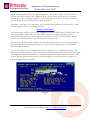
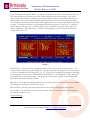
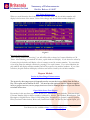
To print shipping labels from the order or in batch printing, you must edit the ship to address to
indicate shipping labels are required.
Figure 1
© 2005 Britannia, Inc.
Tel: 800-274-5245
User Notes are also available at http://notes.britanniainc.com.
Page 3 of 12