1
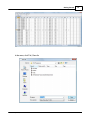
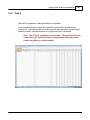
Importing a file
171
This value must be entered exactly as shown in the chart in the Users
Manual. A value that is not in the table will result in an incorrect tone
value setting in the resulting Programming file.
This value is set independently for each memory channel.
DCS Code: Enter one of the 104 codes in a three digit format (This will
appear as two digits if you editor does not show leading zeroes. Two
digits are acceptable when the third is a leading zero).
This value must be entered exactly as shown in the chart in the Users
Manual.
A value that is not in the table will result in an incorrect tone value
setting.
This value can be set independently for each memory channel that
uses a DCS tone.
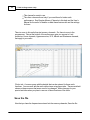
Skip: Marks selected memory channel to be skipped during scanning This field
should contain one of the following:
Scan, 0, or Stop to include the channel to be scanned
Skip or 1 to mark the channel to be skipped.
PScan or 2 to mark the channel as Preferential Scan
Step: The frequency being used by the radio changes by the value of the step when
tuning manually. This value is used by the radio in Memory Tune mode. This value is
not critical in memory mode since the original memory channel frequency can be
retrieved by exiting Memory Tune mode.
Enter 5/10/12.5/15/20/25/50 or 100 as needed.
Clock Shift: Shifts the internal reference frequency slightly to eliminate "birdies" that
interfere on other channels.
Enter On or 1 / Off or 0
Tx Power: The output power can be set individually set for each memory channel to
address the exact needs of each operation.
Enter High / Med / Low
© 2013 RT Systems, Inc.