1
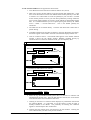
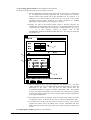
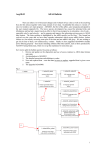
The processing options window has the appearance shown below
An arbitrary title may be given for the case being processed.
9. Parent configurations obtained from analysis of the input files are displayed at
a). The approximate ionisation potentials, that is the energies (cm-1) of these
parents relative to the ground state of the recombined ion, are required. It is
sufficient to use term averages as these data are only used in the impact
parameter electron impact excitation rate coefft. calculation to establish
approximate target sizes for strong coupling corrections.
10. Specific ion files of data format adf04 contain a character field for the
configuration associated with each energy level. In the output adf04 file written
by the code, the configuration may be written in standard form as n1l1q1 n2l2q2
......
or in the compact notation of Eissner used in the
SUPERSTRUCTURE/AUTOSTRUCTURE data entry. The choice is made with
the buttons at b).
$'$6 352&(66,1* 237,216
7LWOH IRU 5XQ
GHPRQVWUDWLRQ
,QSXW ,RQLVDWLRQ 3RWHQWLDOV IRU 3DUHQW V V
V S
V V
D
(LVVQHU VW\OH HQHUJ\ OHYHOV E
F
<HV
1R
7HPSHUDWXUH 9DOXHV
,1'(; 2XWSXW
(
(
(
(
,QSXW
(
(
(
(
7HPSHUDWXUH 8QLWV .HOYLQ
(GLW 7DEOH
'HIDXOW 7HPSHUDWXUH 9DOXHV
G
(GLW WKH SURFHVVLQJ RSWLRQV GDWD DQG SUHVV 'RQH WR FRQWLQXH
&DQFHO
'RQH
11. Electron temperatures for the output adf04 file are specified at c). The Input
values constitute the 1997 standard reduced ADAS temperature set which are
hard-wired in the code.
The olg and oic files passed from the
AUTOSTRUCTURE run contain no electron temperature data. The program
recovers the output temperatures you used when last executing the program.
Pressing the Default Temperatures Values button copies the Input temperatures
as the Output temperatures.
12. The Temperature Values are editable. Click on the Edit Table button if you wish
to change the values. Note that you can work in a choice of temperature units.
13. At the base of the window, the icon for Exit to Menu is present. This quits the
program and returns you to the ADAS series 7 menu. Remember that Done
takes you forward to the next screen while Cancel takes you back to the previous
screen.
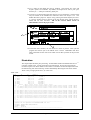
The output options window appearance is shown below
ADAS User manual
Chap8-03
17 March 2003