1
19
• The VXSwitch-V drivers are installed automatically with the Vigilant/iH drivers.
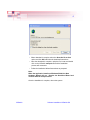
• Open the Video Overlay sheet in the Display Properties dialog by
clicking the right mouse button anywhere on the desktop, select
properties from the displayed menu select Settings and then
Advanced then the Video Overlay tab. Alternatively, go to Start/
Settings/Control Panel/Display and select the Video Overlay
tab. The following dialog is displayed:
Use the down arrow to display a list of available Video Switches.
VXSwitch
Installing VXSwitch-V With Vigilant Cards