1
Patent Application Publication
Nov. 20, 2014 Sheet 1 0f 11
US 2014/0344758 A1
100
2
101
104
105
2
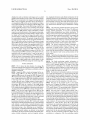
2
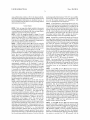
ì
DEPLAY
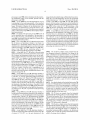
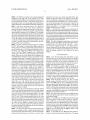
PmMARY
STORAGEDEWCE
SECONDARY
sToRAGEDEVmE
A
i
A
Y
Y
Y
1
COMMUNmAnoN
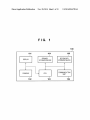
3
3
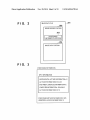
3
102
103
106
Patent Application Publication
F | G.
2
Nov. 20, 2014 Sheet 2 0f 11
US 2014/0344758 A1
IMAGE DATAFLE
r„201
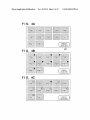
rj202
IMAGE HEADER PORTION
203
2
POSITIONING
INFORMATION PORTION
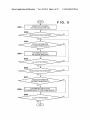
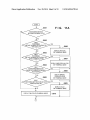
r,204
IMAGEDATAPORHON
I: I (5. 13
POSITIONING INFORMATION
SPOT INFORMATION
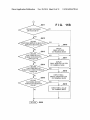
NORTH/SOUTH LATITUDE INFORMATION= N
LATITUDE INFORMATION= 35.34.0.3
EAST/WEST LONGITUDE INFORMATION= E
LONGITUDE INFORMATION= 139.40495
ALTITUDE INFORMATION= 30.78
POSITIONING METHOD INFORMATION= GPS
HORIZONTAL ERROR INFORMATION= 12
Patent Application Publication
Nov. 20, 2014 Sheet 3 0f 11
US 2014/0344758 A1
Ima e2
Ima e5
Ima e3
Imá/
//// /“
/g //// /g
6/ {age/¿ó ZÁÁ/ Ã@ Image10
/// a//P/Á
Ima e 11
//9
FIG
m/age K
SELECTION
4B
“L”
Imá1
/g
Ima e2
mae
mae/
m411
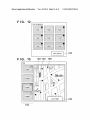
j
/Q
j
m/age/á
/Ima e3
//g
mae
láe
///
Ima e5
mae/
mae
/g
DISPLAY
SELECTION
IWM /m/gí% /Im/ageSÃ Im/aqeóp Irœgefi
¿fe/$3 Ive? Im/ageQ Imaîw
Ima e 11
j
Image 12
DISPLAY
SELECTION
Patent Application Publication
Nov. 20, 2014 Sheet 4 0f 11
US 2014/0344758 A1
FIG. 5
S501 w
DISPLAY LIST OF IMAGES
(NO POSITION-RELATED ICON)
8502
I'
SELECTION BUTTON OPERATED?
YES
NO
S
POSITION INFORMATION
NO
RECORDED IN IMAGE DATA?
œ
SUPEPIIYIPOSE DISPLAY
S504
PIN ICON ON IMAGE DATA
$505
"
ALL DATA PPOOESSED?
YES
5506
„
"
SELECTION BUTTON OPERATED?
YES
S507
E
V
POSITION INFORMATION
RECORDED IN IMAGE DATA?
S508 w
SDPEPIIYIPOSE DISPLAY ICON
CORRESPONDINO TO POSITIONING METHOD
$509
NO
"
AIL DATA PROCESSED?
NO
Patent Application Publication
Nov. 20, 2014 Sheet 5 0f 11
US 2014/0344758 A1
START
$601
NO
F I G. 6
POSITIONING METHOD
RECORDED IN IMAGE DATA?
YES
5602
FIRST
POSITIONING
METHOD IN IMAGE DATA INDICATES
YES
3606
GPS SATELLITE
v „j
NO
DISPLAY GPS ICON
ON THUMBNAIL IMAGE
$603
PIRST
POSITIONING
YES
|_
METHOD IN IMAGE DATA INDICATES
RADIO COMMUNICATION
7
NO
$604
II
f/
$607
DISPLAY vaRELESS LAN ICON
ON THUMBNAIL IMAGE
PIRST
POSITIONING METHOD IN
YES
Lw-»--->
IMAGE DATA INDICATES MANUAL
5608
POSITIONING?
II
NO
DISPLAY MANUAL
OPERATION ICON
ON THUMBNAIL IMAGE
5605
PIRST
f/
YES
|------>
POSITIONING METHOD IN IMAGE DATA
INDICATES CELLID?
5609
II
„J
DISPLAY CELLID
> NO
II
DISPLAY PIN ICON ON THUMBNAIL IMAGE
ON THUMBNAIL IMAGE
w3610
V
V
( RETURN )wg-350
Patent Application Publication
Nov. 20, 2014 Sheet 7 0f 11
US 2014/0344758 A1
F I G. 8A
Ima
Ima e2
ma e 6
Image 7
f
Ime/3Ã ¿né?
Ima e5
f MW /ßy/ß f
LATlTUDE 123;45;67;
/////9/
LONGITUDE 12:34:56;
Á
RECORDING DATE AND TIME 2011061518256
¿p
)$211 ImageIZ
y
8\00
F I G. BB
802
%/a/eîì /ÄÄ/e/z/
/////s% /j/
?
|ma es,Ã LATITUDE123:45:67;890 Y
j/ toNGITUDEIzAzstìfsßJëQ/Í
ß ßß
Ima e8
Ima e6
f
Ima9e7
InyeII
Image 12
Ima e9
///g// Í
«ß
Ima eIO
/f/
Patent Application Publication
Nov. 20, 2014 Sheet 8 0f 11
US 2014/0344758 A1
FIG. 9
900
///g Pim á ff ///g///Í 7//7/2
7
2mg/253
‘maf
á//q//í @fg/ß /f @yy/ß f //
///7 7/////%/
FIG. 10
¿f W//Z f /
á//ßi
W//ß ß//ßß
@Mí
//// „M ¿Wi
Patent Application Publication
Nov. 20, 2014 Sheet 9 0f 11
$601
NO
US 2014/0344758 A1
FIG.
11A
POSITIONING METHOD
RECORDED IN IMAGE DATA?
YES
$602
FIRST
POSITIONING
METHOD IN IMAGE DATA INDICATES
YES
GPS SATELLITE
II
,J $606
?
NO
DISPLAY GPS ICON
ON THUMBNAIL IMAGE
5503
FIRST
POSITIONING
YES
L_______
METHOD IN IMAGE DATA INDICATES
RADIO COMMUNICATION
?
NO
II
ff $607
DISPLAY WIRELESS LAN ICON
$604
ON THUMBNAIL IMAGE
FIRST
POSITIONING METHOD IN
YES
|_>
IMAGE DATA INDICATES MANUAL
POSITIONING?
$608
II
No
DISPLAY MANUAL
$605
FIRST
POSITIONING METHOD IN IMAGE DATA
OPERATION ICON
ON THUMBNAIL IMAGE
YES
I_____>
INDICATES CELLID?
> NO
II
DISPLAY PIN ICON ON THUMBNAIL IMAGE
V
[J $609
DISPLAY CELLID
ON THUMBNAIL IMAGE
„3510
II
IF
(D
H
Patent Application Publication
NOV. 20, 2014 Sheet 10 0f 11
US 2014/0344758 A1
0
5611
SECOND POSITIONING
METHOD EXISTS?
F | G.
11B
NO
YES
5612
SECOND
POSITIONING METHOD IN IMAGE DATA
YES
INDICATES GPS SATELLITE
v fj361:5
?
O
DISPLAY
SMALL GPS ICON
ON THUMBNAIL IMAGE
N
8613
SECOND
POSITIONING METHOD
YES
IN IMAGE DATA INDICATES
WIRELESS LAN
P
No
3614
l_>
$617
II
f/
DISPLAY
SMALL WIRELESS LAN ICON
ON THUMBNAIL IMAGE
SECOND
POSITIONING METHOD
YES
IN IMAGE DATA INDICATES MANUAL
OPERATION
P
NO
$615
SECOND
POSITIONING METHOD
IN IMAGE DATA INDICATES
CELLID?
NO
LM»
5618
II
DISPLAY SMALL
MANUAL OPERATION ICON
ON THUMBNAIL IMAGE
YES
L_»
5619
v ff
DISPLAY SMALL CELLID
ON THUMBNAIL IMAGE
II
V
( RETURN hf 5650
f/
Patent Application Publication
Nov. 20, 2014 Sheet 11 0f 11
US 2014/0344758 A1
FIG. 12
`USTOFIMAGES
Imzige1d ige 2
Im/age S/g
Ima e ß Áge 5
/g/ /
Im/age 6
/
////////
7%
7//9
@w/ //
%
MAP DISPLAY /-\/1201
F I G'l
Map
1304 1303 13)05
l/
l/
Í/
//
Image 2
'
a*In_ti-Í
I u
I
EEÉEÈÉ
3E
1302
I@ IJ/
_ k\
LIST FORM
` / `/1301
Nov. 20, 2014
US 2014/0344758 A1
TECHNICAL FIELD
indicated with the positioning method information in the
image file including the position information, in a distin
guishable appearance.
[0007] According to the disclosure, it is possible to not only
[0001] The present invention relates to an apparatus which
displays a list of images and its control method.
information, but also easily check a positioning method of
IMAGE DISPLAY APPARATUS AND
CONTROL METHOD THEREFOR
BACKGROUND ART
[0002] Recently, some digital cameras and mobile termi
nals with a built-in camera are capable of recording position
information as attribute information of image data obtained
by image sensing. Further, some personal computer (PC)
applications display image data where the above-described
position information is recorded distinctively from image
data where position information is not recorded. For example,
Japanese Patent Laid-Open No. 2007-323543 discloses a
technique of displaying an icon which indicates whether or
not position information is recorded as attribute information
of image data to be described, so as to distinguish such image
data where position information is recorded from image data
where position information is not recorded.
[0003] However, in the above-described conventional tech
nique, while it is possible to know whether or not position
information is recorded in image data, it is not possible to
determine the positioning method used to acquire the position
information.
[0004] There are a plurality of types of positioning methods
to obtain position information. For example, in the case of a
digital camera having a GPS (Global Positioning System)
receiver, under a condition where a signal can be received
from a GPS satellite, position information, obtained based on
the signal, is recorded as attribute information of image data.
Further, in the case of a digital camera or mobile terminal
having a wireless LAN, position information, obtained from
the nearest radio base station, can be recorded in image data.
In addition, arbitrary position information may be recorded
by manual operation with a console, in image data where no
position information is recorded. There is a probability of
erroneous input due to manual operation. As described above,
plural sets of position information exist in view of accuracy
and credibility. To check the accuracy and credibility of the
position information, it is insuñicient to merely determine
determine whether or not an image file includes position
obtaining the position information.
[0008]
Further features of the disclosure will become
apparent from the following description of exemplary
embodiments (with reference to the attached drawings).
BRIEF DESCRIPTION OF DRAWINGS
[0009]
The accompanying drawings, which are incorpo
rated in and constitute a part of the specification, illustrate
embodiments and, together with the description, serve to
explain the principles of the invention.
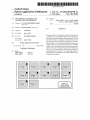
[0010] FIG. 1 is a block diagram showing an image pro
cessing apparatus according to an embodiment,
[0011]
[0012]
FIG. 2 illustrates a data structure of an image file,
FIG. 3 illustrates a data structure of position infor
mation portion,
[0013] FIGS. 4A to 4C are display examples of images in
list form in the ñrst embodiment,
[0014] FIG. 5 is a flowchart showing a processing proce
dure in the ñrst embodiment,
[0015] FIG. 6 is a flowchart showing the details of step
S508 in FIG. 5;
[0016] FIGS. 7A and 7B are display examples of details of
position information in balloon form;
[0017] FIGS. 8A and 8B are other display examples of
details of position information in balloon form,
[0018]
FIG. 9 is a display example of an editing menu for
position information,
[0019]
FIG. 10 is a display example ofimages in list form
in a second embodiment,
[0020] FIGS. 11A and 11B are flowcharts showing the
details of step S508 in FIG. 5 in the second embodiment,
[0021] FIG. 12 is a display example ofimages in list form
in a third embodiment, and
[0022] FIG. 13 is a display example of a map in the third
embodiment.
DESCRIPTION OF EMBODIMENTS
presence/absence of position information.
[0023]
SUMMARY OF INVENTION
[0005] The present invention has been made to solve the
above problem. For example, this disclosure provides an
image display apparatus having the structure as follows.
[0006] That is, there is provided an image display control
apparatus which performs control to display a list of image
files stored in storage means, comprising: determination
means for analyzing each image file stored in the storage
means, and determining whether or not the image file
includes position information indicating a position and
whether or not, when the image file includes the position
information, positioning method information indicating a
positioning method for the position exists, and display con
trol means for, upon display ofthe list of image files stored in
the storage means, in accordance with the result of determi
nation by the determination means, displaying an image file
including the position information in a appearance distin
guishable from an image file not including the position infor
mation, while displaying a type of the positioning method
Hereinbelow, embodiments of the present invention
will be described in detail in accordance with the attached
drawings.
[0024]
Note that as an apparatus according to the embodi
ments ofthe present invention, a general-purpose image pro
cessing apparatus such as a personal computer (hereinbelow,
“PC”) will be used. However, since the present invention is
applicable to any apparatus as long as it performs control to
display a list of image files such as a digital camera, a cellular
phone, a so -called tablet terminal and a car navigation system,
the present invention is not limited to the type of apparatus.
First Embodiment
[0025]
FIG. 1 is a block diagram showing the configuration
of a PC which functions as an image processing apparatus 100
according to a ñrst embodiment.
[0026]
The image processing apparatus 100 has a display
101, a console 102, a CPU 103, a primary storage device 104,
a secondary storage device 105, and a communication unit
106. The display 101, which is e.g. a liquid crystal display,
Nov. 20, 2014
US 2014/0344758 A1
displays data such as characters and images and a so-called
graphical user interface such as a menu. Note that the display
101 may be incorporated in the image processing apparatus
100, or may be separately provided. That is, the image pro
cessing apparatus 100 may be any type of apparatus as long as
it has at least an interface for connection With the display and
tion, longitude information and altitude information Will be
generally referred to as spot information. Further, positioning
method information indicates a positioning method used in
the positioning of the spot. Note that all the devices do not
have a function of describing positioning method informa
tion. Some devices describe only spot information in image
controls the display. The console 102, having a keyboard, a
data.
mouse and the like, receives a user’s operation. Note that the
respective constituent elements ofthe image processing appa
ratus 100, and performs processing related to display control
for display in list form based on image file analysis and its
result of analysis. Further, the CPU 103 performs processing
for communication control. The primary storage device 104
is used for storage of temporary data, programs executed With
[0031] The positioning method information in the present
embodiment may have four types of values. The first posi
tioning method information is CELLlD of positioning
method using cellular-phone base station information. To
obtain a current position from the cellular-phone base station,
the folloWing various methods are available. For example, the
position of a base station communicating With a cellular
phone is obtained as the current position ofthe cellular phone.
Otherwise, the current position is estimated from the differ
the CPU 103, and is used as a Work area. The primary storage
ence among arrival time of radio Waves from plural base
device 104 is typically a RAM. The secondary storage device
105, Which is used for storage of an operating system (OS) to
stations and the positions of the respective base stations.
[0032] The second positioning method information is
WLAN of positioning method using Wireless LAN. The
console 102 may have buttons, levers, a touch panel and the
like. The CPU 103 performs various calculations, controls
control the image processing apparatus 100, various applica
tion programs, various files (including image files) and the
acquisition of current position is made as folloWs. Radio
like. The secondary storage device 105 is typically a hard
Waves are received from single or plural Wireless LAN access
disk, a nonvolatile semiconductor memory or the like. The
communication unit 106 is a Wireless LAN interface for com
munication With an external device. lt may be any type of
apparatus, such as a cable LAN interface, a USB interface and
the like as long as it communicates With the external device.
points, and the current position is estimated from the inten
sities of the respective radio Waves and the positions of the
lt is possible to receive image files from an external device
(for example, a digital camera and a cellular phone) via the
communication unit 106 and manage the stored image files.
Position lnformation
access points.
[0033]
The third positioning method information is GPS of
positioning method using information received from plural
satellites. The current position is calculated from the received
information.
[0034]
The fourth positioning method information is
MANUAL generally indicating position information input
ted by a user’s manual operation. The input of this value
FIG. 2 shoWs the data structure of an image file
greatly depends on packaging. For example, When latitude
stored and managed in the image proces sing apparatus 1 00. ln
the present embodiment, a file format in conformity With Exif
standard is employed.
[0028] lmage data 201 is stored and managed in the sec
ondary storage 205 as a file. When the image processing
apparatus 100 processes the image data 201, the image data
201 is temporarily copied in the primary storage 204 in some
cases. lmage header portion 202 holds information attached
to the image data. For example, the attached information
includes date and time of image sensing, a shutter speed, f
number, ISO film speed and the like. A positioning informa
and longitude are directly inputted or When latitude and lon
[0027]
tion portion 203 exists as a portion of the image header
portion 202. The positioning information portion 203 holds
GPS-related information handled in the present embodiment.
An image data portion 204 holds an image data main body.
[0029] Note that the image header portion 202 and the
positioning information portion 203 are not necessarily lim
ited to the Exif format. For example, the image headerportion
202 and the positioning information portion 203 may be
recorded in other file than the image data, or may be recorded
in a database of the image processing apparatus 100.
[0030] FIG. 3 shoWs an example of information held in the
positioning information portion 203. North/south latitude
information is latitude information having a value indicating
north latitude or south latitude. Latitude information indi
cates a latitude. East/West longitude information is longitude
information having a value indicating an east longitude or
West longitude. Longitude information indicates a longitude.
Altitude information indicates an altitude. ln the present
embodiment, the above-described north/south latitude infor
mation, latitude information, east/West longitude informa
gitude are inputted by the user’s designation of a particular
point on a map, this value may be used.
[0035] Horizontal error information indicates a horizontal
error of the spot information, i.e., an error between the lati
tude information and the longitude information. The error is
set in accordance With positioning conditions. For example,
in the case of GPS system, the error is estimated from a DOP
value, the number of GPS satellites from Which radio-Wave
have been received and the intensities of the radio Waves.
[0036] Note that in the example of FIG. 3, the current
position is at 35 degrees 34 minutes 0.3 seconds north lati
tude, 139 degrees 40 minutes 49.5 seconds east longitude, and
30.78 meters altitude. The positioning method information
indicates the GPS, and the horizontal error is 12 meters.
[0037] Note that some of recent cellular phones With a
built-in camera perform so-called hybrid type positioning of
obtaining spot information With higher accuracy by com
bined plural positioning methods. ln the present embodiment,
in this case, all the utilized positioning methods are added to
the positioning method information. That is, When position
ing information is determined based on GPS and information
on the Wireless LAN access points, the positioning method
information is “GPS WLAN”. Note that in the present
embodiment, the positioning methods are described in the
order of contribution upon determination of positioning
information. The level of contribution is calculated based on
error amount and the reliability of predetermined positioning
method itself. ln the above-described example of the “GPS
WLAN”, the GPS positioning method has higher level of
contribution in comparison With the positioning method
Nov. 20, 2014
US 2014/0344758 Al
using cellular phone wireless LAN. ln the present embodi
ment, the ñrst positioning method information and the second
positioning method information are described, however, it
may be arranged such that three or more positioning method
information are described.
Screen Display
[0038]
Next, an image data display method in the present
embodiment will be described. FIG. 4A shows an example of
a screen displayed on the display 101 when an image display
positioning method information is “CELLID”, an icon differ
ent from any of the pin icon, the GPS icon, the wireless LAN
icon and the manual operation icon (hereinbelow, “cell
icon”), is superimposed on the image data.
[0043] As described above, in the screen shown in FIG. 4C,
an icon corresponding to positioning method is superimposed
on image data. With this arrangement, it is possible for the
user to easily check the positioning method used in the posi
tioning of each image data. Note that in the display screen in
FIG. 4C, when the display selection button 401 is clicked, the
application is started on the present apparatus.
screen changes to the screen in FIG. 4A. That is, every time
[0039] ln FIG. 4A, image data lmage l to lmage l2, stored
in the secondary storage 205, are displayed in list form. These
the display selection button 401 is clicked, the above-de
scribed three display screens are sequentially displayed.
[0044] Hereinbelow, a thumbnail list display processing in
images are obtained from e.g. a digital camera or a cellular
phone. Further, the images may be downloaded from a server
the image display application according to the ñrst embodi
or the like on a network. Further, thumbnails of image data in
place of image data themselves may be used.
[0040] A display selection button 401 is used for selecting
display of information related to position information. When
ment ofthe present invention will be described in accordance
with the flowchart of FIG. 5. Note that it may be arranged such
that when the apparatus communicates with an external
device via the communication unit 106 and image data file is
the display selection button 401 in the status shown in FIG.
4A is designated by click operation or the like via the console
received, the image display application is started in accor
dance with the reception of the image data ñle. Otherwise, it
102, the screen changes to a screen shown in FIG. 4B.
may be arranged such that when the user inputs an instruction
[0041] As shown in FIG. 4B, regarding image data to which
position information is added, a “pin” shaped icon (herein
below, “pin icon”) is superimposed on the thumbnail of the
image. That is, the pin icon is displayed with respect to an
image file having position information portion. ln this screen
from the console 102, the image display application is started.
example, latitude and longitude information are described as
positioning information with respect to the Images l, 3, 4, 6,
7, 8, 10 and 11. Note that the pin icon is not necessarily
superimposed completely on the thumbnail. lt may be
arranged such that a part of the pin icon is superposed or the
pin icon is not superimposed on the thumbnail of the image
data but displayed in the vicinity of the thumbnail as long as
it is possible to distinguish image files having positioning
information from images without positioning information.
Note that in this screen, the pin icon is superimposed on
image data where the latitude and longitude information are
described regardless of positioning method information. lt is
possible for the user to easily know image data having posi
tion information by checking the screen.
[0042] Further, in the status shown in FIG. 4B, when the
display selection button 401 is designated by click operation
ln any case, upon start of the image display application, the
CPU 103 reads the image display application program from
the secondary storage device 105 to the primary storage
device 104, and the CPU 103 executes the program.
[0045]
First, at step S101, the CPU 103 analyZes image files
stored in a designated folder in the secondary storage device
105, and displays thumbnails ofthe image files in list form as
shown in FIG. 4A on the display 101. At this time, the posi
tion-related icons are not superposed on the thumbnail
images.
[0046] At step S502, the CPU 103 determines whether or
not the display selection button 401 has been operated, and
when it determines that the operation of the display selection
button has not been performed, waits until the operation is
performed. When the operation ofthe display selection button
positioning method information indicates “GPS”, i.e., the
positioning method information indicates that the image data
has spot information obtained by using GPS. An icon indi
401 is detected, the CPU 103 proceeds with the processing to
step S503. At step S503, the CPU 103 analyzes the image data
files to be displayed, and regarding each of the image data
files, determines whether or not the positioning information
portion is recorded in the image data ñle. When the CPU 103
determines that the positioning information portion is
described, the CPU 103 proceeds with the processing to step
S504, while it determines that the positioning information
portion is not described, the CPU proceeds with the process
ing to step S505. At step S504, a thumbnail of image data, on
which the pin icon is superposed, is displayed. On the other
hand, regarding an image data file without positioning infor
mation portion, this processing is not performed. These pro
cating a radio wave (hereinbelow, “wireless LAN icon”) is
superimposed on the lmages 6 and 8. This means that the
the display subjects have been processed. When the processes
or the like, the screen changes to a screen shown in FIG. 4C.
As shown in the screen in FIG. 4C, it is possible to discrimi
nate a positioning method by replacing the pin icon with an
icon corresponding to positioning method. For example, an
icon indicating a satellite (hereinbelow, “GPS icon”) is super
posed on the lmages l, 4, 10 and ll. This means that the
positioning method information is “WLAN”, i.e., the posi
tiomng method information indicates that the image data has
spot information obtained by using wireless LAN. An icon
indicating a hand (hereinbelow, “manual-operation icon”) is
superimposed on the lmage 7. This means that the positioning
method information is “MANUAL”, i.e., the positioning
method information indicates that the image data has spot
information obtained by manual operation. The pin icon is
superposed on the lmage 3. This indicates that the image data
has no positioning method information. Note that when the
cesses are repeated until it is determined at step S505 that all
at steps S503 to S505 have been performed, the screen
changes to that as shown in FIG. 4B.
[0047] At step S506, the CPU 103 waits until the display
selection button 401 is operated. When the operation of the
display selection button 401 is detected, the CPU 103 pro
ceeds with the processing to step S507.At step S507, the CPU
103 determines whether or not the positioning information
portion is recorded in the image data file to be displayed.
When the CPU 103 determines that the positioning informa
tion portion is recorded, the CPU 103 proceeds with the
Nov. 20, 2014
US 2014/0344758 Al
processing to step S508, while it determines that the position
ing infomation portion is not recorded, proceeds with the
processing to step S509.
[0048] At step S508, the CPU 103 superimposes an icon
corresponding to the positioning method of the described
positioning infomation portion and displays the thumbnail
image. The method of display will be described later. This
processing is not performed on an image file where no posi
tioning information is recorded. These processes are repeated
until it is determined at step S509 that all the display subjects
have been processed.
[0049]
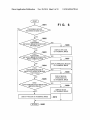
The details ofthe processing at step S508 in FIG. 5
will be described below with reference to the flowchart of
FIG. 6. This processing, corresponding to the processing at
step S508, is performed when an image file of interest has a
positioning information portion.
[0050]
First, at step S601, the CPU 103 analyZes the image
file of interest, and determines whether or not there is a
description of a positioning method. When the CPU 103
determines that a positioning method is recorded, it proceeds
with the processing to step S602. When the CPU 103 deter
mines at step S601 that any positioning method is not
recorded, it proceeds with the processing to step S610.
[0051] At step S602, the CPU 103 refers to the positioning
method information in the header information of the image
file of interest, and determines whether or not the first posi
tioning method information (described at first) in the image
data is “GPS”, i.e., whether or not the positioning method
image data has been addedusing a cellular phone base station.
When the CPU 103 determines that the first positioning
method information is “CELLID”, it proceeds with the pro
cessing to step S609. At step S609, the CPU 103 superim
poses a cell icon in place ofthe pin icon on the thumbnail of
the image file of interest, and proceeds with the processing to
step S650. Further, when the CPU 103 determines at step
S604 that the first positioning method information is not
“CELLID”, it proceeds with the processing to step S610.
[0055] At step S610, the cell icon in place ofthe pin icon is
superimposed on the thumbnail of the image file of interest.
Note that when it is determined at step S605 that the first
positioning method information in the image file of interest is
not “CELLID”, it may be determined that the positioning
information portion is recorded but an unknown positioning
method is described. ln this case, it may be arranged such that
an icon indicating the unknown positioning method in place
of the pin icon is superimposed on the thumbnail, otherwise,
superimposed image is not displayed. As a result ofthe above
processing, the screen shown in FIG. 4C is displayed.
lcon Operation
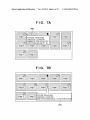
[0056] FIG. 7A shows a display screen example when the
user designated (selected) a thumbnail of an image (in the
figure, a thumbnail in an upper left position). As a method of
designation (selection), a selection subject may be changed
by operating upward/downward/leftward/rightward keys
uses a GPS. When the CPU 103 determines that the first
provided on the console 102. Further, it may be arranged such
positioning method information is “GPS”, it proceeds with
that a status where a cursor interlocked with a pointing device
such as a mouse is positioned on the corresponding thumbnail
the processing to step S606. When the CPU 103 determines
that the first positioning method information is not “GPS”, it
proceeds with the processing to step S603. At step S605, the
GPS icon in place of the pin icon is superimposed on a
thumbnail of the image file of interest. Then the CPU 103
proceeds with the processing to step S650, then returns to the
main processing (FIG. 5).
[0052] At step S603, the CPU 103 determines whether or
not the first positioning method information ofthe image data
is “WLAN”, i.e., the first positioning method in the image
data uses a wireless LAN. When the CPU 103 determines at
step S603 that the first positioning method is “WLAN”, it
proceeds with the processing to step S607. At step S607, a
wireless LAN icon in place of the pin icon is superposed on
the thumbnail of the image file of interest. Then the CPU 103
proceeds with the processing to step S650. On the other hand,
when the CPU 103 determines at step S603 that the position
ing method is not “WLAN”, it proceeds with the processing
to step S604.
[0053] At step S604, the CPU 103 determines whether or
not the first positioning method information in the image data
is “MANUAL”, i.e., the spot information in the image data is
manually added. When the CPU 103 determines at step S604
that the first positioning method information is “MANUAL”,
it proceeds with the processing to step S608. At step S608, the
(or on an icon on the thumbnail) is regarded as a designated
(selected) status. ln any case, when a thumbnail (lmage l) is
designated, detailed information 700 ofthe positioning infor
mation portion of the image corresponding to the designated
thumbnail is displayed. As the detailed information 700 in the
case of FIG. 7A, in addition to the position information
obtained from a GPS satellite signal, information on position
ing using GPS, such as the number of satellites upon acqui
sition of the position information and positioning reliability,
are displayed. The number of satellites and the positioning
reliability are recorded as a part of Exif 2.3 standard tag
information.
[0057]
Note that the display ofthe detailed information 700
is made, not with the designation of thumbnail as a trigger, but
with detection of GPS icon on the thumbnail, or detection of
a pointer such as a mouse cursor on the GPS icon, as a trigger.
ln such case, it is possible to select the image data itself by
clicking other part than the GPS icon. This arrangement is
similarly applicable to the other icons.
[0058] FIG. 7B shows an example where the designated
thumbnail has the wireless LAN icon. ln the example of FIG.
7B, detailed information 701 of the positioning information
portion of “lmage 8” is displayed. As the detailed information
701, in addition to the latitude and longitude, information on
manual operation icon in place of the pin icon is superim
positioning using a wireless LAN such as an address of a
posed on the thumbnail of the image file of interest, and the
process proceeds with the processing to step S650. Further,
wireless LAN access point is displayed.
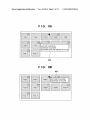
[0059] FIG. 8A shows a display screen when the designated
thumbnail has the manual operation icon. ln the example of
FIG. 8A, detailed information 800 of the positioning infor
when the CPU 103 determines at step S604 that the first
positioning method information is not “MANUAL”, it pro
ceeds with the processing to step S605.
[0054] At step S605, the CPU 103 determines whether or
not the first positioning method information in the image file
of interest is “CELLID”, i.e., the spot information in the
mation portion of the image file “lmage 7” is displayed. As
the detailed information 800, in addition to the latitude and
longitude, time at which the position information has been
added to the image data is displayed.
Nov. 20, 2014
US 2014/0344758 Al
[0060] FIG. 8B shoWs a display screenWhenthe designated
thumbnail has the pin icon. In the example of FIG. 8B,
detailed infomation 801 of the positioning information por
tion ofthe image file “Image 3” is displayed. In the pin icon
indicating that there is no positioning method infomation,
latitude information and longitude information are displayed.
[0061]
Note that in the screen shoWn in FIG. 4B, all the
information of some icon is copied, When right click is per
formed on image data With no icon display, only the item
“add” is displayed as an editing menu. When the icon “add” is
selected, the detailed information such as the spot informa
tion andthe positioning method information is added to the
right-clicked image data. It is not necessary to add all the
detailed information. For example, only the positioning
icons are pin icons. In this screen, When a thumbnail is
selected, latitude and longitude are displayed as in the case of
method information may be added.
FIG. 8B regardless of positioning method, and positioning
referring to the positioning method information described as
method specific information is not displayed. This arrange
attribute information of image data indicating, not only exist
ence/ absence of positioning information ofthe image, but the
ment is based on the supposition that the user pays attention to
the position information itself in the screen of FIG. 4B, While
the user pays attention to the positioning method in the screen
of FIG. 4C. Further, even When a thumbnail having a pin icon
is selected for the purpose of displaying information in detail
as much as possible, information corresponding to the posi
tioning method may be displayed.
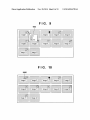
[0062] FIG. 9 is a display for editing an icon. For example,
the CPU 103 displays an editing menu 900 having plural
editing items in accordance With predetermined operation of
e.g. moving the cursor on a GPS icon and right-button click of
the mouse. The editing menu 900 has three editing items,
“copy”, “ad ” and “delete”, prepared so as to edit detailed
[0065] As described above, in the present embodiment, by
type of the positioning method, is superimposed on a thumb
nail image. With this arrangement, it is possible for the user to
easily check the positioning method used upon acquisition of
spot information of the image data.
[0066] Note that in the present embodiment, every time the
display selection button 401 is operated, the display format is
looped (FIG. 4A->FIG. 4B->FIG. 4C->FIG. 4A . . . ). How
ever, it may be arranged such that one of the display types is
directly designated from the display menu and the display is
made in accordance With the designated display type. Accord
ingly, the present invention is not limited to the above
example.
information of the GPS icon and positioning method infor
mation. When any one of the editing item is designated, the
Second Embodiment
CPU 103 performs editing processing in accordance With the
designated editing item. For example, When the item “copy”
is selected, it is possible to copy the detailed information such
indicating the type of positioning information is superim
posed on a thumbnail based on the first positioning method
as the spot information, the number of GPS satellites and the
information described as the attribute information of an
positioning reliability, recorded in the image data ofthe right
image ñle. In the second embodiment, When the second posi
tioning method information exists, it is displayed too.
[0068] FIG. 10 shoWs a display example of images in list
clicked GPS icon, and the positioning method, recorded in the
image data, in the temporary storage memory (generally
referred to as a “clip board”). When the icon “delete” is
selected, it is possible to delete the detailed information such
as the position information, the number of GPS satellites and
the positioning reliability and the positioning method
recorded in the image data, and it is possible to delete the icon
from the display screen. When the icon “add” is selected, only
When “copy” has been selected in the editing menu for the
icon of another image data prior to the selection of the icon
“add”, the detailed information of the above-described other
image data, as a copy original data and the positioning
method are added to the copy destination image data. Note
that it is not necessary to add all the detailed information. For
example, it may be arranged such that only the positioning
[0067]
In the above-described ñrst embodiment, an icon
form in the second embodiment. In FIG. 10, an image file
positioned at an upper left corner is subjected to positioning
using tWo positioning methods, GPS and WLAN. The ñrst
positioning method “GPS” is a ñrst siZed icon, and the second
positioning method “WLAN” is a second siZed icon smaller
than the ñrst siZe, and they are superposed on the thumbnail.
To reduce a region of the thumbnail image hidden With the
icons, the second positioning method icon is smaller.
[0069] When the display screen in FIG. 10 is a display
example in place of that shoWn in FIG. 4C in the first embodi
ment, at step S508 in FIG. 5, the CPU 103 performs process
ing in accordance With the flowcharts of FIGS. 11A and 11B.
Note that steps S601 to S610 and step S650 in the flowcharts
method information is added.
of FIGS. 11A and 11B are identical to those in the flowchart
[0063] Further, the icon indicating the positioning method
of FIG. 6. Accordingly, these steps have the same reference
of the above-described other image data as the copy original
data is additionally displayed on the copy destination image
numerals, and hereinbeloW, processing at step S611 and the
subsequent steps Will be described.
[0070] Note that in the processing up to step S610, the icon
of the initial positioning method is already superimposed on
the thumbnail image.
[0071] At step S611, the CPU 103 analyzes the positioning
information portion of the image file of interest, and deter
data. Note that the detailed information added to the copy
destination image data is recorded in MakerNote as one ofthe
Exif 2.3 tags. The positioning method added to the copy
destination image data is recorded in the ñrst GPS Processing
Method tag, and the positioning method initially recorded in
the copy destination image data is re-recorded in the second
tag. Then, the icon display is changed, and as described
above, an icon indicating a high-level contribution position
ing method and small icon indicating a loW-level contribution
positioning method are displayed.
[0064] The above description has been made With the GPS
mines Whether or not the second positioning method is
recorded. When the CPU 103 determines as a result of deter
icon as an example, hoWever, a similar editing menu is dis
S509 in the flowchart of FIG. 5.
[0072] At step S612, the CPU 103 determines Whether or
played upon right-click ofthe Wireless LAN icon, the manual
operation icon and the pin icon. Further, in a status Where
mination that the second positioning method is recorded, it
proceeds With the processing to step S612. On the other hand,
When the CPU 103 determines that the second positioning
method is not recorded, then at step S650, it returns to step
not the second positioning method information of the image
Nov. 20, 2014
US 2014/0344758 Al
file of interest is “GPS”. When the CPU 103 determines that
Third Embodiment
the second positioning method infomation is “GPS”, it pro
ceeds with the processing to step S616. At step S616, the GPS
on the PC side. Note that as many parts of the third embodi
icon in a siZe smaller than the first positioning method icon is
superimposed adjacent to the ñrst positioning method icon.
Then the CPU 103 proceeds with the processing to step S650,
and returns to the main processing. Further, when the CPU
103 determines at step S612 that the second positioning
method information is not “GPS”, it proceeds with the pro
cessing to step S613.
[0073] At step S613, the CPU 103 determines whether or
not the second positioning method information of the image
file of interest is “WLAN”. When the CPU 103 determines
that the second positioning method information is “WLAN”,
it proceeds with the process to step S617. At step S617, the
wireless LAN icon is superimposed, in a siZe smaller than that
of the already displayed icon, adjacent to the already dis
[0079]
ln a third embodiment, it is possible to display a map
ment correspond to those in the ñrst embodiment, the expla
nations ofthe corresponding parts will be omitted and a part
speciñc to the present embodiment will be mainly described.
Note that the secondary storage device 105 previously holds
a map database to output a map image including a given
position, retrieved using the position as a key. That is, it is
possible to designate a position indicated with latitude and
longitude and retrieve the position, and obtain map data in a
designated scale from the database. Note that since a tech
nique of retrieval using a position from a map database,
typiñed by car navigation, is well known, the detailed
description of the technique will be omitted.
[0080] FIG. 12 is a display example ofimages in list form
in the third embodiment. ln the screen shown in FIG. 12, the
played icon. Then, the CPU 103 returns through step S650 to
the main processing. Further, when the CPU 103 determines
at step S613 that the second positioning method information
is not “WLAN”, it proceeds with the process to step S614.
list of image files is displayed along with their thumbnail
images. lmage data which cannot be displayed within the
screen can be displayed by scroll operation.
[0081] ln the third embodiment, with respect to an image
file having at least latitude and longitude information, the pin
[0074] At step S614, the CPU 103 determines whether or
not the second positioning method information of the image
icon is superimposed on the thumbnail of the image ñle. ln
this screen, the pin icon is uniformly displayed with respect to
file of interest is “MANUAL”. When the CPU 103 determines
image data having latitude and longitude information, regard
that the second positioning method information of the image
file of interest is “MANUAL”, it proceeds with the process to
step S618. At step S618, the manual operation icon is super
imposed, in a size smaller than the already display icon,
adjacent to the already displayed icon. Then the CPU 103
returns through step S650 to the main processing. Further,
less of positioning method information. With respect to an
mouse or the like, the CPU 103 determines a rectangular
when the CPU 103 determines at step S614 that the second
range of a map to be displayed as a default, from a mean
positioning method information ofthe image file of interest is
not “MANUAL”, it proceeds with the process to step S615.
position of the latitudes and longitudes of all the pin-icon
superimposed image files (latitude mean value and longitude
[0075] At step S615, the CPU 103 determines whether or
not the second positioning method information of the image
file of interest is “CELLlD”. When the CPU determines that
the second positioning method information of the image file
of interest is “CELLID”, it proceeds with the process to step
S619. At step S619, the cell icon is superimposed, in a siZe
smaller than the already display icon, adjacent to the already
displayed icon. Then the CPU 103 returns through step S650
to the main processing.
image file without latitude and longitude information, the pin
icon is not displayed. Further, the image list screen has a map
display button 1201.
[0082]
When the map display button 1201 is clicked with a
mean value) and latitude maximum and minimum values and
longitude maximum and minimum values. Then the CPU 1 03
obtains a map image from the map database, enlarges/reduces
it to be displayed in the display region, and displays the pin
icon in the position of each image data file indicated with
latitude and longitude.
[0083]
FIG. 13 shows a display screen example of the pin
icons displayed on the above-described map. This screen is
result at step S615 is No, it can be considered that some
briefly formed with a map region to display a map image and
a list display region 1302 to display scrollable list of thumb
nail images in a vertical direction. When the list display
button 1301 is clicked, the CPU 103 performs processing to
return the map display status in the figure to the list display as
shown in FIG. 12. A slider bar 1303 is used for control ofmap
scale. A direction key group 1304 is used for scroll ofthe map
unknown data (or unknown positioning information) is
upward/downward/leftward/rightward.
described as the second positioning method information. ln
this case, as the spot information itself is described, it may be
[0084] Further, when the user operates the mouse to move
the cursor to a desired pin position and clicks on the position,
the CPU 103 scrolls screen such that the thumbnail of an
[0076] Then, when the CPU 103 determines at step S616
that the second positioning method information of the image
file of interest is not “CELLID”, it returns through step S650
to the main processing. Note that when the determination
arranged such that the pin icon is continuously displayed or an
icon indicating known positioning information is superim
posed.
[0077] The processing of displaying an icon in accordance
with positioning method on a thumbnail image of each image
image corresponding to the pin is positioned within the image
display region 1302. Further, the CPU 103 displays the
thumbnail with a bold frame (the color of the frame may be
changed) to be distinguished from other thumbnails.
[0085]
As a result of the above arrangement, it is also pos
data in the second embodiment is as described above.
sible to check an image obtained by image sensing, in the
[0078] Note that the display screen in FIG. 10 in the second
embodiment has been described as an example in place of
position of image sensing, by designating the pin icon on the
FIG. 4C, however, it may be arranged such that, in the screen
shown in FIG. 4C, when the display selection button 401 is
operated, then the display screen in FIG. 10 is displayed next.
[0086] Further, one of speciñc displays in the screen shown
in FIG. 13 is icon display in the list display region. ln FIG. 12,
the pin icons are uniformly displayed, while in FIG. 13, icons
map.
Nov. 20, 2014
US 2014/0344758 A1
corresponding to the positioning methods of the respective
image data (the GPS icon, the Wireless LAN icon, the cell
icon and the pin icon) are displayed. ln the map display status,
position and Whether or not, When the image file
as the user is interested in position information, the more
position exists, and
detailed information regarding the position information is
necessary.
[0087]
As described above, in the third embodiment, as to
includes the position information, positioning method
information indicating a positioning method for the
a display control unit configured to, upon display ofthe list
of image files stored in said storage unit, in accordance
With the result of determination by said determination
Whether or not the screen is for map display, i.e., Whether or
unit, display an image file including the position infor
not the screen is for utilization of position information, the
form of icon related to position information is changed. With
this arrangement, it is possible for the user to more easily
check the necessary information. Note that the screen in FIG.
12 in the second embodiment may be displayed as one of the
screens in FIGS. 4A to 4C. Further, the map display button
1201 may be displayed not in the screen in FIG. 12 but in the
display screen in FIG. 4C and FIG. 10.
mation in a appearance distinguishable from an image
[0088] As described above, the respective embodiments of
the present invention have been described, hoWever, the
present invention is not limited to an application executed on
a PC. The present invention is applicable to any apparatus as
long as it stores and manages image files and displays them.
For example, the invention may be realiZed With a digital
camera or a cellular phone.
[0089] Further, in the above-described embodiment, upon
display of image files in list form, thumbnails of the respec
tive image files are displayed, and icons indicating presence/
absence of positioning information and the type of position
ing method are superimposed. However, the image files may
be distinguished With a list of file names and character colors,
or type icons and file names may be displayed. Note that since
it is desirable for the user to check images displayed in list
form to some degree, the superimposition of the icons on the
thumbnails as described in the above embodiment is prefer
able.
Other Embodiments
file not including the position information, While dis
playing a type of the positioning method indicated With
said positioning method information in the image file
including the position information, in a distinguishable
appearance.
2. The image display control apparatus according to claim
1, Wherein said display control unit displays, regarding the
image file not including said position information, a thumb
nail of an image represented With the image file, While regard
ing the image file including said position information, super
imposes an icon corresponding to the type of the positioning
method indicated With said positioning method information
on a thumbnail of an image represented With the image file.
3. The image display control apparatus according to claim
2, Wherein When said determination unit determines an image
file including first positioning method information and sec
ond positioning method information as said positioning
method information, said display control unit superimposes
an icon, having a first siZe, corresponding to the type of the
positioning method indicated With said first positioning
method information, and an icon having a second siZe smaller
than said firs siZe, corresponding to the type ofthe positioning
method indicated With said second positioning method infor
mation, on said thumbnail of the image represented With the
determined image file.
4. The image display control apparatus according to claim
1, further comprising:
Aspects ofthe present invention can also be realiZed
a designation unit configured to designate one ofthe image
by a computer of a system or apparatus (or devices such as a
CPU or MPU) that reads out and executes a program recorded
on a memory device to perform the functions of the above
files displayed in list form by said display control unit,
[0090]
described embodiments, and by a method, the steps of Which
are performed by a computer of a system or apparatus by, for
example, reading out and executing a program recorded on a
memory device to perform the functions of the above-de
scribed embodiments. For this purpose, the program is pro
vided to the computer for example via a network or from a
recording medium of various types serving as the memory
device (e. g., computer-readable medium).
and
a position information display unit configured to, When the
image file designated by the designation unit includes
the position information, display detailed information of
said position information in a balloon form.
5. The image display control apparatus according to claim
1, further comprising:
a designation unit configured to designate one ofthe image
files displayed in list form by said display control unit,
a menu display unit configured to, When the image file
designated by said designation unit includes the position
[0091] While the present invention has been described With
reference to exemplary embodiments, it is to be understood
that the invention is not limited to the disclosed exemplary
embodiments. The scope of the folloWing claims is to be
information and a predetermined operation is per
formed, display an editing menu including a plurality of
accorded the broadest interpretation so as to encompass all
an editing unit configured to, When one of said displayed
such modifications and equivalent structures and functions.
[0092] This application claims the benefit of Japanese
Patent Application No. 2012-011507, filed Jan. 23, 2012,
Which is hereby incorporated by reference herein in its
entirety.
1. An image display control apparatus Which performs
control to display a list of image files stored in a storage unit,
comprising:
a determination unit configured to analyZe each image file
stored in said storage unit, and determine Whether or not
the image file includes position information indicating a
editing items for said position information, and
editing items is designated, perform editing processing
corresponding to said designated editing item With
respect to the position information of said image file.
6. The image display control apparatus according to claim
2, further comprising:
a map database to output a map image including a position
indicated With a given position information, in accor
dance With the position information,
a display device having a list display region to display
thumbnails of a plurality of image files in a scrollable
form and a map region to display a map image, and
US 2014/0344758 Al
Nov. 20, 2014
a map display unit configured to calculate a mean position
position information, positioning method information
from image files having the position infomation, among
indicating a positioning method for the position exists,
the image files stored in said storage unit, and obtain a
map image, using the mean position as a key, from said
map database, and display said map image in said map
in said determination step, and
a display control step of, upon display ofthe list of image
files stored in said storage unit, in accordance With the
region,
Wherein said display control unit displays the thumbnails
of the respective image files in said list display region,
and further, regarding an image file having the position
information, displays a predetermined icon in a position
indicated With said position information in said map
image.
7. A control method for an image display control apparatus
Which displays a list of image files stored in a storage unit,
comprising:
a determination step of analyzing each image file stored in
said storage unit, and determining Whether or not the
image file includes position information indicating a
position and Whether or not, When the image includes the
result of determination at said determination step, dis
playing an image file including the position information
in a appearance distinguishable from an image file not
including the position information, While displaying a
type ofthe positioning method indicated With said posi
tioning method information in the image file including
the position information, in a distinguishable appear
ance, in by display control step.
8. A non-transitory computer-readable storage medium
storing a computer program read and eXecute by a computer
to cause the computer to perform the steps of the method
according to claim 7.