1
Quick Start
1.
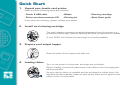
Unpack your Javelin card printer
Make sure the following items are included:
- Power & USB cable
- Driver and documentation CD
- Ribbon
- Cleaning kit
- Cleaning cartridge
- Quick Start guide
If any items are missing, please contact your dealer.
2.
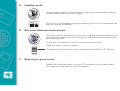
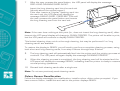
Install card cleaning cartridge
The card cleaning cartridge is packed separately from the printer in a
protective plastic bag. Remove carefully and peel off tape before installation.
A loud ‘CLICK’ will indicate the cartridge is correctly installed.
3.
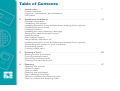
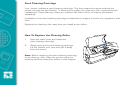
Prepare card output hopper
Grab the sides of the hopper and slide out.
4.
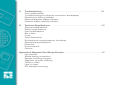
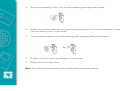
Loading ribbon
Turn on the power to the printer and raise the printhead.
Ribbon loading involves the placement of the ribbon onto the supply and
take-up spindles.
As soon as the ribbon is installed and the printhead is locked down, the
spindles will automatically rotate to take up any slack and to synchronise the
ribbon to the correct panel.
2