1
Connecting Power
The printer includes an internal AC power supply that accepts nominal input voltage in
the range from 110 to 230 volts at 50 to 60 Hertz. The power source must be grounded.
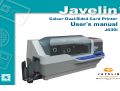
Depending on specific model number, your J430i printer will include a power cord. If this is not
appropriate, AC power cords may be purchased locally; make sure it is a three-wire (grounded)
cord.
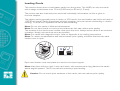
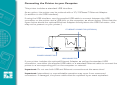
POWER SWITCH
POWER CONNECTOR
Place the printer’s power switch in the OFF ( O ) position.
Depending on your local AC voltage, plug the appropriate power cord into the printer’s
power connector and a grounded AC power source connection.
To turn the printer on, set the printer’s power switch to the ON ( | ) position.
Caution: If the power cord appears damaged in any way, or if the power cord will not
securely plug into the printer’s power connector or the AC power source connection,
STOP! Use of a damaged or incorrect power cord could cause equipment damage,
result in an electrical fire, or possibly cause injury.
21