1
How to Disarm
Trouble Display
To disarm your system when entering:
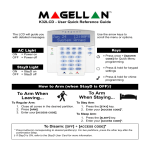
The LCD screen will display all troubles when they
occur. To view and clear troubles:
Step
Description
1.
Press [OFF] and enter your [ACCESS
CODE].
2.
Select the desired partition (1 or 2). For
both, press one, then the other after the
beep.
Panic Keys
Step
Description
1.
Press [TBL].
2.
Scroll through the list of troubles using
the arrow keys. Refer to the MGSP User
Guide for trouble descriptions and
instructions.
3.
Perform the recommended repair
instructions to clear the trouble. If no
instructions are given, contact your
security company.
4.
Press [CLEAR] to exit.
To send a silent or audible alarm to your security
company, press and hold one of the key
combinations listed below, for two seconds.
Panic Alarm
Key Combinations
Police
Keys [1] & [3]
How to Bypass Zones
Medical
Keys [4] & [6]
When a zone is bypassed, it remains unarmed when
the corresponding area is armed. To bypass zones:
Fire
Keys [7] & [9]
Step
Description
Alarm Memory Display
1.
Press [BYP].
To view the alarms that occurred during the last
armed period:
2.
Enter your [ACCESS CODE].
3.
Select the zone you want to bypass by
entering the zone number, e.g., zone
3=03.
4.
Press [Enter].
Step
Description
1.
Disarm the system.
2.
Press [MEM]. All zones that were
breached during the last armed period
will be displayed. Use the arrow keys to
view the zones.
3.
Press [ENTER] to save and exit.
© 2014 Paradox Ltd. All rights reserved.
Specifications may change without prior notice.
For complete patent, trademark, certification,
and warranty information, please visit www.paradox.com.