1
Third Party Manual Check PayLoad Entry
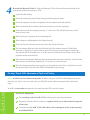
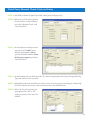
STEP 1: Add PPD to schedule/Open Pay Period: (third party sick pay only).
STEP 2: Select the 3rd Tab when opening
the Pay Period, “Switch Setting”
and select “Manual Check” and
“Override Taxes”.
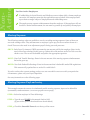
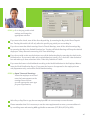
STEP 3: In the employee earnings screen,
type the word “CASH” as the
manual check number OR an
optional identifier number from
third party reports and select
“Override Taxes”.
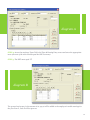
STEP 4: In the Earnings tab use the Rate Code “0”, enter the appropriate third party sick pay Earning
Type and Amount to be recorded.
STEP 5: Scheduled Deductions should be zero (this can be set in the pay period setting by “deselecting”
the Take Deductions box) by removing the amount in the deduction tab.
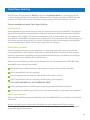
STEP 6: Select the Tax tab and enter the
appropriate FICA, SIT or FIT
employer portion of the tax to be
drafted.
14