1
PROBLEM SOLVING
Very often incorrect UPS operation is not caused by a fault but by common problems, difficulties or
carelessness.
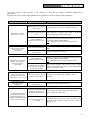
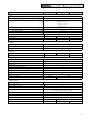
The table below gives some useful information to help the user solve the most frequent problems.
PROBLEM
POSSIBLE CAUSE
THE POWER CABLE IS NOT
CONNECTED
THE DISPLAY PANEL
DOES NOT LIGHT UP
THE PANEL IS ON BUT
THE LOAD IS NOT
POWERED
THE UPS IS IN BATTERY
MODE EVEN THOUGH
MAINS POWER IS
AVAILABLE
Check that the power cable is connected correctly.
NO MAINS POWER (BLACK- Check that there is voltage in the socket to which the
OUT)
UPS is connected (try with a table lamp)
INPUT THERMAL
PROTECTION IS ACTIVE
Reset the protection by pressing the button on the rear
of the UPS (CIRCUIT BREAKER).
N.B.: Check that there is no UPS output overload.
UPS IN STANDBY MODE
Press the ON button on the front panel to power the
loads.
THE LOAD IS NOT
CONNECTED
Check the connection to the load.
INPUT THERMAL
PROTECTION ACTIVE
Reset the protection by pressing the button on the rear
of the UPS (CIRCUIT BREAKER).
N.B.: Check that there is no UPS output overload.
THE INPUT VOLTAGE IS
OUTSIDE THE ACCEPTED
VALUES FOR OPERATION
OFF MAINS POWER
Mains power problem. Wait until the input voltage
returns to acceptable limits; the UPS will automatically
return to mains power mode.
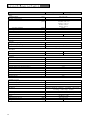
A CONTINUOUS BEEP
SOUNDS AND THE LOAD
INDICATOR IS ALL LIT UP
THE LOAD CONNECTED TO
THE UPS IS TOO HIGH
“BATTERY FAILURE”
APPEARS ON THE
DISPLAY
THE BATTERIES MUST BE
REPLACED
A CONTINUOUS BEEP
SOUNDS AND THE LED
PANEL SHOWS ONE OF
THE INDICATIONS LISTED
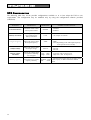
IN THE “FAULTS TABLE”
SOLUTION
Reduce the load so that it falls within the 102%
threshold.
Contact the Technical Support centre
A FAULT HAS BEEN FOUND
Disconnect all the loads and reconnect them one at a
ON ONE OR MORE LOADS
time to identify the faulty load.
POWERED BY THE UPS
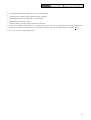
A MALFUNCTION HAS
OCCURRED
If possible disconnect the load, switch the UPS off and
on again. If the problem remains, call the Technical
Support centre.
55