1
General Operating Instructions
"TV" are all based on TV Input Source. The operating steps for any other Input Source are nearly the same
as TV Input Source.
Note: [t
], [ u
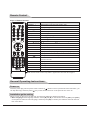
], [▲] and [ ▼] in this Manual stand for the direction cursor keys on the remote control unless
specifically defined. The operating instructions in the text below are all based on keys on the remote control.
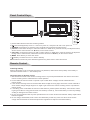
Please review and understand the keys on the panel.
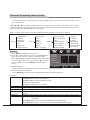
Below is a list of menu options. You will find detailed operating instructions later in the manual.
In TV Mode
Picture Mode
Contrast
Brightness
Sound
Picture
Saturation
Tint
Sharpness
Advanced Video
Sound Mode
Bass
Treble
Setting
Balance
Surround
SPDIF
Audio Language
Menu Language
Parental Controls
Time
TV
Closed Caption
Menu Settings
VGA Settings
Restore Default
Antenna
Auto Scan
Favorite
Show/ Hide
Channel No.
Channel Label
DTV Signal:
Picture
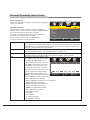
1. Press [MENU] to display the main menu.
2. Press [▼] to enter the menu "Picture" and press [▲] and
[▼] to move the cursor to select an adjustment item.
3. Press [t
] and [u
] to change the analog value. When there
is an icon " " on the screen, you can press [u
] to enter
the next sub-menu or press [MENU] to exit the current
menu.
Picture Mode
Contrast
Brightness
Saturation
Tint
Sharpness
Advanced Video
Select
★ Special Attention
All the analog values adjusted by the user will be auto saved as personal mode.
Personal
50
50
50
50
50
Move
MENU
Return
★ Remote Control Shortcut Keys
Press [SMART P] to directly shift among Standard, Dynamic, Soft and Personal.
Function:
Picture Mode
Select from four image modes: Standard/Dynamic/Soft/Personal
Standard: Moderate color and brightness
Dynamic: Brilliant, bright, and dynamic image
Soft: Soft and bright image
Personal: Set the value as you prefer
Contrast
Adjust the image contrast and change the image level feeling with an analog value of 0-100
Brightness
Adjust the screen brightness with an analog value of 0-100
Saturation
Adjust the image brilliance with an analog value of 0-100
Tint
Adjust the image hue to be warmer or cooler with an analog value of 0-100 only in NTSC
system
Sharpness
Adjust the image definition and sharpen or soften the image with an analog value of 0-100
Advanced Video Color Temp.: Adjust the white chroma of the image, selecting from Cool/Normal/Warm
repeatedly
Scale Mode: Select picture scale: Auto/Subtitle/Cinema/4:3/Full mode
Noise Reduction: Set the noise reduction level: Off/Weak/Middle/Strong/Auto
10