1
General Operating Instructions
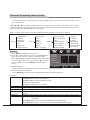
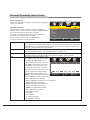
"Show/Hide." Press [▲] and [▼] to select a channel, then press [OK], the channel which you selected will hide.
Press [OK] again to display the channel.
Channel No.
Press [▲] or [▼] to move the cursor to select "Channel No ." and then press [t
] or [u
] to select Channel.
Channel Label
Press [▲] or [▼] to move the cursor to select "Channel Label" and then press [u
] or [OK] to enter the menu
"Channel Label,"press [▲], [▼], [t
] or [u
] to edit channel label.
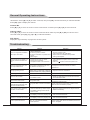
DTV Signal:
Display the signal intensity of programme in DTV system.
Troubleshooting
Failure
The TV image has snowflakelike spots, and noise
Reason
1. Antenna connector is loose, or
cable is damaged
2. Antenna type isn't suitable
3. Antenna orientation or position isn't
proper
4. Weak signal
Solution
1. Check whether antenna connector is loose,
whether cable is intact
2. Check antenna type (VHF/UHF)
3. Adjust antenna orientation and position
4. Use signal amplifier
The screen has no display, no
audio, and the indicator isn't
on
1. Power plug is loose, or power
supply isn't connected
2. The power button is not turned on
1. Check whether the power cord is connected
properly
2. Check if " " button on the front panel is on
The TV image has spot, line
or stripe interference
The signal is interfered with by neon
light, electric hair dryer, etc.
Do not use the electric hair dryer near the device,
and adjust the antenna direction to reduce
interference
Image ghosting occurs
1. The TV signal is reflected by a large
1. Use high-directional antenna
building such as a tower block or hotel, etc.
2. Adjust the antenna orientation
2. Antenna orientation isn't properly positioned
The image doesn't have color
Color saturation is too low
Enter "Picture" to increase the color saturation
The TV has no audio
1. The volume is too low
2. The audio is mute
1. Adjust the volume properly
2. Press the "MUTE" key on the remote control to
cancel the mute state
DTV screen has mosaic
The signal is weak
Check whether the antenna plug is loose and
whether the cable is intact
The PC has no display,
prompts no signal input, and
the red indicator flashes
The signal cable is loose or has fallen
off
Check whether the signal cable is loose or has
fallen off, and reconnect it properly
The remote control distance
is short, or out of order
1. The signal receiver of the remote
control is blocked by certain object
2. The battery voltage of the remote
control is low
1. Move the object that blocks the signal receiver
2. Replace the battery
PC display is blurry
1. The adjustment isn't properly set
2. The display mode isn't properly set
1. Use automatic adjustment function
2. Use recommended mode
1. The adjustment isn't properly set
PC image shifts, can't fill the
screen, or exceeds the screen 2. The display mode isn't properly set
1. Use automatic adjustment function
2. Use recommended mode
Can't operate the device
External influences (e.g. lighting,
static, etc.) will interfere with the
normal operation
16
Disconnect the power supply first,connect the
power supply after about 1-2 minutes, then turn
on the TV again