1
General Operating Instructions
Sound
1. Press [MENU] to display the main menu.
2. Press [t
] and [u
] to move the cursor to select the menu
"Sound," press [▼] to enter the menu "TV" and press [▲]
and [▼] to move the cursor to select an adjustment item.
3. Press [t
] and [u
] to change the analog value or state.
Function:
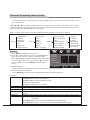
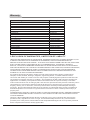
Sound Mode
Bass
Treble
Balance
Surround
SPDIF
Audio Language
Select
Personal
75
70
50
Off
RAW
English
Move
MENU
Return
Select from five sound modes: Standard/Music/Movie/Sports/Personal
Adjust bass value of 0-100
Adjust treble value of 0-100
Adjust the sound output proportion of the left and right sound channels within 0-100.
When you set the analog value as 0, there will be no sound from the right speaker. When
you set the analog value as 100, there will be no sound from the left speaker. When you
set the analog value as 50, both speakers will have the same volume.
Enable or disable surround sound
Surround
Select SPDIF mode, selecting from RAW/PCM
SPDIF
Audio Language Digital TV language selection: English/French/Spanish
Note: This item is adjustable only in DTV mode. It is not adjustable in ATV mode.
The default value is English.
Sound Mode
Bass
Treble
Balance
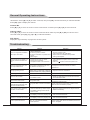
Volume Adjustment
Press [VOL+] and [VOL-] to adjust the volume. Press [VOL+] to increase the volume and press [VOL-] to
decrease the volume.
Mute
If you want to turn off the sound for a-while, press [MUTE] to enable the mute function and you will
see a mute icon appear on the screen. Press [MUTE] again to disable the mute function.
★Special Attention
Please set the balance value as 50 in general cases.
★Remote Control Shortcut Keys
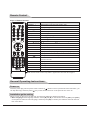
Press [SMART S] to directly shift among Standard/Music/Movie/Sports/Personal.
Setting
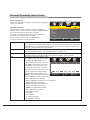
1. Press [MENU] to display the main menu.
Menu Language
2. Press [t
] and [u
] to move the cursor to select the menu
Parental Controls
"Setting," press [▼] to enter the menu "Setting" and press
Time
[▲] and [▼] to move the cursor to select an adjustment
Closed Caption
Menu Settings
item.
VGA Settings
3. Press [t
] and [u
] to change the analog value. When
Restore Default
there is an icon " " on the screen, you can press [u
] to
enter the next sub-menu or press [MENU] to exit the
Select
current menu.
11
English
Move
MENU
Return