1
C.3 Installing the 2.5" Hard Disk Drive (HDD)
You can attach one enhanced Integrated Device Electronics (IDE) hard
disk drive to the Point of Care Terminal’s internal controller which uses a
PCI local-bus interface. The following are instructions for installation:
1.
Detach the HDD bracket by unscrewing the four screws (#2) on the
top of the HDD bracket.
2.
Place the HDD inside the HDD bracket and tighten four screws
(#1) from both sides of the HDD bracket.
3.
The HDD cable (1 x 44-pin to 1 x 44-pin) is next to the HDD
bracket. Connect the HDD cable to the POC-155. Make sure that
the red wire corresponds to Pin 1 on the connector (CN6), which is
labeled on the board. Plug the other end of the cable into the HDD,
with Pin 1 on the cable corresponding to Pin 1 on the HDD.
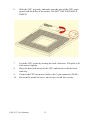
Figure C.2: Installing the primary 2.5" HDD
POC-155 User Manual
72