Transcript
LCD8000-97C Quick Start Guide
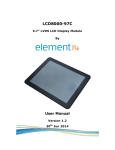
This Quick Start Guide introduces the LCD8000-97C, a 9.7-inch capacitive multi-touch# TFT LCD for SABRE Lite
(MCIMX6Q-SL) & MarS board(MARS BOARD), featuring the powerful Freescale i.MX6 multimedia application
processor.
Kit Contents
A
1. Connecting to MarS Board
USB Hos
t
Debug (J9)
LCD8000-97C
5V@4A Adapter
(Power adapter not included)
B
LVDS (J3)
Power (J8)
2. Connecting to SABRE Lite
Mini HDMI C-to-C Cable Dedicated for MarS Board
(for LVDS signal transmission)
RS232
Serial Po
rt
C
Debug Port
UART(J17)
5V@4A Adapter
(Power adapter not included)
IIC (J7)
LVDS (J6)
Power(J10)
LVDS Cable Dedicated for SABRE Lite
Setting Up the System*
Follow the outlines 1 or 2 above to connect SABRE Lite OR MarS board, LCD8000-97C and PC, using a 5V@4A
adapter to power the board.
Execute the following instructions under *uboot to set a proper display mode for the 9.7-in LVDS LCD:
setenvbootargsconsole=ttymxc1,115200 init=/initrw video=mxcfb0:dev=ldb, LDB-XGA,
if=RGB666 fbmem=10M vmalloc=400M androidboot.console=ttymxc1
saveenv
Reboot the board. After reboot the system should display Android image.
*Please refer to the SABRE Lite or MarS board User Manual on how to work with uboot at:
www.element14.com/iMX6
Disclaimer
This product is intended to be used for ENGINEERING DEVELOPMENT, DEMONSTRATION, OR EVALUATION PURPOSES ONLY and is not considered
by element14 to be a finished end product fit for general consumer use. Persons handling the product(s) must have electronics training and
observe good engineering practice standards. The goods being provided are not intended to be complete in terms of required design and/or
manufacturing related protective considerations, including product safety and environmental measures typically found in end products that
incorporate such semiconductor components or circuit boards.
Please visit www.element14.com/iMX6 for more technical information
# multi-touch is available only in Android system, for Linux system it’s single touch only.