1
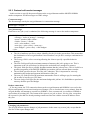
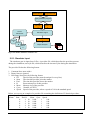
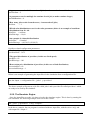
Once the simulator is launched it does the following: Read input file Create a list of jobs ordered by their arrival time to the system Create a list of providers ordered by their arrival time to the system Initialize the solver framework and set it to use the market algorithm chosen by the –s option (where the default is the greedy-migration algorithm) Start the time counter at t=0 At each cycle of the simulation the simulator does the following: Increment the time counter t=t+1 Check if there are jobs that should be submitted to the simulation. If so, those jobs are moved from the initial job list and are added to an internal list of waiting jobs. The solver framework is notified about the arrival of new jobs Check if there are providers that should be registered in the system at that time. If there are such providers the solver framework is notified about the addition of new providers Check if there are running jobs that consumed enough CPU to finish. If so the solver framework is notified about the finished jobs Check if there are jobs that finished migrating or have become suspended and notify the solver framework Ask the solver framework to compute an allocation of jobs to providers, receive the allocation and implement it. Each time an allocation is computed the simulator does the following: If the allocation is an allocation of a job not yet started (waiting) then this job is marked as running immediately with no delay If the allocation means a migration of the job from one node to another, the time it should take the migration to occur is calculated (based on the job‟s memory size and network bandwidth) and the job is kept in a “migrating” status for that time If the allocation means a suspension (freezing), then the time it should take this suspension to occur is calculated (based on the job‟s memory size and the disk speed) and the process is kept in a “being suspended” state until this time passes For each completed job, the simulator computes statistics of its run and keeps them in a special memory contained buffer. Once all jobs finish running, the statistics are outputted to a single simulation output file. 2.5.3. Simulator Output The simulator outputs a single output file at the end of the simulation. This output file may be composed of several parts where each part contains a different type of information. We will describe the basic statistics the simulator produces. 2.5.3.1. Simulation Summary This part of the output file provides a full summary of the simulation. The example below shows the summary part of the output for running the simulations of the „jobs.1‟ and „providers.1‟ input files. We mark out comments in blue while the original output is in black: 30