1
Grapholas 10.3
21 / 47
7.2.9 Generating a Job
Ctrl + E
opens a dialog window in which the job name can be entered. Pressing "OK" sends the job.
7.3 Menu Bar
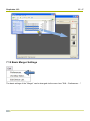
Only the additional functions which are not listed in the toolbar are described. The menu bar is
situated above the toolbar.
7.3.1 Unloading Images
"Unload Image" (Ctrl + u) removes the selected image from the "Merger". The file is not
deleted from the hard drive.
7.3.2 Unloading Positioned Images
"Remove All Positioned Images" (Ctrl + d) removes all images from the "Merger" which are
positioned on the working surface. The files are not deleted from the hard drive. This is useful
when the job was sent and several images are still in the queue.
7.3.3 Selecting the Working Directory
"Select Working Folder" (Ctrl + w) changes the working directory in which all images are
copied or moved during the loading process. This option is not available if images are loaded.