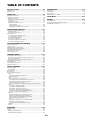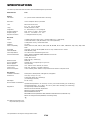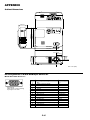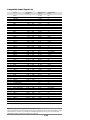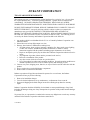
1
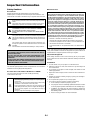
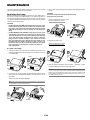
Fire and Shock Precautions
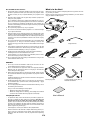
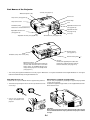
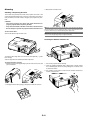
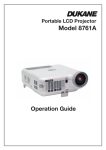
What's in the Box?
1. Ensure that there is sufficient ventilation and that vents are unobstructed to prevent the build-up of heat inside your projector. Allow
at least 3 inches (10 cm) of space between your projector and a
wall.
Make sure your box contains everything listed. If any pieces are missing, contact your dealer.
Please save the original box and packing materials if you ever need to
ship your Dukane 8766 Projector.
2. Prevent foreign objects such as paper clips and bits of paper from
falling into your projector.
Do not attempt to retrieve any objects that might fall into your projector. Do not insert any metal objects such as a wire or screwdriver
into your projector. If something should fall into your projector, disconnect it immediately and have the object removed by a qualified
NEC service personnel.
Lens cap
3. Do not place any liquids on top of your projector.
4. Do not look into the lens while the projector is on. Serious damage
to your eyes could result.
FF
VI
DE
O
PO
W
VI
S-
ER
DE
O
N
RG
O
B
AU
TO
AD
J.
T
C
LE
E
S
6. Do not cover the lens with the supplied lens cap or equivalent while
the projector is on. Doing so can lead to melting of the cap and
possibly burning your hands due to the heat emitted from the light
output.
O
5. Keep any items such as magnifying glass out of the light path of the
projector. The light being projected from the lens is extensive, therefore any kind of abnormal objects that can redirect light coming out
of the lens, can cause unpredictable outcome such as fire or injury
to the eyes.
Projector
PJ
PIC
TU
RE
HE
LP
AS
PE
CT
FR
EE
ZE
MA
GN
IFY
PIC
-MU
TE
VO
LU
ME
Remote control
String and rivet
7. The projector is designed to operate on a power supply of 100-120
or 200-240 V 50/60 Hz AC. Ensure that your power supply fits this
requirement before attempting to use your projector.
8. Handle the power cable carefully and avoid excessive bending.
A damaged cord can cause electric shock or fire.
9. If the projector is not to be used for an extended period of time,
disconnect the plug from the power outlet.
10. Do not touch the power plug during a thunderstorm. Doing so can
cause electrical shock or fire.
Power cable
USB cable
RGB signal cable
CAUTION
1. Do not try to touch the ventilation outlet on the front as it can become heated while the projector is turned on.
2. Do no use the tilt-foot for purposes other than originally intended.
Misuses such as gripping the tilt-foot or hanging on the wall can
cause damage to the projector.
3. When carrying the projector by the carrying handle, make sure the
two screws that attach the carrying handle to the projector cabinet
are tight.
Insufficient tightening of the two screws could result in the projector
falling and causing injury.
Soft carrying case
4. Enable High-Speed Fan mode if you continue to use the projector
for consecutive days. (From the menu, select [Advanced] → [High
Speed Fan Mode].)
5. Do not unplug the power cable from the wall outlet under any one of
the following circumstances.
Doing so can cause damage to the projector:
*
While the Hour Glass icon appears.
*
While the cooling fans are running. (The cooling fans continue
to work for 60 seconds after the projector is turned off).
Lamp Replacement
User's Manual
•
To replace the lamp, follow all instructions provided on page E-30.
•
Be sure to replace the lamp when the message "The lamp has
reached the end of its usable life. Please replace the lamp."
appears. If you continue to use the lamp after the lamp has reached
the end of its usable life, the lamp bulb may shatter, and pieces of
glass may be scattered in the lamp case. Do not touch them as the
pieces of glass may cause injury.
If this happens, contact your dealer for lamp replacement.
•
Allow a minimum of 60 seconds to elapse after turning off the projector. Then turn off the main power switch, disconnect the power
cable and allow 60 minutes to cool the projector before replacing
the lamp.
E-3
Carrying handle, Screw (M4⳯2)
Flathead screwdriver