1
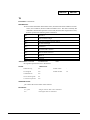
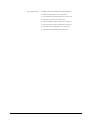
DMC-1000, DMC-1500
Command
Reference
Manual Rev. 1.0f
By Galil Motion Control, Inc.
Galil Motion Control, Inc.
203 Ravendale Drive
Mountain View, California 94043
Phone: (650) 967-1700
Fax: (650) 967-1751
Internet Address: [email protected]
URL: www.galilmc.com
Rev 12-99
i • Index
COM1000.DOC
Overview
Controller Notation
This command reference is a supplement to Galil Motion Control User Manual. For proper controller
operation, consult the Users Manual. This manual describes commands to be used with the following
Galil Motion Controllers: DMC-1000, DMC-1500. Commands are listed in alphabetical order.
Please note that all commands may not be valid for every controller. The following symbol is used to
identify the controllers for which the command is applicable.
DMC-1000
DMC-1500
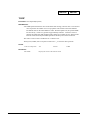
This symbol is placed at the top right corner of each command description. The DMC-1000 symbol
refers to all controllers from the DMC-1000 series (1-8 axes), the DMC-1500 symbol refers to all
controllers from the DMC-1500 series (1-8 axes). When the corresponding box entry is dark, the
command is not valid for that controller.
Removing Non-Applicable Commands:
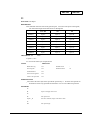
Since there may be commands which are not applicable to your controller, you may use the following
table to identify and remove these pages:
Manual Pages Not Applicable to Specific Controllers:
CONTROLLER
PAGE NO
DMC-1000
9,24,25,27,30,116
DMC-1500
55,117,157
Servo and Stepper Motor Notation:
Your motion controller has been designed to work with both servo and stepper type motors.
Installation and system setup will vary depending upon whether the controller will be used with stepper
motors, or servo motors. To make finding the appropriate instructions faster and easier, icons will be
next to any information that applies exclusively to one type of system. Otherwise, assume that the
instructions apply to all types of systems. The icon legend is shown below.
Attention: Pertains to servo motor use.
Attention: Pertains to stepper motor use.
Command Descriptions
Each executable instruction is listed in the following section in alphabetical order. Below is a
description of the information which is provided for each command.
COM1000.DOC
Index • 1
The two-letter Opcode for each instruction is placed in the upper right corner.
Axes Arguments
Some commands require the user to identify the specific axes to be affected. These commands are
followed by uppercase X,Y,Z, W or A,B,C,D,E,F,G and H. No commas are needed and the order of axes
is not important. Do not insert any spaces prior to any command. For example, STX; AMX is invalid
because there is a space after the semicolon. When no argument is given, the command is executed for
all axes.
Valid XYZW syntax
SH X
Servo Here, X only
SH XYW
Servo Here, X,Y and W axes
SH XZW
Servo Here, X,Z and W axes
SH XYZW
Servo Here, X,Y,Z and W axes
SH BCAD
Servo Here, A,B,C and D axes (Note: ABCD IS the same as XYZW)
SH ADEG
Servo Here, A,D,E and G axes (Note: AD is the same as XW)
SH H
Servo Here, H axis only
SH
Servo Here, all axes
Parameter Arguments
Some commands require numerical arguments to be specified following the instruction. In the argument
description, these commands are followed by lower case x,y,z,w or a,b,c,d,e,f,g,h where the lowercase
letter represents the value. Values may be specified for any axis separately or any combination of axes.
The argument for each axis is separated by commas. Examples of valid syntax are listed below.
Valid x,y,z,w syntax
AC x
Specify argument for x axis only
AC x,y
Specify x and y only
AC x,,z
Specify x and z only
AC x,y,z,w
Specify x,y,z,w
AC a,b,c,d
Specify arguments for a,b,c,d (Note: a,b,c,d are the same as x,y,z,w)
AC ,b,,,e
Specify b and e axis only (Note: b and y axis are the same)
AC ,,,e,f
Specify e and f (Note: e and z axis are the same)
Where x,y,z,w and a,b,c,d,e,f,g and h are replaced by actual values.
Direct Command Arguments
An alternative method for specifying data is to set data for individual axes using an axis designator
followed by an equals sign. The * symbol defines data for all axes to be the same. For example:
2 • Index
PRY=1000
Sets Y axis data at 1000
PR*=1000
Sets all axes to 1000
COM1000.DOC
Interrogation
Most commands accept a question mark (?) as an argument. This argument causes the controller to
return parameter information listed in the command description. Type the command followed by a ? for
each axis requested. The syntax format is the same as the parameter arguments described above except
'?' replaces the values.
PR ?
The controller will return the PR value for the X axis
PR ,,,?
The controller will return the PR value for the W axis
PR ?,?,?,?
The controller will return the PR value for the A,B,C and D axes
PR ,,,,,,,?
The controller will return the PR value for the H axis
Operand Usage
Most commands have a corresponding operand that can be used for interrogation. The Operand Usage
description provides proper syntax and the value returned by the operand. Operands must be used
inside of valid DMC expressions. For example, to display the value of an operand, the user could use
the command:
MG ‘operand’
All of the command operands begin with the underscore character (_). For example, the value of the
current position on the X axis can be assigned to the variable ‘V’ with the command:
V=_TPX
Usage Description
The Usage description specifies the restrictions on proper command usage. The following provides an
explanation of the command information provided:
"While Moving" states whether or not the command is valid while the controller is performing a
previously defined motion.
"In a program" states whether the command may be used as part of a user-defined program.
"Command Line" states whether the command may be used other than in a user-defined program.
"Can be Interrogated" states whether or not the command can be interrogated by using the ? as a
command argument.
"Used as an Operand" states whether the command has an associated operand.
Default Description
In the command description, the DEFAULT section provides the default values for controller setup
parameters. These parameters can be changed and the new values can be saved in the controller's nonvolatile memory by using the command, BN. If the setup parameters are not saved in non-volatile
memory, the default values will automatically reset when the system is reset. A reset occurs when the
power is turned off and on, when the reset button is pushed, or the command, RS, is given.
When a master reset occurs, the controller will always reset all setup parameters to their default values
and the non-volatile memory is cleared to the factory state. A master reset is executed by the command,
<ctrl R> <ctrl S> <Return> OR by powering up or resetting the controller with the MRST jumper or dip
switch on.
COM1000.DOC
Index • 3
For example, the command KD is used to set the Derivative Constant for each axis. The default value
for the derivative constant is 64. If this parameter is not set by using the command, KD, the controller
will automatically set this value to 64 for each axis. If the Derivative Constant is changed but not saved
in non-volatile memory, the default value of 64 will be used if the controller is reset or upon power up of
the controller. If this value is set and saved in non-volatile memory, it will be restored upon reset until a
master reset is given to the controller.
The default format describes the format for numerical values which are returned when the command is
interrogated. The format value represents the number of digits before and after the decimal point.
4 • Index
COM1000.DOC
DMC-1000
DMC-1500
AB
FUNCTION:
Abort
DESCRIPTION:
AB (Abort) stops a motion instantly without a controlled deceleration. If there is a program
operating, AB also aborts the program unless a 1 argument is specified. The command
AB will shut off the motors for any axis in which the off-on-error function is enabled (see
command "OE" on page 114).
ARGUMENTS: AB n
where
n = no argument or 1
1 aborts motion without aborting program, 0 aborts motion and program
AB aborts motion on all axes in motion and cannot stop individual axes.
USAGE:
DEFAULTS:
While Moving
Yes
Default Value
---
In a Program
Yes
Default Forma t
---
Command Line
Yes
Can be Interrogated
No
Used as an Operand
No
OPERAND USAGE:
_AB gives state of Abort Input.
RELATED COMMANDS:
"SH" on page 137
Turns servos back on if they were shut-off by Abort and OE1.
EXAMPLES:
AB
Stops motion
OE 1,1,1,1
Enable off-on-error
AB
Shuts off motor command and stops motion
#A
Label - Start of program
JG 20000
Specify jog speed on X-axis
BGX
Begin jog on X-axis
WT 5000
Wait 5000 msec
AB1
Stop motion without aborting program
W T 5000
Wait 5000 milliseconds
SH
Servo Here
JP #A
Jump to Label A
EN
End of the routine
Hint: Remember to use the parameter 1 following AB if you only want the motion to be aborted.
Otherwise, your application program will also be aborted.
COM1000.DOC
Index • 5
DMC-1000
DMC-1500
AC
FUNCTION: Acceleration
DESCRIPTION:
The Acceleration (AC) command sets the linear acceleration rate of the motors for independent
moves, such as PR, PA and JG. The parameters input will be rounded down to the nearest
factor of 1024. The units are in counts per second squared. The acceleration rate may be
changed during motion. The DC command is used to specify the deceleration rate.
ARGUMENTS: AC x,y,z,w
ACX=x
AC a,b,c,d,e,f,g,h
where
x,y,z,w are unsigned numbers in the range in the range 1024 to 67107840
"?" returns the acceleration value for the specified axes.
USAGE:
DEFAULTS:
While Moving
Yes
Default Value
25600
In a Program
Yes
Default Format
8.0
Command Line
Yes
Can be Interrogated
Yes
Used as an Operand
Yes
OPERAND USAGE:
_ACx contains the value of acceleration for the specified axis.
RELATED COMMANDS:
"DC" on page 43
Specifies deceleration rate.
"FA " on page 67
Feedforward Acceleration
"IT" on page 85
Smoothing constant - S-curve
EXAMPLES:
AC 150000,200000,300000,400000
Set X-axis acceleration to 150000, Y-axis to
200000 counts/sec 2, the Z -axis to 300000
counts/sec 2, and the W -axis to 400000
count/sec 2.
AC ?,?,?,?
Request the Acceleration
0149504,0199680,0299008,0399360
Return Acceleration
(resolution, 1024)
V=_ACY
Assigns the Y acceleration to the variable
V
Hint: Specify realistic acceleration rates based on your physical system such as motor torque rating,
loads, and amplifier current rating. Specifying an excessive acceleration will cause large following
error during acceleration and the motor will not follow the commanded profile. The acceleration
feedforward command FA will help minimize the error.
6 • Index
COM1000.DOC
DMC-1000
DMC-1500
AD
FUNCTION: After Distance
DESCRIPTION:
The After Distance (AD) command is a trippoint used to control the timing of events. This
command will hold up the execution of the following command until one of the following
conditions have been met:
1.
The commanded motor position crosses the specified relative distance from the start of
the move.
2.
The motion profiling on the axis is complete.
3.
The commanded motion is in the direction which moves away from the specified position.
The units of the command are quadrature counts. Only one axis may be specified at a time.
The motion profiler must be on or the trippoint will automatically be satisfied.
Note: AD will be affected when the motion smoothing time constant, IT, is not 1. See IT
command for further information.
ARGUMENTS: AD x or AD,y or AD,,z or AD,,,w ADX=x
AD a,b,c,d,e,f,g,h where
x,y,z,w are unsigned integers in the range 0 to 2147483647 decimal.
USAGE:
DEFAULTS:
While Moving
Yes
Default Value
-
In a Program
Yes
Default Format
-
Command Line
Yes
Can be Interrogated
No
Used as an Operand
No
RELATED COMMANDS:
"AD" on page 7
After distance for repetitive triggering
"A V" on page 18
After distance for vector moves
EXAMPLES:
COM1000.DOC
#A;DP0,0,0,0
Begin Program
PR 10000,20000,30000,40000
Specify positions
BG
Begin motion
AD 5000
After X reaches 5000
MG "Halfway to X";TPX
Send message
AD ,10000
After Y reaches 10000
MG "Halfway to Y";TPY
Send message
AD ,,15000
After Z reaches 15000
MG "Halfway to Z";TPZ
Send message
AD ,,,20000
After W reaches 20000
Index • 7
MG "Halfway to W";TPW
Send message
EN
End Program
Hint: The AD command is accurate to the number of counts that occur in 2 msec. Multiply your
speed by 2 msec to obtain the maximum position error in counts. Remember AD measures incremental
distance from the start of a move on one axis.
8 • Index
COM1000.DOC
DMC-1500
AF
FUNCTION: Analog Feedback
DESCRIPTION::
The Analog Feedback (AF) command is used to set an axis with analog instead of digital
feedback (quadrature or pulse & dir). As the analog feedback is decoded by a 12-bit A/D
converter, an input voltage of 10 volts is decoded as a position of 2047 counts and a
voltage of -10 volts corresponds to a position of -2048 counts. An option is available for
16-bits where an input voltage of 10 volts is decoded as a position of 32,768 counts and a
voltage of -10volts corresponds to a position of -32,768 counts.
ARGUMENTS: AF x,y,z,w
AFX=x AF a,b,c,d,e,f,g,h
where
x,y,z,w are integers
1 = Enables analog feedback
0 = Disables analog feedback and switches to digital feedback
"?" returns a 0 or 1 which states whether analog feedback is enabled for the specified axes.
USAGE:
DEFAULTS:
While Moving
No
Default Value
0,0,0,0
In a Program
Yes
Default Format
-
Command Line
Yes
Can be Interrogated
Yes
Used as an Operand
Yes
OPERAND USAGE:
_AFx contains the value of acceleration for the specified axis.
RELATED COMMANDS:
"MT" on page 111
Motor Type
"CE" on page 29
Configure Encoder
EXAMPLES:
AF 1,0,0,1
Analog feedback on X and W axis
V1 = _AFX
Assign feedback type to variable
AF ?,?,?
Interrogate feedback type
Note: AF on the 8 th axis of DMC-1580 requires special modification from the factory. Consult Galil.
COM1000.DOC
Index • 9
DMC-1000
DMC-1500
AI
FUNCTION: After Input
DESCRIPTION:
The AI command is used in motion programs to wait until the specified input has occurred. If
n is positive, it waits for the input to go high. If n is negative, it waits for n to go low.
ARGUMENTS: AI +/-n
where
n is an integer in the range 1 to 8 decimal
USAGE:
DEFAULTS:
While Moving
Yes
Default Value
-
In a Program
Yes
Default Format
-
Command Line
Yes
Can be Interrogated
No
Used as an Operand
No
RELATED COMMANDS:
@IN[n]
Function to read input 1 through 8
"II" on page 79
Input interrupt
#ININT
Label for input interrupt
EXAMPLES:
#A
Begin Program
AI 8
Wait until input 8 is high
SP 10000
Speed is 10000 counts/sec
AC 20000
Acceleration is 20000 counts/sec2
PR 400
Specify position
BG X
Begin motion
EN
End Program
Hint: The AI command actually halts execution of the next line in a program until the specified input
is at the desired logic level. Use the conditional Jump command (JP) or input interrupt (II) if you do
not want the program sequence to halt.
10 • Index
COM1000.DOC
DMC-1000
DMC-1500
AL
FUNCTION: Arm Latch
DESCRIPTION:
The AL command enables the latching function (high speed main) of the controller. When the
position latch is armed, the main or auxiliary encoder position will be captured upon a low
going signal. Each axis has a position latch and can be activated through the general
inputs: Input 1 (X or A axis), Input 2 (Y or B axis), Input 3 (Z or C axis), Input 4 (W or D
axis), Input 5 (E axis), Input 6 (F axis), Input 7 (G axis). The command RL returns the
captured position for the specified axes. When interrogated the AL command will return a
1 if the latch for that axis is armed or a zero after the latch has occurred. The CN command
will change the polarity of the latch.
ARGUMENTS: AL XYZW where
X,Y,Z,W specifies the X,Y,Z,W axes.
USAGE:
DEFAULTS:
While Moving
Yes
Default Value
0
In a Program
Yes
Default Format
1.0
Command Line
Yes
Can be Interrogated
No
Used as an Operand
Yes
OPERAND USAGE:
_ALx contains the state of the specified latch. 0 = not armed, 1 = armed.
RELATED COMMANDS:
"RL" on page 130
Report Latch
EXAMPLES:
#START
Start program
ALY
Arm Y-axis latch
JG,50000
Set up jog at 50000 counts/sec
BGY
Begin the move
#LOOP
Loop until latch has occurred
JP #LOOP,_ALY=1
COM1000.DOC
RLY
Transmit the latched position
EN
End of program
Index • 11
DMC-1000
DMC-1500
AM
FUNCTION: After Move
DESCRIPTION:
The AM command is a trippoint used to control the timing of events. This command will hold
up execution of the following commands until the current move on the specified axis or
axes is completed. Any combination of axes or a motion sequence may be specified with
the AM command. For example, AM XY waits for motion on both the X and Y axis to be
complete. AM with no parameter specifies that motion on all axes be complete.
ARGUMENTS: AM XYZWS or AM SX SY SZ SW or ( AL ABCDEFGH or AL
SASBSCSDSESFSGSH) where
X,Y,Z,W,S specifies X,Y,Z, or W axis, or sequence. No argument specifies that motion on all
axes is complete.
USAGE:
DEFAULTS:
While Moving
Yes
Default Value
0
In a Program
Yes
Default Format
1.0
Command Line
Yes
Can be Interrogated
No
Used as an Operand
No
RELATED COMMANDS:
"BG" on page 19
_BGx contains a 0 if motion complete
EXAMPLES:
#MOVE
Program MOVE
PR 5000,5000,5000,5000
Position relative moves
BG X
Start the X-axis
AM X
After the move is complete on X,
BG Y
Start the Y-axis
AM Y
After the move is complete on Y,
BG Z
Start the Z -axis
AM Z
After the move is complete on Z
BG W
Start the W -axis
AM W
After the move is complete on W
EN
End of Program
Hint: AM is a very important command for controlling the timing between multiple move sequences.
For example, if the X-axis is in the middle of a position relative move (PR) you cannot make a
position absolute move (PAX, BGX) until the first move is complete. Use AMX to halt the program
sequences until the first motion is complete. AM tests for profile completion. The actual motor may
still be moving. Another method for testing motion complete is to check for the internal variable,
_BG, being equal to zero.
12 • Index
COM1000.DOC
DMC-1000
DMC-1500
AP
FUNCTION: After Absolute Position
DESCRIPTION:
The After Position (AP) command is a trippoint used to control the timing of events. This
command will hold up the execution of the following command until one of the following
conditions have been met:
1.
The actual motor position crosses the specified absolute position.
2.
The motion profiling on the axis is complete.
3.
The commanded motion is in the direction which moves away from the specified position.
The units of the command are quadrature counts. Only one axis may be specified at a time.
The motion profiler must be on or the trippoint will automatically be satisfied
ARGUMENTS: APx or AP,y or AP,,z or AP,,,w
APX=x
AP abcdefgh
where
x,y,z,w are signed integers in the range -2147483648 to 2147483647 decimal
USAGE:
DEFAULTS:
While Moving
Yes
Default Value
---
In a Program
Yes
Default Format
---
Command Line
Yes
Can be Interrogated
No
Used as an Operand
No
RELATED COMMANDS:
"A D" on page 7
Trippoint for relative distances
“MF" on page 107
Trippoint for forward motion
EXAMPLES:
#TEST
Program B
DP0
Define zero
JG 1000
Jog mode (speed of 1000 counts/sec)
BG X
Begin move
AP 2000
After passing the position 2000
V1=_TPX
Assign V1 X position
MG "Position is", V1=
Print Message
ST
Stop
EN
End of Program
Hint: The accuracy of the AP command is the number of counts that occur in 2 msec. Multiply the
speed by 2 msec to obtain the maximum error. AP tests for absolute position. Use the AD command to
measure incremental distances.
COM1000.DOC
Index • 13
DMC-1000
DMC-1500
AR
FUNCTION: After Relative Distance
DESCRIPTION:
The After Relative (AR) command is a trippoint used to control the timing of events. This
command will hold up the execution of the following command until one of the following
conditions have been met:
1.
The commanded motor position crosses the specified relative distance from either the
start of the move or the last AR or AD command.
2.
The motion profiling on the axis is complete.
3.
The commanded motion is in the direction which moves away from the specified position.
The units of the command are quadrature counts. Only one axis may be specified at a time.
The motion profiler must be on or the trippoint will automatically be satisfied.
Note: AR will be affected when the motion smoothing time constant, IT, is not 1. See IT
command for further information.
ARGUMENTS: ARx or AR,y or AR,,z or AR,,,w
ARX=X
AR abcdefgh
where
x,y,z,w are unsigned integers in the range 0 to 2147483647 decimal.
USAGE:
DEFAULTS:
While Moving
Yes
Default Value
-
In a Program
Yes
Default Format
-
Command Line
Yes
Can be Interrogated
No
Used as an Operand
No
RELATED COMMANDS:
"A V" on page 18
Trippoint for after vector position for coordinated
moves
"AP " on page 13
Trippoint for after absolute position
EXAMPLES:
14 • Index
#A;DP 0,0,0,0
Begin Program
JG 50000,,,7000
Specify speeds
BG XW
Begin motion
#B
Label
AR 25000
After passing 25000 counts of relative distance on
X-axis
MG "Passed_X";TPX
Send message on X-axis
JP #B
Jump to Label #B
EN
End Program
COM1000.DOC
Hint: AR is used to specify incremental distance from last AR or AD command. Use AR if multiple
position trippoints are needed in a single motion sequence.
COM1000.DOC
Index • 15
DMC-1000
DMC-1500
AS
FUNCTION: At Speed
DESCRIPTION:
The AS command is a trippoint that occurs when the generated motion profile has reached the
specified speed. This command will hold up execution of the following command until the
speed is reached. The AS command will operate after either accelerating or decelerating.
If the speed is not reached, the trippoint will be triggered after the motion is stopped (after
deceleration).
ARGUMENTS: AS X or AS Y or AS Z or AS W or AS S
AS ABCDEFGH where
XYZWS specifies X,Y,Z,W axis or sequence
USAGE:
DEFAULTS:
While Moving
Yes
Default Value
-
In a Program
Yes
Default Format
-
Command Line
Yes
Can be Interrogated
No
Used as an Operand
No
EXAMPLES:
#SPEED
Program A
PR 100000
Specify position
SP 10000
Specify speed
BG X
Begin X
ASX
After speed is reached
MG "At Speed"
Print Message
EN
End of Program
WARNING:
The AS command applies to a trapezoidal velocity profile only with linear acceleration. AS used with Scurve profiling will be inaccurate.
16 • Index
COM1000.DOC
DMC-1000
DMC-1500
AT
FUNCTION: At Time
DESCRIPTION:
The AT command is a trippoint which is used to hold up execution of the next command until
after the specified time has elapsed. The time is measured with respect to a defined
reference time. AT 0 establishes the initial reference. AT n specifies n msec from the
reference. AT -n specifies n msec from the reference and establishes a new reference after
the elapsed time period.
ARGUMENTS: AT n
where
n is a signed integer in the range 0 to 2 Billion
n = 0 defines a reference time at current time
positive n waits n msec from reference
negative n waits n msec from reference and sets new reference after elapsed time period
(AT -n is equivalent to AT n; AT <old reference + n>
USAGE:
DEFAULTS:
While Moving
Yes
Default Value
0
In a Program
Yes
Default Format
-
Command Line
Yes
Can be Interrogated
No
Used as an Operand
No
EXAMPLES:
The following commands are sent sequentially
COM1000.DOC
AT 0
Establishes reference time 0 as current time
AT 50
Waits 50 msec from reference 0
AT 100
Waits 100 msec from reference 0
AT -150
Waits 150 msec from reference 0 and sets new reference at 150
AT 80
Waits 80 msec from new reference (total elapsed time is 230 msec)
Index • 17
DMC-1000
DMC-1500
AV
FUNCTION: After Vector Distance
DESCRIPTION:
The AV command is a trippoint which is used to hold up execution of the next command
during coordinated moves such as VP,CR or LI. This trippoint occurs when the path
distance of a sequence reaches the specified value. The distance is measured from the
start of a coordinated move sequence or from the last AV command. The units of the
command are quadrature counts.
ARGUMENTS: AV n
where
n is an unsigned integer in the range 0 to 2147483647 decimal
USAGE:
DEFAULTS:
While Moving
Yes
Default Value
0
In a Program
Yes
Default Format
-
Command Line
Yes
Can be Interrogated
No
Used as an Operand
Yes
OPERAND USAGE:
_AV contains the vector distance from the start of the sequence. _AV is valid in the linear
mode, LM and in the vector mode, VM.
EXAMPLES:
#MOVE;DP 0,0
Label
LMXY
Linear move for X,Y
LI 1000,2000
Specify distance
LI 2000,3000
Specify distance
LE
BGS
Begin
AV 500
After path distance = 500,
MG "Path>500";TPXY Print Message
EN
End Program
Hint: Vector Distance is calculated as the square root of the sum of the squared distance for each
axis in the linear or vector mode.
18 • Index
COM1000.DOC
DMC-1000
DMC-1500
BG
FUNCTION: Begin
DESCRIPTION:
The BG command starts a motion on the specified axis or sequence.
ARGUMENTS: BG XYZWS
BG ABCDEFGH
where
XYZW are X,Y,Z,W axes and S is coordinated sequence
USAGE:
DEFAULTS:
While Moving
Yes
Default Value
0
In a Program
Yes
Default Format
-
Command Line
Yes
Can be Interrogated
No
Used as an Operand
Yes
OPERAND USAGE:
_BG contains a ‘0’ if motion complete on the specified axis, otherwise contains a ‘1’.
RELATED COMMANDS:
"A M " on page 12
After motion complete
“ST” on page 139
Stop motion
EXAMPLES:
COM1000.DOC
PR 2000,3000,,5000
Set up for a relative move
BG XYW
Start the X,Y and W motors moving
HM
Set up for the homing
BGX
Start only the X-axis moving
JG 1000,4000
Set up for jog
BGY
Start only the Y-axis moving
YSTATE=_BGY
Assign a 1 to YSTATE if the Y-axis is performing a move
VP 1000,2000
Specify vector position
VS 20000
Specify vector velocity
BGS
Begin coordinated sequence
VMXY
Vector Mode
VP 4000,-1000
Specify vector position
VE
Vector End
PR ,,8000,5000
Specify Z and W position
BGSZW
Begin sequence and Z,W motion
Index • 19
MG _BGS
Displays a 1 if coordinated sequence move is running
Hint: You cannot give another BG command until current BG motion has been completed. Use the
AM trippoint to wait for motion complete between moves. Another method for checking motion
complete is to test for _BG being equal to 0.
20 • Index
COM1000.DOC
DMC-1000
DMC-1500
BL
FUNCTION: Reverse Software Limit
DESCRIPTION:
The BL command sets the reverse software limit. If this limit is exceeding during motion,
motion on that axis will decelerate to a stop. Reverse motion beyond this limit is not
permitted. The reverse limit is activated at X-1, Y-1, Z-1, W-1. To disable the reverse limit,
set X,Y,Z,W to -2147483648. The units are in quadrature counts.
When the reverse software limit is activated, the automatic subroutine #LIMSWI will be
executed if it is included in the program and a program is executing. See User's Manual,
Automatic Subroutine.
ARGUMENTS: BL x,y,z,w
BLX=x
BL a,b,c,d,e,f,g,h
where
x,y,z,w are signed integers in the range -2147483648 to 2147483647.
-214783648 turns off the reverse limit.
"?" returns the reverse software limit for the specified axes.
USAGE:
DEFAULTS:
While Moving
Yes
Default Value
-214783648
In a Program
Yes
Default Format
Position format
Command Line
Yes
Can be Interrogated
Yes
Used as an Operand
Yes
OPERAND USAGE:
_BLx contains the value of the reverse software limit for the specified axis.
RELATED COMMANDS:
"FL" on page 70
Forward Limit
"PF" on page 119
Position Formatting
EXAMPLES:
#TEST
Test Program
AC 1000000
Acceleration Rate
DC 1000000
Deceleration Rate
BL -15000
Set Reverse Limit
JG -5000
Jog Reverse
BGX
Begin Motion
AMX
After Motion (limit occurred)
TPX
Tell Position
EN
End Program
Hint: Galil Controllers also provide hardware limits.
COM1000.DOC
Index • 21
DMC-1000
DMC-1500
BN
FUNCTION: Burn
DESCRIPTION:
The BN command saves controller parameters, variables, arrays and applications programs
shown below in Flash EEPROM memory. This command typically takes 1 second to execute
and must not be interrupted. The controller returns a : when the Burn is complete.
PARAMETERS SAVED DURING BURN:
AC
FL
SB
BL
GA
SP
CB
GR
TL
CE
IL
TM
CN
KD (ZR converted to KD)
TR
CO
KI
VA
CW
KP (GN converted to KP)
VD
DV
MO (MOTOR OFF or ON)
VF
DC
MT
VS
EO
OE
VT
PL
OP
ER
PF
ARGUMENTS: None
USAGE:
DEFAULTS:
While Moving
Yes
Default Value
-
In a Program
Yes
Default Format
-
Command Line
Yes
Can be Interrogated
No
Used as an Operand
No
OPERAND USAGE:
_BN contains the serial number of the controller.
EXAMPLES:
22 • Index
KD 100
Set damping term for X axis
KP 10
Set proportional gain term for X axis
KI 1
Set integral gain term for X axis
AC 200000
Set acceleration
DC 150000
Set deceleration rate
SP 10000
Set speed
COM1000.DOC
COM1000.DOC
MT -1
Set motor type for X axis to be type ‘-1’, reversed polarity servo
motor
MO
Turn motor off
BN
Burn parameters; may take up to 15 seconds
Index • 23
DMC-1500
BP
FUNCTION: Burn Program
DESCRIPTION::
The BP command saves the application program in non-volatile EEPROM memory. This
command typically takes up to 10 seconds to execute and must not be interrupted. The
controller returns a : when the Burn is complete.
ARGUMENTS: None
USAGE:
DEFAULTS:
While Moving
No
In a Program
No
Not in a Program
Yes
Can be Interrogated
No
Used in an Operand
No
Default Va lue
---
RELATED COMMANDS:
"BN" on page 22
Burn Parameters
"BV" on page 25
Burn Variable
Note: This command may cause the Galil software to issue the following warning "A time-out occurred
while waiting for a response from the controller". This warning is normal and is designed to warn the
user when the controller does not respond to a command within the timeout period. This occurs
because this command takes more time than the default timeout of 1 sec. The timeout can be changed
in the Galil software but this warning does not affect the operation of the controller or software.
24 • Index
COM1000.DOC
DMC-1500
BV
FUNCTION: Burn Variables
DESCRIPTION::
The BV command saves the controller variables in non-volatile EEPROM memory. This
command typically takes up to 2 seconds to execute and must not be interrupted. The
controller returns a : when the Burn is complete.
ARGUMENTS: None
USAGE:
DEFAULTS:
While Moving
No
In a Program
Yes
Not in a Program
Yes
Can be Interrogated
No
Used in an Operand
No
Default Value
---
RELATED COMMANDS:
"BN" on page 22
Burn Parameters
"BP" on page 24
Burn Program
Note: This command may cause the Galil software to issue the following warning "A time-out occurred
while waiting for a response from the controller". This warning is normal and is designed to warn the
user when the controller does not respond to a command within the timeout period. This occurs
because this command takes more time than the default timeout of 1 sec. The timeout can be changed
in the Galil software but this warning does not affect the operation of the controller or software.
COM1000.DOC
Index • 25
DMC-1000
DMC-1500
CB
FUNCTION: Clear Bit
DESCRIPTION:
The CB command sets the specified output bit low. CB can be used to clear the outputs of
extended I/O which have been configured as outputs.
ARGUMENTS: CB n,
where
n is an integer corresponding to the output bit to be cleared. The first output bit is specified
as 1.
USAGE:
DEFAULTS:
While Moving
Yes
Default Value
-
In a Program
Yes
Default Format
-
Command Line
Yes
Can be Interrogated
No
Used as an Operand
No
RELATED COMMANDS:
"SB" on page 135
Set Bit
"OP” on page 116
Define output port (bytewise).
EXAMPLES:
26 • Index
CB 7
Clear output bit 7
CB 16
Clear output bit 16 (8 axis controllers only)
COM1000.DOC
DMC-1500
CC
FUNCTION: Configure Communications Port 2
DESCRIPTION:
The CC command configures baud rate, handshake, mode, and echo for the AUX SERIAL
PORT, referred to as Port 2. This command must be given before using the MG, IN, or CI
commands with Port 2.
ARGUMENTS: CC m,n,r,p
m - Baud rate
300,1200,4800,9600,19200, or 38400
n - Handshake
0 for handshake off, 1 for handshake on
r - Mode
0 for daisy chain off, 1 for daisy chain on
p - Echo
0 for echo off, 1 for echo on
Note: echo only active when daisy chain feature is off
USAGE:
DEFAULTS:
While Moving
Yes
Default Value
0,0,0
In a Program
Yes
Default Format
-
Command Line
Yes
Can be Interrogated
No
Used as an Operand
No
RELATED COMMANDS:
"CI" on page 134
Set Bit
EXAMPLES:
CC 9600,0,0,1
9600 baud, no handshake, daisy chain off, echo on.
Typical setting with TERM -1500.
CC 19200,1,1,0
19,200 baud, handshake on, daisy chain on, echo off.
Typical setting in daisy chain mode.
COM1000.DOC
Index • 27
DMC-1000
DMC-1500
CD
FUNCTION: Contour Data
DESCRIPTION:
The CD command specifies the incremental position on X,Y,Z and W axes. The units of the
command are in quadrature counts. This command is used only in the Contour Mode
(CM).
ARGUMENTS: CD x,y,z,w
CDX=x
CD a,b,c,d,e,f,g,h
where
x,y,z,w are integers in the range of +/-32762
USAGE:
DEFAULTS:
While Moving
Yes
Default Value
-
In a Program
Yes
Default Format
-
Command Line
Yes
Can be Interrogated
No
Used as an Operand
No
RELATED COMMANDS:
"CM" on page 32
Contour Mode
"W C" on page 171
Wait for Contour
"DT" on page 48
Time Increment
"CS" on page 38
_CS is the Segment Counter
EXAMPLES:
28 • Index
CM XYZW
Specify Contour Mode
DT 4
Specify time increment for contour
CD 200,350,-150,500
Specify incremental positions on X,Y,Z and W axes X-axis moves
200 counts Y-axis moves 350 counts Z -axis moves -150 counts W axis moves 500 counts
WC
Wait for complete
CD 100,200,300,400
New position data
WC
Wait for complete
DT0
Stop Contour
CD 0,0,0,0
Exit Mode
COM1000.DOC
DMC-1000
DMC-1500
CE
FUNCTION: Configure Encoder
DESCRIPTION:
The CE command configures the encoder to the quadrature type or the pulse and direction
type. It also allows inverting the polarity of the encoders. The configuration applies
independently to the four main axes encoders and the four auxiliary encoders.
ARGUMENTS: CE x,y,z,w
CEX=x
CE a,b,c,d,e,f,g,h
where
x,y,z,w are integers in the range of 0 to 15. Each integer is the sum of two integers n and m
which configure the main and the auxiliary encoders. The values of m and n are
M=
MAIN ENCODER TYPE
N=
AUXILIARY ENCODER TYPE
0
Normal quadrature
0
Normal quadrature
1
Normal pulse and direction
4
Normal pulse and direction
2
Reversed quadrature
8
Reversed quadrature
3
Reversed pulse and direction
12
Reversed pulse and direction
For example: x = 6 implies m = 2 and n = 4, both encoders are reversed quadrature.
"?" returns the value of the encoder configuration for the specified axes.
USAGE:
DEFAULTS:
While Moving
Yes
Default Value
O
In a Program
Yes
Default Format
2.0
Command Line
Yes
Can be Interrogated
Yes
Used as an Operand
Yes
OPERAND USAGE:
_CEx contains the value of encoder type for the axis specified by ‘x’.
RELATED COMMANDS:
"MT" on page 111
Specify motor type
EXAMPLES:
CE 0, 3, 6, 2
Configure encoders
CE ?,?,?,?
Interrogate configuration
V = _CEX
Assign c onfiguration to a variable
Note: When using pulse and direction encoders, the pulse signal is connected to CHA and the
direction signal is connected to CHB.
COM1000.DOC
Index • 29
DMC-1500
CI
FUNCTION: Communication Interrupt
DESCRIPTION:
The CI command configures a program interrupt based on characters received on either Port 1,
the MAIN serial port, or Port 2, the AUX serial port. An interrupt causes program flow to
jump to the #COMINT subroutine label. If multiple program threads are used, the
#COMINT subroutine runs in thread 0 and threads 1, 2, and 3 continue to run in the
background without interruption. The characters received on the serial port are stored in
internal variables such as P2CH. See chapter 7 for more detailed information on the
communications interrupt.
ARGUMENTS: CI m,n,o
PARAMETER
EXPLANATION
m=0
Do not interrupt Port 1
m=1
Interrupt on carriage return character on
Port 1
m=2
Interrupt on any character Port 1
m = -1
Clear interrupt data buffer
n=0
Do not interrupt Port 2
n=1
Interrupt on carriage return character on
Port 2
n=2
Interrupt on any character Port 2
n = -1
Clear interrupt data buffer
o=0
Disable live data mode for Port 1
o=1
Enable live data mode for Port 1
USAGE:
DEFAULTS:
While Moving
Yes
Default Value
-
In a Program
Yes
Default Format
-
Command Line
No
Can be Interrogated
No
Used as an Operand
No
EXAMPLES:
30 • Index
CI 0,1,0
Interrupt on <enter> received on Port 2
CI 0,2,0
Interrupt on a single character received on Port 2
COM1000.DOC
CI 1,2,1
Interrupt on <enter> received on Port 1, interrupt on any character
received on Port 2
Note: The third field of the CI command enables or disables live data mode on Port 1. If live data
mode is enabled, then the controller will not respond to commands sent to the main serial port. This
setting is necessary to use the communications interrupt on the main serial port.
COM1000.DOC
Index • 31
DMC-1000
DMC-1500
CM
FUNCTION: Contouring Mode
DESCRIPTION:
The Contour Mode is initiated by the instruction CM. This mode allows the generation of an
arbitrary motion trajectory with any of the axes. The CD command specified the position
increment, and the DT command specifies the time interval.
The command, CM?, can be used to check the status of the Contour Buffer. A value of 1
returned from the command CM? indicates that the Contour Buffer is full. A value of 0
indicates that the Contour Buffer is empty.
ARGUMENTS: CM XYZW
CM ABCDEFGH
where
the argument specifies the axes to be affected.
CM? returns a 1 if the contour buffer is full and 0 if the contour buffer is empty.
USAGE:
DEFAULTS:
While Moving
Yes
Default Value
0
In a Program
Yes
Default Format
2.0
Command Line
Yes
Can be Interrogated
Yes
Used as an Operand
Yes
OPERAND USAGE:
_CM contains a ‘0’ if the contour buffer is empty, otherwise contains a ‘1’.
RELATED COMMANDS:
"CD" on page 28
Contour Data
"W C" on page 171
Wait for Contour
"DT" on page 48
Time Increment
EXAMPLES:
32 • Index
V=_CM;V=
Return contour buffer status
CM?
Return contour buffer status
CM XZ
Specify X,Z axes for Contour Mode
COM1000.DOC
DMC-1000
DMC-1500
CN
FUNCTION: Configure
DESCRIPTION:
The CN command configures the polarity of the limit switches, the home switch and the latch
input.
ARGUMENTS: CN m,n,o where
m,n,o are integers with values 1 or -1.
m=
1
-1
n=
Limit switches active high
Limit switches active low
1
Home switch configured to drive motor in
forward direction when input is high. See
HM and FE commands.
-1
Home switch configured to drive motor in
reverse direction when input is high. See
HM and FE commands
1*
o=
-1
Latch input is active high
Latch input is active low
*
Note: The latch function will occur within 25usec only when used in active low mode.
USAGE:
DEFAULTS:
While Moving
Yes
Default Value
-1.-1.-1.
In a Program
Yes
Default Format
2.0
Command Line
Yes
Can be Interrogated
No
Used as an Operand
No
RELATED COMMANDS:
"AL" on page 11
Arm latch
EXAMPLES:
CN 1,1
Sets limit and home switches to active high
CN,, -1
Sets input latch active low
Hint: To use step motors, connect the 20-pin connector on the DMC-1000 and install the SM
jumpers.
COM1000.DOC
Index • 33
DMC-1000
DMC-1500
CO
FUNCTION: Configure Outputs
DESCRIPTION:
The CO command configures the extended I/O on the DB-10072 of the DMC-1000 series
controller, the DB-15072 of the DMC-1500 series controller.
For the DMC-1000: The first 48 I/O points of the DB-10072 expansion board can be
configured in blocks of 8. The extended I/O of the DB-10072 are denoted as bits 9-80 and
blocks 1-9. The configurable I/O are bits 9-56 which denote blocks 1-6.
For the DMC-1500: The first 24 I/O points of the DB-15072 expansion board can be
configured in blocks of 8. The extended I/O of the DB-15072 are denoted as bits 25-96 and
blocks 3-11. The configurable I/O are bits 25-48 which denote blocks 3-5.
ARGUMENTS: COn
where
n is a decimal value which represents a binary number. Each bit of the binary number
represents one block of extended I/O. When set to 1, the corresponding block is
configured as an output.
For the DMC-1000: The least significant bit represents block 1 and the most significant bit
represents block 6. The decimal value can be calculated by the following formula. n = n 1 +
2*n2 + 4*n3 +8* n 4 +16* n 5 + 32 n 6 where n x represents the block. If the n x value is a one,
then the block of 8 I/O points is to be configured as an output. If the n x value is a zero,
then the block of 8 I/O points will be configured as an input. For example, if blocks
0,1,2,and 4 are to be configured as outputs, CO 23 is issued.
For the DMC-1500: The least significant bit represents block 5 and the most significant bit
represents block 3. The decimal value can be calculated by the following formula. n =
4*n3 + 2*n4 + n 5 where n x represents the block. If the n x value is a one, then the block of 8
I/O points is to be configured as an output. If the n x value is a zero, then the block of 8
I/O points will be configured as an input. For example, if block 5 is to be configured as an
output, CO 1 is issued.
USAGE:
DEFAULTS:
While Moving
Yes
Default Value
-
In a Program
Yes
Default Format
-
Command Line
Yes
Can be Interrogated
No
Used as an Operand
No
RELATED COMMANDS:
"CB" on page 26
Clear Output Bit
"SB" on page 135
Set Output Bit
"OP" on page 116
Set Output Port
"TI" on page 145
Tell Inputs
EXAMPLES:
CO 0
34 • Index
Configure all points as inputs
COM1000.DOC
CO 2
Configures I/O points 17-24 as outputs on DB-10072
Hint: See appendix for more information on the extended I/O boards.
COM1000.DOC
Index • 35
DMC-1000
DMC-1500
CR
FUNCTION: Circle
DESCRIPTION:
The CR command specifies a 2-dimensional arc segment of radius, r, starting at angle, θ, and
traversing over angle ∆θ. A positive ∆θ denotes counterclockwise traverse, negative ∆θ
denotes clockwise. The VE command must be used to denote the end of the motion
sequence after all CR and VP segments are specified. The BG (Begin Sequence) command
is used to start the motion sequence. All parameters, r, θ, ∆θ, must be specified. Radius
units are in quadrature counts. θ and ∆θ have units of degrees. The parameter n is
optional and describes the vector speed that is attached to the motion segment.
ARGUMENTS: CR r,θ,∆θ < n > o
where
r is an unsigned real number in the range 10 to 6000000 decimal (radius)
θ a signed number in the range 0 to +/-32000 decimal (starting angle in degrees)
∆θ is a signed real number in the range 0.0001 to +/-32000 decimal (angle in degrees)
n specifies a vector speed to be taken into effect at the execution of the vector segment. n is
an unsigned even integer between 0 and 8,000,000 for servo motor operation and between
0 and 2,000,000 for stepper motors.
o is not valid for DMC-1000 and DMC-1500 controllers.
Note: The product r * ∆θ must be limited to +/-4.5 108
USAGE:
DEFAULTS:
While Moving
Yes
Default Value
-
In a Program
Yes
Default Format
-
Command Line
Yes
Can be Interrogated
No
Used as an Operand
No
RELATED COMMANDS:
"VP" on page 165
Vector Position
"VS" on page 169
Vector Speed
"VD" on page 160
Vector Deceleration
"VA " on page 159
Vector Acceleration
"VM " on page 163
Vector Mode
"VE" on page 161
End Vector
"BG" on page 19
BGS - Begin Sequence
EXAMPLES:
36 • Index
VMXY
Specify vector motion in the X and Y plane
VS 10000
Specify vector speed
COM1000.DOC
COM1000.DOC
CR 1000,0,360
Generate circle with radius of 1000 counts, start at 0 degrees and
complete one circle in counterclockwise direction.
CR 1000,0,360 < 40000
Generate circle with radius of 1000 counts, start at 0 degrees and
complete one circle in counterclockwise direction and use a vector
speed of 40000.
VE
End Sequence
BGS
Start motion
Index • 37
DMC-1000
DMC-1500
CS
FUNCTION: Clear Sequence
DESCRIPTION:
The CS command will remove VP, CR or LI commands stored in a motion sequence. Note, after
a sequence has been run, the CS command is not necessary to put in a new sequence.
This command is useful when you have incorrectly specified VP, CR or LI commands.
Note: This command is not valid for single axis controllers..
ARGUMENTS: None
USAGE:
DEFAULTS:
While Moving
No
Default Va lue
---
In a Program
Yes
Default Format
---
Command Line
Yes
Can be Interrogated
No
Used as an Operand
Yes
OPERAND USAGE:
When used as an operand, _CS contains the number of the segment in the sequence, starting
at zero. The operand _CS is valid in the Linear mode, LM, Vector mode, VM, and contour
mode, CM.
RELATED COMMANDS:
"CR" on page 36
Circular Interpolation Segment
"LI" on page 96
Linear Interpolation Segment
"LM" on page 99
Linear Interpolation Mode
"VM" on page 163
Vector Mode
"VP" on page 165
Vector Position
EXAMPLES:
38 • Index
#CLEAR
Label
VP 1000,2000
Vector position
VP 4000,8000
Vector position
CS
Clear vectors
VP 1000,5000
New vector
VP 8000,9000
New vector
VE
End Sequence
BGS
Begin sequence
EN
End of Program
COM1000.DOC
DMC-1000
DMC-1500
CW
FUNCTION: Copyright information / Data Adjustment bit on/off
DESCRIPTION:
The CW command has a dual usage. The CW command will return the copyright information
when the argument, n is 0. Otherwise, the CW command is used as a communications
enhancement for use by the Servo Design Kit software. When turned on, the
communication enhancement sets the MSB of unsolicited, returned ASCII characters to 1.
Unsolicited ASCII characters are those characters which are returned from the controller
without being directly queried from the terminal. This is the case when a program has a
command that requires the controller to return a value or string.
ARGUMENTS: CW n.m
where
n is a number, either 0,1, 2 or ?:
0
causes the controller to return the copyright information
1
to 1
causes the controller to set the MSB of unsolicited returned characters
2
causes the controller to not set the MSB of unsolicited characters.
?
returns the copyright information for the controller.
m is 0 or 1 (optional)
0
full until
causes the controller to pause program execution when output FIFO is
FIFO no longer full.
1
is full -
causes the controller to continue program execution when output FIFO
output characters after FIFO is full will be lost.
USAGE:
DEFAULTS:
While Moving
Yes
Default Value
In a Program
Yes
Default Format
Command Line
Yes
Can be Interrogated
Yes
Used as an Operand
Yes
2, 0
OPERAND USAGE:
_CW contains the value of the data adjustment bit. 2 = off, 1 = on
Note: The CW command can cause garbled characters to be returned by the controller. The default
state of the controller is to disable the CW command, however, the Galil Servo Design Kit software
and terminal software may sometimes enable the CW command for internal usage. If the controller is
reset while the Galil software is running, the CW command could be reset to the default value which
would create difficulty for the software. It may be necessary to re-enable the CW command. The CW
command status can be stored in EEPROM.
COM1000.DOC
Index • 39
40 • Index
COM1000.DOC
DMC-1000
DMC-1500
DA
FUNCTION: Deallocate the Variables & Arrays
DESCRIPTION:
The DA command frees the array and/or variable memory space. In this command, more than
one array or variable can be specified for deallocation of memories. Different arrays and
variables are separated by comma when specified in one command. The argument *
deallocates all the variables, and *[0] deallocates all the arrays.
ARGUMENTS: DA c[0],variable-name
where
c[0] = Defined array name
variable-name = Defined variable name
* - Deallocates all the variables
*[0] - Deallocates all the arrays
DA ? returns the number of arrays available on the controller.
USAGE:
DEFAULTS:
While Moving
Yes
Default Value
In a Program
Yes
Default Format
Command Line
Yes
Can be Interrogated
Yes
Used as an Operand
Yes
OPERAND USAGE:
_DA contains the total number of arrays available. For example, before any arrays have been
defined. If an array is defined, the operand _DA will return 13.
CONTROLLER
NUMBER OF AVAILABLE ARRAYS
DMC-1500
30
DMC-1010 thru DMC-1040
14
DMC-1050 thru DMC-1080
30
DMC-1010-MX thru DMC-1040-MX
30
RELATED COMMANDS:
"DM " on page 46
Dimension Array
EXAMPLES: ‘Cars’ and ‘Sales’ are arrays and ‘Total’ is a variable.
COM1000.DOC
DM Cars[400],Sales[50]
Dimension 2 arrays
Total=70
Assign 70 to the variable Total
DA
Cars[0],Sales[0],Total
Deallocate the 2 arrays & variables
DA*[0]
Deallocate all arrays
Index • 41
DA *,*[0]
Deallocate all variables and all arrays
Note: Since this command deallocates the spaces and compacts the array spaces in the memory, it is
possible that execution of this command may take longer time than 2 ms.
42 • Index
COM1000.DOC
DMC-1000
DMC-1500
DC
FUNCTION: Deceleration
DESCRIPTION:
The Deceleration command (DC) sets the linear deceleration rate of the motors for independent
moves such as PR, PA and JG moves. The parameters will be rounded down to the
nearest factor of 1024 and have units of counts per second squared.
ARGUMENTS: DC x,y,z,w
DCX=x
DC a,b,c,d,e,f,g,h
where
x,y,z,w are unsigned numbers in the range 1024 to 67107840
"?" returns the deceleration value for the specified axes.
USAGE:
*
DEFAULTS:
While Moving
Yes *
Default Value
256000
In a Program
Yes
Default Format
8.0
Command Line
Yes
Can be Interrogated
Yes
Used as an Operand
Yes
When moving, the DC command can only be specified while in the jog mode.
OPERAND USAGE:
_DCx contains the deceleration rate for the specified axis.
RELATED COMMANDS:
"AC" on page 6
Acceleration
"PR" on page 121
Position Relative
"PA" on page 118
Position Absolute
"SP" on page 138
Speed
"JG" on page 86
Jog
"BG" on page 19
Begin
"IT" on page 85
Smoothing
EXAMPLES:
PR 10000
Specify position
AC 2000000
Specify acceleration rate
DC 1000000
Specify deceleration rate
SP 5000
Specify slew speed
BG
Begin motion
Note: The DC command may be changed during the move in JG move, but not in PR or PA move.
COM1000.DOC
Index • 43
DMC-1000
DMC-1500
DE
FUNCTION: Dual (Auxiliary) Encoder Position
DESCRIPTION:
The DE x,y,z,w command defines the position of the auxiliary encoders. The auxiliary encoders
may be used for dual-loop applications.
The DE command defines the encoder position when used with stepper motors.
DE ?
returns the commanded reference position of the motor in step pulses. Example: DE 0
This will define the TP or encoder position to 0. This will not effect the DE ? value.
(To set the DE value when in stepper mode use the DP command.)
Note: The auxiliary encoders are not available for the stepper axis or for the axis where
output compare is active.
ARGUMENTS: DE x,y,z,w
DEX=x
DE a,b,c,d,e,f,g,h
where
x,y,z,w are signed integers in the range -2147483647 to 2147483648 decimal
"?" returns the position of the auxiliary encoders for the specified axes.
USAGE:
EFAULTS:
While Moving
Yes
Default Value
0,0,0,0
In a Program
Yes
Default Format
Position Format
Command Line
Yes
Can be Interrogated
Yes
Used as an Operand
Yes
OPERAND USAGE:
_DEx contains the current position of the specified auxiliary encoder.
RELATED COMMANDS:
"PF" on page 119
Position Formatting
EXAMPLES:
DE 0,100,200,400
Set the current auxiliary encoder position to 0,100,200,400 on X,Y,Z
and W axes
DE?,?,?,?
Return auxiliary encoder positions
DUALX=_DEX
Assign auxiliary encoder position of X-axis to the variable DUALX
Hint: Dual encoders are useful when you need an encoder on the motor and on the load. The encoder
on the load is typically the auxiliary encoder and is used to verify the true load position. Any error in
load position is used to correct the motor position.
44 • Index
COM1000.DOC
DMC-1000
DMC-1500
DL
FUNCTION: Download
DESCRIPTION:
The DL command transfers a data file from the host computer to the controller. Instructions in
the file will be accepted as a datastream without line numbers. The file is terminated using
<control> Z, <control> Q, <control> D, or \. DO NOT insert spaces before each command.
If no parameter is specified, downloading a data file will clear all programs in the controllers
RAM. The data is entered beginning at line 0. If there are too many lines or too many
characters per line, the controller will return a ?. To download a program after a label,
specify the label name following DL. The argument # may be used with DL to append a
file at the end of the program in RAM.
ARGUMENTS: DL n
where
n = no argument
Downloads program beginning at line 0. Erases programs in RAM.
n = #Label
Begins download at line following #Label
n=#
Begins download at end of program in RAM.
USAGE:
DEFAULTS:
While Moving
Yes
Default Value
---
In a Program
No
Default Format
---
Command Line
Yes
Can be Interrogated
No
Used as an Operand
Yes
OPERAND USAGE:
When used as an operand, _DL gives the number of available labels.
CONTROLLER
NUMBER OF AVAILABLE LABELS
DMC-1500
254
DMC-1010 thru DMC-1040
126
DMC-1050 thru DMC-1080
254
DMC-1010-MX thru DMC-1040-MX
510
RELATED COMMANDS:
"UL" on page 158
Upload
EXAMPLES:
COM1000.DOC
DL;
Begin download
#A;PR 4000;BGX
Data
AMX;MG DONE
Data
EN
Data
<control> Z
End download
Index • 45
DMC-1000
DMC-1500
DM
FUNCTION: Dimension
DESCRIPTION:
The DM command defines a single dimensional array with a name and n total elements. The
first element of the defined array starts with element number 0 and the last element is at n1.
ARGUMENTS: DM c[n] where
c is a name of up to eight characters, starting with an uppercase alphabetic character. n
specifies the size of the array (number of array elements).
DM ? returns the number of array elements available.
USAGE:
DEFAULTS:
While Moving
Yes
Default Value
---
In a Program
Yes
Default Format
---
Command Line
Yes
Can be Interrogated
Yes
Used as an Operand
Yes
OPERAND USAGE:
_DM contains the available array space. For example, before any arrays have been defined,
the operand _DM will return 8000. If an array of 100 elements is defined, the operand
_DM will return 7900.
CONTROLLER
AMT. OF AVAILABLE ARRAY SPACE
DMC-1500
8000 elements
DMC-1010 thru DMC-1040
1600 elements
DMC-1050 thru DMC-1080
8000 elements
DMC-1010-MX thru DMC-1040-MX
8000 elements
RELATED COMMANDS:
"DA " on page 41
Deallocate Array
EXAMPLES:
46 • Index
DM
Pets[5],Dogs[2],Cats[3]
Define dimension of arrays, pets with 5 elements; Dogs with 2
elements; Cats with 3 elements
DM Tests[1600]
Define dimension of array Tests with 1600 elements
COM1000.DOC
DMC-1000
DMC-1500
DP
FUNCTION: Define Position
DESCRIPTION:
The DP command sets the current motor position and current command positions to a user
specified value. The units are in quadrature counts. This command will set both the TP
and RP values.
The DP command sets the commanded reference position for axes configured as steppers.
The units are in steps. Example: DP 0 This will set the DE value to zero, but will not
effect the TP value.
ARGUMENTS: DP x,y,z,w
DPX=x
DP a,b,c,d,e,f,g,h
where
x,y,z,w are signed integers in the range -2147483648 to 2147483647 decimal.
"?" returns the current position of the motor for the specified axes.
USAGE:
DEFAULTS:
While Moving
No
Default Value
0,0,0,0
In a Program
Yes
Default Format
Position Format
Command Line
Yes
Can be Interrogated
Yes
Used as an Operand
Yes
OPERAND USAGE:
_DPx contains the current position of the specified axis.
RELATED COMMANDS:
"PF" on page 119
Position Formatting
EXAMPLES:
DP 0,100,200,400
Sets the current position of the X-axis to 0, the Yaxis to 100, the Z -axis to 200, and the W -axis to 400
DP ,-50000
Sets the current position of Y-axis to -50000. The
Y,Z and W axes remain unchanged.
DP ?,?,?,?
Interrogate the position of X,Y,Z and W axis.
0000000,-0050000,0000200,0000400
Returns all the motor positions
DP ?
Interrogate the position of X axis
0000000
Returns the X-axis motor position
Hint: The DP command is useful to redefine the absolute position. For example, you can manually
position the motor by hand using the Motor Off command, MO. Turn the servo motors back on with
SH and then use DP0 to redefine the new position as your absolute zero.
COM1000.DOC
Index • 47
DMC-1000
DMC-1500
DT
FUNCTION: Delta Time
DESCRIPTION:
The DT command sets the time interval for Contouring Mode. Sending the DT command once
will set the time interval for all following contour data until a new DT command is sent. 2n
milliseconds is the time interval. Sending DT0 followed by CD0 command terminates the
Contour Mode.
ARGUMENTS: DT n
where
n is an integer in the range 0 to 8. 0 terminates the Contour Mode. n=1 thru 8 specifies the
time interval of 2n samples.
The default time interval is n=1 or 2 msec for a sample period of 1 msec.
DT ? returns the value for the time interval for contour mode.
USAGE:
DEFAULTS:
While Moving
Yes
Default Value
0
In a Program
Yes
Default Format
1.0
Command Line
Yes
Can be Interrogated
Yes
Used as an Operand
Yes
OPERAND USAGE:
_DT contains the value for the time interval for Contour Mode
RELATED COMMANDS:
"CM" on page 32
Contour Mode
"CD" on page 28
Contour Data
"W C" on page 171
Wait for next data
EXAMPLES:
48 • Index
DT 4
Specifies time interval to be 16 msec
DT 7
Specifies time interval to be 128 msec
#CONTOUR
Begin
CMXY
Enter Contour Mode
DT 4
Set time interval
CD 1000,2000
Specify data
WC
Wait for contour
CD 2000,4000
New data
WC
Wait
DT0
Stop contour
CD0
Exit Contour Mode
COM1000.DOC
EN
COM1000.DOC
End
Index • 49
DMC-1000
DMC-1500
DV
FUNCTION: Dual Velocity (Dual Loop)
DESCRIPTION:
The DV function changes the operation of the filter. It causes the KD (derivative) term to
operate on the dual encoder instead of the main encoder. This results in improved
stability in the cases where there is a backlash between the motor and the main encoder,
and where the dual encoder is mo unted on the motor.
ARGUMENTS: DV x,y,z,w
where
x,y,z,w may be 0 or 1. 0 disables the function. 1 enables the dual loop.
"?" returns a 0 if dual velocity mode is disabled and 1 if enabled for the specified axes.
USAGE:
DEFAULTS:
While Moving
Yes
Default Value
0
In a Program
Yes
Default Format
1.0
Command Line
Yes
Can be Interrogated
Yes
Used as an Operand
Yes
OPERAND USAGE:
_DVx contains the state of dual velocity mode for specified axis. 0 = disabled, 1 = enabled.
RELATED COMMANDS:
"KD" on page 89
Damping constant
"FV" on page 72
Velocity feedforward
EXAMPLES:
DV 1,1,1,1
Enables dual loop on all axes
DV 0
Disables DV on X axis
DV,,11
Enables dual loop on Z axis and WX axis. Other axes remain
unchanged.
DV 1,0,1,0
Enables dual loop on X and Z axis. Disables dual loop on Y and W
axis.
Hint: The DV command is useful in backlash and resonance compensation.
50 • Index
COM1000.DOC
DMC-1000
DMC-1500
EA
FUNCTION: Choose ECAM master
DESCRIPTION:
The EA command selects the master axis for the electronic cam mode. Any axis may be
chosen.
ARGUMENTS: EA p
where
p is XYZW or EFGH
USAGE:
DEFAULTS:
While Moving
Yes
Default Value
In a Program
Yes
Default Format
Command Line
Yes
Can be Interrogated
No
Used as an Operand
No
RELATED COMMANDS:
"EB" on page 52
Enable ECAM
"EG" on page 54
Engage ECAM
"EP" on page 62
Specify ECAM table intervals & staring point
“EQ” on page 63
Disengage ECAM
"ET" on page 66
ECAM table
EXAMPLES:
EAY
COM1000.DOC
Select Y as a master for ECAM
Index • 51
DMC-1000
DMC-1500
EB
FUNCTION:
Enable ECAM
DESCRIPTION:
The EB function enables or disables the cam mode. In this mode, the starting position of the
master axis is specified within the cycle. When the EB command is given, the master axis
is modularized.
ARGUMENTS: EB n
where
n = 1 starts cam mode and n = 0 stops cam mode.
EB ? returns the a 0 if ecam disabled and a 1 if enabled.
USAGE:
DEFAULTS:
While Moving
Yes
Default Value
In a Program
Yes
Default Format
Command Line
Yes
Can be Interrogated
Yes
Used as an Operand
No
OPERAND USAGE:
_EB contains the state of Ecam mode. 0 = disabled, 1 = enabled
RELATED COMMANDS:
"EA" on page 51
Choose ECAM master
"EG" on page 54
Engage ECAM
"EP" on page 62
Specify ECAM table intervals & staring point
“EQ” on page 63
Disengage ECAM
"ET" on page 66
ECAM table
EXAMPLES:
52 • Index
EB1
Starts ECAM mode
EB0
Stops ECAM mode
B = _EB
Return status of cam mode
COM1000.DOC
DMC-1000
DMC-1500
ED
FUNCTION: Edit
DESCRIPTION:
Using Galil DOS Terminal Software: The ED command puts the controller into the Edit
subsystem. In the Edit subsystem, programs can be created, changed, or destroyed. The
commands in the Edit subsystem are:
<cntrl>D
Deletes a line
<cntrl>I
Inserts a line before the current one
<cntrl>P
Displays the previous line
<cntrl>Q
Exits the Edit subsystem
<return>
Saves a line
Using Galil Windows Terminal Software: The ED command causes the Windows terminal
software to open the terminal editor.
USAGE:
Used as an Operand
Yes
OPERAND USAGE:
_ED contains the line number of the last line to have an error.
EXAMPLES:
ED
000 #START
001 PR 2000
002 BGX
003 SLKJ
Bad line
004 EN
005 #CMDERR
Routine which occurs upon a command error
006 V=_ED
007 MG "An error has occurred" {n}
008 MG "In line", V{F3.0}
009 ST
010 ZS0
011 EN
Hint: Remember to quit the Edit Mode prior to executing or listing a program.
COM1000.DOC
Index • 53
DMC-1000
DMC-1500
EG
FUNCTION:
ECAM go (engage)
DESCRIPTION:
The EG command engages an ECAM slave axis at a specified position of the master. If a value
is specified outside of the master’s range, the slave will engage immediately. Once a slave
motor is engaged, its position is redefined to fit within the cycle.
ARGUMENTS: EG x,y,z,w EGX=x EG a,b,c,d,e,f,g,h where
x,y,z,w and a,b,c,d,e,f,g,h are the master positions at which the X,Y,Z,W axis must be engaged.
USAGE:
DEFAULTS:
While Moving
Yes
Default Value
In a Program
Yes
Default Format
Command Line
Yes
Can be Interrogated
No
Used as an Operand
Yes
OPERAND USAGE:
_EGx contains ecam status for specified axis. 0 = axis is not engaged, 1 = axis is engaged.
RELATED COMMANDS:
"EA" on page 51
Choose ECAM master
"EB" on page 52
Enable ECAM
"EP" on page 62
Specify ECAM table intervals & staring point
“EQ” on page 63
Disengage ECAM
"ET" on page 66
ECAM table
EXAMPLES:
EG 700,1300
Engages the X and Y axes a t the master position 700 and 1300
respectively.
B = _EPY
Return the status of Y axis, 1 if engaged
Note: This command is not a trippoint. This command will not hold the execution of the program
flow. If the execution needs to be held until master position is reached, use MF or MR command.
54 • Index
COM1000.DOC
DMC-1000
EI
FUNCTION: Enable Interrupts
DESCRIPTION:
The EI command enables interrupt conditions such as motion complete or excess error. The
conditions are selected by the parameter m where m is the bit mask for the selected
conditions as shown below. Prior to using interrupts, interrupts must be configured for
your controller. An interrupt service routine must also be incorporated in your host
program.
ARGUMENTS: EI m,n
where
EI 0 clears the interrupt queue
m is interrupt condition mask
n is input mask
BIT
NO
m=
BIT
NO
m=
0
1
X motion complete
8
256
All axes motion
complete
1
2
Y motion complete
9
512
Excess position
error*
2
4
Z motion complete
10
1024
Limit switch
3
8
W motion complete
11
2048
Watchdog timer
4
16
E motion complete
12
4096
Reserved
5
32
F motion complete
13
8192
Application program
stopped
6
64
G motion complete
14
16384
Command done
7
128
H motion complete
15
32768
Inputs* (uses n for
mask)
(2
BIT NO
CONDITION
)
CONDITION
(2
BIT NO
)
The * conditions must be re-enabled after each occurrence.
BIT
NO
n=
0
1
1
BIT
NO
n=
Input 1
4
16
Input 5
2
Input 2
5
32
Input 6
2
4
Input 3
6
64
Input 7
3
8
Input 4
7
128
Input 8
(2 BIT NO)
USAGE:
COM1000.DOC
CONDITION
CONDITION
(2 BIT NO)
DEFAULTS:
While Moving
Yes
Default Value
0
In a Program
Yes
Default Format
---
Index • 55
56 • Index
Command Line
Yes
Can be Interrogated
No
Used as an Operand
No
COM1000.DOC
RELATED COMMANDS:
"UI" on page 157
User interrupt
EXAMPLES:
1. Specify interrupts for all axes motion complete and limit switch.
Enable bits 8 and 10. m = 28 + 210 = 256 + 1024 = 1280
EI 1280
2. Specify interrupt on Input 3.
Enable bit 15 on m and bit 2 on n.
m = 215 = 32768
n = 22 = 4
EI 32768,4
COM1000.DOC
Index • 57
DMC-1000
DMC-1500
EM
FUNCTION: Cam cycles
DESCRIPTION:
The EM command is part of the ECAM mode. It is used to define the change in position over
one complete cycle of the master. The field for the master axis is the cycle of the master
position. For the slaves, the field defines the net change in one cycle. If a slave will
return to its original position at the end of the cycle, the change is zero. If the change is
negative, specify the absolute value.
ARGUMENTS: EM x,y,z,w EMX=x EM a,b,c,d,e,f,g,h
where
the parameters are positive integers in the range between 1 and 8,388,607 for the master axis
and between 1 and 2,147,483,647 for a slave axis.
USAGE:
DEFAULTS:
While Moving
Yes
Default Value
In a Program
Yes
Default Format
Command Line
Yes
Can be Interrogated
No
Used as an Operand
Yes
OPERAND USAGE:
_EMx contains the cycle of the specified axis.
RELATED COMMANDS:
"EA" on page 51
Choose ECAM master
"EB" on page 52
Enable ECAM
"EG" on page 54
Engage ECAM
"EP" on page 62
Specify ECAM table intervals & staring point
“EQ” on page 63
Disengage ECAM
"ET" on page 66
ECAM table
EXAMPLES:
58 • Index
EAZ
Select Z axis as master for ECAM.
EM 0,3000,2000
Define the changes in X and Y to be 0 and 3000 respectively.
Define master cycle as 2000.
V = _EMX
Return cycle of X
COM1000.DOC
DMC-1000
DMC-1500
EN
FUNCTION: End
DESCRIPTION:
The EN command is used to designate the end of a program or subroutine. If a subroutine was
called by the JS command, the EN command ends the subroutine and returns program flow
to the point just after the JS command.
The EN command is used to end the automatic subroutines #MCTIME, #CMDERR, and
#COMINT. When the EN command is used to terminate the #COMINT communications
interrupt subroutine, there are two arguments; the first determines whether trippoints will
be restored upon completion of the subroutine and the second determines whether the
communication interrupt will be re-enabled.
ARGUMENTS: EN m, n
where
m=0
Return from #COMINT without restoring trippoint
m=1
Return from subroutine and restore trippoint
n=0
Return from #COMINT without restoring interrupt
n=1
Return from communications interrupt #COMINT and restore interrupt
Note1: The default values for the arguments are 0. For example EN,1 and EN0,1 have the same
effect.
Note2: Trippoints cause a program to wait for a particular event. The AM command, for
example, waits for motion on all axes to complete. If the #COMINT subroutine is executed
due to a communication interrupt while the program is waiting for a trippoint, the
#COMINT can end by continuing to wait for the trippoint as if nothing happened, or clear
the trippoint and continue executing the program at the command just after the trippoint.
The EN arguments will specify how the #COMINT routine handles trippoints.
Note3: Use the RE command to return from the interrupt handling subroutines #LIMSWI and
#POSERR. Use the RI command to return from the #ININT subroutine.
USAGE:
DEFAULTS:
While Moving
Yes
Default Value
In a Program
Yes
Default Format
Command Line
No
Can be Interrogated
No
Used as an Operand
No
n=0, m=0
RELATED COMMANDS:
COM1000.DOC
“RE” on page 128
Return from error subroutine
“RI” on page 129
Return from interrupt subroutine
Index • 59
EXAMPLES:
#A
Program A
PR 500
Move X axis forward 500 counts
BGX
Pause the program until the X axis completes the motion
AMX
Move X axis forward 1000 counts
PR 1000
Set another Position Relative move
BGX
Begin motion
EN
End of Program
Note: Instead of EN, use the RE command to end the error subroutine and limit subroutine. Use the
RI command to end the input interrupt (ININT) subroutine.
60 • Index
COM1000.DOC
DMC-1000
DMC-1500
EO
FUNCTION: Echo
DESCRIPTION:
The EO command turns the echo on or off. If the echo is off, characters input over the bus will
not be echoed back.
ARGUMENTS: EO n
where
n=0 or 1. 0 turns echo off, 1 turns echo on.
USAGE:
DEFAULTS:
While Moving
Yes
Default Value
0
In a Program
Yes
Default Format
1.0
Command Line
Yes
Can be Interrogated
No
Used as an Operand
No
EXAMPLES:
COM1000.DOC
EO 0
Turns echo off
EO 1
Turns echo on
Index • 61
DMC-1000
DMC-1500
EP
FUNCTION:
Cam table intervals and starting point
DESCRIPTION:
The EP command defines the ECAM table intervals and offset. The offset is the master
position of the first ECAM table entry. The interval is the difference of the master
position between 2 consecutive table entries. This command effectively defines the size
of the ECAM table. The parameter m is the interval and n is the starting point. Up to 257
points may be specified.
ARGUMENTS: EP m,n
where
m is a positive integer in the range between 1 and 32, 767 and n is an integer between 2,147,483,648 and 2,147,483,647.
EP ? returns the value of the interval, m.
USAGE:
DEFAULTS:
While Moving
Yes
Default Value
In a Program
Yes
Default Format
Command Line
Yes
Can be Interrogated
Yes
Used as an Operand
Yes (m only)
OPERAND USAGE:
_EP contains the value of the interval m.
RELATED COMMANDS:
"EA" on page 51
Choose ECAM master
"EB" on page 52
Enable ECAM
"EG" on page 54
Engage ECAM
“EQ” on page 63
Disengage ECAM
"ET" on page 66
ECAM table
EXAMPLES:
62 • Index
EP 20,100
Sets the cam master points to 100,120,140 . . .
D = _EP
Contains interval (m)
COM1000.DOC
DMC-1000
DMC-1500
EQ
FUNCTION:
ECAM quit (disengage)
DESCRIPTION:
The EQ command dis engages an electronic cam slave axis at the specified master position.
Separate points can be specified for each axis. If a value is specified outside of the
master’s range, the slave will disengage immediately.
ARGUMENTS: EQ x,y,z,w EQX=x
EQ a,b,c,d,e,f,g,h
where
x,y,z,w and a,b,c,d,e,f,g,h are the master positions at which the XYZW axes are to be
disengaged.
USAGE:
DEFAULTS:
While Moving
Yes
Default Value
In a Program
Yes
Default Format
Command Line
Yes
Can be Interrogated
Yes
Used as an Operand
Yes
OPERAND USAGE:
_EQx contains 1 if engage command issued and axis is waiting to engage, 2 if disengage
command issued and axis is waiting to disengage, and 0 if ECAM engaged or disengaged.
RELATED COMMANDS:
"EA" on page 51
Choose ECAM master
"EB" on page 52
Enable ECAM
"EG" on page 54
Engage ECAM
"EP" on page 62
Specify ECAM table intervals & staring point
"ET" on page 66
ECAM table
EXAMPLES:
EQ 300,700
Disengages the X and Y motors at master positions 300 and 700
respectively.
Note: This command is not a trippoint. This command will not hold the execution of the program
flow. If the execution needs to be held until master position is reached, use MF or MR command.
COM1000.DOC
Index • 63
DMC-1000
DMC-1500
ER
FUNCTION: Error Limit
DESCRIPTION:
The ER command sets the magnitude of the X,Y,Z and W-axis position errors that will trigger
an error condition. When the limit is exceeded, the Error output will go low (true). If the
Off On Error (OE1) command is active, the motors will be disabled. The units of ER are
quadrature counts.
ARGUMENTS: ER x,y,z,w
ERX=x
ER a,b,c,d,e,f,g,h
where
x,y,z,w are unsigned numbers in the range 1 to 32767
"?" returns the value of the Error limit for the specified axis.
USAGE:
DEFAULTS:
While Moving
Yes
Default Value
16384
In a Program
Yes
Default Format
Position Format
Command Line
Yes
Can be Interrogated
Yes
Used as an Operand
Yes
OPERAND USAGE:
_ERx contains the value of the Error limit for the specified axis.
RELATED COMMANDS:
"OE" on page 114
Off-On Error
#POSERR
Automatic Error Subroutine
EXAMPLES:
ER 200,300,400,600
Set the X-axis error limit to 200, the Y-axis error limit to 300, the Z axis error limit to 400, and the W -axis error limit to 600.
ER ,1000
Sets the Y-axis error limit to 1000, leave the X-axis error limit
unchanged.
ER ?,?,?,?
Return X,Y,Z and W values
00200,00100,00400,006
00
ER ?
Return X value
00200
V1=_ERX
Assigns V1 value of ERX
V1=
Returns V1
00200
Hint: The error limit specified by ER should be high enough as not to be reached during normal
operation. Examples of exceeding the error limit would be a mechanical jam, or a fault in a system
component such as encoder or amplifier.
64 • Index
COM1000.DOC
DMC-1000
DMC-1500
ES
FUNCTION: Ellipse Scale
DESCRIPTION:
The ES command divides the resolution of one of the axes in a vector mode. This allows the
generation of an ellipse instead of a circle.
The command has two parameters, m and n, (ES m,n), and it applies to the axes designated by
the VM command (VMXY, for example). When m>n, the resolution of the first axis (X in
the example), will be divided by the ratio m/n. When m<n, the resolution of the second
axis (Y in the example), will be divided by n/m. The resolution change applies for the
purpose of generating the VP and CR commands. Note that this command results in one
axis moving a distance specified by the CR and VP commands while the other one moves a
larger distance.
ARGUMENTS: ES m,n
where
m and n are positive integers in the range between 1 and 65,535.
USAGE:
DEFAULTS:
While Moving
Yes
Default Value
In a Program
Yes
Default Format
Command Line
Yes
Can be Interrogated
No
Used as an Operand
No
1,1
RELATED COMMANDS:
"VM " on page 163
Vector Mode
"CR" on page 36
Circle move
"VP" on page 165
Vector position
EXAMPLES:
COM1000.DOC
VMXY;ES3,4
Divide Y resolution by 4/3
VMZX;ES2,3
Divide X resolution by 3/2
Index • 65
DMC-1000
DMC-1500
ET
FUNCTION:
Electronic cam table
DESCRIPTION:
The ET command sets the ECAM table entries for the slave axes.. The values of the master
axes are not required. The slave entry (n) is the position of the slave axes when the master
is at the point (n ∗ i) + o, where i is the interval and o is the offset as determined by the EP
command.
ARGUMENTS: ET [n] = x,y,z,w ET[n] = a,b,c,d,e,f,g,h
where
n is an integer between 0 and 256.
x,y,z,w and a,b,c,d,e,f,g,h are integers in the range between -2,147,438,648, and 2,147,438,647.
USAGE:
DEFAULTS:
While Moving
Yes
Default Value
In a Program
Yes
Default Format
Command Line
Yes
Can be Interrogated
No
Used as an Operand
No
RELATED COMMANDS:
"EA" on page 51
Choose ECAM master
"EB" on page 52
Enable ECAM
"EG" on page 54
Engage ECAM
"EP" on page 62
Specify ECAM table intervals & staring point
“EQ” on page 63
Disengage ECAM
EXAMPLES:
66 • Index
ET[0]=0,,0
Specifies the position of the slave axes X and Z to be
synchronized with the starting point of the master.
ET[1]=1200,,400
Specifies the position of the slave axes X and Z to be
synchronized with the second point of the master
EC0
Set the table index value to 0, the first element in the table
ET 0,,0
Specifies the position of the slave axes X and Z to be
synchronized with the starting point of the master.
ET 1200,,400
Specifies the position of the slave axes X and Z to be
synchronized with the second point of the master
COM1000.DOC
DMC-1000
DMC-1500
FA
FUNCTION: Acceleration Feedforward
DESCRIPTION:
The FA command sets the acceleration feedforward coefficient, or returns the previously set
value. This coefficient, when scaled by the acceleration, adds a torque bias voltage
during the acceleration phase and subtracts the bias during the deceleration phase of a
motion.
Acceleration Feedforward Bias = FA ⋅ AC ⋅ 1.5 ⋅ 10-7
Deceleration Feedforward Bias = FA ⋅ DC ⋅ 1.5 ⋅ 10-7
The Feedforward Bias product is limited to 10 Volts. FA will only be operational during
independent moves.
ARGUMENTS: FA x,y,z,w
where
x,y,z,w are unsigned numbers in the range 0 to 8191 decimal with a resolution of 0.25.
"?" returns the value of the feedforward acceleration coefficient for the specified axis.
USAGE:
DEFAULTS:
While Moving
Yes
Default Value
0
In a Program
Yes
Default Format
4.0
Command Line
Yes
Can be Interrogated
Yes
Used as an Operand
Yes
OPERAND USAGE:
_FAx contains the value of the feedforward acceleration coefficient for the specified axis.
RELATED COMMANDS:
"FV" on page 72
Velocity feedforward
EXAMPLES:
AC 500000,1000000
Set feedforward coefficient to 10 for the X-axis
FA 10,15
and 15 for the Y-axis. The effective bias will be 0.75V for X and
2.25V for Y.
FA ?,?
Return X and Y values
010,015
Note: If the feedforward coefficient is changed during a move, then the change will not take effect
until the next move.
COM1000.DOC
Index • 67
DMC-1000
DMC-1500
FE
FUNCTION: Find Edge
DESCRIPTION:
The FE command moves a motor until a transition is seen on the homing input for that axis.
The direction of motion depends on the initial state of the homing input (use the CN
command to configure the polarity of the home input). Once the transition is detected, the
motor decelerates to a stop.
This command is useful for creating your own homing sequences.
ARGUMENTS: FE XYZW
FE ABCDEFGH
where
X,Y,Z,W specify XYZ or W axis. No argument specifies all axes.
USAGE:
DEFAULTS:
While Moving
No
Default Value
In a Program
Yes
Default Format
Command Line
Yes
Can be Interrogated
No
Used as an Operand
No
RELATED COMMANDS:
"FI" on page 69
Find Index
"HM " on page 76
Home
"BG" on page 19
Begin
"AC" on page 6
Acceleration Rate
"DC" on page 43
Deceleration Rate
"SP" on page 138
Speed for search
EXAMPLES:
FE
Set find edge mode
BG
Begin all axes
FEX
Only find edge on X
BGX
FEY
Only find edge on Y
BGY
FEZW
Find edge on Z and W
BGZW
Hint: Find Edge only searches for a change in state on the Home Input. Use FI (Find Index) to
search for the encoder index. Use HM (Home) to search for both the Home input and the Index.
Remember to specify BG after each of these commands.
68 • Index
COM1000.DOC
DMC-1000
DMC-1500
FI
FUNCTION: Find Index
DESCRIPTION:
The FI and BG commands move the motor until an encoder index pulse is detected. The
controller looks for a transition from low to high. When the transition is detected, motion
stops and the position is defined as zero. To improve accuracy, the speed during the
search should be specified as 500 counts/s or less. The FI command is useful in custom
homing sequences. The direction of motion is specified by the sign of the JG command.
ARGUMENTS: FI XYZW Where
X,Y,Z,W specify XYZ or W axis. No argument specifies all axes.
USAGE:
DEFAULTS:
While Moving
No
Default Value
In a Program
Yes
Default Format
Command Line
Yes
Can be Interrogated
No
Used as an Operand
No
RELATED COMMANDS:
"FE" on page 68
Find Edge
"HM " on page 76
Home
"BG" on page 19
Begin
"AC" on page 6
Acceleration Rate
"DC" on page 43
Deceleration Rate
"SP" on page 138
Search Speed
EXAMPLES:
#HOME
Home Routine
JG 500
Set speed and forward direction
FIX
Find index
BGX
Begin motion
AMX
After motion
MG "FOUND INDEX"
Hint: Find Index only searches for a change in state on the Index. Use FE to search for the Home.
Use HM (Home) to search for both the Home input and the Index. Remember to specify BG after each
of these commands.
COM1000.DOC
Index • 69
DMC-1000
DMC-1500
FL
FUNCTION: Forward Software Limit
DESCRIPTION:
The FL command sets the forward software position limit. If this limit is exceeded during
motion, motion on that axis will decelerate to a stop. Forward motion beyond this limit is
not permitted. The forward limit is activated at X+1, Y+1, Z+1, W+1. The forward limit is
disabled at 2147483647. The units are in counts.
When the reverse software limit is activated, the automatic subroutine #LIMSWI will be
executed if it is included in the program and a program is executing. See User's Manual,
Automatic Subroutine.
ARGUMENTS: FL x,y,z,w
FLX=x
FL a,b,c,d,e,f,g,h
where
x,y,z,w are signed integers in the range -2147483648 to 2147483647
2147483647 turns off the forward limit
"?" returns the value of the forward limit switch for the specified axis.
USAGE:
DEFAULTS:
While Moving
Yes
Default Value
2147483647
In a Program
Yes
Default Format
Position Format
Command Line
Yes
Can be Interrogated
Yes
Used as an Operand
Yes
OPERAND USAGE:
_FLx contains the value of the forward limit switch for the specified axis.
RELATED COMMANDS:
"BL" on page 21
Reverse Limit
"PF" on page 119
Position Formatting
EXAMPLES:
70 • Index
FL 150000
Set forward limit to 150000 counts on the X-axis
#TEST
Test Program
AC 1000000
Acceleration Rate
DC 1000000
Deceleration Rate
FL 15000
Forward Limit
JG 5000
Jog Forward
BGX
Begin
AMX
After Limit
TPX
Tell Position
EN
End
COM1000.DOC
Hint: Galil controllers also provide hardware limits.
COM1000.DOC
Index • 71
DMC-1000
DMC-1500
FV
FUNCTION: Velocity Feedforward
DESCRIPTION:
The FV command sets the velocity feedforward coefficient, or returns the previously set value.
This coefficient, generates an output bias signal in proportions to the commanded
velocity.
Velocity feedforward bias = 1.22 ⋅ 10-6 ⋅ FV ⋅ Velocity [in ct/s].
For example, if FV=10 and the velocity is 200,000 count/s, the velocity feedforward bias equals
2.44 volts.
ARGUMENTS: FV x,y,z,w
FVX=x
FV a,b,c,d,e,f,g,h
where
x,y,z,w are unsigned numbers in the range 0 to 8191 decimal
"?" returns the feedforward velocity for the specified axis.
USAGE:
DEFAULTS:
While Moving
Yes
Default Value
0
In a Program
Yes
Default Format
3.0
Command Line
Yes
Can be Interrogated
Yes
Used as an Operand
Yes
OPERAND USAGE:
_FVx contains the feedforward velocity for the specified axis.
RELATED COMMANDS:
"FA " on page 67
Acceleration feedforward
EXAMPLES:
FV 10,20
Set feedforward coefficients to 10 and 20 for x
JG 30000,80000
and y respectively. This produces 0.366 volts for x and 1.95 volts
for y.
FV ?,?
Return the x and y values.
010,020
72 • Index
COM1000.DOC
DMC-1000
DMC-1500
GA
FUNCTION: Master Axis for Gearing
DESCRIPTION:
The GA command specifies the master axis for electronic gearing. Only one master may be
specified. The master may be the main encoder input, auxiliary encoder input, or the
commanded position of any axis. The master may also be the commanded vector move in
a coordinated motion of LM or VM type. When the master is a simple axis, it may move in
any direction and the slave follows. When the master is a commanded vector move, the
vector move is considered positive and the slave will move forward if the gear ratio is
positive, and backward if the gear ratio is negative. The slave axes and ratios are specified
with the GR command and gearing is turned off by the command GR0.
ARGUMENTS: GA n
where
n = X or Y or Z or W or A,B,C,D,E,F,G,H for main encoder as axis master
n = CX or CY or CZ or CW or CA,CB,CC,CD,CE,CF,CG,CH for command position as master axis
n = S for vector motion as master
n = DX or DY or DZ or DW or DA,DB,DC,DD,DE,DF,DG,DH for auxiliary encoder as master
USAGE:
DEFAULTS:
While Moving
No
Default Value
In a Program
Yes
Default Format
Command Line
Yes
Can be Interrogated
No
Used as an Operand
No
RELATED COMMANDS:
"GR" on page 74
Gear Ratio
EXAMPLES :
#GEAR
Gear program
GAX
Specify X axis as master
GR ,.5,-2.5
Specify Y and Z ratios
JG 5000
Specify master jog speed
BGX
Begin motion
WT 10000
Wait 10000 msec
STX
Stop
Hint: Using the command position as the master axis is useful for gantry applications. Using the
vector motion as master is useful in generating Helical motion.
COM1000.DOC
Index • 73
DMC-1000
DMC-1500
GN
FUNCTION: Gain
DESCRIPTION:
The GN command sets the gain of the control loop or returns the previously set value. It fits in
the z-transform control equation as follows:
D(z) = GN(z-ZR)/z
ARGUMENTS: GN x,y,z,w
GNX=x
GN a,b,c,d,e,f,g,h
where
x,y,z,w are unsigned integers in the range 0 to 2047 decimal.
"?" returns the value of the gain for the specified axis.
USAGE:
DEFAULTS:
While Moving
Yes
Default Value
70
In a Program
Yes
Default Format
4
Command Line
Yes
Can be Interrogated
Yes
Used as an Operand
Yes
OPERAND USAGE:
_GNx contains the value of the gain for the specified axis, ‘x’.
RELATED COMMANDS:
"ZR" on page 174
Zero
"KI" on page 90
Integrator
"KP" on page 91
Proportional
"KD" on page 89
Derivative
EXAMPLES:
GN 12,14,15,20
Set X-axis gain to 12 Set Y-axis gain to 14 Set Z -axis gain to 15 Set
W -axis gain to 20
GN 6
Set X-axis gain to 6 Leave other gains unchanged
GN ,8
Set Y-axis gain to 8 Leave other gains unchanged
GN ?,?,?,?
Returns X,Y,Z,W gains
0006,0008,0015,0020
GN ?
Returns X gain
0006
GN ,?
Returns Y gain
0008
74 • Index
COM1000.DOC
DMC-1000
DMC-1500
GR
FUNCTION: Gear Ratio
DESCRIPTION:
GR specifies the Gear Ratios for the geared axes in the electronic gearing mode. The master
axis is defined by the GAX or GAY or GAZ or GAW command. The gear ratio may be
different for each geared axis and range between +/-127.9999. The slave axis will be geared
to the actual position of the master. The master can go in both directions. GR 0,0,0,0
disables gearing for each axis. A limit switch also disables the gearing unless gantry
mode has been enabled.
ARGUMENTS: GR x,y,z,w
GRX=x
GR a,b,c,d,e,f,g,h
where
x,y,z,w are signed numbers in the range +/-127, with a fractional resolution of .0001.
0 disables gearing
"?" returns the value of the gear ratio for the specified axis.
USAGE:
DEFAULTS:
While Moving
Yes
Default Value
0
In a Program
Yes
Default Format
3.4
Command Line
Yes
Can be Interrogated
Yes
Used as an Operand
Yes
OPERAND USAGE:
_GRx contains the value of the gear ratio for the specified axis.
EXAMPLES:
#GEAR
MOY
Turn off servo to Y motor
GAY
Specify master axis as Y
GR .25,,-5
Specify X and Z gear ratios
EN
End program
Now when the Y motor is rotated by hand, the X will rotate at 1/4th the speed and Z will rotate 5 times
the speed in the opposite direction.
COM1000.DOC
Index • 75
DMC-1000
DMC-1500
HM
FUNCTION: Home
DESCRIPTION:
The HM command performs a three-stage homing sequence for servo systems and two stage
sequence for stepper motor operation.
For servo motor operation:
The first stage consists of the motor moving at the user programmed speed until detecting a
transition on the homing input for that axis. The direction for this first stage is determined
by the initial state of the Homing Input. Once the homing input changes state, the motor
decelerates to a stop. The state of the homing input can be configured using the CN
command.
The second stage consists of the motor changing directions and slowly approaching the
transition again. When the transition is detected, the motor is stopped instantaneously..
The third stage consists of the motor slowly moving forward until it detects an index pulse
from the encoder. It stops at this point and defines it as position 0.
For stepper mode operation, the sequence consists of the first two stages. The frequency of
the motion in stage 2 is 256 cts/ sec.
ARGUMENTS: None
USAGE:
DEFAULTS:
While Moving
No
Default Value
In a Program
Yes
Default Format
Command Line
Yes
Can be Interrogated
No
Used as an Operand
Yes
OPERAND USAGE:
_HMx contains the state of the home switch for the specified axis
RELATED COMMANDS:
"CN" on page 33
Configure Home
"FI" on page 69
Find Index Only
"FE" on page 68
Find Home Only
EXAMPLES:
76 • Index
HM
Set Homing Mode fo r all axes
BG
Home all axes
BGX
Home only the X-axis
BGY
Home only the Y-axis
BGZ
Home only the Z -axis
BGW
Home only the W -axis
COM1000.DOC
Hint: You can create your own custom homing sequence by using the FE (Find Home Sensor only)
and FI (Find Index only) commands.
COM1000.DOC
Index • 77
DMC-1000
DMC-1500
HX
FUNCTION: Halt Execution
DESCRIPTION:
The HX command halts the execution of any of the four programs that may be running
independently in multitasking. The parameter n specifies the program to be halted.
ARGUMENTS: HXn
where
n is an integer which indicates the thread number.
n is an integer in the range of 0 to 3.
USAGE:
DEFAULTS:
While Moving
Yes
Default Value
In a Program
Yes
Default Format
Command Line
Yes
Can be Interrogated
No
Used as an Operand
Yes
n=0
OPERAND USAGE:
When used as an operand, _HXn contains the running status of thread n with:
0
Thread not running
1
Thread is running
2
Thread has stopped at trippoint
RELATED COMMANDS:
"XQ" on page 173
Execute program
EXAMPLES:
78 • Index
XQ #A
Execute program #A, thread zero
XQ #B,3
Execute program #B, thread three
HX0
Halt thread zero
HX3
Halt thread three
COM1000.DOC
DMC-1000
DMC-1500
II
FUNCTION: Input Interrupt
DESCRIPTION:
The II command enables the interrupt function for the specified inputs. m specifies the
beginning input and n specifies the final input in the range. For example, II 2,4 specifies
interrupts occurring for Input 2, Input 3 and Input 4. m=0 disables the Input Interrupts. If
only the m parameter is given, only that input will generate an interrupt.
The parameter o is an interrupt mask for all eight inputs. If m and n are unused, o contains a
number with the mask. A 1 designates that input to be enabled for an interrupt.
Example: II,,5 enables inputs 1 and 3
If any of the specified inputs go low during program execution, the program will jump to the
subroutine with label #ININT. Any trippoints set by the program will be cleared but can
be re-enabled by the proper termination of the interrupt subroutine using RI. The RI
command is used to return from the #ININT routine.
ARGUMENTS: II m,n,o
where
m is an integer in the range 0 to 8 decimal. 0 disable interrupts
n is an integer in the range 1 to 8 decimal
o is an integer in the range 0 to 255 decimal
USAGE:
DEFAULTS:
While Moving
Yes
Default Value
0
In a Program
Yes
Default Format
3.0 (mask only)
Command Line
No
Can be Interrogated
No
Used as an Operand
No
RELATED COMMANDS:
"RI" on page 129
Return from Interrupt
#ININT
Interrupt Subroutine
"AI" on page 10
Trippoint for input
EXAMPLES:
COM1000.DOC
#A
Program A
II 1
Specify interrupt on input 1
JG 5000;BGX
Specify jog and begin motion on X axis
#LOOP;JP #LOOP
Loop
EN
End Program
#ININT
Interrupt subroutine
STX;MG
"INTERRUPT"
Stop X, print message
Index • 79
80 • Index
AMX
After stopped
#CLEAR;JP#CLEAR,
@IN[1]=0
Check for interrupt clear
BGX
Begin motion
RI0
Return to main program, don't re -enable trippoints
COM1000.DOC
DMC-1000
DMC-1500
IL
FUNCTION: Integrator Limit
DESCRIPTION:
The IL command limits the effect of the integrator function in the filter to a certain voltage. For
example, IL 2 limits the output of the integrator of the X-axis to the +/-2 Volt range.
A negative parameter also freezes the effect of the integrator during the move. For example, IL
-3 limits the integrator output to +/-3V. If, at the start of the motion, the integrator output
is 1.6 Volts, that level will be maintained through the move. Note, however, that the KD
and KP terms remain active in any case.
ARGUMENTS: IL x,y,z,w
ILX=x
IL a,b,c,d,e,f,g,h
where
x,y,z,w are numbers in the range -9.9988 to 9.9988 Volts with a resolution of 0.0003.
"?" returns the value of the integrator limit for the specified axis.
USAGE:
DEFAULTS:
While Moving
Yes
Default Value
9.9988
In a Program
Yes
Default Format
1.4
Command Line
Yes
Can be Interrogated
Yes
Used as an Operand
Yes
USAGE:
_ILx contains the value of the integrator limit for the specified axis.
RELATED COMMANDS:
"KI" on page 90
Integrator
EXAMPLES:
KI 2,3,5,8
Integrator constants
IL 3,2,7,2
Integrator limits
IL ?
Returns the X-axis limit
3.0000
COM1000.DOC
Index • 81
DMC-1000
DMC-1500
IN
FUNCTION: Input Variable
DESCRIPTION:
The IN command allows a variable to be input from a keyboard. When the IN command is
executed in a program, the prompt message is displayed. The operator then enters the
variable value followed by a carriage return. The entered value is assigned to the
specified variable name.
The IN command holds up execution of following commands in a program until a carriage
return or semicolon is detected. If no value is given prior to a semicolon or carriage return,
the previous variable value is kept. Input Interrupts, Error Interrupts and Limit Switch
Interrupts will still be active.
The IN command may only be used in thread φ.
ARGUMENTS: IN "m",n
where
m is prompt message
n is the variable name
The limit on the number of characters for n and m are such that the total number of characters
per line are 40 characters or less.
USAGE:
DEFAULTS:
While Moving
Yes
Default Value
In a Program
Yes
Default Format
Command Line
No
Can be Interrogated
No
Used as an Operand
No
Position Format
EXAMPLES:
Operator specifies length of material to be cut in inches and speed in inches/sec (2 pitch lead
screw, 2000 counts/rev encoder).
82 • Index
#A
Program A
IN "Enter Speed(in/sec)",V1
Prompt operator for speed
IN "Enter Length(in)",V2
Prompt for length
V3=V1*4000
Convert units to counts/sec
V4=V2*4000
Convert units to counts
SP V3
Speed command
PR V4
Position command
BGX
Begin motion
AMX
Wait for motion complete
MG "MOVE DONE"
Print Message
EN
End Program
COM1000.DOC
DMC-1000
DMC-1500
IP
FUNCTION: Increment Position
DESCRIPTION:
The IP command allows for a change in the command position while the motor is moving. This
command does not require a BG. The command has three effects depending on the
motion being executed. The units of this are quadrature.
Case 1: Motor is standing still
An IP x,y,z,w command is equivalent to a PR x,y,z,w and BG command. The motor will move to
the specified position at the requested slew speed and acceleration.
Case 2: Motor is moving towards specified position
An IP x,y,z,w command will cause the motor to move to a new position target, which is the old
target plus x,y,z,w. x,y,z,w must be in the same direction as the existing motion.
Case 3: Motor is in the Jog Mode
An IP x,y,z,w command will cause the motor to instantly try to servo to a position x,y,z,w from
the present instantaneous position. The SP and AC parameters have no effect. This
command is useful when synchronizing 2 axes in which one of the axis' speed is
indeterminate due to a variable diameter pulley.
Warning: When the mode is in jog mode, an IP will create an instantaneous position error. In
this mode, the IP should only be used to make incremental position movements.
ARGUMENTS: IP x,y,z,w
IPX=x
IP a,b,c,d,e,f,g,h
where
x,y,z,w are signed numbers in the range -2147483648 to 2147483647 decimal.
"?" returns the current position of the specified axis.
USAGE:
DEFAULTS:
While Moving
Yes
Default Value
In a Program
Yes
Default Format
Command Line
Yes
Can be Interrogated
Yes
Used as an Operand
No
7.0
RELATED COMMANDS:
"PF" on page 119
Posit ion Formatting
EXAMPLES:
COM1000.DOC
IP 50
50 counts with set acceleration and speed
#CORRECT
Label
AC 100000
Set acceleration
JG 10000;BGX
Jog at 10000 counts/sec rate
WT 1000
Wait 1000 msec
IP 10
Move the motor 10 counts instantaneously
Index • 83
STX
84 • Index
Stop Motion
COM1000.DOC
DMC-1000
DMC-1500
IT
FUNCTION: Independent Time Constant - Smoothing Function
DESCRIPTION:
The IT command filters the acceleration and deceleration functions in independent moves of
JG, PR, PA type to produce a smooth velocity profile. The resulting profile, known as Scurve, has continuous acceleration and results in reduced mechanical vibrations. IT sets
the bandwidth of the filter where 1 means no filtering and 0.004 means maximum filtering.
Note that the filtering results in longer motion time.
The use of IT will not affect the trippoints AR and AD. The trippoints AR & AD monitor the
profile prior to the IT filter and therefore can be satisfied before the distance has been
reached if IT is not 1.
ARGUMENTS: IT x,y,z,w
ITX=x
IT a,b,c,d,e,f,g,h
where
x,y,z,w are positive numbers in the range between 0.004 and 1.0 with a resolution of 1/256.
"?" returns the value of the independent time constant for the specified axis.
USAGE:
DEFAULTS:
While Moving
Yes
Default Value
In a Program
Yes
Default Format
Command Line
Yes
Can be Interrogated
Yes
Used as an Operand
Yes
7.0
OPERAND USAGE:
_ITx contains the value of the independent time constant for the specified ‘x’ axis.
RELATED COMMANDS:
"VT" on page 170
Vector Time Constant for smoothing vector moves
EXAMPLES:
IT 0.8, 0.6, 0.9, 0.1
Set independent time constants for x,y,z,w axes
IT ?
Return independent time constant for X-axis
0.8
COM1000.DOC
Index • 85
DMC-1000
DMC-1500
JG
FUNCTION: Jog
DESCRIPTION:
The JG command sets the jog mode. The parameters following the JG set the slew speed of the
axes. Use of the question mark returns the previously entered value or default value. The
units of this are counts/second.
ARGUMENTS: JG x,y,z,w
JGX=x
JG a,b,c,d,e,f,g,h
where
x,y,z,w are signed numbers in the range 0 to +/-12,000,000 decimal
for stepper motor operation, the maximum value is 2,000,000 steps/ second.
"?" returns the absolute value of the jog speed for the specified axis.
USAGE:
DEFAULTS:
While Moving
Yes
Default Value
16385
In a Program
Yes
Default Format
Position Format
Command Line
Yes
Can be Interrogated
Yes
Used as an Operand
Yes
OPERAND USAGE:
_JGx contains the absolute value of the jog speed for the specified axis.
RELATED COMMANDS:
"BG" on page 19
Begin
"ST" on page 139
Stop
"AC" on page 6
Acceleration
"DC" on page 43
Deceleration
"IP" on page 83
Increment Position
"TV" on page 155
Tell Velocity
EXAMPLES:
86 • Index
JG 100,500,2000,5000
Set for jog mode with a slew speed of 100 counts/sec for the X-axis,
500 counts/sec for the Y-axis, 2000 counts/sec for the Z -axis, and
5000 counts/sec for W -axis.
BG
Begin Motion
JG ,,-2000
Change the Z -axis to slew in the negative direction at -2000
counts/sec.
COM1000.DOC
DMC-1000
DMC-1500
JP
FUNCTION: Jump to Program Location
DESCRIPTION:
The JP command causes a jump to a program location on a specified condition. The program
location may be any program line number or label. The condition is a conditional
statement which uses a logical operator such as equal to or less than. A jump is taken if
the specified condition is true.
Multiple conditions can be used in a single jump statement. The conditional statements are
combined in pairs using the operands “&” and “|”. The “&” operand between any two
conditions, requires that both statements must be true for the combined statement to be
true. The “|” operand between any two conditions, requires that only one statement be
true for the combined statement to be true. Note: Each condition must be placed in
parenthesis for proper evaluation by the controller.
ARGUMENTS: JP location,condition
where
location is a program line number or label
condition is a conditional statement using a logical operator
The logical operators are:
< less than
> greater than
= equal to
<= less than or equal to
>= greater than or equal to
<> not equal to
USAGE:
DEFAULTS:
While Moving
Yes
Default Value
In a Program
Yes
Default Format
Command Line
No
Can be Interrogated
No
Used as an Operand
No
EXAMPLES:
JP #POS1,V1<5
Jump to label #POS1 if variable V1 is less than 5
JP #A,V7*V8=0
Jump to #A if V7 times V8 equals 0
JP #B
Jump to #B (no condition)
Hint: JP is similar to an IF, THEN command. Text to the right of the comma is the condition that
must be met for a jump to occur. The destination is the specified label before the comma.
COM1000.DOC
Index • 87
DMC-1000
DMC-1500
JS
FUNCTION: Jump to Subroutine
DESCRIPTION:
The JS command will change the sequential order of execution of commands in a program. If
the jump is taken, program execution will continue at the line specified by the destination
parameter, which can be either a line number or label. The line number of the JS command
is saved and after the next EN command is encountered (End of subroutine), program
execution will continue with the instruction following the JS command. There can be a JS
command within a subroutine.
Multiple conditions can be used in a single jump statement. The conditional statements are
combined in pairs using the operands “&” and “|”. The “&” operand between any two
conditions, requires that both statements must be true for the combined statement to be
true. The “|” operand between any two conditions, requires that only one statement be
true for the combined statement to be true. Note: Each condition must be placed in
parenthesis for proper evaluation by the controller.
Note: Subroutines may be nested 8 deep in the standard DMC-1000 controller, 16 deep in the
DMC-1000-MX, 16 deep in the DMC-1500.
A jump is taken if the specified condition is true. Conditions are tested with logical operators.
The logical operators are:
< less than or equal to
<= less than or equal to
> greater than
>= greater than or equal to
= equal to
<> not equal
ARGUMENTS: JS destination, condition
where
destination is a line number or label
condition is a conditional statement using a logical operator
USAGE:
DEFAULTS:
While Moving
Yes
Default Value
In a Program
Yes
Default Format
Command Line
No
Can be Interrogated
No
Used as an Operand
No
RELATED COMMANDS:
"EN" on page 59
End
EXAMPLES:
88 • Index
JS #SQUARE,V1<5
Jump to subroutine #SQUARE if V1 is less than 5
JS #LOOP,V1<>0
Jump to #LOOP if V1 is not equal to 0
JS #A
Jump to subroutine #A (no condition)
COM1000.DOC
DMC-1000
DMC-1500
KD
FUNCTION: Derivative Constant
DESCRIPTION:
KD designates the derivative constant in the controller filter. The filter transfer function is
⋅
⋅
D(z) = 4 KP + 4 KD(z-1)/z + KIz/2 (z-1)
For further details on the filter see the section Theory of Operation.
ARGUMENTS: KD x,y,z,w
KDX=x
KD a,b,c,d,e,f,g,h
where
x,y,z,w are unsigned numbers in the range 0 to 4095.875 with a resolution of 1/8.
"?" returns the value of the derivative constant for the specified axis.
USAGE:
DEFAULTS:
While Moving
Yes
Default Value
64
In a Program
Yes
Default Format
4.2
Command Line
Yes
Can be Interrogated
Yes
Used as an Operand
Yes
OPERAND USAGE:
_KDx contains the value of the derivative constant for the specified axis.
RELATED COMMANDS:
"KI" on page 90
Integrator
"KP" on page 91
Proportional
EXAMPLES:
KD 100,200,300,400.25
Specify KD
KD ?,?,?,?
Return KD
0100.00,0200.00,0300.00,0400.25
COM1000.DOC
Index • 89
DMC-1000
DMC-1500
KI
FUNCTION: Integrator
DESCRIPTION:
The KI command sets the integral gain of the control loop. It fits in the control equation as
follows:
D(z) = 4
⋅ KP + 4 ⋅ KD(z-1)/z + KI z/2(z-1)
The integrator term will reduce the position error at rest to zero.
ARGUMENTS: KI x,y,z,w
KIX=x
KI a,b,c,d,e,f,g,h
where
x,y,z,w are unsigned numbers in the range 0 to 2047.875 with a resolution of 1/8.
"?" returns the value of the derivative constant for the specified axis.
USAGE:
DEFAULTS:
While Moving
Yes
Default Value
0
In a Program
Yes
Default Format
4.0
Command Line
Yes
Can be Interrogated
Yes
Used as an Operand
Yes
OPERAND USAGE:
_KIx contains the value of the derivative constant for the specified axis.
RELATED COMMANDS:
"KP" on page 91
Proportional Constant
"KI" on page 90
Integrator
"IL" on page 81
Integrator Limit
EXAMPLES:
90 • Index
KI 12,14,16,20
Specify x,y,z,w-axis integral
KI 7
Specify x-axis only
KI ,,8
Specify z-axis only
KI ?,?,?,?
Return X,Y,Z,W
0007,0014,0008,0020
KI values
COM1000.DOC
DMC-1000
DMC-1500
KP
FUNCTION: Proportional Constant
DESCRIPTION:
KP designates the proportional constant in the controller filter. The filter transfer function is
⋅
⋅
D(z) = 4 KP + 4 KD(z-1)/z + KI z/2(z-1)
For further details see the section Theory of Operation.
ARGUMENTS: KP x,y,z,w
KPX=x
KP a,b,c,d,e,f,g,h
where
x,y,z,w are unsigned numbers in the range 0 to 1023.875 with a resolution of 1/8.
"?" returns the value of the proportional constant for the specified axis.
USAGE:
DEFAULTS:
While Moving
Yes
Default Value
6
In a Program
Yes
Default Format
4.2
Command Line
Yes
Can be Interrogated
Yes
Used as an Operand
Yes
OPERAND USAGE:
_KPx contains the value of the proportional constant for the specified axis.
RELATED COMMANDS:
COM1000.DOC
"KP" on page 91
Proportional Constant
"KI" on page 90
Integrator
"IL" on page 81
Integrator Limit
Index • 91
DMC-1000
DMC-1500
KS
FUNCTION: Step Motor Smoothing
DESCRIPTION:
The KS parameter smoothes the frequency of the step motor pulses. Larger values of KS
provide greater smoothness. This parameter will also increase the motion time by 3KS
sampling periods. KS adds a single pole low pass filter onto the output of the motion
profiler. This function smoothes out the generation of step pukes and is most useful
when operating in full or half step mode.
Note: KS will delay the step output.
ARGUMENTS: KS x,y,z,w
KSX=x
KS a,b,c,d,e,f,g,h
where
x,y,z,w are positive integers in the range between .5 and 8 with a resolution of 1/32.
"?" returns the value of the derivative constant for the specified axis.
USAGE:
DEFAULTS:
While Moving
Yes
Default Value
2
In a Program
Yes
Default Format
4.0
Command Line
Yes
Can be Interrogated
Yes
Used as an Operand
Yes
OPERAND USAGE:
_KSx contains the value of the derivative constant for the specified axis.
RELATED COMMANDS:
“MT” on page 221
Motor Type
EXAMPLES:
KS 2, 4 , 8
Specify x,y,z axes
KS 5
Specify x-axis only
KS ,,15
Specify z-axis only
Hint: KS is valid for step motor only.
92 • Index
COM1000.DOC
DMC-1000
DMC-1500
LA
FUNCTION: List Arrays
DESCRIPTION:
The LA command returns a list of all arrays in memory. The listing will be in alphabetical order.
The size of each array will be included next to each array name in square brackets.
ARGUMENTS: None
USAGE:
DEFAULTS:
While Moving
Yes
Default Value
-
In a Program
Yes
Default Format
-
Command Line
Yes
Can be Interrogated
Yes
Used as an Operand
Yes
RELATED COMMANDS:
"LL" on page 98
List Labels
"LS" on page 102
List Program
"LV" on page 103
List Variable
EXAMPLES:
: LA
CA [10]
LA [5]
NY [25]
VA [17]
COM1000.DOC
Index • 93
DMC-1000
DMC-1500
LE
FUNCTION: Linear Interpolation End
DESCRIPTION:
LE signifies the end of a linear interpolation sequence. It follows the last LI specification in a
linear sequence. After the LE specification, the controller issues commands to decelerate
the motors to a stop. The VE command is interchangeable with the LE command.
ARGUMENTS:
LE? returns the length of the vector in counts.
USAGE:
DEFAULTS:
While Moving
Yes
Default Value
-
In a Program
Yes
Default Format
-
Command Line
Yes
Can be Interrogated
Yes
Used as an Operand
Yes
OPERAND USAGE:
_LE contains the length of the vector in counts.
RELATED COMMANDS:
"LI" on page 96
Linear Distance
"BG" on page 19
BGS - Begin Sequence
"LM" on page 99
Linear Interpolation Mode
"VS" on page 169
Vector Speed
"VA " on page 159
Vector Acceleration
"VD" on page 160
Vector Deceleration
"PF" on page 119
Position Formatting
EXAMPLES:
94 • Index
LM ZW
Specify linear interpolation mode
LI ,,100,200
Specify linear distance
LE
End linear move
BGS
Begin motion
COM1000.DOC
DMC-1000
DMC-1500
_LF*
FUNCTION: Forward Limit Switch Operand (Keyword)
DESCRIPTION:
The _LF operand contains the state of the forward limit switch for the specified axis.
_LFx where x is the specified axis.
1 = inactive w/ CN -1 1_LFX = 1 when not closed
w/ CN 1 1_LFX = 0 when closed
0 = active
w/ CN -1 _LFX= 0 when open
w/ CN 1
_LFX = 1 when open
EXAMPLES:
MG _LF X
Display the status of the X axis forward limit switch
* This is an Operand - Not a command.
COM1000.DOC
Index • 95
DMC-1000
DMC-1500
LI
FUNCTION: Linear Interpolation Distance
DESCRIPTION:
The LI x,y,z,w command specifies the incremental distance of travel for each axis in the Linear
Interpolation (LM) mode. LI parameters are relative distances given with respect to the
current axis positions. Up to 511 LI specifications may be given ahead of the Begin
Sequence (BGS) command. Additional LI commands may be sent during motion when the
controller sequence buffer frees additional spaces for new vector segments. The Linear
End (LE) command must be given after the last LI specification in a sequence. This
command tells the controller to decelerate to a stop at the last LI command. It is the
responsibility of the user to keep enough LI segments in the controller's sequence buffer
to ensure continuous motion.
LM ? returns the available spaces for LI segments that can be sent to the buffer. 511 returned
means the buffer is empty and 511 LI segments can be sent. A zero means the buffer is
full and no additional segments can be sent. It should be noted that the controller
computes the vector speed based on the axes specified in the LM mode. For example, LM
XYZ designates linear interpolation for the X,Y and Z axes. The speed of these axes will
2
2
2
2
be computed from VS =XS +YS +ZS where XS, YS and ZS are the speed of the X,Y
and Z axes. If the LI command specifies only X and Y, the speed of Z will still be used in
the vector calculations. The controller always uses the axis specifications from LM, not
LI, to compute the speed. The parameter n is optional and can be used to define the
vector speed that is attached to the motion segment.
ARGUMENTS: LI x,y,z,w < n > o
LI a,b,c,d,e,f,g,h
where
x,y,z,w and a,b,c,d,e,f,h are signed integers in the range -8,388,607 to 8,388,607 and represent
incremental move distance
n specifies a vector speed to be taken into effect at the execution of the linear segment. n is an
unsigned even integer between 0 and 8,000,000 for servo motor operation and between 0
and 2,000,000 for stepper motors.
o is not valid for DMC-1000 and DMC-1500 controllers.
USAGE:
96 • Index
DEFAULTS:
While Moving
Yes
Default Value
-
In a Program
Yes
Default Format
-
Command Line
Yes
Can be Interrogated
No
Used as an Operand
No
COM1000.DOC
(LI cont.)
RELATED COMMANDS:
"LE" on page 94
Linear end
"BG" on page 19
BGS - Begin sequence
"LM" on page 99
Linear Interpolation Mode
"CS" on page 38
Clear Sequence
"VS" on page 169
Vector Speed
"VA " on page 159
Vector Acceleration
"VD" on page 160
Vector Deceleration
EXAMPLES:
COM1000.DOC
LM XYZ
Specify linear interpolation mode
LI 1000,2000,3000
Specify distance
LE
Last segment
BGS
Begin sequence
Index • 97
DMC-1000
DMC-1500
LL
FUNCTION: List Labels
DESCRIPTION:
The LL command returns a listing of all of the program labels in memory. The listing will be in
alphabetical order.
ARGUMENTS: None
USAGE:
DEFAULTS:
While Moving
Yes
Default Value
-
In a Program
Yes
Default Format
-
Command Line
Yes
Can be Interrogated
Yes
Used as an Operand
Yes
RELATED COMMANDS:
"LA" on page 93
List Arrays
"LS" on page 102
List Program
"LV" on page 103
List Variables
EXAMPLES:
: LL
# FIVE
# FOUR
# ONE
# THREE
# TWO
98 • Index
COM1000.DOC
DMC-1000
DMC-1500
LM
FUNCTION: Linear Interpolation Mode
DESCRIPTION:
The LM XYZW command specifies the linear interpolation mode where XYZW denote the
axes for linear interpolation. Any set of 1,2,3 or 4 axes may be used for linear interpolation.
LI x,y,z,w commands are used to specify the travel distances for linear interpolation. The
LE command specifies the end of the linear interpolation sequence. Several LI commands
may be given as long as the controller sequence buffer has room for additional segments.
Once the LM command has been given, it does not need to be given again unless the VM
command has been used.
It should be noted that the controller computes the vector speed based on the axes specified
in the LM mode. For example, LM XYZ designates linear interpolation for the X,Y and Z
2
2
2
2
axes. The speed of these axes will be computed from VS =XS +YS +ZS , where XS, YS
and ZS are the speed of the X,Y and Z axes. If the LI command specifies only X and Y, the
speed of Z will still be used in the vector calculations. The controller always uses the axis
specifications from LM, not LI, to compute the speed.
ARGUMENTS: LM XYZW
LM ABCDEFGH
where
XYZW denote X,Y,Z or W axes
LM? will return the number of spaces available in the sequence buffer for additional LI
commands.
USAGE:
DEFAULTS:
While Moving
Yes
Default Value
-
In a Program
Yes
Default Format
-
Command Line
Yes
Can be Interrogated
Yes
Used as an Operand
Yes
OPERAND USAGE:
_LM contains the number of spaces available in the sequence buffer for additional LI
commands
RELATED COMMANDS:
"LE" on page 94
Linear end
"LI" on page 96
Linear Distance
"VA " on page 159
Vector acceleration
"VS" on page 169
Vector Speed
"VD" on page 160
Vector deceleration
"A V" on page 18
Vector distance
"CS" on page 38
_CS - Sequence counter
EXAMPLES:
LM XYZW
COM1000.DOC
Specify linear interpolation mode
Index • 99
100 • Index
VS 10000; VA 100000;VD 1000000
Specify vector speed, acceleration and deceleration
LI 100,200,300,400
Specify linear distance
LI 200,300,400,500
Specify linear distance
LE; BGS
Last vector, then begin motion
COM1000.DOC
DMC-1000
DMC-1500
_LR*
FUNCTION: Reverse Limit Switch Operand (Keyword)
DESCRIPTION:
*The _LR operand contains the state of the reverse limit switch for the specified axis.
_LRx where x is the specified axis.
1 = inactive w/ CN -1 1_LFX = 1 when not closed
w/ CN 1 1_LFX = 0 when closed
0 = active
w/ CN -1 _LFX= 0 when open
w/ CN 1
_LFX = 1 when open
EXAMPLES:
MG _LR X
Display the status of the X axis reverse limit switch
*Note: This is an Operand - Not a command
COM1000.DOC
Index • 101
DMC-1000
DMC-1500
LS
FUNCTION: List Program
DESCRIPTION:
The LS command returns a listing of the programs in memory. The listing will start with the
line pointed to by the first parameter, which can be either a line number or a label. If no
parameter is specified, it will start with line 0. The listing will end with the line pointed to
by the second parameter--again either a line number or label. If no parameter is specified,
the listing will go to the last line of the program.
ARGUMENTS: LS n,m
where
n and m are valid numbers from 0 to 999, or labels. n is the first line to be listed, m is the last.
USAGE:
DEFAULTS:
While Moving
Yes
Default Value
0, Last Line
In a Program
No
Default Format
-
Command Line
Yes
Can be Interrogated
No
Used as an Operand
No
RELATED COMMANDS:
"LA" on page 93
List Arrays
"LL" on page 98
List Labels
"LV" on page 103
List Variables
EXAMPLES:
:LS #A,6
List program starting at #A through line 6
002 #A
003 PR 500
004 BGX
005 AM
006 WT 200
Hint: Remember to quit the Edit Mode <cntrl> Q prior to giving the LS command.
102 • Index
COM1000.DOC
DMC-1000
DMC-1500
LV
FUNCTION: List Variables
DESCRIPTION:
The LV command returns a listing of all of the program labels in memory. The listing will be in
alphabetical order.
ARGUMENTS: None
USAGE:
DEFAULTS:
While Moving
Yes
Default Value
-
In a Program
Yes
Default Format
-
Command Line
Yes
Can be Interrogated
Yes
Used as an Operand
Yes
RELATED COMMANDS:
"LA" on page 93
List Arrays
"LS" on page 102
List Program
"LL" on page 98
List Labels
EXAMPLES:
: LV
APPLE = 60.0000
BOY
= 25.0000
ZEBRA = 37.0000
COM1000.DOC
Index • 103
DMC-1000
DMC-1500
LZ
FUNCTION: Leading Zeros
DESCRIPTION:
The LZ command is used for formatting the values returned from interrogation commands or
interrogation of variables and arrays. By enabling the LZ function, all leading zeros of
returned values will be removed.
ARGUMENTS: LZ n
where n is
1 to remove leading zeros
0 to disable the leading zero removal.
LZ ? returns the state of the LZ function. ‘0’ is disabled and ‘1’ is enabled.
USAGE:
DEFAULTS:
While Moving
Yes
Default Value
0
In a Program
Yes
Default Format
-
Command Line
Yes
Can be Interrogated
Yes
Used as an Operand
Yes
OPERAND USAGE:
_LZ contains the state of the LZ function. ‘0’ is disabled and ‘1’ is enabled.
EXAMPLES:
104 • Index
LZ 0
Disable the LZ function
TPX
Interrogate the controller for current position of X axis
0000021645.0000
Value returned by the controller
VAR1=
Request value of variable “VAR1” (previously set to 10)
0000000010.0000
Value of variable returned by controller
LZ1
Enable LZ function
TPX
Interrogate the controller for current position of X axis
21645.0000
Value returned by the controller
VAR1=
Request value of variable “VAR1” (previously set to 10)
10.0000
Value of variable returned by controller
COM1000.DOC
DMC-1000
DMC-1500
MC
FUNCTION: Motion Complete - "In Position"
DESCRIPTION:
The MC command is a trippoint used to control the timing of events. This command will hold
up execution of the following commands until the current move on the specified axis or axes
is completed and the encoder reaches or passes the specified position. Any combination of
axes or a motion sequence may be specified with the MC command. For example, MC XY
waits for motion on both the X and Y axis to be complete. MC with no parameter specifies
that motion on all axes is complete. TW x,y,z,w sets the timeout to declare an error if the
encoder is not in position within the specified time. If a timeout occurs, the trippoint will
clear and the stopcode will be set to 99. An application program will jump to the special
label #MCTIME.
When used in stepper mode, the controller will hold up execution of the proceeding commands
until the controller has generated the same number of steps as specified in the commanded
position. The actual number of steps that have been generated can be monitored by using the
interrogation command TD. Note: The MC command is useful when operating with stepper
motors since the step pulses can be delayed from the commanded position due to the stepper
motor smoothing function, KS.
ARGUMENTS: MC XYZW
MC ABCDEFGH
where
X,Y,Z,W specifies X,Y,Z or W axis or sequence. No argument specifies that motion on all
axes is complete.
USAGE:
DEFAULTS:
While Moving
Yes
Default Value
-
In a Program
Yes
Default Format
-
Command Line
Yes
Can be Interrogated
No
Used as an Operand
No
RELATED COMMANDS:
"BG" on page 19
Begin
"A M " on page 12
After Move
"TW " on page 156
Timeout
EXAMPLES:
COM1000.DOC
#MOVE
Program MOVE
PR 5000,5000,5000,5000
Position relative moves
BG X
Start the X-axis
MC X
After the move is complete on X,
BG Y
Start the Y-axis
MC Y
After the move is complete on Y,
Index • 105
BG Z
Start the Z -axis
MC Z
After the move is complete on Z
BG W
Start the W -axis
MC W
After the move is complete on W
EN
End of Program
#F;DP 0,0,0,0
Program F Position
PR 5000,6000,7000,8000
relative moves
BG
Start X,Y,Z and W axes
MC
After motion complete on all axes
MG "DONE"; TP
Print message
EN
End of Program
Hint: MC can be used to verify that the actual motion has been completed.
106 • Index
COM1000.DOC
DMC-1000
DMC-1500
MF
FUNCTION Forward Motion to Position
DESCRIPTION:
The MF command is a trippoint used to control the timing of events. This command will hold
up the execution of the following command until the specified motor moves forward and
crosses the position specified. The units of the command are in quadrature counts. Only
one axis may be specified at a time. The MF command can also be used when the
encoder is the master and not under servo control.
ARGUMENTS: MFx or MF,y or MF,,z or MF,,,w
MFX=X
MF abcdefgh where
x,y,z,w are signed integers in the range -2147483648 to 2147483647 decimal
USAGE:
DEFAULTS:
While Moving
Yes
Default Value
-
In a Program
Yes
Default Format
-
Command Line
Yes
Can be Interrogated
No
Used as an Operand
No
RELATED COMMANDS:
"A D" on page 7
Trippoint for after Relative Distances
"AP" on page 13
Trippoint for after Absolute Position
EXAMPLES:
#TEST
Program B
DP0
Define zero
JG 1000
Jog mode (speed of 1000 counts/sec)
BG X
Begin move
MF 2000
After passing the position 2000
V1=_TPX
Assign V1 X position
MG "Position is" ,V1
Print Message Stop
EN
End of Program
Hint: The accuracy of the MF command is the number of counts that occur in 2 msec. Multiply the
speed by 2 msec to obtain the maximum error. MF tests for absolute position. The MF command can
also be used when the specified motor is driven independently by an external device.
COM1000.DOC
Index • 107
DMC-1000
DMC-1500
MG
FUNCTION: Message
DESCRIPTION:
The MG command sends data out the bus. This can be used to alert an operator, send
instructions or return a variable value.
ARGUMENTS: MG "m", {^n}, V {Fm.n or $m,n} {N} {Pn}
where
"m" is a text message including letters, numbers, symbols or <ctrl>G (up to 31 characters).
{^n} is an ASCII character specified by the decimal value n
V is a variable name or array element where the following specifiers can be used for formatting:
{Fm.n} Display variable in decimal format with m digits to left of decimal, and n to the
right.
{$m,n} Display variable in hexadecimal format with m digits to left of decimal, and n to the
right.
{Sn} Display variable as a string of length n where n is 1 thru 6
{N} Suppress carriage return line feed.
For DMC-1500 only: {Pn} Specifies which serial port to send the message. 0 = main port, 1 =
auxiliary port
Note: Multiple text, variables, and ASCII characters may be used, each must be separated by a
comma.
Note: The order of arguments is not important.
USAGE:
DEFAULTS:
While Moving
Yes
Default Value
-
In a Program
Yes
Default Format
Variable Format
Command Line
Yes
Can be Interrogated
No
Used as an Opera nd
No
EXAMPLES:
Case 1: Message command displays ASCII strings
MG "Good Morning" Displays the string
Case 2: Message command displays variables or arrays
MG "The Answer is", Total {F4.2}
Displays the string with the content of variable
TOTAL in local format of 4 digits before and 2 digits after the decimal point.
Case 3: Message command sends any ASCII characters to the port.
Carriage return MG {^13}, {^16}, {^48}, {^55} displays characters 0 and 7.
108 • Index
COM1000.DOC
DMC-1000
DMC-1500
MO
FUNCTION: Motor Off
DESCRIPTION:
The MO command shuts off the control algorithm. The controller will continue to monitor the
motor position. To turn the motor back on use the Servo Here command (SH).
ARGUMENTS: MO XYZW
MO ABCDEFGH where
XYZW specify the axes to be turned off.
"?" returns the state of the motor for the specified axis.
USAGE:
DEFAULTS:
While Moving
No
Default Value
0
In a Program
Yes
Default Format
1.0
Command Line
Yes
Can be Interrogated
Yes
Used as an Operand
Yes
OPERAND USAGE:
_MOx contains the state of the motor for the specified axis.
RELATED COMMANDS:
"SH" on page 137
Servo Here
EXAMPLES:
MO
Turn off all motors
MOX
Turn off the X motor. Leave the other motors unchanged
MOY
Turn off the Y motor. Leave the other motors unchanged
MOZX
Turn off the Z and X motors. Leave the other motors unchanged
SH
Turn all motors on
Bob=_MOX
Sets Bob equal to the X-axis servo status
Bob=
Return value of Bob. If 1, in motor off mode, If 0, in servo mode
Hint: The MO command is useful for positioning the motors by hand. Turn them back on with the SH
command.
COM1000.DOC
Index • 109
DMC-1000
DMC-1500
MR
FUNCTION: Reverse Motion to Position
DESCRIPTION:
The MR command is a trippoint used to control the timing of events. This command will hold
up the execution of the following command until the specified motor moves backward and
crosses the position specified. The units of the command are in quadrature counts. Only
one axis may be specified at a time. The MR command can also be used when the
encoder is the master and not under servo control.
ARGUMENTS: MRx or MR,y or MR,,z or MR,,,w
MRX=X
MR abcdefgh where
x,y,z,w are signed integers in the range -2147483648 to 2147483647 decimal
USAGE:
DEFAULTS:
While Moving
No
Default Value
In a Program
Yes
Default Format
Command Line
Yes
Can be Interrogated
No
Used as an Operand
No
RELATED COMMANDS:
"A D" on page 7
Trippoint for Relative Distances
"AP" on page 13
Trippoint for after Absolute Position
EXAMPLES:
#TEST
Program B
DP0
Define zero
JG -1000
Jog mode (speed of 1000 counts/sec)
BG X
Begin move
MR -3000
After passing the position -3000
V1=_TPX
Assign V1 X position
MG "Position is", V1= ST
Print Message Stop
EN
End of Program
Hint: The accuracy of the MR command is the number of counts that occur in 2 msec. Multiply the
speed by 2 msec to obtain the maximum error. MR tests for absolute position. The MR command
can also be used when the specified motor is driven independently by an external device.
110 • Index
COM1000.DOC
DMC-1000
DMC-1500
MT
FUNCTION: Motor Type
DESCRIPTION:
The MT command selects the type of the motor and the polarity of the drive signal. Motor
types include standard servo motors which require a voltage in the range of +/- 10 Volts,
and step motors which require pulse and direction signals. The polarity reversal inverts
the analog signals for servo motors, and inverts logic level of the pulse train, for step
motors.
ARGUMENTS: MT x,y,z,w
MTX=x
MT a,b,c,d,e,f,g,h where
x,y,z,w are integers with
1 - Servo motor
-1 - Servo motor reversed polarity
2 - Step motor with active low step pulses
-2 - Step motor with active high step pulses
2.5 - Step motor with reversed direction and active low step pulses
-2.5 - Step motor with reversed direction and active high step pulses
"?" returns the value of the motor type for the specified axis.
USAGE:
DEFAULTS:
While Moving
No
Default Value
1,1,1,1
In a Program
Yes
Default Format
1
Command Line
Yes
Can be Interrogated
Yes
Used as an Operand
Yes
OPERAND USAGE:
_MTx contains the value of the motor type for the specified axis.
RELATED COMMANDS:
"CN" on page 33
Configure step pulse width
EXAMPLES:
MT 1,-1,2,2
Configure x as servo, y as reverse servo, z and w as steppers
MT ?,?
Interrogate motor type
V=_MTX
Assign motor type to variable
Hint: When using step motors, you must install the SM jumper for each axis. For the DMC-1000 and
DMC-1500, the step and direction signals are accessed through the J4 20-pin connector on the
controller.
COM1000.DOC
Index • 111
DMC-1000
DMC-1500
NO
FUNCTION: No Operation
DESCRIPTION:
The NO command performs no action in a sequence, but can be used as a comment in a
program. This helps to document a program.
ARGUMENTS: NO m
where
m is any group of letter, number, symbol or <cntrl>G
For DMC-1000: up to 37 characters can follow the NO command
USAGE:
DEFAULTS:
While Moving
Yes
Default Value
In a Program
Yes
Default Format
Command Line
Yes
Can be Interrogated
No
Used as an Operand
No
EXAMPLES:
112 • Index
#A
Program A
NO
No Operation
NO This Program
No Operation
NO Does Absolutely
No Operation
NO Nothing
No Operation
EN
End of Program
COM1000.DOC
DMC-1000
DMC-1500
OB
FUNCTION: Output Bit
DESCRIPTION:
The OB n, logical expression command defines output bit n = 1 through 8 as either 0 or 1
depending on the result from the logical expression. Any non-zero value of the expression
results in a one on the output.
ARGUMENTS: OB n, expression
where
n denotes the output bit
expression is any valid logical expression, variable or array element.
USAGE:
DEFAULTS:
While Moving
Yes
Default Value
In a Program
Yes
Default Format
Command Line
Yes
Can be Interrogated
No
Used as an Operand
No
EXAMPLES:
OB 1, POS 1
If POS 1 is non-zero, Bit 1 is high.
If POS 1 is zero, Bit 1 is low
OB 2, @IN[1]&@IN[2]
If Input 1 and Input 2 are both high, then
Output 2 is set high
COM1000.DOC
OB 3, COUNT[1]
If the element 1 in the array is zero, clear bit 3
OB N, COUNT[1]
If element 1 in the array is zero, clear bit N
Index • 113
DMC-1000
DMC-1500
OE
FUNCTION: Off on Error
DESCRIPTION:
The OE command causes the controller to shut off the motor command if a position error
exceeds the limit specified by the ER command occurs or an abort occurs from either the
abort input or on AB command.
If a position error is detected on an axis, and the motion was under an independent move, only
that axis will be shut off. However, if the motion is a coordinated mode of the types VM,
LM or CM, all the participating axes will be stopped.
ARGUMENTS: OE x,y,z,w OEX=m
OE a,b,c,d,e,f,g,h
where
the argument may be 0 or 1. 0 disables function. 1 enables off-on-error function.
"?" returns the state of the Off-on-Error function for the specified axis.
USAGE:
DEFAULTS:
While Moving
Yes
Default Value
0
In a Program
Yes
Default Format
1.0
Command Line
Yes
Can b e Interrogated
Yes
Used as an Operand
Yes
OPERAND USAGE:
_OEx contains the status of the off-on-error function for the specified axis. 0 = off, 1 = on
RELATED COMMANDS:
"AB" on page 5
Abort
"ER" on page 64
Error limit
"SH" on page 137
Servo Here
#POSERR
Error Subroutine
EXAMPLES:
OE 1,1,1,1
Enable OE on all axes
OE 0
Disable OE on X-axis other axes remain unchanged
OE ,,1,1
Enable OE on Z -axis and W -axis other axes remain unchanged
OE 1,0,1,0
Enable OE on X and Z -axis Disable OE on Y and W axis
Hint: The OE command is useful for preventing system damage on excessive error.
114 • Index
COM1000.DOC
DMC-1000
DMC-1500
OF
FUNCTION: Offset
DESCRIPTION:
The OF command sets a bias voltage in the motor command output or returns a previously set
value. This can be used to counteract gravity or an offset in an amplifier.
ARGUMENTS: OF x,y,z,w
OFX=x
OF a,b,c,d,e,f,g,h
where
x,y,z,w are signed numbers in the range -9.998 to 9.998 volts with resolution of 0.0003.
"?" returns the offset for the specified axis.
USAGE:
DEFAULTS:
While Moving
Yes
Default Value
0
In a Program
Yes
Default Format
1.0
Command Line
Yes
Can be Interrogated
Yes
Used as an Operand
Yes
OPERAND USAGE:
_OFx contains the offset for the specified axis.
EXAMPLES:
OF 1,-2,3,5
Set X-axis offset to 1, the Y-axis offset to -2, the Z -axis to 3,
and the W -axis to 5
OF -3
Set X-axis offset to -3 Leave other axes unchanged
OF ,0
Set Y-axis offset to 0 Leave other axes unchanged
OF ?,?,?,?
Return offsets
-3.0000,0.0000,3.0000,5.0000
OF ?
Return X offset
-3.0000
OF ,?
Return Y offset
0.0000
COM1000.DOC
Index • 115
DMC-1500
OP
FUNCTION: Output Port
DESCRIPTION:
The OP command sends data to the output ports of the controller. You can use the output
port to control external switches and relays.
The first parameter controls the first output port (bits 1-8) and the second output port (bits 916) if the controller has 5 or more axes.
The second parameter controls the output ports of the -72 option if the ports have been
configured as outputs by the CO command.
ARGUMENTS: OP m,n
where
m is an integer in the range 0 to 65535 decimal, or $0 to FF hexadecimal. (0 to 255 for 4 axes or
less). n is an integer in the range 0 to 16772215.
OP ? returns the value of the first argument, m
OP ,? returns the value of the second argument, n.
USAGE:
DEFAULTS:
While Moving
Yes
Default Value
0
In a Program
Yes
Default Format
3.0
Command Line
Yes
Can be Interrogated
Yes
Used as an Operand
Yes
OPERAND USAGE:
_OP0 contains the value of the first argument, m
_OP1 contains the value of the second argument, n.
RELATED COMMANDS:
"SB" on page 135
Set output bit
"CB" on page 26
Clear output bit
"OB" on page 113"
Output Byte
EXAMPLES:
116 • Index
OP 0
Clear Output Port -- all bits
OP $85
Set outputs 1,3,8; clear the others
M G-OP0
Returns the first parameter "m"
M G-OP1
Returns the second parameter "n"
COM1000.DOC
DMC-1000
OQ
FUNCTION: Output Block
DESCRIPTION:
The OQ command sets the state of 16 bits of output at one time. This command is only valid
for controllers with the DB-10072 or DB-10096 I/O Expansion Board.
ARGUMENTS:
For use with the daughter board DB-10096:
OQ m,n
where m is the decimal representation for the outputs 9 to 24 and n is
the decimal representation of outputs 25 to 48
Example: OQ 3,4 will set output bits 9,10 and 27
For use with the daughter board DB-10072:
OQ m,n,o
where m, n and o range from 0 to 65535.
The data fields define the outputs as follows:
FIELD
MOST SIGNIFICANT TO LEAST SIGNIFICANT BYTE
m
block 2 to 1
n
block 4 to 3
o
block 6 to 5
For example, the command, OQ ,259 followed by the command MG OQ1 will have the response “259”
USAGE:
DEFAULTS:
While Moving
Yes
Default Value
0
In a Program
Yes
Default Format
3.0
Command Line
Yes
Can be Interrogated
No
Used as an Operand
Yes
See description
OPERAND USAGE FOR DB-10072:
_OQ0 contains the decimal representation of outputs 9-24, _OQ1 contains the decimal
representation of outputs 25-48.
OPERAND USAGE FOR DB-10096:
_OQ0 contains the current state of blocks 2 to 1,
_OQ1 contains the current state of blocks 4 to 3
_OQ2 contains the current state of blocks 6 to 5.
RELATED COMMANDS:
COM1000.DOC
"SB" on page 135
Set output bit
"CB" on page 26
Clear output bit
Index • 117
DMC-1000
DMC-1500
PA
FUNCTION: Position Absolute
DESCRIPTION:
The PA command will set the final destination of the next move. The position is referenced to
the absolute zero. If a ? is used, then the current destination (current command position if
not moving, destination if in a move) is returned. For each single move, the largest
position move possible is +/-2147483647. Units are in quadrature counts.
ARGUMENTS: PA x,y,z,w
PAX=x
PA a,b,c,d,e,f,g,h
where
x,y,z,w are signed integers in the range -2147483647 to 2147483648 decimal
USAGE:
DEFAULTS:
While Moving
No
Default Value
-
In a Program
Yes
Default Format
Position Format
Command Line
Yes
Can be Interrogated
Yes
Used as an Operand
Yes
OPERAND USAGE:
_PAx contains current destination (current command position if not moving, destination if in a
move).
RELATED COMMANDS:
"PR" on page 121
Position relative
"SP" on page 138
Speed
"AC" on page 6
Acceleration
"DC" on page 43
Deceleration
"BG" on page 19
Begin
"PF" on page 119
Position Formatting
EXAMPLES:
:PA 400,-600,500,200
X-axis will go to 400 counts Y-axis will go to -600 counts Z -axis will
go to 500 counts W -axis will go to 200 counts
:PA ?,?,?,?
Returns the current commanded position
400, -600, 500, 200
118 • Index
:BG
Start the move
:PA 700
X-axis will go to 700 on the next move while the
:BG
Y,Z and W -axis will travel the previously set relative distance if the
preceding move was a PR move, or will not move if the preceding
move was a PA move.
COM1000.DOC
DMC-1000
DMC-1500
PF
FUNCTION: Position Format
DESCRIPTION:
The PF command allows the user to format the position numbers such as those returned by TP.
The number of digits of integers and the number of digits of fractions can be selected with
this command. An extra digit for sign and a digit for decimal point will be added to the total
number of digits. If PF is minus, the format will be hexadecimal and a dollar sign will precede
the characters. Hex numbers are displayed as 2's complement with the first bit used to signify
the sign.
If a number exceeds the format, the number will be displayed as the maximum possible positive
or negative number (i.e. 999.99, -999, $8000 or $7FF).
The PF command can be used to format values returned from the following commands:
BL ?
LE ?
DE ?
PA ?
DP ?
PR ?
EM ?
TN ?
FL ?
VE ?
IP ?
TE
TP
ARGUMENTS: PF m,n
where
m is an integer between -8 and 10 which represents the number of places preceding the decimal
point. A negative sign for m specifies hexadecimal representation.
n is an integer between 0 and 4 which represent the number of places after the decimal point.
PF ? returns the value of m.
USAGE:
DEFAULTS:
While Moving
Yes
Default Value
10.0
In a Program
Yes
Default Format
10.0
Command Line
Yes
Can be Interrogated
Yes
Used as an Operand
Yes
OPERAND USAGE:
_PF contains the value of 'm' position format parameter.
EXAMPLES:
COM1000.DOC
:TPX
Tell position of X
0000000000
Default format
:PF 5.2
Change format to 5 digits of integers and 2 of fractions
:TPX
Tell Position
Index • 119
00021.00
120 • Index
PF-5.2
New format Change format to hexadecimal*
:TPX
Tell Position
$00015.00
Report in hex
COM1000.DOC
DMC-1000
DMC-1500
PR
FUNCTION: Position Relative
DESCRIPTION:
The PR command sets the incremental distance and direction of the next move. The move is
referenced with respect to the current position. If a ? is used, then the current incremental
distance is returned (even if it was set by a PA command). Units are in quadrature counts.
ARGUMENTS: PR x,y,z,w
PRX=x
PR a,b,c,d,e,f,g,h
where
x,y,z,w are signed integers in the range -2147483648 to 2147483647 decimal.
"?" returns the current incremental distance for the specified axis.
USAGE:
DEFAULTS:
While Moving
No
Default Value
0
In a Program
Yes
Default Format
Position Format
Command Line
Yes
Can be Interrogated
Yes
Used as an Operand
No
OPERAND USAGE:
_PRx contains the current incremental distance for the specified axis.
RELATED COMMANDS:
"PA" on page 118
Position Absolute
"BG" on page 19
Begin
"AC" on page 6
Acceleration
"DC" o n page 43
Deceleration
"SP" on page 138
Speed
"IP" on page 83
Increment Position
"PF" on page 119
Position Formatting
EXAMPLES:
:PR 100,200,300,400
On the next move the X-axis will go 100 counts,
:BG
the Y-axis will go to 200 counts forward, Z -axis will go
300 counts and the W -axis will go 400 counts.
:PR ?,?,?
Return relative distances
0000000100,0000000200,0000000300
COM1000.DOC
:PR 500
Set the relative distance for the X axis to 500
:BG
The X-axis will go 500 counts on the next move while
the Y-axis will go its previously set relative distance.
Index • 121
DMC-1000
DMC-1500
QD
FUNCTION: Download Array
DESCRIPTION:
The QD command transfers array data from the host computer to the controller. QD
array[],start,end requires that the array name be specified along with the first element of
the array and last element of the array. The array elements can be separated by a comma (
, ) or by <CR> <LF>. The downloaded array is terminated by a <control>Z, <control>Q,
<control>D or \.
ARGUMENTS: QD array[],start,end
where
array[] is valid array name start is first element of array (default=0) end is last element of array
(default=last element)
USAGE:
DEFAULTS:
While Moving
No
Default Value
0
In a Program
Yes
Default Format
Position Format
Command Line
Yes
Can be Interrogated
No
Used as an Operand
No
RELATED COMMANDS:
"QU" on page 123
Upload array
HINT:
Using Galil terminal software, the command can be used in the following manner:
1.
Set the timeout to 0
2.
Send the command QD
3a. Use the send file command to send the data file.
OR
3b. Enter data manually from the terminal. End the data entry with the character '\'
122 • Index
COM1000.DOC
DMC-1000
DMC-1500
QU
FUNCTION: Upload Array
DESCRIPTION:
The QU command transfers array data from the controller to a host computer. QU
array[],start,end,delim requires that the array name be specified along with the first
element of the array and last element of the array. If delim is 1, then the array elements
will be separated by a comma. Otherwise, the elements will be separated by a carriage
return. The uploaded array will be followed by a <control>Z as an end of text marker.
ARGUMENTS: QU array[],start,end,delim
where
array[] is a valid array name, start is the first element of the array (default=0), end is last
element of array (default=last element) comma -- if it is a 1, then elements are separated by
a comma, else a carriage return
USAGE:
DEFAULTS:
While Moving
No
Default Value
0
In a Program
Yes
Default Format
Position Format
Command Line
Yes
Can be Interrogated
No
Used as an Operand
No
RELATED COMMANDS:
"QD" on page 122
COM1000.DOC
Download array
Index • 123
DMC-1000
DMC-1500
RA
FUNCTION: Record Array
DESCRIPTION:
The RA command selects one through four arrays for automatic data capture. The selected
arrays must be dimensioned by the DM command. The data to be captured is specified by
the RD command and time interval by the RC command.
ARGUMENTS: RA n [],m [],o [],p []
RA n[],m[],o[],p[],q[],r[],s[],t[]
where
n,m,o and p are dimensioned arrays as defined by DM command. The [] contain nothing.
USAGE:
DEFAULTS:
While Moving
Yes
Default Value
-
In a Program
Yes
Default Format
-
Command Line
Yes
Can be Interrogated
No
Used as an Operand
No
RELATED COMMANDS:
"DM " on page 46
Dimension Array
"RD" on page 126
Record Data
"RC" on page 125
Record Interval
EXAMPLES:
#Record
Label
DM POS[100]
Define array
RA POS[]
Specify Record Mode
RD _TPX
Specify data type for record
RC 1
Begin recording at 2 msec intervals
PR 1000;BG
Start motion
EN
End
Hint: The record array mode is useful for recording the real-time motor position during motion. The
data is automatically captured in the background and does not interrupt the program sequencer.
The record mode can also be used for a teach or learn of a motion path.
124 • Index
COM1000.DOC
DMC-1000
DMC-1500
RC
FUNCTION: Record
DESCRIPTION:
The RC command begins recording for the Automatic Record Array Mode (RA). RC 0 stops
recording.
ARGUMENTS: RC n,m
where
n is an integer 1 thru 8 and specifies 2n samples between records. RC 0 stops recording.
m is optional and specifies the number of records to be recorded. If m is not specified, the DM
number will be used. A negative number for m causes circular recording over array
addresses 0 to m-1. The address for the array element for the next recording can be
interrogated with _RD.
RC? returns status of recording. ‘1’ if recording, ‘0’ if not recording.
USAGE:
DEFAULTS:
While Moving
Yes
Default Value
-
In a Program
Yes
Default Format
-
Command Line
Yes
Can be Interrogated
Yes
Used as an Operand
Yes
OPERAND USAGE:
_RC contains status of recording. ‘1’ if recording, ‘0’ if not recording.
RELATED COMMANDS:
"DM " on page 46
Dimension Array
"RD" on page 126
Record Data
"RA" on page 124
Record Array Mode
EXAMPLES:
COM1000.DOC
#RECORD
Record
DM Torque[1000]
Define Array
RA Torque[]
Specify Record Mode
RD _TTX
Specify Data Type
RC 2
Begin recording and set 4 msec between records
JG 1000;BG
Begin motion
#A;JP #A,_RC=1
Loop until done
MG "DONE
RECORDING"
Print message
EN
End program
Index • 125
DMC-1000
DMC-1500
RD
FUNCTION: Record Data
DESCRIPTION:
The RD command specifies the data type to be captured for the Record Array (RA) mode. The
command type includes:
_DEx
2nd encoder
_TPx
Position
_TEx
Position error
_SHx
Commanded position
_RLx
Latched position
_TI
Inputs
_OP
Outputs
_TSx
Switches, only 0-4 bits valid
_SCx
Stop code
_TTx
Tell torque (Note: the values recorded for torque are in the range
of +/- 32767 where 0 is 0 torque, -32767 is -10 volt command
output, and +32767 is +10 volt.
where ‘x’ is the axis specifier.
ARGUMENTS: RD m1,m2,m3,m4,m5,m6,m7,m8 where
The arguments are data types to be captured using the record array feature. The order is
important. Each data type corresponds with the array specified in the RA command.
USAGE:
DEFAULTS:
While Moving
Yes
Default Value
-
In a Program
Yes
Default Format
-
Command Line
Yes
Can be Interrogated
No
Used as an Operand
Yes
OPERAND USAGE:
_RD contains the address for the next array element for recording.
RELATED COMMANDS:
"RA" on page 124
Record Array
"RC" on page 125
Record Interval
"DM " on page 46
Dimension Array
EXAMPLES:
126 • Index
DM ERRORX[50],ERRORY[50]
Define array
RA ERRORX[],ERRORY[ ]
Specify record mode
COM1000.DOC
COM1000.DOC
RD _TEX,_TEYS
Specify data type
RC1
Begin record
JG 1000;BG
Begin motion
Index • 127
DMC-1000
DMC-1500
RE
FUNCTION: Return from Error Routine
DESCRIPTION:
The RE command is used to end a position error handling subroutine or limit switch handling
subroutine. The error handling subroutine begins with the #POSERR label. The limit
switch handling subroutine begins with the #LIMSWI. An RE at the end of these
routines causes a return to the main program. Care should be taken to be sure the error or
limit switch conditions no longer occur to avoid re-entering the subroutines. If the
program sequencer was waiting for a trippoint to occur, prior to the error interrupt, the
trippoint condition is preserved on the return to the program if RE1 is used. RE0 clears the
trippoint. To avoid returning to the main program on an interrupt, use the ZS command to
zero the subroutine stack.
ARGUMENTS: RE n
where
n = 0 or 1
0 clears the interrupted trippoint
1 restores state of trippoint
USAGE:
DEFAULTS:
While Moving
No
Default Value
-
In a Program
Yes
Default Format
-
Command Line
No
Can be Interrogated
No
Used as an Operand
No
RELATED COMMANDS:
#POSERR
Error Subroutine
#LIMSWI
Limit Subroutine
EXAMPLES:
#A;JP #A;EN
Label for main program
#POSERR
Begin Error Handling Subroutine
MG "ERROR"
Print message
SB1
Set output bit 1
RE
Return to main program and clear trippoint
Hint: An applications program must be executing for the #LIMSWI and #POSERR subroutines to
function.
128 • Index
COM1000.DOC
DMC-1000
DMC-1500
RI
FUNCTION: Return from Interrupt Routine
DESCRIPTION:
The RI command is used to end the interrupt subroutine beginning with the label #ININT. An
RI at the end of this routine causes a return to the main program. The RI command also reenables input interrupts. If the program sequencer was interrupted while waiting for a
trippoint, such as WT, RI1 restores the trippoint on the return to the program. RI0 clears
the trippoint. To avoid returning to the main program on an interrupt, use the command
ZS to zero the subroutine stack. This turns the jump subroutine into a jump only.
ARGUMENTS: RI n
where
n = 0 or 1
0 clears interrupt trippoint
1 restores trippoint
USAGE:
DEFAULTS:
While Moving
No
Default Value
-
In a Program
Yes
Default Format
-
Command Line
No
Can be Interrogated
No
Used as an Operand
No
RELATED COMMANDS:
#ININT
Input interrupt subroutine
"II" on page 79
Enable input interrupts
EXAMPLES:
#A;II1;JP #A;EN
Program label
#ININT
Begin interrupt subroutine
MG "INPUT
INTERRUPT"
Print Message
SB 1
Set output line 1
RI 1
Return to the main program and restore trippoint
Hint: An applications program must be executing for the #ININT subroutine to function.
COM1000.DOC
Index • 129
DMC-1000
DMC-1500
RL
FUNCTION: Report Latched Position
DESCRIPTION:
The RL command will return the last position captured by the latch. The latch must first be
armed by the AL command and then a 0 must occur on the appropriate input. (Input 1,2,3
and 4 for X,Y,Z and W, respectively). The armed state of the latch can be configured
using the CN command.
ARGUMENTS: RL XYZW
RL ABCDEFGH
where
the argument specifies the axes to be affected
USAGE:
DEFAULTS:
While Moving
Yes
Default Value
0
In a Program
Yes
Default Format
Position Format
Command Line
Yes
Can be Interrogated
No
Used as an Operand
Yes
OPERAND USAGE:
_RLx contains the latched position of the specified axis.
RELATED COMMAND:
"AL" on page 11
Arm Latch
EXAMPLES:
JG ,5000
Set up to jog the Y-axis
BGY
Begin jog
ALY
Arm the Y latch; assume that after about 2 seconds, input goes low
RLY
Report the latch
10000
130 • Index
COM1000.DOC
DMC-1000
DMC-1500
RP
FUNCTION: Reference Position
DESCRIPTION:
This command returns the commanded reference position of the motor(s).
ARGUMENTS: RP XYZW
RP ABCDEFGH
where
the argument specifies the axes to be affected
USAGE:
DEFAULTS:
While Moving
Yes
Default Value
0
In a Program
Yes
Default Format
Position Format
Command Line
Yes
Can be Interrogated
No
Used as an Operand
Yes
OPERAND USAGE:
_RPx contains the commanded reference position for the specified axis.
RELATED COMMAND:
"TP" on page 150
Tell Position
Note: The relationship between RP, TP and TE: TEX equals the difference between the
reference position, RPX, and the actual position, _TPX.
EXAMPLES: Assume that XYZ and W axes are commanded to be at the positions 200, -10, 0, -110
respectively. The returned units are in quadrature counts.
:PF 7
Position format of 7
0:RP
0000200,-0000010,0000000,-0000110
Return X,Y,Z,W reference positions
RPX
0000200
Return the X motor reference position
RPY
-0000010
Return the Y motor reference position
PF-6.0
Change to hex format
RP
$0000C8,$FFFFF6,$000000,$FFFF93
Return X,Y,Z,W in hex
Position=_RPX
Assign t he variable, Position, the value of RPX
The Hint: RP command is useful when operating step motors since it provides the commanded
position in steps when operating in stepper mode.
COM1000.DOC
Index • 131
DMC-1000
DMC-1500
RS
FUNCTION: Reset
DESCRIPTION:
The RS command resets the state of the processor to its power-on condition. The previously
saved state of the controller, along with parameter values, and saved sequences are
restored.
USAGE:
132 • Index
DEFAULTS:
While Moving
Yes
Default Value
0
In a Program
No
Default Format
-
Command Line
Yes
Can be Interrogated
No
Used as an Operand
No
COM1000.DOC
DMC-1000
DMC-1500
<control>R<control>S
FUNCTION: Master Reset
DESCRIPTION:
The Master Reset command resets the controller to factory default settings and erases
EEPROM.
For the DMC-1500: A master reset can also be performed by setting the MRST dipswitch and
resetting the controller (power cycle or pressing the reset button). Remove the jumper
after this procedure.
USAGE:
COM1000.DOC
DEFAULTS:
While Moving
Yes
Default Value
-
In a Program
No
Default Format
-
Command Line
Yes
Can be Interrogated
No
Used as an Operand
No
Index • 133
DMC-1000
DMC-1500
<control>R<control>V
FUNCTION: Revision Information
DESCRIPTION:
This command causes the controller to return firmware revision information.
USAGE:
134 • Index
DEFAULTS:
While Moving
Yes
Default Value
-
In a Program
No
Default Format
-
Command Line
Yes
Can be Interrogated
No
Used as an Operand
No
COM1000.DOC
DMC-1000
DMC-1500
SB
FUNCTION: Set Bit
DESCRIPTION:
The SB command sets one of eight bits on the output port.
ARGUMENTS: SB n
where
n is an integer in the range 1 to 8 decimal.
USAGE:
DEFAULTS:
While Moving
Yes
Default Value
-
In a Program
Yes
Default Format
-
Command Line
Yes
Can be Interrogated
No
Used as an Operand
No
RELATED COMMAND
"CB" on page 26
Clear Bit
EXAMPLES:
COM1000.DOC
SB 5
Set output line 5
SB 1
Set output line 1
Index • 135
DMC-1000
DMC-1500
SC
FUNCTION: Stop Code
DESCRIPTION:
The SC command allows the user to determine why a motor stops. The controller responds
with the stop code as follows:
CODE
MEANING
CODE
MEANING
0
Motors are running,
independent mode
9
Stopped after Finding
Edge (FE)
1
Motors stopped at commanded
independent position
10
Stopped after Homing
(HM)
2
Decelerating or stopped by
FWD limit switches
50
Contour running
3
Decelerating or stopped by
REV limit switches
51
Contour Stop
4
Decelerating or stopped by
Stop Command (ST)
99
MC timeout
6
Stopped by Abort input
100
Motors are running,
vector sequence
7
Stopped by Abort command
(AB)
101
Motors stopped at
commanded vector
8
Decelerating or stopped by Offon-Error (OE1)
ARGUMENTS: SC XYZW
SC ABCDEFGH
where
the argument specifies the axes to be affected
USAGE:
DEFAULTS:
While Moving
Yes
Default Value
-
In a Program
Yes
Default Format
3.0
Command Line
Yes
Can be Interrogated
No
Used as an Operand
Yes
OPERAND USAGE:
_SCx contains the value of the stop code for the specified axis.
EXAMPLES:
Tom=_SCW
136 • Index
Assign the Stop Code of W to variable Tom
COM1000.DOC
DMC-1000
DMC-1500
SH
FUNCTION: Servo Here
DESCRIPTION:
The SH commands causes the controller to set the commanded position to be the current
motor position and to enable the motor amplifier for the specified axes.
This command can be useful when the position of a motor has been manually adjusted
following a motor off (MO) command.
ARGUMENTS: SH XYZW
SH ABCDEFGH
where
the argument specifies the axes to be affected
USAGE:
DEFAULTS:
While Moving
No
Default Value
-
In a Program
Yes
Default Format
-
Command Line
Yes
Can be Interrogated
No
Used as an Operand
No
RELATED COMMANDS:
“MO"on page 109
Motor-off
EXAMPLES:
SH
Servo X,Y,Z,W motors
SHX
Only servo the X motor, the Y,Z and W motors remain in its
previous state.
SHY
Servo the Y motor; leave the X,Z and W motors unchanged
SHZ
Servo the Z motor; leave the X,Y and W motors unchanged
SHW
Servo the W motor; leave the X,Y and Z motors unchanged
Note: The SH command changes the coordinate system. Therefore, all position commands given
prior to SH, must be repeated. Otherwise, the controller produces incorrect motion.
COM1000.DOC
Index • 137
DMC-1000
DMC-1500
SP
FUNCTION: Speed
DESCRIPTION:
This command sets the slew speed of any or all axes for independent moves, or it will return
the previously set value. The parameters input will be rounded down to the nearest factor
of 2 and the units of the parameter are in counts per second. Note: Negative values will
be interpreted as the absolute value.
ARGUMENTS: SP x,y,z,w
SPX=x
SP a,b,c,d,e,f,g,h
where
x,y,z,w or a,b,c,d,e,f,g,h are unsigned numbers in the range 0 to 8,000,000 for servo motors
OR
x,y,z,w or a,b,c,d,e,f,g,h are unsigned numbers in the range 0 to 2,000,000 for stepper
motors
x,y,z,w or a,b,c,d,e,f,g,h are unsigned numbers in the range 0 to 3,000,000 for stepper
motors
"?" returns the speed for the specified axis.
USAGE:
DEFAULTS:
While M oving
Yes
Default Value
25000
In a Program
Yes
Default Format
Position Format
Command Line
Yes
Can be Interrogated
Yes
Used as an Operand
Yes
OPERAND USAGE:
_SPx contains the speed for the specified axis.
RELATED COMMANDS:
"AC" on page 6
Acceleration
"DC" on page 43
Deceleration
“PA” on page 118
Position Absolute
"PR" on page 121
Position Relation
"BG" on page 19
Begin
EXAMPLES:
PR 2000,3000,4000,5000
Specify x,y,z,w parameter
SP 5000,6000,7000,8000
Specify x,y,z,w speeds
BG
Begin motion of all axes
AM Z
After Z motion is complete
Note: For vector moves, use the vector speed command (VS) to change the speed. SP is not a "mode"
of motion like JOG (JG).
138 • Index
COM1000.DOC
DMC-1000
DMC-1500
ST
FUNCTION: Stop
DESCRIPTION:
The ST command stops motion on the specified axis. Motors will come to a decelerated stop.
If ST is given without an axis specification, program execution will stop in addition to
XYZW. XYZW specification will not halt program execution.
ARGUMENTS: ST XYZW
ST ABCDEFGH
where
the argument specifies the axes to be affected
No parameters will stop motion on all axes and stop program.
USAGE:
DEFAULTS:
While Moving
Yes
Default Value
-
In a Program
Yes
Default Format
-
Command Line
Yes
Can be Interrogated
No
Used as an Operand
No
RELATED COMMANDS:
"BG" on page 19
Begin Motion
"AB" on page 5
Abort Motion
"A M " on page 12
Wait for motion end
"DC" on page 43
Deceleration rate
EXAMPLES:
ST X
Stop X-axis motion
ST S
Stop coordinated sequence
ST XYZW
Stop X,Y,Z,W motion
ST
Stop program and XYZW motion
ST SZW
Stop coordinated XY sequence, and Z and W motion
Hint: Use the after motion complete command, AM, to wait for motion to be stopped.
COM1000.DOC
Index • 139
DMC-1000
DMC-1500
TB
FUNCTION: Tell Status Byte
DESCRIPTION:
The TB command returns status information from the controller as a decimal number. Each bit
of the status byte denotes the following condition when the bit is set (high):
BIT
STATUS
Bit 7
N/A
Bit 6
Executing program
Bit 5
Contouring
Bit 4
Executing error or limit switch routine
Bit 3
Input interrupt enabled
Bit 2
Executing input interrupt routine
Bit 1
0 (Reserved)
Bit 0
Echo on
*Bit 7 will always be high when not operating in a daisy chain. When operating in a daisy chain, bit 7
will be high when commands are being directed to the controller with the %A command - See Chapter 4.
ARGUMENTS:
TB ? returns the status byte
USAGE:
DEFAULTS:
While Moving
Yes
Default Value
-
In a Program
Yes
Default Format
1.0
Command Line
Yes
Can be Interrogated
Yes
Used as an Operand
Yes
OPERAND USAGE:
_TB Contains the status byte
EXAMPLES:
140 • Index
"TB" on page 140
Tell status information from the controller
65
Executing program and Echo is on (2 6 + 20 = 64 + 1 = 65)
COM1000.DOC
DMC-1000
DMC-1500
TC
FUNCTION: Tell Error Code
DESCRIPTION:
The TC command returns a number between 1 and 255. This number is a code that reflects
why a command was not accepted by the controller. This command is useful when the
controller halts execution of a program at a command or when the response to a command
is a question mark. Entering the TC command will provide the user with a code as to the
reason. After TC has been read, it is set to zero. TC 1 returns the text message as well as
the numeric code.
ARGUMENTS: TC n
where
n=0 returns code only
n=1 returns code and message
TC ? returns the error code
COM1000.DOC
CODE
EXPLANATION
CODE
EXPLANATION
1
Unrecognized command
50
Not enough fields
2
Command only valid from program
51
Question mark not valid
3
Command not valid in program
52
Missing " or string too long
4
Operand error
53
Error in {}
5
Input buffer full
54
Question mark part of string
6
Number out of range
55
Missing [ or []
7
Command not valid while running
56
Array index invalid or out of
range
8
Command not valid when not
running
57
Bad function or array
9
Variable error
58
Unrecognized command in a
command response (i.e._GNX)
10
Empty program line or undefined
label
59
Mismatched parentheses
11
Invalid label or line number
60
Download error - line too long or
too many lines
12
Subroutine more than 16 deep
61
Duplicate or bad label
13
JG only valid when running in jog
mode
62
Too many labels
14
EEPROM check sum error
65
IN command must have a comma
15
EEPROM write error
66
Array space full
16
IP incorrect sign during position
move or IP given during forced
deceleration
67
Too many arrays or variables
Index • 141
17
ED, BN and DL not valid while
program running
71
IN only valid in task #0
18
Command not valid when
contouring
80
Record mode already running
19
Application strand already
executing
81
No array or source specified
20
Begin not valid with motor off
82
Undefined Array
21
Begin not valid while running
83
Not a valid number
22
Begin not possible due to Limit
Switch
84
Too many elements
24
Begin not valid because no
sequence defined
90
Only X Y Z W valid operand
25
Variable not given in IN command
96
SM jumper needs to be installed
for stepper motor operation
28
S operand not valid
100
Not valid when running ECAM
29
Not valid during coordinated move
101
Improper index into ET
(must be 0-256)
30
Sequence segment too short
102
No master axis defined for ECAM
31
Total move distance in a sequence
> 2 billion
103
Master axis modulus greater than
256∗EP value
32
More than 511 segments in a
sequence
104
Not valid when axis performing
ECAM
41
Contouring record range error
105
EB1 command must be given first
42
Contour data being sent too slowly
118
Controller has GL1600 not GL1800
46
Gear axis both master and follower
USAGE:
DEFAULTS:
While Moving
Yes
Default Value
---
In a Program
Yes
Default Format
3.0
Not in a Program
Yes
Can be Interrogated
Yes
Used in an Operand
Yes
USAGE:
_TC contains the error code
EXAMPLES:
142 • Index
:GF32
Bad command
?TC
Tell error code
001
Unrecognized command
COM1000.DOC
DMC-1000
DMC-1500
TD
FUNCTION: Tell Dual Encoder
DESCRIPTION::
This command returns the current position of the dual (auxiliary) encoder(s). Auxiliary
encoders are not available for stepper axes or for the axis where output compare is used.
When operating with stepper motors, the TD command returns the number of counts that
have been output by the controller.
ARGUMENTS: TD XYZW
TD ABCDEFGH
where
the argument specifies the axes to be affected
USAGE:
DEFAULTS:
While Moving
Yes
Default Value
0
In a Program
Yes
Default Format
Position Format
Not in a Program
Yes
Can be Interrogated
No
Used in an Operand
Yes
USAGE:
_TDX contains value of dual encoder register.
RELATED COMMANDS:
"DE" on page 44
Dual Encoder
EXAMPLES:
:PF 7
Position format of 7
:TD
Return X,Y,Z,W Dual encoders
0000200,-0000010,0000000,-0000110
TDX
Return the X motor Dual encoder
0000200
DUAL=_TDX
COM1000.DOC
Assign the variable, DUAL, the value of TDX
Index • 143
DMC-1000
DMC-1500
TE
FUNCTION: Tell Error
DESCRIPTION::
This command returns the current position error of the motor(s). The range of possible error is
2147483647. The Tell Error command is not valid for step motors since they operate openloop.
ARGUMENTS: TE XYZW
TE ABCDEFGH
where
the argument specifies the axes to be affected
USAGE:
DEFAULTS:
While Moving
Yes
Default Value
0
In a Program
Yes
Default Format
Position Format
Not in a Program
Yes
Can be Interrogated
No
Used in an Operand
Yes
RELATED COMMANDS:
"OE" on page 114
Off On Error
"ER" on page 64
Error Limit
#POSERR
Error Subroutine
"PF" on page 119
Position Formatting
EXAMPLES:
TE
Return all position errors
00005,-00002,00000,00006
TEX
Return the X motor position error
00005
TEY
Return the Y motor position error
-00002
Error =_TEX
Sets the variable, Error, with the X-axis position error
Hint: Under normal operating conditions with servo control, the position error should be small. The
position error is typically largest during acceleration.
144 • Index
COM1000.DOC
DMC-1000
DMC-1500
TI
FUNCTION: Tell Inputs
DESCRIPTION:
This command returns the state of the general inputs. TI or TI0 return inputs I1 through I8,
TI1 returns I9 through I16 and TI2 returns I17 through I24.
TI or TI0
TI1
TI2
MSB Bit 7
Input 8
Input 16
Input 24
LSB Bit 6
Input 7
Input 15
Input 23
LSB Bit 5
Input 6
Input 14
Input 22
LSB Bit 4
Input 5
Input 13
Input 21
LSB Bit 3
Input 4
Input 12
Input 20
LSB Bit 2
Input 3
Input 11
Input 19
LSB Bit 1
Input 2
Input 10
Input 18
LSB Bit 0
Input 1
Input 9
Input 17
ARGUMENTS: TIn
where
n equals 0, 1 or 2
TI ? returns the status byte of input block 0
USAGE:
DEFAULTS:
While Moving
Yes
Default Value
-
In a Program
Yes
Default Format
1.0
Command Line
Yes
Can be Interrogated
Yes
Used as an Operand
Yes
OPERAND USAGE:
_TIn contains the status byte of the input block specified by ‘n’. Note that the operand can
be masked to return only specified bit information - see section on Bitwise operations.
EXAMPLES:
TI
08
Input 4 is high, others low
TI
00
All inputs low
Input=_TI
Sets the variable, Input, with the TI value
TI
255
COM1000.DOC
All inputs high
Index • 145
DMC-1000
DMC-1500
TIME*
FUNCTION: Time Operand (Keyword)
DESCRIPTION:
*The TIME operand returns the value of the intenal free running, real time clock. The returned
value represents the number of servo loop updates and is based on the TM command.
The default value for the TM command is 1000. With this update rate, the operand TIME
will increase by 1 count every update of approximately 1000usec. Note that a value of
1000 for the update rate (TM command) will actually set an update rate of 1/1024 seconds.
Thus the value returned by the TIME operand will be off by 2.4% of the actual time.
The clock is reset to 0 with a standard reset or a master reset.
The keyword, TIME, does not require an underscore "_" as does the other operands.
USAGE:
Used as an Operand
Yes
Format
TIME
EXAMPLES:
MG TIME
146 • Index
Display the value of the internal clock
COM1000.DOC
DMC-1000
DMC-1500
TL
FUNCTION: Torque Limit
DESCRIPTION:
The TL command sets the limit on the motor command output. For example, TL of 5 limits the
motor command output to 5 volts. Maximum output of the motor command is 9.998 volts.
ARGUMENTS: TL x,y,z,w
TLX=x
TL a,b,c,d,e,f,g,h
where
x,y,z,w are unsigned numbers in the range 0 to 9.998 volts with resolution of 0.003 volts
"?" returns the value of the torque limit for the specified axis.
USAGE:
DEFAULTS:
While Moving
Yes
Default Value
-
In a Program
Yes
Default Format
1.0
Command Line
Yes
Can be Interrogated
Yes
Used as an Operand
Yes
OPERAND USAGE:
_TLx contains the value of the torque limit for the specified axis.
EXAMPLES:
TL 1,5,9,7.5
Limit X-axis to 1volt Limit Y-axis to 5 volts Limit Z -axis to 9 volts
Limit W -axis to 7.5 volts
TL ?,?,?,?
Return limits
1.0000,5.0000,9.0000,
7.5000
TL ?
Return X-axis limit
1.0000
COM1000.DOC
Index • 147
DMC-1000
DMC-1500
TM
FUNCTION: Update Time
DESCRIPTION:
The TM command sets the sampling period of the control loop. Changing the sampling period
will uncalibrate the speed and acceleration parameters. A negative number turns off the
internal clock allowing for an external source to be used as the time base. The units of this
command are µsec.
ARGUMENTS: TM n
where
n is an integer in the range 250 to 20000 decimal with resolution of 125 microseconds. The
minimum sample time for the DMC-1010 or DMC-1510 is 250 µsec; 375 µsec for the DMC1020 or DMC-1520; 500 µsec for the DMC-1030 or DMC-1530; 500 µsec for the DMC-1040
or DMC-1540;625 µsec for the DMC-1050 or DMC-1550; 750 µsec for the DMC-1060 or
DMC-1560;875 µsec for the DMC-1070 or DMC-1570; 1000 µsec for the DMC-1080 or
DMC-1580;.
"?" returns the value of the sample time.
USAGE:
DEFAULTS:
While Moving
Yes
Default Value
-
In a Program
Yes
Default Format
1.0
Command Line
Yes
Can be Interrogated
Yes
Used as an Operand
Yes
OPERAND USAGE:
_TM contains the value of the sample time.
EXAMPLES:
148 • Index
TM -1000
Turn off internal clock
TM 2000
Set sample rate to 2000 [EQN "[mu]"]sec (This will cut all speeds in half
and all acceleration in fourths)
TM 1000
Return to default sample rate
COM1000.DOC
DMC-1000
DMC-1500
TN
FUNCTION: Tangent
DESCRIPTION:
The TN m,n command describes the tangent axis to the coordinated motion path. m is the
scale factor in counts/degree of the tangent axis. n is the absolute position of the tangent
axis where the tangent axis is aligned with zero degrees in the coordinated motion plane.
The tangent axis is specified with the VM n,m,p command where p is the tangent axis. The
tangent function is useful for cutting applications where a cutting tool must remain
tangent to the part.
ARGUMENTS: TN m,n
where
m is the scale factor in counts/degree, in the range between -127 and 127 with a fractional
resolution of 0.004
When operating with stepper motors, m is the scale factor in steps / degree
⋅
n is the absolute position at which the tangent angle is zero, in the range between +/-2 109
TN ? returns the first position value for the tangent axis.
USAGE:
DEFAULTS:
While Moving
Yes
Default Value
-
In a Program
Yes
Default Format
--
Command Line
Yes
Can be Interrogated
Yes
Used as an Operand
Yes
OPERAND USAGE:
_TN contains the first position value for the tangent axis. This allows the user to correctly
position the tangent axis before the motion begins.
RELATED COMMANDS:
"VM " on page 163
Vector mode
"PF" on page 119
Position Formatting
EXAMPLES:
COM1000.DOC
VM X,Y,Z
Specify coordinated mode for X and Y-axis; Z-axis is tangent to the
motion path
TN 100,50
Specify scale factor as 100 counts/degree and 50 counts at which
tangent angle is zero
VP 1000,2000
Specify vector position X,Y
VE
End Vector
BGS
Begin coordinated motion with tangent axis
Index • 149
DMC-1000
DMC-1500
TP
FUNCTION: Tell Position
DESCRIPTION:
This command returns the current position of the motor(s).
ARGUMENTS: TP XYZW
TP ABCDEFGH
where
the argument specifies the axes to be affected
USAGE:
DEFAULTS:
While Moving
Yes
Default Value
-
In a Program
Yes
Default Format
--
Command Line
Yes
Can be Interrogated
No
Used as an Operand
Yes
OPERAND USAGE:
_TPx contains the current position value for the specified axis.
RELATED COMMANDS:
"PF" on page 119
Position Formatting
EXAMPLES:
Assume the X-axis is at the position 200 (decimal), the Y-axis is at the position -10 (decimal),
the Z-axis is at position 0, and the W-axis is at -110 (decimal). The returned parameter
units are in quadrature counts.
:PF 7
Position format of 7
:TP
Return X,Y,Z,W positions
0000200,-0000010,0000000,-0000110
TPX
Return the X motor position
0000200
TPY
Return the Y motor position
-0000010
PF-6.0
Change to hex format
TP
Return X,Y,Z,W in hex
$0000C8,$FFFFF6,$000000,$FFFF93
Position=_TPX
150 • Index
Assign the variable, Position, the value of TPX
COM1000.DOC
DMC-1000
DMC-1500
TR
FUNCTION: Trace
DESCRIPTION:
The TR command causes each instruction in a program to be sent out the communications port
prior to execution. TR1 enables this function and TR0 disables it. The trace command is
useful in debugging programs.
ARGUMENTS: TR n
where
n=0 or 1
0 disables function
1 enables function
USAGE:
COM1000.DOC
DEFAULTS:
While Moving
Yes
Default Value
TR0
In a Program
Yes
Default Format
--
Command Line
Yes
Can be Interrogated
No
Used as an Operand
No
Index • 151
DMC-1000
DMC-1500
TS
FUNCTION: Tell Switches
DESCRIPTION:
TS returns status information of the Home switch, Forward Limit switch and Reverse Limit
switch, error conditions, motion condition and motor state. The value returned by this
command is decimal and represents an 8 bit value (decimal value ranges from 0 to 255).
Each bit represents the following status information:
BIT
STATUS
Bit 7
Axis in motion if high
Bit 6
Axis error exceeds error limit if high
Bit 5
X motor off if high
Bit 4
Undefined
Bit 3
Forward Limit X inactive
Bit 2
Reverse Limit X inactive
Bit 1
Home X
Bit 0
Latched
ARGUMENTS: TS XYZW
TS ABCDEFGH
where
the argument specifies the axes to be affected
USAGE:
DEFAULTS:
While Moving
Yes
Default Value
-
In a Program
Yes
Default Format
3.0
Command Line
Yes
Can be Interrogated
No
Used as an Operand
Yes
OPERAND USAGE:
_TS contains the current status of the switches.
EXAMPLES:
152 • Index
V1=_TSY
Assigns value of TSY to the variable V1
V1=
Interrogate value of variable V1
COM1000.DOC
015 (returned value)
Decimal value corresponding to bit pattern 00001111
Y axis not in motion (bit 7 - has a value of 0)
Y axis error limit not exceeded (bit 6 has a value of 0)
Y axis motor is on (bit 5 has a value of 0)
Y axis forward limit is inactive (bit 3 has a value of 1)
Y axis reverse limit is inactive (bit 2 has a value of 1)
Y axis home switch is high (bit 1 has a value of 1)
Y axis latch is not armed (bit 0 has a value of 1)
COM1000.DOC
Index • 153
DMC-1000
DMC-1500
TT
FUNCTION: Tell Torque
DESCRIPTION:
The TT command reports the value of the analog output signal, which is a number between 9.998 and 9.998 volts.
ARGUMENTS: TT XYZW
TT ABCDEFGH
where
the argument specifies the axes to be affected
USAGE:
DEFAULTS:
While Moving
Yes
Default Value
-
In a Program
Yes
Default Format
1.4
Command Line
Yes
Can be Interrogated
No
Used as an Operand
Yes
OPERAND USAGE:
_TTx contains the value of the torque for the specified axis.
RELATED COMMANDS:
"TL" on page 147
Torque Limit
EXAMPLES:
154 • Index
V1=_TTX
Assigns value of TTX to variable, V1
TTX
Report torque on X
-0.2843
Torque is -.2843 volts
COM1000.DOC
DMC-1000
DMC-1500
TV
FUNCTION: Tell Velocity
DESCRIPTION:
The TV command returns the actual velocity of the axes in units of quadrature count/s. The
value returned includes the sign.
ARGUMENTS: TV XYZW
TV ABCDEFGH
where
the argument specifies the axes to be affected
USAGE:
DEFAULTS:
While Moving
Yes
Default Value
-
In a Program
Yes
Default Format
7.0
Command Line
Yes
Can be Interrogated
No
Used as an Operand
Yes
OPERAND USAGE:
_TVx contains the value of the velocity for the specified axis.
EXAMPLES:
VELX=_TVX
Assigns value of X-axis velocity to the variable VELX
TVX
Returns the Y-axis velocity
0003420
Note: The TV command is computed using a special averaging filter (over approximately .25 sec).
Therefore, TV will return average velocity, not instaneous velocity.
COM1000.DOC
Index • 155
DMC-1000
DMC-1500
TW
FUNCTION: Timeout for IN-Position (MC)
DESCRIPTION:
The TW x,y,z,w command sets the timeout in msec to declare an error if the MC command is
active and the motor is not at or beyond the actual position within n msec after the
completion of the motion profile. If a timeout occurs, then the MC trippoint will clear and
the stopcode will be set to 99. An application program will jump to the special label
#MCTIME. The RE command should be used to return from the #MCTIME subroutine.
ARGUMENTS: TW x,y,z,w
TWX=X
TW a,b,c,d,e,f,g,h
where
x,y,z,w specifies timeout in msec range 0 to 32767 msec -1 disables the timeout.
"?" returns the timeout in msec for the MC command for the specified axis.
USAGE:
DEFAULTS:
While Moving
Yes
Default Value
In a Program
Yes
Default Format
Command Line
Yes
Can be Interrogated
Yes
Used as an Operand
Yes
32766
OPERAND USAGE:
_TWx contains the timeout in msec for the MC command for the specified axis.
RELATED COMMANDS:
"MC" on page 104
156 • Index
Motion Complete trippoint
COM1000.DOC
DMC-1000
UI
FUNCTION: User Interrupt
DESCRIPTION:
The UI command causes an interrupt on the selected IRQ line. There are 16 user interrupts
where UI n, n = 0 through 15. Prior to using the UI command, one IRQ line must be
enabled on the controller and the data 2 and 4 written to the control register at address N
+ 1. Interrupts are enabled via jumpers on the DMC-1000. An interrupt service routine
must also be incorporated in your host program. The interrupt condition can be read by
writing a 6 to address N + 1 and then reading address N + 1. Refer to the user manual for
additional information.
ARGUMENTS: UI n where
n is an integer between 0 and 15.
USAGE:
DEFAULTS:
While Moving
Yes
Default Value
0
In a Program
Yes
Default Format
-
Command Line
Yes
Can be Interrogated
No
Used as an Operand
No
EXAMPLES:
#I
Label
PR 10000
Position relative
SP 5000
Speed
BGX
Begin motion
AS
Wait for at speed
UI 1
Send interrupt 1
EN
End program
This program sends an interrupt to the selected IRQ line. The host writes a 6 to address N + 1 and then
reads address N + 1 to receive data E1 which corresponds to UI1.
COM1000.DOC
Index • 157
DMC-1000
DMC-1500
UL
FUNCTION: Upload
DESCRIPTION:
The UL command transfers data from the controller to a host computer through port 1.
Programs are sent without line numbers. The Uploaded program will be followed by a
<control>Z or a \ as an end of text marker.
ARGUMENTS: None
USAGE:
DEFAULTS:
While Moving
Yes
Default Value
0
In a Program
No
Default Format
-
Command Line
Yes
Can be Interrogated
No
Used as an Operand
Yes
OPERAND USAGE:
When used as an operand, _UL gives the number of available variables.
CONTROLLER
NUMBER OF AVAILABLE VARIABLES
DMC-1500
254
DMC-1010 thru DMC-1040
126
DMC-1050 thru DMC-1080
254
DMC-1010-MX thru DMC-1040-MX
510
RELATED COMMAND:
"DL" on page 45
Download
EXAMPLES:
158 • Index
UL;
Begin upload
#A
Line 0
NO This is an Example
Line 1
NO Program
Line 2
EN
Line 3
<cntrl>Z
Terminator
COM1000.DOC
DMC-1000
DMC-1500
VA
FUNCTION: Vector Acceleration
DESCRIPTION:
This command sets the acceleration rate of the vector in a coordinated motion sequence. The
parameter input will be rounded down to the nearest factor of 1024. The units of the
parameter is counts per second squared.
ARGUMENTS: VA n
where
n is an unsigned number in the range 1024 to 68,431,360 decimal.
"?" returns the value of the vector acceleration for the specified axis.
USAGE:
DEFAULTS:
While Moving
Yes
Default Value
262144
In a Program
Yes
Default Format
Position Format
Command Line
Yes
Can be Interrogated
Yes
Used as an Operand
Yes
OPERAND USAGE:
_VAx contains the value of the vector acceleration for the specified axis.
RELATED COMMANDS:
"VS" on page 169
Vector Speed
"VP" on page 165
Vector Position
"VE" on page 161
End Vector
"CR" on page 36
Circle
"VM " on page 163
Vector Mode
"BG" on page 19
Begin Sequence
"VD" on page 160
Vector Deceleration
"VT" on page 170
Vector smoothing constant - S-curve
EXAMPLES:
VA 1024
Set vector acceleration to 1024 counts/sec 2
VA ?
Return vector acceleration
00001024
VA 20000
Set vector acceleration
VA ?
0019456
ACCEL=_VA
COM1000.DOC
Return vector acceleration
Assign variable, ACCEL, the value of VA
Index • 159
DMC-1000
DMC-1500
VD
FUNCTION: Vector Deceleration
DESCRIPTION:
This command sets the deceleration rate of the vector in a coordinated motion sequence. The
parameter input will be rounded down to the nearest factor of 1024. The units of the
parameter is counts per second squared.
ARGUMENTS: VD n
where
n is an unsigned number in the range 1024 to 68,431,360 decimal.
"?" returns the value of the vector deceleration for the specified axis.
USAGE:
DEFAULTS:
While Moving
No
Default Value
262144
In a Program
Yes
Default Format
Position Format
Command Line
Yes
Can be Interrogated
Yes
Used as an Operand
Yes
OPERAND USAGE:
_VDx contains the value of the vector deceleration for the specified axis.
RELATED COMMANDS:
"VA " on page 159
Vector Acceleration
"VS" on page 169
Vector Speed
"VP" on page 165
Vector Position
"CR" on page 36
Circle
"VE" on page 161
Vector End
"VM " on page 163
Vector Mode
"BG" on page 19
Begin Sequence
"VT" on page 170
Smoothing constant - S-curve
EXAMPLES:
160 • Index
#VECTOR
Vector Program Label
VMXY
Specify plane of motion
VA1000000
Vector Acceleration
VD 5000000
Vector Deceleration
VS 2000
Vector Speed
VP 10000, 20000
Vector Position
VE
End Vector
BGS
Begin Sequence
COM1000.DOC
DMC-1000
DMC-1500
VE
FUNCTION: Vector Sequence End
DESCRIPTION:
VE is required to specify the end segment of a coordinated move sequence. VE would follow
the final VP or CR command in a sequence. VE is equivalent to the LE command.
ARGUMENTS:
VE ? returns the length of the vector in counts.
USAGE:
DEFAULTS:
While Moving
Yes
Default Value
-
In a Program
Yes
Default Format
-
Command Line
Yes
Can be Interrogated
Yes
Used as an Operand
Yes
OPERAND USAGE:
_VE contains the length of the vector in counts.
RELATED COMMANDS:
"VM " on page 163
Vector Mode
"VS" on page 169
Vector Speed
"VA " on page 159
Vector Acceleration
"VD" on page 160
Vector Deceleration
"CR" on page 36
Circle
"VP" on page 165
Vector Position
"BG" on page 19
Begin Sequence
"CS" on page 38
Clear Sequence
"PF" on page 119
Position Formatting
EXAMPLES:
COM1000.DOC
VM XY
Vector move in XY
VP 1000,2000
Linear segment
CR 0,90,180
Arc segment
VP 0,0
Linear segment
VE
End sequence
BGS
Begin motion
Index • 161
DMC-1000
DMC-1500
VF
FUNCTION: Variable Format
DESCRIPTION:
The VF command allows the variables and arrays to be formatted for number of digits before
and after the decimal point. When displayed, the value m represents the number of digits
before the decimal point, and the value n represents the number of digits after the decimal
point. When in hexadecimal, the string will be preceded by a $. Hex numbers are
displayed as 2's complement with the first bit used to signify the sign.
If a number exceeds the format, the number will be displayed as the maximum possible positive
or negative number (i.e. 999.99, -999, $8000 or $7FF).
ARGUMENTS: VF m.n
where
m and n are unsigned numbers in the range 0<m<10 and 0<n<4. A negative m specifies
hexadecimal format.
VF ? returns the value of the format for variables and arrays.
USAGE:
DEFAULTS:
While Moving
Yes
Default Value
10.4
In a Program
Yes
Default Format
2.1
Command Line
Yes
Can be Interrogated
Yes
Used as an Operand
Yes
OPERAND USAGE:
_VF contains the value of the format for variables and arrays.
RELATED COMMANDS:
"PF" on page 73
Vector Position
EXAMPLES:
162 • Index
VF 5.3
Sets 5 digits of integers and 3 digits after the decimal point
VF 8.0
Sets 8 digits of integers and no fractions
VF -4.0
Specify hexadecimal format with 4 bytes to the left of the decimal
COM1000.DOC
DMC-1000
DMC-1500
VM
FUNCTION: Coordinated Motion Mode
DESCRIPTION: The VM command specifies the coordinated motion mode and the plane of motion.
This mode may be specified for motion on any set of two axes.
The motion is specified by the instructions VP and CR, which specify linear and circular segments.
Up to 511 segments may be given before the Begin Sequence (BGS) command.
The Vector End (VE) command must be given after the last segment. This tells the controller to
decelerate to a stop during the last segment.
It is the responsibility of the user to keep enough motion segments in the buffer to ensure
continuous motion. VM ? returns the available spaces for motion segments that can be sent to
the buffer.
511 returns means that the buffer is empty and 511 segments may be sent. A zero means that the
buffer is full and no additional segments may be sent.
ARGUMENTS: VM nmp
where
n and m specifies the plane of vector motion. The parameters can be any two axes of
X,Y,Z,W or A,B,C,D,E,F,G,H. The parameter, p, is the tangent axis X,Y,Z,W or A,B,C,D,E,F,G,H.
A value of N for the parameter, p, turns off tangent.
Vector Motion can be specified for one axis by specifying the parameter, m, as N. This allows for
sinusoidal motion on 1 axis..
USAGE:
DEFAULTS:
While Moving
No
Default Value
X,Y
In a Program
Yes
Default Format
-
Command Line
Yes
Can be Interro gated
No
Used as an Operand
No
OPERAND USAGE:
_VM contains instantaneous commanded vector velocity.
RELATED COMMANDS:
COM1000.DOC
"VP" on page 165
Vector Position
"VS" on page 169
Vector Speed
"VA " on page 159
Vector Acceleration
"VD" on page 160
Vector Deceleration
"CR" on page 36
Circle
"VE" on page 161
End Vector Sequence
"BG" on page 19
Begin Sequence
"CS" on page 38
Clear Sequence
"CS" on page 38
_CS - Segment counter
"VT" on page 170
Vector smoothing constant -- S-curve
Index • 163
"A V" on page 18
Vector distance
EXAMPLES:
164 • Index
VM X,Y
Specify coordinated mode for X,Y
CR 500,0,180
Specify arc segment
VP 100,200
Specify linear segment
VE
End vector
BGS
Begin sequence
COM1000.DOC
DMC-1000
DMC-1500
VP
FUNCTION Vector Position
DESCRIPTION:
The VP command defines the target coordinates of a straight line segment in a 2 axis motion
sequence. The axes are chosen by the VM command. The motion starts with the Begin
sequence command. The units are in quadrature counts, and are a function of the vector
scale factor. For three or four axis linear interpolation, use the LI command.
ARGUMENTS: VP n,m < n > o
where
n and m are signed integers in the range -2147483648 to 2147483647 The length of each
segment must be limited to 8 ⋅ 106.
n specifies a vector speed to be taken into effect at the execution of the vector segment. n is
an unsigned even integer between 0 and 8,000,000 for servo motor operation and between
0 and 2,000,000 for stepper motors.
o is not valid for DMC-1000 and DMC-1500 controllers.
USAGE:
DEFAULTS:
While Moving
Yes
Default Value
-
In a Program
Yes
Default Format
-
Command Line
Yes
Can be Interrogated
No
Used as an Operand
Yes
OPERAND USAGE:
_VPx contains the absolute coordinate of the axes at the last intersection along the sequence.
For example, during the first motion segment, this instruction returns the coordinate at the
start of the sequence. The use as an operand is valid in the linear mode, LM, and in the
Vector mode, VM.
RELATED COMMANDS:
COM1000.DOC
"CR" on page 36
Circle
"VM " on page 163
Vector Mode
"VA " on page 159
Vector Acceleration
"VD" on page 160
Vector Deceleration
"VE" on page 161
Vector End
"VS" on page 169
Vector Speed
"BG" on page 19
Begin Sequence
"VT" on page 170
Vector smoothing
Index • 165
EXAMPLES:
#A
Program A
VM X,Y
Specify motion plane
VP 1000,2000
Specify vector position X,Y
CR 1000,0,360
Specify arc
VE
Vector end
VS 2000
Specify vector speed
VA 400000
Specify vector acceleration
BGS
Begin motion sequence
EN
End Program
Hint: The first vector in a coordinated motion sequence defines the origin for that sequence. All
other vectors in the sequence are defined by their endpoints with respect to the start of the move
sequence.
166 • Index
COM1000.DOC
DMC-1000
DMC-1500
VR
FUNCTION: Vector Speed Ratio
DESCRIPTION:
The VR command multiplies the current vector speed by the value specified by r. r is between
0 and 10 with a resolution of .0001. VR takes effect immediately and will ratio all the
following VS commands and any vector. Speed specified with the operators "<" or ">"
The change in speed is accomplished by accelerating or decelerating at the rate specified
by VA and VD. VR doesn't ratio acceleration and deceleration.
ARGUMENTS: VR r
where
r is between 0 and 10 with a resolution of .0001
VR ? returns the vector speed ratio
USAGE:
DEFAULTS:
While Moving
Yes
Default Value
1
In a Program
Yes
Default Format
-
Command Line
Yes
Can be Interrogated
Yes
Used as an Operand
Yes
OPERAND USAGE:
_VR contains the vector speed ratio
RELATED COMMANDS:
"VS" on page 169
Vector Speed
EXAMPLES:
COM1000.DOC
#A
Vector Program
VMXY
Vector Mode
VP 1000,2000
Vector Position
CR 1000,0,360
Specify Arc
VE
End Sequence
VS 2000
Vector Speed
BGS
Begin Sequence
AMS
After Motion
JP#A
Repeat Move
#SPEED
Speed Override
VR@AN[1]*.1
Read analog input compute ratio
JP#SPEED
Loop
XQ#A,0;
XQ#SPEED,1
Execute task 0 and 1 simultaneously
Index • 167
Note: VR is useful for feedrate override, particularly when specifying the speed of individual
segments using the operator ‘<’ and '>'.
168 • Index
COM1000.DOC
DMC-1000
DMC-1500
VS
FUNCTION: Vector Speed
DESCRIPTION:
The VS command specifies the speed of the vector in a coordinated motion sequence in either
the LM or VM modes. The parameter input is rounded down to the nearest factor of 2.
The units are counts per second. VS may be changed during motion.
Vector Speed can be calculated by taking the square root of the sum of the squared values of
speed for each axis specified for vector or linear interpolated motion.
ARGUMENTS: VS n
where
n specifies the rate
n is an unsigned number in the range 0 to 8,000,000 decimal for servo motors and 0 to 8,000,000
decimal for stepper motors Resolution is 2.
VS ? returns the vector speed.
USAGE:
DEFAULTS:
While Moving
Yes
Default Value
8192
In a Program
Yes
Default Format
-
Command Line
Yes
Can be Interrogated
Yes
Used as an Operand
Yes
OPERAND USAGE:
_VS contains the vector speed.
RELATED COMMANDS:
"VA " on page 159
Vector Acceleration
"VP" on page 165
Vector Position
"CR" on page 36
Circle
"LM" on page 99
Linear Interpolation
"VM " on page 163
Vector Mode
"BG" on page 19
Begin Sequence
"VE" on page 161
Vector End
EXAMPLES:
VS 2000
VS ?
Define vector speed as 2000 counts/sec
Return vector speed
002000
Hint: Vector speed can be attached to individual vector segments. For more information, see
description of VP, CR, and LI commands.
COM1000.DOC
Index • 169
DMC-1000
DMC-1500
VT
FUNCTION: Vector Time Constant - S curve
DESCRIPTION:
The VT command filters the acceleration and deceleration functions in vector moves of VM,
LM type to produce a smooth velocity profile. The resulting profile, known as S-curve,
has continuous acceleration and results in reduced mechanical vibrations. VT sets the
bandwidth of the filter, where 1 means no filtering and 0.004 means maximum filtering. Note
that the filtering results in longer motion time.
ARGUMENTS: VT n
where
n is a positive number in the range between 0.004 and 1.0, with a resolution of 1/256.
VT ? returns the vector time constant.
USAGE:
DEFAULTS:
While Moving
Yes
Default Value
1.0
In a Program
Yes
Default Format
1.4
Command Line
Yes
Can be Interrogated
Yes
Used as an Operand
Yes
OPERAND USAGE:
_VT contains the vector time constant.
RELATED COMMANDS:
"IT" on page 85
Independent Time Constant for s moothing independent moves
EXAMPLES:
VT 0.8
Set vector time constant
VT ?
Return vector time constant
0.8
170 • Index
COM1000.DOC
DMC-1000
DMC-1500
WC
FUNCTION: Wait for Contour Data
DESCRIPTION:
The WC command acts as a flag in the Contour Mode. After this command is executed, the
controller does not receive any new data until the internal contour data buffer is ready to
accept new commands. This command prevents the contour data from overwriting on
itself in the contour data buffer.
USAGE:
DEFAULTS:
While Moving
Yes
Default Value
1.0
In a Program
Yes
Default Format
1.4
Command Line
Yes
Can be Interrogated
No
Used as an Operand
No
RELATED COMMANDS:
"CM" on page 32
Contour Mode
"CD" on page 28
Contour Data
"DT" on page 48
Contour Time
EXAMPLES:
CM XYZW
Specify contour mode
DT 4
Specify time increment for contour
CD 200,350,-150,500
Specify incremental position on X,Y,Z and W X-axis moves 200
counts Y-axis moves 300 counts Z -axis moves -150 counts W -axis
moves 500 counts
WC
Wait for contour data to complete
CD 100,200,300,400
COM1000.DOC
WC
Wait for contour data to complete
DT 0
Stop contour
CD 0,0,0,0
Exit mode
Index • 171
DMC-1000
DMC-1500
WT
FUNCTION: Wait
DESCRIPTION:
The WT command is a trippoint used to time events. After this command is executed, the
controller will wait for the number of samples specified before executing the next
command. If the TM command has not been used to change the sample rate from 1 msec,
then the units of the Wait command are milliseconds.
ARGUMENTS: WT n
where
n is an integer in the range 0 to 2 Billion decimal
USAGE:
DEFAULTS:
While Moving
Yes
Default Value
-
In a Program
Yes
Default Format
-
Command Line
Yes
Can be Interrogated
No
Used as an Operand
No
EXAMPLES: Assume that 10 seconds after a move is over a relay must be closed.
#A
Program A
PR 50000
Position relative move
BGX
Begin the move
AMX
After the move is over
WT 10000
Wait 10 seconds
SB 0
Turn on relay
EN
End Program
Hint: To achieve longer wait intervals, just stack multiple WT commands.
172 • Index
COM1000.DOC
DMC-1000
DMC-1500
XQ
FUNCTION: Execute Program
DESCRIPTION:
The XQ command begins execution of a program residing in the program memory of the
controller. Execution will start at the label or line number specified. Up to four programs
may be executed simultaneously with the DMC-1000 and DMC-1500 controller.
ARGUMENTS: XQ #A,n
XQm,n where
A is a program name of up to seven characters.
m is a line number
n is an integer representing the thread number for multitasking
n is an integer in the range of 0 to 3.
NOTE: The arguments for the command, XQ, are optional. If no arguments are given, the first
program in memory will be executed as thread 0.
USAGE:
DEFAULTS:
While Moving
Yes
Default Value of n:
0
In a Program
Yes
Default Format
-
Command Line
Yes
Can be Interrogated
No
Used as an Operand
Yes
OPERAND USAGE:
_XQn contains the current line number of execution for thread n, and -1 if thread n is not
running.
RELATED COMMANDS:
"HX" on page 78
Halt execution
EXAMPLES:
XQ #Apple,0
Start execution at label Apple, thread zero
XQ #data,2
Start execution at label data, thread two
XQ 0
Start execution at line 0
Hint: Don't forget to quit the edit mode first before executing a program!
COM1000.DOC
Index • 173
DMC-1000
DMC-1500
ZR
FUNCTION: Zero
DESCRIPTION:
The ZR command sets the compensating zero in the control loop or returns the previously set
value. It fits in the control equation as follows:
D(z) = GN(z-ZR/z)
ARGUMENTS: ZR x,y,z,w
ZRX=x
ZR a,b,c,d,e,f,g,h
where
x,y,z,w are unsigned numbers in the range 0 to 1 decimal with a resolution of 1/256.
"?" returns the value of the compensating zero for the specified axis.
USAGE:
DEFAULTS:
While Moving
Yes
Default Value
.9143
In a Program
Yes
Default Format
3.0
Command Line
Yes
Can be Interrogated
Yes
Used as an Operand
Yes
OPERAND USAGE:
_ZRx contains the value of the compensating zero for the specified axis.
RELATED COMMANDS:
"GN" on page 74
Gain
"KD" on page 52
Derivative
"KP" on page 91
Proportional
"KI" on page 90
Integral Gain
EXAMPLES:
ZR .95,.9,.8,.822
Set X-axis zero to 0.95, Y-axis to 0.9, Z-axis to 0.8, W -axis zero
to 0.822
ZR ?,?,?,?
Return all zeroes
0.9527,0.8997,0.7994,0.8244
ZR ?
Return X zero only
0.9527
ZR ,?
Return Y zero only
0.8997
174 • Index
COM1000.DOC
DMC-1000
DMC-1500
ZS
FUNCTION: Zero Subroutine Stack
DESCRIPTION:
The ZS command is only valid in an application program and is used to avoid returning from
an interrupt (either input or error). ZS alone returns the stack to its original condition.
ZS1 adjusts the stack to eliminate one return. This turns the jump to subroutine into a
jump. Do not use RI (Return from Interrupt) when using ZS. To re-enable interrupts, you
must use II command again.
The status of the stack can be interrogated with the operand _ZSx - see operand usage below.
ARGUMENTS: ZS n
where
0 returns stack to original condition
1 eliminates one return on stack
USAGE:
DEFAULTS:
While Moving
Yes
Default Value
0
In a Program
Yes
Default Format
3.0
Command Line
No
Can be Interrogated
No
Used as an Operand
Yes
OPERAND USAGE:
_ZSn contains the stack level for the specified thread where n = 0,1,2 or 3. Note: n can also be
specified using X (thread 0), Y(thread1), Z(thread2) or W(thread3) .
EXAMPLES:
COM1000.DOC
II1
Input Interrupt on 1
#A;JP #A;EN
Main program
#ININT
Input Interrupt
MG "INTERRUPT"
Print message
S=_ZS
Interrogate stack
S=
Print stack
ZS
Zero stack
S=_ZS
Interrogate stack
S=
Print stack
EN
End
Index • 175
THIS PAGE LEFT BLANK INTENTIONALLY
176 • Index
COM1000.DOC
Index
A
Abort 5
Off-On-Error 5, 114
Stop Motion 139
Absolute Position 13, 47, 107, 110, 149
Absolute Value 58
Acceleration 6, 16, 67, 83, 148, 159
Address 125, 157
Analog Feedback 9
Arm Latch 11
Array 41, 46, 104, 113, 122, 162
Automatic Subroutine
LIMSWI 128
MCTIME 105, 156
POSERR 64, 114, 128
Auxiliary Encoder 29, 44, 73
Dual Encoder 44, 50
B
Backlash 50
Backlash Compensation
Dual Loop 50
Burn 22
EEPROM 22, 39, 133
Variables 25
C
Capture Data
Record 124
Circle 36, 65
Circular Interpolation 125, 163
Clear Bit 26
Clear Sequence 38
Clock 146, 148
Sample Time 148
Update Rate 146
Doc-To-Help Standard Template
Code 2, 11, 29, 44, 50, 64, 68, 73, 76, 82, 105, 107, 110, 136,
156
Command
Syntax 2
Commanded Position 73
Communication 39
Compare Function 44, 143
Compensation
Backlash 50
Conditional jump 10, 87
Configuration
Jumper 33, 111
Connector 33, 111
Contour Mode 28, 32, 38, 48, 171
Control Filter
Gain 74, 90
Integrator 81
Coordinated Motion 73, 149, 159, 163, 166, 169
Circular 125, 163
Contour Mode 28, 32, 38, 48, 171
Ecam 51–52, 54, 58, 62, 66
Electronic Cam 51, 63, 66
Electronic Gearing 73, 75
Gearing 73, 75
Linear Interpolation 94, 96, 165
Vector Mode 18, 65, 165
Cycle Time
Clock 146, 148
D
Data Capture 124
Data Output
Set Bit 26, 135
Daughter Board
DB-10096 117
DB-10096 117
Debugging 151
Deceleration 5, 16, 43, 67, 85, 170
Default Setting 133
Master Reset 4, 133, 134, 146
Digital Output
Clear Bit 26
Dip Switch
Address 125, 157
Download 45, 122
Dual Encoder 44, 50
Backlash 50
Dual Loop 50
Dual Loop 50
Backlash 50
Index • 177
E
Ecam 51–52, 54, 58, 62, 66
Electronic Cam 51, 63, 66
Echo 61, 140
Edit Mode 53, 102, 173
EEPROM 22, 39, 133
Electronic Cam 51, 63, 66
Electronic Gearing 73, 75
Ellipse Scale 65
Encoder
Auxiliary Encoder 29, 44, 73
Dual Encoder 44, 50
Index Pulse 69, 76
Quadrature 7, 13, 14, 18, 21, 28, 36, 47, 64, 83, 107, 110,
118, 121, 131, 150, 155, 165
Error
Codes 141, 142
Error Code 2, 11, 29, 44, 50, 64, 68, 73, 76, 82, 105, 107,
110, 136, 156
Error Handling 128
Error Limit 64, 152
Off-On-Error 5, 114
Execute Program 173
Jumper 33, 111
Set Bit 26, 135
Torque Limit 147
Home Input 68
Homing 68, 76
Find Edge 68
I
I/O
Clear Bit 26
DB-10096 117
Home Input 68
Set Bit 26, 135
Independent Motion
Jog 43, 83, 86, 138
Index Pulse 69, 76
ININT 10, 60, 79, 129
Input Interrupt 60, 79, 140
ININT 10, 60, 79, 129
Integrator 81
Internal Variable 12
Interrogation 83, 104
Interrupt 22, 55–57, 60, 79, 82, 124, 128, 140, 157, 175
Invert 29, 111
F
Feedforward Acceleration 67
Feedrate 168
Filter Parameter
Gain 74, 90
Integrator 81
Stability 50
Find Edge 68
Formatting 104
Frequency 92
Sample Time 148
Function 58
G
Gain 74, 90
Gear Ratio 73, 75
Gearing 73, 75
H
Halt 10, 12, 78, 139
Abort 5
Off-On-Error 5, 114
Stop Motion 139
Hardware 21, 71, 133
Address 125, 157
Clear Bit 26
178 • Index
J
Jog 43, 83, 86, 138
Jumper 33, 111
K
Keyword 95, 101, 146
TIME 146
KS 92
L
Label 45, 79, 87, 102, 105, 128, 133, 156–57, 173
Special Label 105, 156
Latch 11, 33, 130
Arm Latch 11
Data Capture 124
Position Capture 11
Record 124
Teach 124
Limit Switch 33, 70, 75, 82, 95, 101, 128, 136, 140
LIMSWI 128
Linear Interpolation 94, 96, 165
Clear Sequence 38
Logical Operator 87
Doc-To-Help Standard Template
M
Master Reset 4, 133, 134, 146
Math Function
Absolute Value 58
Logical Operator 87
MCTIME 105, 156
Memory 22, 41, 102
Array 41, 46, 104, 113, 122, 162
Download 45, 122
Upload 158
Message 82
Motion Complete
MCTIME 105, 156
Motion Smoothing
S-Curve 16, 85, 170
Motor Command 114, 147
Moving
Acceleration 6, 16, 67, 83, 148, 159
Circular 125, 163
Multitasking 78
Execute Program 173
Halt 10, 12, 78, 139
N
Non-volatile memory
Burn 22
O
OE
Off-On-Error 5, 114
Off-On-Error 5, 114
Operand
Internal Variable 12
Optoisolation
Home Input 68
Output
Motor Command 114, 147
Output of Data
Clear Bit 26
Set Bit 26, 135
P
Plug and Play 55
POSERR 64, 114, 128
Position Error 8, 90, 114, 131
Position Capture 11
Latch 11, 33, 130
Teach 124
Position Error 8, 90, 114, 131
POSERR 64, 114, 128
Doc-To-Help Standard Template
Position Limit 70
Program Flow 54, 63
Interrupt 22, 55–57, 60, 79, 82, 124, 128, 140, 157, 175
Stack 79, 128, 172, 175
Programmable
EEPROM 22, 39, 133
Programming
Halt 10, 12, 78, 139
Protection
Error Limit 64, 152
Torque Limit 147
Q
Quadrature 7, 13, 14, 18, 21, 28, 36, 47, 64, 83, 107, 110,
118, 121, 131, 150, 155, 165
Quit
Abort 5
Stop Motion 139
R
Record 124
Latch 11, 33, 130
Position Capture 11
Teach 124
Register 157
Reset 4, 39, 132, 146
Master Reset 4, 133, 134, 146
Standard 146
S
Sample Time 148
Update Rate 146
Save
Burn 22
SB
Set Bit 26, 135
Scaling
Ellipse Scale 65
S-Curve 16, 85, 170
Selecting Address 125, 157
Set Bit 26, 135
Slew 83, 86, 138
Smoothing 85, 92
KS 92
Special Label 105, 156
Specification 94, 96, 139
Stability 50
Stack 79, 128, 172, 175
Standard Reset 146
Status 32, 39, 41, 54, 78, 114, 116, 125, 140, 152, 175
Interrogation 83, 104
Index • 179
Stop Code 136
Step Motor 33, 92, 111
KS, Smoothing 85, 92
Smoothing 92
Stop
Abort 5
Stop Code 2, 11, 29, 44, 50, 64, 68, 73, 76, 82, 105, 107,
110, 136, 156
Stop Motion 139
Subroutine 79, 88, 128, 156, 175
Syntax 2
Clear Sequence 38
Ellipse Scale 65
Feedrate 168
Tangent 149, 163
Vector Speed 36, 96, 138
X
XQ
Execute Program 173
T
Tangent 149, 163
Teach 124
Data Capture 124
Latch 11, 33, 130
Position Capture 11
Record 124
Tell Error
Position Error 8, 90, 114, 131
Terminal 39
Theory 89, 91
Stability 50
Time
Clock 146, 148
Sample Time 148
Update Rate 146
TIME 146
Time Interval 32, 48, 124
Timeout 105, 156
MCTIME 105, 156
Torque Limit 147
Trigger 16, 64
Trippoint 7, 12, 13, 14, 54, 63, 78–79, 105, 107, 110, 128,
156, 172
Tuning
Stability 50
U
Update Rate 146
Sample Time 148
Upload 158
V
Variable
Internal 12
Vector Acceleration 159
Vector Mode 18, 65, 165
Circle 36, 65
Circular Interpolation 125, 163
180 • Index
Doc-To-Help Standard Template