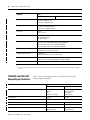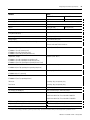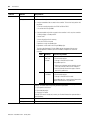
1
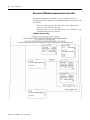
CompactLogix
Controllers
Catalog Numbers 1769-L31,
1769-L32C, 1769-L32E, 1769-L35CR,
1769-L35E
Firmware Revision 16
User Manual
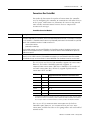
Important User Information
Solid state equipment operates differently than electromechanical equipment.
To learn how solid state equipment differs from hard-wired
electromechanical devices, consult Safety Guidelines for the Application,
Installation and Maintenance of Solid State Controls, publication SGI-1.1,
available from your local Rockwell Automation sales office or online at
http://www.ab.com/literature. Because of this difference, and also because
of the wide variety of uses for solid state equipment, all persons responsible
for applying this equipment must satisfy themselves that each intended
application of this equipment is acceptable.
In no event will Rockwell Automation, Inc. be responsible or liable for
indirect or consequential damages resulting from the use or application of
this equipment.
The examples and diagrams in this manual are included solely for illustrative
purposes. Because of the many variables and requirements associated with
any particular installation, Rockwell Automation, Inc. cannot assume
responsibility or liability for actual use based on the examples and diagrams.
No patent liability is assumed by Rockwell Automation, Inc. with respect to
use of information, circuits, equipment, or software described in this manual.
Reproduction of the contents of this manual, in whole or in part, without
written permission of Rockwell Automation, Inc. is prohibited.
Throughout this manual, when necessary, we use notes to make you aware
of safety considerations.
WARNING
IMPORTANT
ATTENTION
Identifies information about practices or circumstances that can cause
an explosion in a hazardous environment, which may lead to personal
injury or death, property damage, or economic loss.
Identifies information that is critical for successful application and
understanding of the product.
Identifies information about practices or circumstances that can lead
to: personal injury or death, property damage, or economic loss.
Attentions help you identify a hazard, avoid a hazard, and recognize
the consequences.
SHOCK HAZARD
Labels may be on or inside the equipment, for example, a drive or
motor, to alert people that dangerous voltage may be present.
BURN HAZARD
Labels may be on or inside the equipment, for example, a drive or
motor, to alert people that surfaces may reach dangerous
temperatures.
Allen-Bradley, CompactLogix, CompactFlash, ControlLogix, PowerFlex, Rockwell Automation, PLC-2, PLC-3, PLC-5, RSLinx,
RSLogix, RSLogix 5000 and TechConnect are trademarks of Rockwell Automation.
Trademarks not belonging to Rockwell Automation are property of their respective companies.
Summary of Changes
Introduction
This release of this document contains new and updated information.
To find new and updated information, look for change bars, as shown
next to this paragraph.
Updated Information
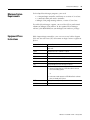
The document contains these changes.
3
Topic
Page
Validate I/O Layout
50
Configure I/O
55
Add-On Instructions
73
CompactLogix Controllers Specifications
95
Dynamic Memory Allocation in CompactLogix Controllers
111
Publication 1769-UM011F-EN-P - January 2007
Summary of Changes
4
Notes:
Publication 1769-UM011F-EN-P - January 2007
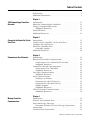
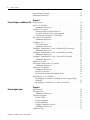
Table of Contents
Preface
Introduction . . . . . . . . . . . . . . . . . . . . . . . . . . . . . . . . . . . . . 9
Additional Information . . . . . . . . . . . . . . . . . . . . . . . . . . . . . 9
Chapter 1
1769 CompactLogix Controllers
Overview
Introduction . . . . . . . . . . . . . . . . . .
About the CompactLogix Controllers
Design a CompactLogix System . . . .
Additional Resources . . . . . . . . .
Install Hardware . . . . . . . . . . . . . . .
Additional Resources. . . . . . . . . . . .
.
.
.
.
.
.
.
.
.
.
.
.
.
.
.
.
.
.
.
.
.
.
.
.
.
.
.
.
.
.
.
.
.
.
.
.
.
.
.
.
.
.
.
.
.
.
.
.
.
.
.
.
.
.
.
.
.
.
.
.
.
.
.
.
.
.
.
.
.
.
.
.
.
.
.
.
.
.
.
.
.
.
.
.
.
.
.
.
.
.
.
.
.
.
.
.
.
.
.
.
.
.
.
.
.
.
.
.
11
11
13
13
14
14
Introduction . . . . . . . . . . . . . . . . . . . . . . . .
Connect to the Controller Via the Serial Port
Configure the Serial Driver . . . . . . . . . . . . .
Select the Controller Path . . . . . . . . . . . . . .
Controller Options . . . . . . . . . . . . . . . . .
Additional Resources. . . . . . . . . . . . . . . . . .
.
.
.
.
.
.
.
.
.
.
.
.
.
.
.
.
.
.
.
.
.
.
.
.
.
.
.
.
.
.
.
.
.
.
.
.
.
.
.
.
.
.
.
.
.
.
.
.
.
.
.
.
.
.
.
.
.
.
.
.
.
.
.
.
.
.
.
.
.
.
.
.
15
15
17
19
20
20
Introduction . . . . . . . . . . . . . . . . . . . . . . . . . .
EtherNet/IP Network Communication . . . . . . .
Connections Over an EtherNet/IP Network .
Additional Resources . . . . . . . . . . . . . . . . .
ControlNet Network Communication . . . . . . . .
Connections Over ControlNet. . . . . . . . . . .
Additional Resources . . . . . . . . . . . . . . . . .
DeviceNet Communications. . . . . . . . . . . . . . .
Additional Resources . . . . . . . . . . . . . . . . .
Serial Communications . . . . . . . . . . . . . . . . . .
Configure an Isolator . . . . . . . . . . . . . . . . .
Communicate with DF1 Devices . . . . . . . . .
Communicate with ASCII Devices. . . . . . . .
Modbus Support . . . . . . . . . . . . . . . . . . . .
Additional Resources . . . . . . . . . . . . . . . . .
DH-485 Network Communications. . . . . . . . . .
Additional Resources . . . . . . . . . . . . . . . . .
.
.
.
.
.
.
.
.
.
.
.
.
.
.
.
.
.
.
.
.
.
.
.
.
.
.
.
.
.
.
.
.
.
.
.
.
.
.
.
.
.
.
.
.
.
.
.
.
.
.
.
.
.
.
.
.
.
.
.
.
.
.
.
.
.
.
.
.
.
.
.
.
.
.
.
.
.
.
.
.
.
.
.
.
.
.
.
.
.
.
.
.
.
.
.
.
.
.
.
.
.
.
.
.
.
.
.
.
.
.
.
.
.
.
.
.
.
.
.
.
.
.
.
.
.
.
.
.
.
.
.
.
.
.
.
.
.
.
.
.
.
.
.
.
.
.
.
.
.
.
.
.
.
.
.
.
.
.
.
.
.
.
.
.
.
.
.
.
.
.
21
22
23
24
25
27
28
28
30
31
32
34
35
38
38
39
42
Introduction . . . . . . . . . . . . . . . . . . . . . . . . . . . . . . . .
Produce and Consume Data . . . . . . . . . . . . . . . . . . . .
Send and Receive Messages. . . . . . . . . . . . . . . . . . . . .
Determine Whether to Cache Message Connections
Connections . . . . . . . . . . . . . . . . . . . . . . . . . . . . . . . .
Calculate Total Connections. . . . . . . . . . . . . . . . . . . . .
.
.
.
.
.
.
.
.
.
.
.
.
.
.
.
.
.
.
.
.
.
.
.
.
43
43
44
45
45
46
Chapter 2
Connect to the Controller Via the
Serial Port
Chapter 3
Communicate Over Networks
Chapter 4
Manage Controller
Communications
5
Publication 1769-UM011F-EN-P - January 2007
6
Table of Contents
Connections Example . . . . . . . . . . . . . . . . . . . . . . . . . . . . . 47
Additional Resources. . . . . . . . . . . . . . . . . . . . . . . . . . . . . . 48
Chapter 5
Place, Configure, and Monitor I/O
Introduction . . . . . . . . . . . . . . . . . . . . . . . . . . . . . . . . . .
Select I/O Modules . . . . . . . . . . . . . . . . . . . . . . . . . . . . .
Additional Resources . . . . . . . . . . . . . . . . . . . . . . . . .
Validate I/O Layout. . . . . . . . . . . . . . . . . . . . . . . . . . . . .
Estimate Request Packet Interval. . . . . . . . . . . . . . . . .
Calculate System Power Consumption . . . . . . . . . . . .
Validate Placement of I/O Modules. . . . . . . . . . . . . . .
Place Local I/O Modules . . . . . . . . . . . . . . . . . . . . . . . . .
Additional Resources . . . . . . . . . . . . . . . . . . . . . . . . .
Configure I/O . . . . . . . . . . . . . . . . . . . . . . . . . . . . . . . . .
I/O Connections . . . . . . . . . . . . . . . . . . . . . . . . . . . .
Additional Resources . . . . . . . . . . . . . . . . . . . . . . . . .
Configure Distributed I/O on an EtherNet/IP Network . . .
Additional Resources . . . . . . . . . . . . . . . . . . . . . . . . .
Configure Distributed I/O on a ControlNet Network . . . . .
Additional Resources . . . . . . . . . . . . . . . . . . . . . . . . .
Configure Distributed I/O on a DeviceNet Network . . . . .
Additional Resources . . . . . . . . . . . . . . . . . . . . . . . . .
Address I/O Data . . . . . . . . . . . . . . . . . . . . . . . . . . . . . .
Determine When Data Is Updated . . . . . . . . . . . . . . . . . .
Additional Resources . . . . . . . . . . . . . . . . . . . . . . . . .
Monitor I/O Modules . . . . . . . . . . . . . . . . . . . . . . . . . . .
Additional Resources . . . . . . . . . . . . . . . . . . . . . . . . .
Display Fault Data . . . . . . . . . . . . . . . . . . . . . . . . . . .
End-cap Detection and Module Faults. . . . . . . . . . . . .
Reconfigure an I/O Module . . . . . . . . . . . . . . . . . . . . . . .
Reconfigure a Module via RSLogix 5000 Programming
Software . . . . . . . . . . . . . . . . . . . . . . . . . . . . . . . . . .
Reconfigure a Module via a MSG Instruction . . . . . . . .
.
.
.
.
.
.
.
.
.
.
.
.
.
.
.
.
.
.
.
.
.
.
.
.
.
.
.
.
.
.
.
.
.
.
.
.
.
.
.
.
.
.
.
.
.
.
.
.
.
.
.
.
49
49
49
50
50
51
51
54
55
55
56
57
57
57
58
58
59
59
60
61
61
62
62
62
63
63
. . 63
. . 64
Chapter 6
Develop Applications
Publication 1769-UM011F-EN-P - January 2007
Introduction . . . . . . . . . . . . .
Manage Tasks . . . . . . . . . . . .
Additional Resources . . . .
Develop Programs . . . . . . . .
Define Tasks . . . . . . . . . .
Define Programs . . . . . . .
Define Routines . . . . . . . .
Sample Controller Projects
Additional Resources . . . .
Organize Tags. . . . . . . . . . . .
.
.
.
.
.
.
.
.
.
.
.
.
.
.
.
.
.
.
.
.
.
.
.
.
.
.
.
.
.
.
.
.
.
.
.
.
.
.
.
.
.
.
.
.
.
.
.
.
.
.
.
.
.
.
.
.
.
.
.
.
.
.
.
.
.
.
.
.
.
.
.
.
.
.
.
.
.
.
.
.
.
.
.
.
.
.
.
.
.
.
.
.
.
.
.
.
.
.
.
.
.
.
.
.
.
.
.
.
.
.
.
.
.
.
.
.
.
.
.
.
.
.
.
.
.
.
.
.
.
.
.
.
.
.
.
.
.
.
.
.
.
.
.
.
.
.
.
.
.
.
.
.
.
.
.
.
.
.
.
.
.
.
.
.
.
.
.
.
.
.
.
.
.
.
.
.
.
.
.
.
.
.
.
.
.
.
.
.
.
.
.
.
.
.
.
.
.
.
.
.
.
.
.
.
.
.
.
.
.
.
.
.
.
.
.
.
.
.
.
.
.
.
.
.
.
.
.
.
.
.
65
65
65
66
67
69
69
70
71
71
Table of Contents
7
Additional Resources . . . . . . . . . . . . . . . . . . . . . . . . . . .
Select a Programming Language . . . . . . . . . . . . . . . . . . . . .
Add-On Instructions. . . . . . . . . . . . . . . . . . . . . . . . . . . .
Additional Resources . . . . . . . . . . . . . . . . . . . . . . . . . . .
Additional Resources . . . . . . . . . . . . . . . . . . . . . . . . . . .
Monitor Controller Status . . . . . . . . . . . . . . . . . . . . . . . . . . .
Additional Resources . . . . . . . . . . . . . . . . . . . . . . . . . . .
Monitor Connections . . . . . . . . . . . . . . . . . . . . . . . . . . . . . .
Determine if Device Communication Has Timed Out. . . .
Determine if I/O Module Communication Has Timed Out
Interrupt the Execution of Logic and Execute the
Fault Handler. . . . . . . . . . . . . . . . . . . . . . . . . . . . . . . . .
Additional Resources . . . . . . . . . . . . . . . . . . . . . . . . . . .
Select a System Overhead Time Slice Percentage . . . . . . . . .
71
72
73
74
74
75
76
76
77
78
79
79
80
Chapter 7
Configure PhaseManager
Introduction . . . . . . . . . . . . . . . . . . . . . . . . . .
Additional Resources . . . . . . . . . . . . . . . . .
About PhaseManager. . . . . . . . . . . . . . . . . . . .
About a State Model . . . . . . . . . . . . . . . . . . . .
Change Equipment States . . . . . . . . . . . . . .
Manually Change States . . . . . . . . . . . . . . .
Compare PhaseManager to Other State Models.
Minimum System Requirements . . . . . . . . . . . .
Equipment Phase Instructions . . . . . . . . . . . . .
.
.
.
.
.
.
.
.
.
.
.
.
.
.
.
.
.
.
.
.
.
.
.
.
.
.
.
.
.
.
.
.
.
.
.
.
.
.
.
.
.
.
.
.
.
.
.
.
.
.
.
.
.
.
.
.
.
.
.
.
.
.
.
.
.
.
.
.
.
.
.
.
.
.
.
.
.
.
.
.
.
.
.
.
.
.
.
.
.
.
83
83
83
85
86
88
88
89
89
Chapter 8
Maintain Nonvolatile Memory
Introduction . . . . . . . . . . . . . . . . . .
Prevent a Major Fault During a Load
Use a CompactFlash Reader. . . . . . .
Additional Resources . . . . . . . . .
.
.
.
.
.
.
.
.
.
.
.
.
.
.
.
.
.
.
.
.
.
.
.
.
.
.
.
.
.
.
.
.
.
.
.
.
.
.
.
.
.
.
.
.
.
.
.
.
.
.
.
.
.
.
.
.
.
.
.
.
.
.
.
.
.
.
.
.
.
.
.
.
91
92
92
92
.
.
.
.
.
.
.
.
.
.
.
.
.
.
.
.
.
.
.
.
.
.
.
.
.
.
.
.
.
.
.
.
.
.
.
.
.
.
.
.
.
.
.
.
.
.
.
.
.
.
.
.
.
.
.
.
.
.
.
.
.
.
.
.
.
.
.
.
.
.
.
.
.
.
.
.
.
.
.
.
.
.
.
.
.
.
.
.
.
.
93
93
94
94
94
Introduction . . . . . . . . . . . . . . . . . . . . . . . . . . . . . . .
1769-L31 CompactLogix Controller. . . . . . . . . . . . . . .
1769-L32C and 1769-L35CR CompactLogix Controllers
1769-L32E and 1769-L35E CompactLogix Controllers. .
Real-Time Clock Accuracy . . . . . . . . . . . . . . . . . . . . .
.
.
.
.
.
.
.
.
.
.
.
.
.
.
.
.
.
.
.
.
.
.
.
.
95
95
97
98
100
Chapter 9
Maintain the Battery
Introduction . . . . . . . . . . . . .
Check If the Battery Is Low . .
Estimate 1769-BA Battery Life
Store Batteries. . . . . . . . . . . .
Additional Resources . . . .
.
.
.
.
.
.
.
.
.
.
.
.
.
.
.
.
.
.
.
.
.
.
.
.
.
Appendix A
CompactLogix Controllers
Specifications
Publication 1769-UM011F-EN-P - January 2007
8
Table of Contents
Appendix B
LED Indicators
Introduction . . . . . . . . . . . . . . . . . . . . . . . . . . .
1769-L3xx Controllers LED Indicators. . . . . . . . .
CompactFlash LED Indicator. . . . . . . . . . . . .
RS-232 Serial Port LED Indicators . . . . . . . . . . . .
ControlNet LED Indicators . . . . . . . . . . . . . . . . .
Interpret ControlNet Network LED Indicators
Module Status (MS) LED Indicator . . . . . . . .
Network Channel LED Indicators . . . . . . . . .
EtherNet/IP LED Indicators . . . . . . . . . . . . . . . .
Module Status (MS) LED Indicator . . . . . . . .
Network Status (NS) LED Indicator . . . . . . . .
Link Status (LNK) LED Indicator . . . . . . . . . .
.
.
.
.
.
.
.
.
.
.
.
.
.
.
.
.
.
.
.
.
.
.
.
.
.
.
.
.
.
.
.
.
.
.
.
.
.
.
.
.
.
.
.
.
.
.
.
.
.
.
.
.
.
.
.
.
.
.
.
.
.
.
.
.
.
.
.
.
.
.
.
.
.
.
.
.
.
.
.
.
.
.
.
.
.
.
.
.
.
.
.
.
.
.
.
.
103
103
105
105
106
106
107
108
109
109
109
110
Appendix C
Dynamic Memory Allocation in
CompactLogix Controllers
Introduction . . . . . . . . . . . . . . . . . . . . . . . .
Messages . . . . . . . . . . . . . . . . . . . . . . . . . .
RSLinx Tag Optimization . . . . . . . . . . . . . . .
Trends . . . . . . . . . . . . . . . . . . . . . . . . . . . .
DDE/OPC Topics . . . . . . . . . . . . . . . . . . . .
Specify Connections per PLC . . . . . . . . .
Number of Connections Needed to
Optimize Throughput. . . . . . . . . . . . . . .
View the Number of Open Connections .
Rockwell Automation Support . . . . . . . . . . .
Installation Assistance . . . . . . . . . . . . . .
New Product Satisfaction Return . . . . . . .
Index
Publication 1769-UM011F-EN-P - January 2007
.
.
.
.
.
.
.
.
.
.
.
.
.
.
.
.
.
.
.
.
.
.
.
.
.
.
.
.
.
.
.
.
.
.
.
.
.
.
.
.
.
.
.
.
.
.
.
.
.
.
.
.
.
.
.
.
.
.
.
.
.
.
.
.
.
.
111
112
112
113
113
113
.
.
.
.
.
.
.
.
.
.
.
.
.
.
.
.
.
.
.
.
.
.
.
.
.
.
.
.
.
.
.
.
.
.
.
.
.
.
.
.
.
.
.
.
.
.
.
.
.
.
.
.
.
.
.
115
115
127
127
127
Preface
Introduction
Use this manual to become familiar with the CompactLogix controller
and its features. This manual corresponds to controller firmware
revision 16.
This manual describes the necessary tasks to install, configure,
program, and operate a CompactLogix system. In some cases, this
manual includes references to additional documentation that provides
the more comprehensive details.
Additional Information
These documents address Logix5000 products.
Catalog Number
Title
Publication Number
1769-L31,
1769-L32E,
1769-L35CR, and
1769-L35E
Logix5000 Controllers Quick Start
1756-QS001
1769-L31,
1769-L32C,
1769-L32E,
1769-L35CR, and
1769-L35E
Logix5000 Controllers Common Procedures Programming Manual
1756-PM001
SFC and ST Programming Languages Programming Manual
1756-PM003
Logix5000 Controllers System Reference
1756-QR107
Logix5000 Controllers General Instruction Set Reference Manual
1756-RM003
Logix5000 Controllers Process Control/Drives Instruction Set Reference Manual
1756-RM006
Logix5000 Controllers PhaseManager User Manual
LOGIX-UM001
1769-L32E and
1769-L35E
EtherNet/IP Communication Modules in Logix5000 Control Systems User Manual
ENET-UM001
1769-L32C and
1769-L35CR
ControlNet Communication Modules in Logix5000 Control Systems User Manual
CNET-UM001
To view or download these publications, go to:
http://literature.rockwellautomation.com
To obtain a hard copy, contact your Rockwell Automation distributor
or sales representative.
9
Publication 1769-UM001F-EN-P - January 2007
10
Notes:
Publication 1769-UM001F-EN-P - January 2007
Chapter
1
1769 CompactLogix Controllers Overview
Introduction
This chapter introduces the 1769 CompactLogix controllers. These
controllers offer state-of-the-art control, communications, and I/O
elements in a distributed control package.
About the CompactLogix
Controllers
The CompactLogix controller offers state-of-the-art control,
communications, and I/O elements in a distributed control package.
Topic
Page
Design a CompactLogix System
13
Install Hardware
14
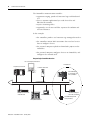
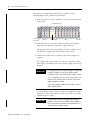
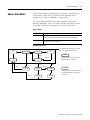
CompactLogix Controller and 1769 I/O Modules
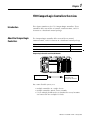
CompactLogix Controller
1769 I/O Modules
Connected to the
CompactLogix Controller
For a more flexible system, use:
• multiple controllers in a single chassis.
• multiple controllers joined across networks.
• I/O in multiple platforms that is distributed in many locations
and connected over multiple I/O links.
11
Publication 1769-UM011F-EN-P - January 2007
12
1769 CompactLogix Controllers Overview
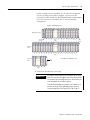
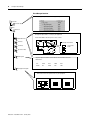
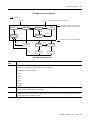
CompactLogix System Overview
1769 I/O Modules
Connected to the
CompactLogix Controller
Built-in ControlNet or
EtherNet/IP
Communication Ports
or 1769-SDN Module
Connected to the
Controller
}
Remote I/O Modules
Drives
EtherNet/IP Link
ControlNet Link
EtherNet/IP Link
DeviceNet Link
ControlNet Link
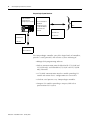
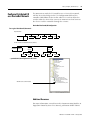
DH-485 Link
Computers
Other Controllers
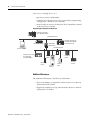
The CompactLogix controller, part of the Logix family of controllers,
provides a small, powerful, cost-effective system consisting of:
• RSLogix 5000 programming software.
• built-in communication ports for EtherNet/IP (1769-L32E and
1769-L35E only) and ControlNet (1769-L32C and 1769-L35CR
only) networks.
• a 1769-SDN communication interface module providing I/O
control and remote device configuration over DeviceNet.
• a built-in serial port on every CompactLogix controller.
• Compact I/O modules providing a compact, DIN-rail or
panel-mounted I/O system.
Publication 1769-UM011F-EN-P - January 2007
1769 CompactLogix Controllers Overview
13
CompactLogix Controller Combinations
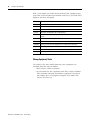
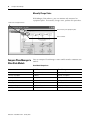
Controller
Available
Memory
Communication Options
Number of
Tasks Supported
Number of Local I/O
Modules Supported
1769-L35CR
1.5 MB
1 port ControlNet - supports redundant media
8
30
6
16
1 port RS-232 serial (system or user protocols)
1769-L35E
1 port EtherNet/IP
1 port RS-232 serial (system or user protocols)
1769-L32C
750 KB
1 port ControlNet
1 port RS-232 serial (system or user protocols)
1769-L32E
1 port EtherNet/IP
1 port RS-232 serial (system or user protocols)
1769-L31
512 KB
1 port RS-232 serial (system or user protocols)
4
1 port RS-232 serial (system protocol only)
Design a CompactLogix
System
When designing a CompactLogix system, determine the network
configuration and the placement of components in each location. To
design your CompactLogix system, you must select:
•
•
•
•
•
I/O devices.
a communication network.
controllers.
power supplies.
software.
Additional Resources
For more information, consult these publications:
• CompactLogix Selection Guide, publication 1769-SG001.
• Logix5000 Controller Design Considerations Reference Manual,
publication 1756-RM094.
Publication 1769-UM011F-EN-P - January 2007
14
1769 CompactLogix Controllers Overview
Install Hardware
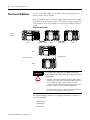
To install a CompactLogix controller, perform these procedures:
1. Set the node address, but only for 1769-L32C and 1769-L35CR
controllers.
2. Connect the battery. See the chapter Maintain the Battery.
3. Install a 1784-CF64 CompactFlash card for nonvolatile memory.
See the chapter Maintain Nonvolatile Memory.
4. Assemble the system.
5. Mount the system.
6. Establish a serial connection to the controller. See the chapter
Connect to the Controller Via the Serial Port.
7. For 1769-L32E and 1769-L35E controllers only, assign an IP
address.
8. Make additional network connections. See the section
Communicate Over Networks.
9. Install the EDS files.
10. Load the controller firmware.
Additional Resources
For more information, consult these publications:
• 1769-L31 CompactLogix Controller Installation Instructions,
publication 1769-IN069
• 1769-L32C, -L35CR CompactLogix Controllers Installation
Instructions, publication 1769-IN070
• 1769-L32E, -L35E CompactLogix Controllers Installation
Instructions, publication 1769-IN020
Publication 1769-UM011F-EN-P - January 2007
Chapter
2
Connect to the Controller Via the Serial Port
Introduction
This chapter describes how to connect to the controller via the serial
port so you can configure the controller and upload or download a
project to the controller.
Topic
Page
Connect to the Controller Via the Serial Port
15
Configure the Serial Driver
17
Select the Controller Path
19
Additional Resources
20
For the CompactLogix controller to operate on a serial network,
you need:
• a workstation with a serial port.
• RSLinx software to configure the serial communication driver.
• RSLogix5000 programming software to configure the serial port
of the controller.
Connect to the Controller
Via the Serial Port
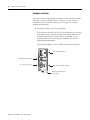
Channel 0 on the CompactLogix controllers is fully isolated and does
not need a separate isolation device. Channel 1 on the 1769-L31 is not
an isolated serial port.
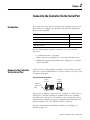
Serial Connection to Controller
1769-L31
Controller
Personal
Computer
1747-CP3 or
1756-CP3 Serial
Cable
If you connect channel 1 of the 1769-L31 controller to a modem or an
ASCII device, consider installing an isolator between the controller
and modem or ASCII device. An isolator is also recommended when
connecting the controller directly to a programming workstation. One
possible isolator is the 1761-NET-AIC interface converter.
For more information on installing an isolator, see Configure an
Isolator on page 32.
15
Publication 1769-UM011F-EN-P - January 2007
16
Connect to the Controller Via the Serial Port
To connect a serial cable, perform this procedure.
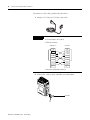
1. Obtain a 1747-CP3 or 1756-CP3 serial cable.
TIP
If you make your own serial cable, complete this procedure.
I
A. Limit the length to 15.2 m (50 ft).
B. Wire the connectors.
Workstation
Controller
1 CD
1 CD
2 RDX
2 RDX
3 TXD
3 TXD
4 DTR
4 DTR
COMMON
COMMON
6 DSR
6 DSR
7 RTS
7 RTS
8 CTS
8 CTS
9
9
C. Attach the shield to both connectors.
2. Connect the cable to your controller and workstation.
CP3 Cable
Publication 1769-UM011F-EN-P - January 2007
Connect to the Controller Via the Serial Port
Configure the Serial Driver
17
Use RSLinx software to configure the RS-232 DF1 Device driver for
serial communications. To configure the driver, perform this
procedure.
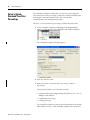
1. From the Communications pull-down menu, choose Configure
Drivers.
The Configure Drivers dialog appears.
2. From the Available Driver Types pull-down menu, choose the
RS-232 DF1 Device driver.
3. Click Add New to add the driver.
The Add New RSLinx Driver dialog appears.
4. Specify the driver name and click OK.
Publication 1769-UM011F-EN-P - January 2007
18
Connect to the Controller Via the Serial Port
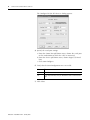
The Configure RS-232 DF1 Devices dialog appears.
5. Specify the serial port settings.
a. From the Comm Port pull-down menu, choose the serial port
on the workstation to which the cable is connected.
b. From the Device pull-down menu, choose Logix 5550-Serial
Port.
c. Click Auto-Configure.
6. Verify that the Auto-Configuration was successful.
If
Then
Yes
Click OK.
No
Go to step 5 and verify that you selected the correct communications
port.
7. Click Close.
Publication 1769-UM011F-EN-P - January 2007
Connect to the Controller Via the Serial Port
Select the Controller Path
19
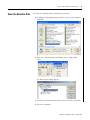
To select the controller path, perform this procedure.
1. In RSLogix 5000 programming software, open a project for the
controller.
2. From the Communications pull-down menu, choose Who
Active.
The Who Active dialog appears.
3. Expand the communication driver to the level of the controller.
4. Select the controller.
Publication 1769-UM011F-EN-P - January 2007
20
Connect to the Controller Via the Serial Port
Controller Options
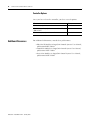
Once you have selected a controller, you have several options.
Additional Resources
To
Choose
Monitor the project in the controller
Go Online
Transfer a copy of the project from the controller to RSLogix
5000 software
Upload
Transfer the open project to the controller
Download
For additional information, consult these publications:
• EtherNet/IP Modules in Logix5000 Control Systems User Manual,
publication ENET-UM001
• ControlNet Modules in Logix5000 Control System User Manual,
publication CNET-UM001
• DeviceNet Modules in Logix5000 Control System User Manual,
publication DNET-UM004
Publication 1769-UM011F-EN-P - January 2007
Chapter
3
Communicate Over Networks
Introduction
This chapter explains how CompactLogix controllers support
additional networks to enable various functions.
CompactLogix Controller Network Support
Function
Example
Control distributed (remote) I/O.
CompactLogix Controller
• EtherNet/IP
• ControlNet
DeviceNet Network
• DeviceNet
Distributed (remote)
I/O Platform
Produce/consume (interlock) data between
controllers.
CompactLogix Controller
• EtherNet/IP
ControlNet Network
• ControlNet
Other Logix5000
Controller
Send and receive messages to and from
other devices. This includes access to the
controller via RSLogix 5000 programming
software.
CompactLogix Controller
• EtherNet/IP
EtherNet/IP Network
• ControlNet
Other Remote
Devices
• DeviceNet (to devices only)
• serial
• DH-485
21
Topic
Page
EtherNet/IP Network Communication
22
ControlNet Network Communication
25
DeviceNet Communications
28
Serial Communications
31
DH-485 Network Communications
39
Publication 1769-UM011F-EN-P - January 2007
22
Communicate Over Networks
EtherNet/IP Network
Communication
The EtherNet/IP network offers a full suite of control, configuration
and data collection services by layering the Common Industrial
Protocol (CIP) over the standard Internet protocols, such as TCP/IP
and UDP. This combination of well-accepted standards provides the
capability required to both support information data exchange and
control applications.
The EtherNet/IP network also uses commercial, off-the-shelf Ethernet
components and physical media, providing you with a cost-effective
plant-floor solution.
For EtherNet/IP communications, you can use these CompactLogix
controllers with a built-in EtherNet/IP communication port:
• 1769-L32E CompactLogix controller
• 1769-L35E CompactLogix controller
You can use several software products with a 1769 CompactLogix
controller on an EtherNet/IP network.
EtherNet/IP Network Software Combinations
Software
RSLogix 5000 programming
software
Functions
• Configure the
CompactLogix project
Requirement
Yes
• Define EtherNet/IP
communications
BOOTP/DHCP utility with
RSLogix 5000 software
Assign IP addresses to
devices on an EtherNet/IP
network
No
RSNetWorx software for an
EtherNet/IP network
Configure EtherNet/IP
devices by IP addresses
and/or host names
No
The EtherNet/IP communication modules:
• support messaging, produced/consumed tags, HMI, and
distributed I/O.
• encapsulate messages within standard TCP/UDP/IP protocol.
• share a common application layer with ControlNet and
DeviceNet.
• interface via RJ45, category 5, unshielded, twisted-pair cable.
• support half/full-duplex 10 Mbps or 100 Mbps operation.
• support standard switches.
• require no network scheduling.
• require no routing tables.
Publication 1769-UM011F-EN-P - January 2007
Communicate Over Networks
23
In this example:
• the controllers produce and consume tags amongst themselves.
• the controllers initiate MSG instructions that send and receive
data or configure devices.
• the personal computer uploads or downloads projects to the
controllers.
• the personal computer configures devices on an EtherNet/IP
network.
CompactLogix EtherNet/IP Overview
FlexLogix Controller with
1788-ENBT Module
Distributed I/O
CompactLogix
Controller with
1756-ENBT
Module
1756-ENBT Module
(as an adapter) with 1756
I/O Modules
CompactLogix Controller
with Integrated
EtherNet/IP Port
1794-AENT Adapter with
1794 I/O Modules
Switch
1734-AENT
Adapter with 1734
I/O Modules
PowerFlex 700S AC
Drive with DriveLogix
Workstation
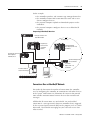
Connections Over an EtherNet/IP Network
You indirectly determine the number of connections the controller
uses by configuring the controller to communicate with other devices
in the system. Connections are allocations of resources that provide
more reliable communications between devices than unconnected
messages.
All EtherNet/IP connections are unscheduled. An unscheduled
connection is a message transfer between controllers that is triggered
by the requested packet interval (RPI) or the program, such as a MSG
instruction. Unscheduled messaging lets you send and receive data
when needed.
Publication 1769-UM011F-EN-P - January 2007
24
Communicate Over Networks
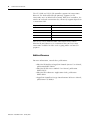
The 1769-L32E and 1769-L35E controllers support 100 connections.
However, the built-in EtherNet/IP port only supports 32 CIP
connections over an EtherNet/IP network. With these controllers, the
number of end-node connections they effectively support depends on
a connection’s RPI.
Requested Packet Interval
Max EtherNet/IP Port Communication Connections
2 ms
2
4 ms
5
8 ms
10
16 ms
18
32 ms+
25+
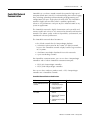
You can use all 32 communication connections on the built-in
EtherNet/IP port. However, we recommend that you leave some
connections available for tasks such as going online and non-I/O
purposes.
Additional Resources
For more information, consult these publications:
• EtherNet/IP Modules in Logix5000 Control Systems User Manual,
publication ENET-UM001
• EtherNet/IP Web Server Module User Manual, publication
ENET-UM527
• EtherNet/IP Performance Application Guide, publication
ENET-AP001
• Logix5000 Controllers Design Considerations Reference Manual,
publication 1756-RM094
Publication 1769-UM011F-EN-P - January 2007
Communicate Over Networks
ControlNet Network
Communication
25
ControlNet is a real-time control network that provides high-speed
transport of both time-critical I/O and interlocking data and messaging
data, including uploading and downloading of programming and
configuration data on a single physical-media link. The ControlNet
network’s highly-efficient data transfer capability significantly
enhances I/O performance and peer-to-peer communication in any
system or application.
The ControlNet network is highly deterministic and repeatable and
remains unaffected as devices are connected or disconnected from the
network. This robust quality results in dependable, synchronized, and
coordinated real-time performance.
The ControlNet network often functions as:
• the default network for the CompactLogix platform.
• a substitute/replacement for the remote I/O (RIO) network
because the ControlNet network adeptly handles large numbers
of I/O points.
• a backbone to multiple distributed DeviceNet networks.
• a peer interlocking network.
For ControlNet communications, you can use these CompactLogix
controllers with a built-in ControlNet communication port:
• 1769-L32C CompactLogix controller
• 1769-L35CR CompactLogix controller
You can use these software products with a 1769 CompactLogix
controller on a ControlNet network.
ControlNet Network Software Combinations
Software
RSLogix 5000 programming
software
Functions
Requirement
• Configure the
CompactLogix project
• Define EtherNet/IP
communications
RSNetWorx software for
ControlNet
• Configure the ControlNet Yes
network
• Define the NUT (network
update time)
• Schedule the ControlNet
network
Publication 1769-UM011F-EN-P - January 2007
26
Communicate Over Networks
The ControlNet communications modules:
• support messaging, produced/consumed tags and distributed
I/O.
• share a common application layer with DeviceNet and
EtherNet/IP networks.
• require no routing tables.
• support the use of coax and fiber repeaters for isolation and
increased distance.
In this example:
• the controllers produce and consume tags amongst themselves.
• the controllers initiate MSG instructions that send and receive
data or configure devices.
• the personal computer uploads or downloads projects to the
controllers.
• the personal computer configures devices on ControlNet, and
configures the network itself.
CompactLogix ControlNet Overview
Personal Computer/Workstation
Distributed I/O
CompactLogix Controller
PowerFlex 700S Drive
1756-CNB Module
(as an adapter) with
1756 I/O Modules
ControlNet Network
FlexLogix Controller with
1788-CNC Card
PanelView Terminal
1794-ACN15 Adapter
with 1794 I/O Modules
1734-ACNR Adapter with
1734 I/O Modules
PLC-5/40C15 Controller
Publication 1769-UM011F-EN-P - January 2007
Communicate Over Networks
27
Connections Over ControlNet
You indirectly determine the number of connections the controller
uses by configuring the controller to communicate with other devices
in the system. Connections are allocations of resources that provide
more reliable communications between devices compared to
unconnected messages.
ControlNet Connection Methods
Connection Method
Description
Scheduled
A scheduled connection is unique to ControlNet communications. A scheduled connection lets you send and
receive data repeatedly at a set interval, which is the requested packet interval (RPI). For example, a connection
to an I/O module is a scheduled connection because you repeatedly receive data from the module at a specified
interval. Other scheduled connections include connections to:
• communication devices.
•
produced/consumed tags.
On a ControlNet network, you must use RSNetWorx for ControlNet to enable all scheduled connections and
establish a network update time (NUT). Scheduling a connection reserves network bandwidth to specifically
handle the connection.
Unscheduled
An unscheduled connection is a message transfer between nodes that is triggered by ladder logic or the
program (such as a MSG instruction). Unscheduled messaging lets you send and receive data when needed.
Unscheduled messages use the remainder of network bandwidth after scheduled connections are allocated.
The 1769-L32C and 1769-L35CR controllers support 100 connections.
However, the built-in ControlNet port only supports 32
communication connections. With these controllers, the number of
end-node connections they effectively support depends on the
connection’s NUT and RPI.
NUT
RPI
Supported ControlNet Communication Connections(1)
2 ms
2 ms
0...1
3 ms
3 ms
1...2
5 ms
5 ms
3...4
10 ms
10 ms
6...9
14 ms
14 ms
10...12
5 ms
20 ms
12...16
4 ms
64 ms
31
(1)
For each NUT/RPI combination, the number of connections supported is listed in a range. The lower number is
the number of connections we recommend you make to maintain reasonable ControlNet port CPU utilization
rates. The higher number is the maximum number of connections possible for that NUT/RPI combination.
You can use all 32 communication connections on the built-in
ControlNet port. However, we recommend that you leave some
connections available for tasks such as going online and unscheduled
network traffic.
Publication 1769-UM011F-EN-P - January 2007
28
Communicate Over Networks
Additional Resources
For additional information, consult these publications:
• Control Net Modules in Logix5000 Control Systems User Manual,
publication CNET-UM001
• Logix5000 Controllers Design Considerations Reference Manual,
publication 1756-RM094
DeviceNet Communications
The DeviceNet network uses the Common Industrial Protocol (CIP) to
provide the control, configuration, and data collection capabilities for
industrial devices. The DeviceNet network uses the proven Controller
Area Network (CAN) technology, which lowers installation costs and
decreases installation time and costly downtime.
A DeviceNet network provides access to the intelligence present in
your devices by letting you connect devices directly to plant-floor
controllers without having to hard wire each device into an I/O
module.
CompactLogix DeviceNet Communications Interfaces
If your application
Select
•Communicates with other DeviceNet devices
1769-SDN
DeviceNet
scanner module
•Uses the controller as a master or slave on DeviceNet
•Uses a controller ControlNet, Ethernet or serial port for other
communications
•Accesses remote Compact I/O over a DeviceNet network
1769-ADN
•Sends remote I/O data for as many as 30 modules back to scanner or DeviceNet
adapter module(1)
controller
(1)
Publication 1769-UM011F-EN-P - January 2007
This table specifically describes using the 1769-ADN module to access remote Compact I/O over DeviceNet.
However, CompactLogix controllers can access other Allen-Bradley remote I/O over DeviceNet. In those cases,
you must select the appropriate interface. For example, if accessing remote POINT I/O modules, you must
select the 1734-ADN.
Communicate Over Networks
29
CompactLogix DeviceNet Overview
CompactLogix
Controller with
1769-SDN
PLC-5 Controller with
1771-SDN Scanner Module
ControlLogix Controller
with 1756-DNB Module
DeviceNet Network
Sensor
CompactLogix System
with 1769-ADN
PanelView
Terminal
Pushbutton
Cluster
Motor
Starter
Laptop
Ultra 5000
Servo Drive
Input/Output
Devices
PowerFlex
AC Drive
Bar Code
Scanner
Indicator
Lights
You can use these software products with a 1769 CompactLogix
controller on a DeviceNet network.
CompactLogix DeviceNet Software Combinations
Software
RSLogix 5000 programming
software
Functions
Requirement
• Configure the
CompactLogix project
• Define EtherNet/IP
communications
RSNetWorx software for
DeviceNet devices
• Configure DeviceNet
devices
Yes
• Define the scan list for
DeviceNet devices
The DeviceNet communications module:
• supports messaging to devices, not controller to controller.
• shares a common application layer with ControlNet and
EtherNet/IP.
• offers diagnostics for improved data collection and fault
detection.
• requires less wiring than traditional, hardwired systems.
Publication 1769-UM011F-EN-P - January 2007
30
Communicate Over Networks
You can use a linking device as a:
• gateway to connect information.
• control-level network to device-level network for programming,
configuration, control or data collection.
• router/bridge to connect the EtherNet/IP or ControlNet network
to the DeviceNet network.
CompactLogix Linking Device Overview
ControlLogix Controller
with 1756-ENBT Module
EtherNet/IP Network
FLEX Adapter and I/O
CompactLogix Controller
with Built-in EtherNet/IP
Communication Port
1788-EN2DN
Linking Device
DeviceNet Network
Personal Computer
CompactLogix System
with 1769-ADN
DeviceNet Adapter
Sensor
Pushbutton
Cluster
PWR
Motor
Starter
STS
PORT
MOD
NET A
NET B
Input/Output
Devices
PowerFlex
AC Drive
Indicator
Lights
Bar Code
Scanner
Additional Resources
For additional information, consult these publications:
• DeviceNet Modules in Logix5000 Control Systems User Manual,
publication DNET-UM004
• Logix5000 Controllers Design Considerations Reference Manual,
publication 1756-RM094
Publication 1769-UM011F-EN-P - January 2007
Communicate Over Networks
Serial Communications
31
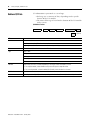
CompactLogix controllers have a built-in RS-232 port.
• 1769-L32C, -L32E, -L35CR, and -L35E CompactLogix controllers
have one built-in RS-232 port. By default, that port is channel 0
on these controllers.
• The 1769-L31 CompactLogix controller has two RS-232 ports.
One port only allows DF1 protocol only. The second port
accepts DF1 and ASCII protocol.
IMPORTANT
Limit the length of serial (RS-232) cables to 15.2 m (50 ft).
You can configure the serial port of the controller for several modes.
CompactLogix Serial Port Configuration
Mode
Functions
DF1 Point-to-Point
Communicate between the controller and one other DF1-protocol-compatible device.
This is the default system mode. Default parameters are:
• Baud Rate: 19,200
• Data Bits: 8
• Parity: None
• Stop Bits: 1
• Control Line: No Handshake
• RTS send Delay: 0
• RTS Off Delay: 0
This mode is typically used to program the controller through its serial port.
DF1 Master
Control polling and message transmission between the master and slave nodes.
• The master/slave network includes one controller configured as the master node and as many
as 254 slave nodes. Link slave nodes using modems or line drivers.
• A master/slave network can have node numbers from 0...254. Each node must have a unique
node address. Also, at least 2 nodes must exist to define your link as a network (1 master and 1
slave station are the two nodes).
DF1 Slave
Use a controller as a slave station in a master/slave serial communication network.
• When there are multiple slave stations on the network, link slave stations using modems or
line drivers to the master. When you have a single slave station on the network, you do not
need a modem to connect the slave station to the master. You can configure the control
parameters for no handshaking. You can connect 2...255 nodes to a single link. In DF1 slave
mode, a controller uses DF1 half-duplex protocol.
• One node is designated as the master and it controls who has access to the link. All the other
nodes are slave stations and must wait for permission from the master before transmitting.
DF1 Radio Modem
• Compatible with SLC500 and MicroLogix1500 controllers.
• This mode supports master and slave, and store and forward modes.
User (channel 0 only) Communicate with ASCII devices.
This requires your program to use ASCII instructions to transmit data to and from ASCII device.
DH-485
• Communicate with other DH-485 devices.
• This multi-master, token-passing network allows programming and peer-to-peer messaging.
Publication 1769-UM011F-EN-P - January 2007
32
Communicate Over Networks
Configure an Isolator
Channel 0 on the CompactLogix controllers is fully isolated and does
not need a separate isolation device. Channel 1 on the 1769-L31
controller is not an isolated serial port. To configure an isolator,
perform this procedure.
1. Determine whether you need an isolator.
If you connect channel 1 of the 1769-L31 controller to a modem
or an ASCII device, consider installing an isolator between the
controller and modem or ASCII device. An isolator is also
recommended when connecting the controller directly to a
programming workstation.
One possible isolator is the 1761-NET-AIC interface converter.
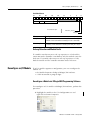
Port 2: Mini-DIN 8 RS-232
Baud Rate Selector Switch
Port 1: DB-9 RS-232, DTE
DC Power Source Selector Switch
Terminals for External 24V dc
Power Supply
Publication 1769-UM011F-EN-P - January 2007
Communicate Over Networks
33
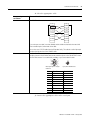
2. Select the appropriate cable.
Are you using
an isolator?
Then use this cable
No
The 1756-CP3 cable attaches the controller directly to the controller.
1 CD
1 CD
2 RDX
2 RDX
3 TXD
3 TXD
4 DTR
4 DTR
COMMON
COMMON
6 DSR
6 DSR
7 RTS
7 RTS
8 CTS
8 CTS
9
9
If you make your own cable, it must be shielded, and the shields must be tied to the metal shell
(that surrounds the pins) on both ends of the cable.
You can also use a 1747-CP3 cable from the SLC product family. This cable has a taller right-angle
connector housing than that of the 1756-CP3 cable.
Yes
The 1761-CBL-AP00 cable (right-angle connector to controller) or the 1761-CBL-PM02 cable
(straight connector to the controller) attaches the controller to port 2 on the 1761-NET-AIC isolator.
The mini-DIN connector is not commercially available, so you cannot make this cable.
6
7
1
2
6 78
3
8
9
4
5
DB-9 Right-angle or Straight
Cable End
Pin
1
2
3
4
5
6
7
8
9
DB-9 End
DCD
RxD
TxD
DTR
Ground
DSR
RTS
CTS
NA
3
4
5
12
8-pin, Mini-DIN Cable End
Mini-DIN End
DCD
RxD
TxD
DTR
Ground
DSR
RTS
CTS
NA
3. Connect the appropriate cable to the serial port.
Publication 1769-UM011F-EN-P - January 2007
34
Communicate Over Networks
Communicate with DF1 Devices
You can configure the controller as a master or slave on a serial
communication network. Use serial communications when:
• the system contains three or more stations.
• communications occur regularly and require leased-line, radio,
or power-line modems.
RS-232
EtherNet/IP
RS-232
RS-232
RS-232
Important: Only the 1769-L31 controller has
more than one RS-232 port. All other 1769
controllers are limited to one RS-232 port.
Modem
Modem
Modem
To configure the controller for DF1 communications, perform this
procedure.
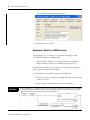
1. In RSLogix 5000 programming software, right-click your
controller and select Properties.
The Controller Properties dialog appears.
2. Click the Serial Port tab.
Publication 1769-UM011F-EN-P - January 2007
Communicate Over Networks
35
3. From the Mode pull-down menu, choose System.
4. Specify communication settings.
5. Click the System Protocol tab.
6. From the Protocol pull-down menu, choose a DF1 protocol.
7. Specify DF1 settings.
Communicate with ASCII Devices
You can use the serial port to interface with ASCII devices when the
controller is configured for user mode. For example, you can use the
serial port to:
• read ASCII characters from a weigh scale module or bar code
reader.
• send and receive messages from an ASCII triggered device, such
as a MessageView terminal.
ASCII Device Serial Communications
Connection from the Controller’s Serial Port to the ASCII Device
Publication 1769-UM011F-EN-P - January 2007
36
Communicate Over Networks
To configure the controller for ASCII communications, perform this
procedure.
1. In RSLogix 5000 programming software, right-click your
controller and select Properties.
The Controller Properties dialog appears.
2. Click the Serial Port tab.
3. From the Mode pull-down menu, choose User.
4. Specify communication settings.
5. Click the User Protocol tab.
6. From the Protocol pull-down menu, choose ASCII.
7. Specify ASCII settings.
Publication 1769-UM011F-EN-P - January 2007
Communicate Over Networks
37
The controller supports several instructions to manipulate ASCII
characters. The instructions are available in ladder diagram (LD) and
structured text (ST).
Read and Write ASCII Characters
Instruction Code
Description
ABL
Determine when the buffer contains termination characters
ACB
Count the characters in the buffer
ACL
Clear the buffer
Clear out ASCII Serial Port instructions that are currently executing or
are in the queue
AHL
Obtain the status of the serial port control lines
Turn on or off the DTR signal
Turn on or off the RTS signal
ARD
Read a fixed number of characters
ARL
Read a varying number of characters, up to and including the first set of
termination characters
AWA
Send characters and automatically append one or two additional
characters to mark the end of the data
AWT
Send characters
Create and Modify Strings of ASCII Characters
Instruction Code
Description
CONCAT
Add characters to the end of a string
DELETE
Delete characters from a string
FIND
Determine the starting character of a substring
INSERT
Insert characters into a string
MID
Extract characters from a string
Convert Data to or from ASCII Characters
Instruction Code
Description
STOD
Convert the ASCII representation of an integer value to a SINT, INT,
DINT, or REAL value
STOR
Convert the ASCII representation of a floating-point value to a REAL
value
DTOS
Convert a SINT, INT, DINT, or REAL value to a string of ASCII characters
RTOS
Convert a REAL value to a string of ASCII characters
UPPER
Convert the letters in a string of ASCII characters to upper case
LOWER
Convert the letters in a string of ASCII characters to lower case
Publication 1769-UM011F-EN-P - January 2007
38
Communicate Over Networks
Modbus Support
To use Logix5000 controllers on Modbus, connect the controllers
through the serial port and execute specific ladder logic routines.
A sample controller project is available with RSLogix 5000 Enterprise
programming software. To view sample projects, see Sample
Controller Projects on pg. 70.
Additional Resources
For more information, consult these publications:
• Logix5000 Controllers Common Procedures Manual, publication
1756-PM001
• Logix5000 Controllers General Instructions Reference Manual,
publication 1756-RM003
• SCADA System Application Guide, publication AG-UM008
• Logix5000 Controllers as Masters or Slaves on Modbus
Application Solution, publication CIG-AP129
Publication 1769-UM011F-EN-P - January 2007
Communicate Over Networks
DH-485 Network
Communications
39
For DH-485 communication, use the controller’s serial port.
However, with a CompactLogix controller, we recommend that you
use NetLinx networks, such as EtherNet/IP, ControlNet, or DeviceNet,
because excessive traffic on a DH-485 network may make it
impractical to connect to a controller with RSLogix 5000 programming
software.
IMPORTANT
If your application uses connections to DH-485 networks, select
built-in serial ports.
The DH-485 protocol uses RS-485 half-duplex as its physical interface.
RS-485 is a definition of electrical characteristics, not a protocol. You
can configure the CompactLogix controller’s RS-232 port to act as a
DH-485 interface. By using a 1761-NET-AIC converter and the
appropriate RS-232 cable (1756-CP3 or 1747-CP3), a CompactLogix
controller can send and receive data on a DH-485 network.
CompactLogix DH-485 Communications Overview
CompactLogix Controller
1747-CP3 Cable
or
1761-CBL-AC00 Cable
(port 1)
1761-CBL-AP00 Cable
or
1761-CBL-PM02 Cable
1761-NET-AIC+
Converter
DH-485 Network
Connection from CompactLogix
Controller to Port 1 or Port 2
1747-CP3 Cable
or
1761-CBL-AC00 Cable
1747-AIC Converter
SLC 5/03 Controller
On the DH-485 network, the CompactLogix controller can send and
receive messages to and from other controllers.
IMPORTANT
A DH-485 network consists of multiple cable segments. Limit
the total length of all the segments to 1219 m (4000 ft).
Publication 1769-UM011F-EN-P - January 2007
40
Communicate Over Networks
For the controller to operate on a DH-485 network, you need a
1761-NET-AIC interface converter for each controller you want to put
on the DH-485 network.
You can have two controllers for each 1761-NET-AIC converter, but
you need a different cable for each controller.
To establish DH-485 communication, perform this procedure.
1. Connect the serial port of the controller to either port 1 or port 2
of the 1761-NET-AIC converter.
2. Use the RS-485 port to connect the converter to the DH-485
network.
The cable you use to connect the controller depends on the port
you use on the 1761-NET-AIC converter.
Connection
Required Cable
Port 1
1747-CP3
DB-9 RS-232, DTE connection
or
1761-CBL-AC00
Port 2
1761-CBL-AP00
mini-DIN 8 RS-232 connection
or
1761-CBL-PM02
3. In RSLogix 5000 programming software, right-click on your
controller and choose Properties.
Publication 1769-UM011F-EN-P - January 2007
Communicate Over Networks
41
The Controller Properties dialog appears.
4. Click the Serial Port tab.
5. From the Mode pull-down menu, choose System.
6. Specify communication settings.
IMPORTANT
The baud rate specifies the communication rate for the
DH-485 port. All devices on the same DH-485 network
must be configured for the same baud rate. Select 9600 or
19200 KB.
7. Click the System Protocol tab.
8. From the Protocol pull-down menu, choose DH485.
9. Specify DH-485 settings.
10. From the Protocol pull-down menu, choose DF1 Radio.
Publication 1769-UM011F-EN-P - January 2007
42
Communicate Over Networks
System Protocol Specifications
Characteristic Description
Station Address Specifies the node address of the controller on the DH-485 network. Select a number 1...31 decimal, inclusive.
To optimize network performance, assign node addresses in sequential order. Initiators, such as personal computers,
should be assigned the lowest address numbers to minimize the time required to initialize the network.
Token Hold
Factor
Number of transmissions plus retries that a node holding a token can send onto the data link each time it receives the
token. Enter a value between 1...4. The default is 1.
Maximum
Specifies the maximum node address of all the devices on the DH-485 network. Select a number 1...31 decimal,
Station Address inclusive.
To optimize network performance, make sure:
• the maximum node address is the highest node number being used on the network.
• that all the devices on the same DH-485 network have the same maximum node address.
Additional Resources
For additional information, consult Data Highway/Data Highway
Plus/Data Highway II/Data Highway-485 Cable Installation Manual,
publication 1770-6.2.2.
Publication 1769-UM011F-EN-P - January 2007
Chapter
4
Manage Controller Communications
Introduction
Produce and Consume Data
This chapter explains how to manage controller communications.
Topic
Page
Produce and Consume Data
43
Send and Receive Messages
44
Connections
45
Calculate Total Connections
46
Connections Example
47
The controller supports the ability to produce (broadcast) and
consume (receive) system-shared tags over ControlNet or EtherNet/IP
networks. Produced and consumed tags each require connections.
Over ControlNet, produced and consumed tags are scheduled
connections.
Controller Communications Overview
Controller_1
Controller_2
Produced Tag
Consumed Tag
Controller_3
Consumed tag
Controller_4
Consumed Tag
Tag Type
Description
Produced
A produced tag allows other controllers to consume the tag, which means that a controller
can receive the tag data from another controller. The producing controller uses one
connection for the produced tag and another for each consumer. The controller’s
communication device uses one connection for each consumer.
As you increase the number of controllers that can consume a produced tag, you also
reduce the number of connections the controller and communication device have available
for other operations, like communications and I/O.
Consumed
43
Each consumed tag requires one connection for the controller that is consuming the tag.
The controller’s communication device uses one connection for each consumer.
Publication 1769-UM011F-EN-P - January 2007
44
Manage Controller Communications
For two controllers to share produced or consumed tags, both
controllers must be attached to the same control network, such as a
ControlNet or Ethernet/IP network. You cannot bridge produced and
consumed tags over two networks.
The number of available connections limits the total number of tags
that can be produced or consumed. If the controller uses all of its
connections for I/O and communication devices, no connections are
left for produced and consumed tags.
Send and Receive
Messages
Messages transfer data to other devices, such as controllers or
operator interfaces. Messages use unscheduled connections to send or
receive data. Connected messages can leave the connection open
(cache) or close the connection when the message is done
transmitting.
Message Transmission
Message Type
Communication
Method
Connected
Message
Can the
message be
cached?
Yes
Yes
PLC-2, PLC-3, PLC-5, or SLC CIP
No
(all types)
CIP with Source ID No
No
CIP data table read or write NA
DH+
CIP generic
NA
Block-transfer read or write NA
No
Yes
Optional
NA
Yes
(1)
Yes(2)
Yes
(1)
You can connect CIP generic messages. However, for most applications we recommend you leave CIP generic
messages unconnected.
(2)
Consider caching only if the target module requires a connection.
Connected messages are unscheduled connections on both
ControlNet and EtherNet/IP networks.
Each message uses one connection, regardless of how many devices
are in the message path. You can program the target of a MSG
instruction to optimize message transfer time.
Publication 1769-UM011F-EN-P - January 2007
Manage Controller Communications
45
Determine Whether to Cache Message Connections
When you configure a MSG instruction, you can cache or not cache
the connection.
Caching Messages
Message Execution
Function
Repeatedly
Cache the connection.
This keeps the connection open and optimizes execution time. Opening a connection each time the
message executes increases execution time.
Infrequently
Do not cache the connection.
This closes the connection upon completion of the message, freeing up that connection for other uses.
Connections
A Logix5000 system uses a connection to establish a communication
link between two devices. Connections can be:
• a controller to local I/O modules or local communication
modules.
• a controller to remote I/O or remote communication modules.
• a controller to remote I/O (rack-optimized) modules.
• produced and consumed tags.
• messages.
• controller access by RSLogix 5000 programming software.
• controller access by RSLinx software for HMI or other
applications.
The limit of connections may ultimately reside in the communication
module you use for the connection. If a message path routes through
a communication module, the connection related to the message also
counts towards the connection limit of that communication module.
Connections Overview
Device
Supported Connections
CompactLogix controller (1769-L31)
Built-in ControlNet communication port
(1769-L32C and 1769-L35CR controllers only)
100
Built-in EtherNet/IP communication port
(1769-L32E and 1769-L35E controllers only)
Publication 1769-UM011F-EN-P - January 2007
46
Manage Controller Communications
Calculate Total
Connections
You can calculate the total number of local and remote connections
the controller uses.
Local Connections Calculation
Local Connection Type
Device
Quantity
Connections
per Device
Local I/O module (always a direct connection)
1
Built-in ControlNet communication port (1769-L32C and 1769-L35CR controllers only)
0
Built-in EtherNet/IP communication port (1769-L32E and 1769-L35E controllers only)
0
1769-SDN DeviceNet scanner module
2
Total
Connections
Total
The number of remote connections a communication module
supports determines how many connections the controller can access
through that module.
Remote Connections Calculation
Remote Connection Type
Device
Quantity
Connections
per Device
Remote ControlNet communication module
• I/O configured as direct connection (none)
0 or
• I/O configured as rack-optimized connection
1
Remote I/O module over ControlNet (direct connection)
1
Remote EtherNet/IP communication module
• I/O configured as direct connection (none)
0 or
• I/O configured as rack-optimized connection
1
Remote I/O module over a EtherNet/IP network (direct connection)
1
Remote device over a DeviceNet network (accounted for in rack-optimized
connection for local 1769-SDN module)
0
Other remote communication adapter (POINT and FLEX adapters, for example)
1
Produced tag
1
Each consumer
1
Consumed tag
1
Message (depending on type)
1
Block-transfer message
1
Total
Publication 1769-UM011F-EN-P - January 2007
Total
Connections
Manage Controller Communications
Connections Example
47
In this example system the 1769-L35E CompactLogix controller:
• controls local digital I/O modules in the same chassis.
• controls remote I/O devices on a DeviceNet network.
• sends and receives messages to/from a ControlLogix controller
on an EtherNet/IP network.
• produces one tag that the 1794 FlexLogix controller consumes.
• is programmed via RSLogix 5000 programming software.
Example - CompactLogix System Connections
1769-ADN Adapter with
CompactLogix I/O Modules
Redistation
Series 9000
Photoeye
DeviceNet Network
ControlLogix Controller
with 1756-ENBT Module
1769-L35E CompactLogix
with 1769-SDN
EtherNet/IP Network
FlexLogix with 1788-DNBO DeviceNet Daughtercard
Personal Computer
Example - CompactLogix Connection Types
Connection Type
Device
Quantity
Connections
per Device
Total
Connections
Controller to local I/O modules (rack-optimized)
2
1
2
Controller to 1769-SDN scanner module
1
2
2
Controller to built-in EtherNet/IP communication port (rack-optimized)
1
0
0
Controller to RSLogix 5000 programming software
1
1
1
Message to ControlLogix controller
2
1
2
Produced tag consumed by FlexLogix controller
2
1
2
Total 9
Publication 1769-UM011F-EN-P - January 2007
48
Manage Controller Communications
Additional Resources
For additional information, consult these publications:
• Logix5000 Controllers Common Procedures Manual, publication
1756-PM001
• Logix5000 Controllers Design Considerations Reference Manual,
publication 1756-RM094
• Logix5000 Controllers General Instructions Reference Manual,
publication 1756-RM003
Publication 1769-UM011F-EN-P - January 2007
Chapter
5
Place, Configure, and Monitor I/O
Introduction
Select I/O Modules
This chapter explains how to place, configure, and monitor
CompactLogix I/O modules.
Topic
Page
Select I/O Modules
49
Place Local I/O Modules
54
Configure I/O
55
Configure Distributed I/O on an EtherNet/IP Network
57
Configure Distributed I/O on a ControlNet Network
58
Configure Distributed I/O on a DeviceNet Network
59
Address I/O Data
60
Determine When Data Is Updated
61
Reconfigure an I/O Module
63
When choosing 1769 I/O modules, select:
• specialty I/O modules when appropriate.
Some modules have field-side diagnostics, electronic fusing, or
individually-isolated inputs and outputs.
• a 1492 wiring system for each I/O module as an alternative to
the terminal block that comes with the module.
• 1492 PanelConnect modules and cables if you are connecting
input modules to sensors.
Additional Resources
For additional information, consult Compact I/O Selection Guide,
publication 1769-SG002.
49
Publication 1769-UM011F-EN-P - January 2007
50
Place, Configure, and Monitor I/O
Validate I/O Layout
After you have selected your I/O modules, you need to validate the
system you want to design. Before you begin to place your I/O
modules, consider that:
• as you add modules, the minimum backplane RPI increases.
• the I/O modules must be distributed such that the current
consumed from the left or right side of the power supply never
exceeds 2.0 A at 5V dc or 1.0 A at 24V dc.
Estimate Request Packet Interval
The request packet interval (RPI) defines the frequency at which the
controller sends and receives all I/O data on the backplane. There is
one RPI for the entire 1769 backplane.
Type of Module
Digital and analog (any mix)
Request Packet Interval
• 1...4 modules can be scanned in 1 ms.
• 5...16 modules can be scanned in 1.5 ms.
• 17...30 modules can be scanned in 2 ms.
• Some input modules have a fixed 8 ms filter, so
selecting a greater RPI has no effect.
Specialty
• Full-sized 1769-SDN modules add 1.5 ms per module.
• 1769-HSC modules add 0.5 ms per module.
You can always select an RPI that is slower than these. The RPI shows
how quickly modules can be scanned, not how quickly an application
can use the data. The RPI is asynchronous to the program scan. Other
factors, such as program execution duration, affect I/O throughput.
Publication 1769-UM011F-EN-P - January 2007
Place, Configure, and Monitor I/O
51
Calculate System Power Consumption
To validate your proposed system, calculate the total 5V dc current
and 24V dc to be consumed.
I/O Module Power Consumption Calculation Table
Catalog
Number
Number of Module Current Requirements
Modules
Calculated Current =
(Number of Modules) x (Module Current Requirements)
at 5V dc (in mA) at 24V dc (in mA) at 5V dc (in mA)
1769-L31
330
40
1769-L32C
650
40
1769-L32E
660
90
1769-L35CR
680
40
1769-L35E
660
90
at 24V dc (in mA)
Total Current Required(1):
(1)
This number must not exceed the power supply current capacity.
Power Supply Current Capacity
Specification
Power Supply and Capacity
1769-PA2
1769-PB2
Output Bus Current Capacity 0...55 °C (32...131 °F)
2 A at 5V dc and 0.8 A at 24V dc
24V dc User Power Capacity 0...55 °C (32...131 °F)
250 mA (maximum)
1769-PA4
1769-PB4
4 A at 5V dc and 2 A at 24V dc
NA
Validate Placement of I/O Modules
The controller you use determines how many local I/O modules you
can configure.
Controller I/O Support
Controller
Supported Local I/O Modules I/O Banks
1769-L35CR
30
3
1769-L35E
30
3
1769-L32C,
1769-L32E and
1769-L31
16
3
Publication 1769-UM011F-EN-P - January 2007
52
Place, Configure, and Monitor I/O
To validate the proposed placement of I/O modules in your
CompactLogix system, perform this procedure.
1. Verify that your 1769-L3x controller resides on the leftmost side
of the bank.
Single-Bank System
1769-L3x
Controller
Bank 0
Power Supply
Bank 1
End Cap
2. Verify that you have placed no more than three I/O modules
between your controller and power supply (bank 0).
Placing more than three I/O modules in bank 0 would exceed
the distance rating of four and invalidate your system.
3. Validate the number of I/O modules your power supply can
support.
In a single-bank system, make sure you have not placed more
than eight I/O modules between the power supply and end cap
(bank 1).
IMPORTANT
In a single-bank system, the power supply can support up
to eight I/O modules as long as the modules’ power
consumption does not exceed the power supply’s capacity.
So, in a single-bank system, you may not have more than
eleven total I/O modules, three to the left of your power
supply and eight to the right.
If your system requires additional I/O modules, you must
add an additional bank.
In a multi-bank system, make sure that your additional bank(s)
do not have more than eight I/O modules on either side of the
additional power supply.
IMPORTANT
Publication 1769-UM011F-EN-P - January 2007
In a multi-bank system, you may place up to eight I/O
modules on either side of the additional power supply so
long as the power consumed by these modules does not
exceed the power supply’s capacity.
Place, Configure, and Monitor I/O
53
In this example, the I/O modules 12...30 could be arranged in
any way so long as the power supplies’ capacity was not
exceeded. In other words, the first additional bank could contain
fewer than sixteen I/O modules This is just one possible
arrangement.
Example of Multi-Bank System
Original Banks 0 and 1
1769-L35x
Processor
1
2
3
Power
Supply
17
18
19
Power
Supply
4
5
6
7
8
9
10
11
End
Caps
Additional
Banks
12
13
14
15
16
Additional
Banks
End
Cap
28
Power
Supply
29
20
21
22
23
24
25
26
27
I/O modules are numbered 1....30
30
4. Verify that all banks have end caps.
IMPORTANT
If you place and configure more I/O modules and I/O banks
than your controller can support, your system may run well
for a period of time. Nothing alerts you to the fact that you
have exceeded your controller’s capacity.
However, by exceeding your controller’s I/O capacity, you
put your system at risk of intermittent faults, the most
common being Major Fault Type 03 (I/O Fault) Code 23.
Publication 1769-UM011F-EN-P - January 2007
54
Place, Configure, and Monitor I/O
Place Local I/O Modules
Use the 1769-CRR1/-CRR3 or 1769-CRL1/-CRL3 expansion cable to
connect banks of I/O modules.
Each I/O module also has a power supply distance rating, the number
of modules from the power supply. The distance rating is printed on
each module’s label. Each module must be located within its distance
rating.
Controller I/O Placement
Horizontal
Orientation
Bank 1
1769-CRLx Cable
Bank 2
1769-CRLx Cable
Bank 3
Bank 1
1769-CRRx Cable
Vertical Orientation
Bank 2
ATTENTION
The CompactLogix system does not support Removal and
Insertion Under Power (RIUP). While the CompactLogix system
is under power:
• any break in the connection between the power supply and the
controller (for example, removing the power supply, controller, or
an I/O module) may subject the logic circuitry to transient
conditions above the normal design thresholds and may result in
damage to system components or unexpected behavior.
• removing an end cap or an I/O module faults the controller and
may also result in damage to system components.
The CompactLogix controller also supports distributed (remote) I/O
via these networks:
• EtherNet/IP
• ControlNet
• DeviceNet
Publication 1769-UM011F-EN-P - January 2007
Place, Configure, and Monitor I/O
55
Additional Resources
For additional information, consult these publications:
• Compact Analog I/O Modules User Manual, publication
1769-UM002
• Compact I/O 1769-IR6 RTD/Resistance Input Module User
Manual, publication 1769-UM005
• Compact I/O 1769-IT6 Thermocouple/mV Input Module User
Manual, publication 1769-UM004
Configure I/O
To communicate with an I/O module in your system, add the module
to the I/O Configuration folder of the controller.
I/O Module Configuration
Add I/O modules to
the CompactBus.
When you add a module, you also define a specific configuration for
the module. While the configuration options vary from module to
module, there are some common options that you typically configure
Publication 1769-UM011F-EN-P - January 2007
56
Place, Configure, and Monitor I/O
I/O Configuration Options
Configuration Option
Description
Requested packet interval (RPI)
The RPI specifies the interval at which data updates over a connection. For example, an input module
sends data to a controller at the RPI that you assign to the module.
• Typically, you configure an RPI in milliseconds (ms). The range is 0.2 ms...750 ms.
• If a ControlNet network connects the devices, the RPI reserves a slot in the stream of data flowing
across the ControlNet network. The timing of this slot may not coincide with the exact value of the
RPI, but the control system guarantees that the data transfers at least as often as the RPI.
Change of state (COS)
Digital I/O modules use COS to determine when to send data to the controller. If a COS does not occur
within the RPI timeframe, the module multicasts data at the RPI.
Because the RPI and COS functions are asynchronous to the logic scan, it is possible for an input to
change state during program scan execution. If this is a concern, buffer input data so your logic has a
stable copy of data during its scan. Use the Synchronous Copy (CPS) instruction to copy the input data
from your input tags to another structure and use the data from that structure.
Communication format
Many I/O modules support different formats. The communication format that you choose also
determines:
• data structure of tags.
• connections.
• network usage.
• ownership.
• returning of diagnostic information.
Electronic keying
When you configure a module, you specify the slot number for the module. However, it is possible to
purposely or accidentally place a different module in that slot. Electronic keying lets you protect your
system against the accidental placement of the wrong module in a slot. The chosen keying option
determines how closely any module in a slot must match the configuration for that slot before the
controller opens a connection to the module. There are different keying options depending on your
application needs.
I/O Connections
A Logix5000 system uses connections to transmit I/O data.
Logix5000 I/O Connections
Connection
Description
Direct
A direct connection is a real-time, data-transfer link between the controller and an I/O module. The
controller maintains and monitors the connection between the controller and the I/O module. Any break
in the connection, such as a module fault or the removal of a module while under power, causes the
controller to set fault status bits in the data area associated with the module.
Typically, analog I/O modules, diagnostic I/O modules, and specialty modules require direct
connections.
Rack-optimized
For digital I/O modules, you can select rack-optimized communication. A rack-optimized connection
consolidates connection usage between the controller and all the digital I/O modules on a rack (or DIN
rail). Rather than having individual, direct connections for each I/O module, there is one connection for
the entire rack (or DIN rail).
Publication 1769-UM011F-EN-P - January 2007
Place, Configure, and Monitor I/O
57
Additional Resources
For additional information, consult these publications:
• Logix5000 Controllers Common Procedures Manual, publication
1756-PM001
• Logix5000 Controllers Design Considerations Reference Manual,
publication 1756-RM094
Configure Distributed I/O
on an EtherNet/IP Network
To communicate with distributed I/O modules over EtherNet/IP:
• choose a 1769-L32E or 1769-L35E CompactLogix controller with
a built-in EtherNet/IP communication port.
• add an EtherNet/IP adapter, and I/O modules to the I/O
Configuration folder of the controller.
Within the I/O Configuration folder, organize the modules into a
hierarchy of tree/branch and parent/child.
EtherNet/IP Distributed I/O Configuration
For a typical distributed I/O network…
Controller
Built-in
EtherNet/IP Port
Remote
Adapter
I/O
Module
Device
…you build the I/O configuration in this order.
1. Add the remote adapter for the distributed I/O chassis or DIN rail.
2. Add the distributed I/O modules.
Additional Resources
For more information, consult EtherNet/IP Communication Modules in
Logix5000 Control Systems User Manual, publication ENET-UM001.
Publication 1769-UM011F-EN-P - January 2007
58
Place, Configure, and Monitor I/O
Configure Distributed I/O on
a ControlNet Network
To communicate with distributed I/O modules over ControlNet:
• choose a 1769-L32C or 1769-L35CR CompactLogix controller
with a built-in ControlNet communication port.
• add a ControlNet adapter, and I/O modules to the I/O
Configuration folder of the controller.
Within the I/O Configuration folder, organize the modules into a
hierarchy of tree/branch and parent/child.
ControlNet Distributed I/O Configuration
For a typical distributed I/O network…
Controller
Built-in
ControlNet Port
Remote
Adapter
I/O
Module
Device
…you build the I/O configuration in this order.
1. Add the remote adapter for the distributed I/O chassis or DIN rail.
2. Add the distributed I/O modules.
Additional Resources
For more information, consult ControlNet Communication Modules in
Logix5000 Control Systems User Manual, publication CNET-UM001.
Publication 1769-UM011F-EN-P - January 2007
Place, Configure, and Monitor I/O
Configure Distributed I/O
on a DeviceNet Network
59
To communicate with the I/O modules over a DeviceNet network,
add the DeviceNet bridge to the I/O Configuration folder of the
controller. RSNetWorx for DeviceNet software is used to define the
scanlist within the DeviceNet scanner to communicate data between
the devices and the controller through the scanner.
DeviceNet Distributed I/O Configuration
For a typical distributed I/O network…
Single Network
Controller Scanner
Device
Device
Device
Device
Device
Device
Several Smaller Distributed Networks (subnets)
Linking
Device
Controller Scanner
Device
Device
Linking
Device
Device
Device
Device
Device
…you build the I/O configuration in this order
Add the local scanner module.
Additional Resources
For more information, consult DeviceNet Communication Modules in
Logix5000 Control Systems User Manual, publication DNET-UM004.
Publication 1769-UM011F-EN-P - January 2007
60
Place, Configure, and Monitor I/O
Address I/O Data
I/O information is presented as a set of tags.
• Each tag uses a structure of data, depending on the specific
features of the I/O module.
• The name of the tags is based on the location of the I/O module
in the system.
I/O Address Format
Location
:Slot
:Type
.Member
.SubMember
.Bit
= Optional
Where
Is
Location
Network location.
Local = same chassis or DIN rail as the controller.
Adapter_Name = identifies remote communication adapter or bridge module.
Slot
Slot number of I/O module in its chassis or DIN rail.
Type
Type of data.
I = input.
O = output.
C = configuration.
S = status.
Member
Specific data from the I/O module, depending on what type of data the module can store.
• For a digital module, a data member usually stores the input or output bit values.
• For an analog module, a channel member (CH#) usually stores the data for a channel.
SubMember
Specific data related to a member.
Bit
Specific point on a digital I/O module, depending on the size of the I/O module (0...31 for a 32-point module).
Publication 1769-UM011F-EN-P - January 2007
Place, Configure, and Monitor I/O
Determine When Data
Is Updated
61
CompactLogix controllers update data asynchronously with the
execution of logic. This flowchart illustrates when producers send
data. Controllers, input modules and bridge modules are producers.
Updating of Data
Output
Input or Output Data?
Digital
Analog or Digital?
Input
Analog
Digital
Analog or Digital?
Remote or Local?
Analog
COS for any point on the
module?
No
RTS ≤RPI?
No
Remote
Yes
Local
Yes
Data is sent to the backplane
at the RTS.
Data is sent to the backplane at
the RTS and RPI.
Data is sent to the backplane at the RPI
and at the change of a specified point.
Data is sent to the backplane at the RPI.
• Over a ControlNet network, remote data is sent at the actual packet interval.
• Over an EtherNet/IP network, remote data is sent close to the RPI, on average.
• Over a DeviceNet network, data is sent to and from the scanner and processor at the RPI.
However, the update rate for remote data between the scanner and end devices depends on the
mapping type selected with the specific device.
TIP
Data is sent to the backplane at the RPI
and at the end of every task.
If you need to ensure that the I/O values being used during logic
execution are from one moment in time, such as at the
beginning of a ladder program, use the Synchronous Copy
instruction (CPS) to buffer I/O data.
Additional Resources
For additional information, consult these publications:
• Logix5000 Controllers Common Procedures Programming
Manual, publication 1756-PM001
• Logix5000 Controllers General Instruction Set Reference Manual,
publication 1756-RM003
Publication 1769-UM011F-EN-P - January 2007
62
Place, Configure, and Monitor I/O
Monitor I/O Modules
With the CompactLogix controller, you can monitor I/O modules at
different levels by:
• using the programming software to display fault data.
Refer to Display Fault Data on page 62.
• programming logic to monitor fault data so you can take
appropriate action
Additional Resources
For examples of programming logic, refer to Logix5000 Controllers
Common Procedures Programming Manual, publication 1756-PM001.
Display Fault Data
Fault data for certain types of module faults can be viewed through
the programming software.
To display fault data, perform this procedure.
1. In RSLogix 5000 programming software, select Controller Tags in
the Controller Organizer and right-click to select Monitor Tags.
The display style for the fault data defaults to decimal.
2. Change the display style to Hex to read the fault code.
If the module faults, but the connection to the controller remains
open, the controller tags database displays the fault value
16#0E01_0001. The fault word uses this format.
Publication 1769-UM011F-EN-P - January 2007
Place, Configure, and Monitor I/O
63
7
0
Fault Word Format
31
27
23
19
15
11
Fault_Code_Value
Reserved
FaultCode
3
Reserved
Fault Information
0 = Connection Open
}
Connection_Closed
Fault_Bit
Bit
Description
Fault_Bit
This bit indicates that at least one bit in the fault word is set (1). If
all the bits in the fault word are cleared (0), this bit is cleared (0).
Connection_Closed This bit indicates whether the connection to the module is open (0)
or closed (1). If the connection is closed (1), the Fault_Bit is set (1).
End-cap Detection and Module Faults
If a module not adjacent to an end cap experiences a fault and the
connection to the controller is not broken, only the module enters the
fault state. If a module adjacent to an end cap experiences a fault,
both the module and the controller transition to the fault state.
Reconfigure an I/O Module
If an I/O module supports reconfiguration, you can reconfigure the
module via:
• the Module Properties dialog in RSLogix 5000 software.
• a MSG instruction in program logic.
Reconfigure a Module via RSLogix 5000 Programming Software
To reconfigure an I/O module via RSLogix 5000 software, perform this
procedure.
1. Highlight the module in the I/O Configuration tree and
right-click to choose Properties.
Publication 1769-UM011F-EN-P - January 2007
64
Place, Configure, and Monitor I/O
The Controller Properties dialog appears.
2. Reconfigure the module.
Reconfigure a Module via a MSG Instruction
To reconfigure an I/O module, use a Module Reconfigure MSG
instruction. During the reconfiguration:
• input modules continue to send input data to the controller.
• output modules continue to control their output devices.
A Module Reconfigure message requires the property Message Type
and a selection of Module Reconfigure.
To reconfigure an I/O module, perform this procedure.
1. Set the required member of the configuration tag of the module
to the new value.
2. Send a Module Reconfigure message to the module.
EXAMPLE
When reconfigure[5] is on, the MOV instruction sets the high alarm to 60 for the local module in slot 4. The Module
Reconfigure message then sends the new alarm value to the module. The ONS instruction prevents the rung from
sending multiple messages to the module while the reconfigure[5] is on.
Publication 1769-UM011F-EN-P - January 2007
Chapter
6
Develop Applications
Introduction
Manage Tasks
This chapter explains how to develop applications.
Topic
Page
Manage Tasks
65
Develop Programs
66
Organize Tags
71
Select a Programming Language
72
Monitor Controller Status
75
Monitor Connections
76
Select a System Overhead Time Slice Percentage
80
With a Logix5000 controller, you can use multiple tasks to schedule
and prioritize the execution of your programs based on specific
criteria. This divides your controller’s processing time among the
different operations in your application. Remember that:
• the controller executes only one task at one time.
• one exception task can interrupt another and take control.
• in any given task, only one program executes at one time.
Additional Resources
For more information, consult these publications:
• Logix5000 Controllers Common Procedures Manual, publication
1756-PM001
• Logix5000 Controllers Design Considerations Reference Manual,
publication 1756-RM094
65
Publication 1769-UM011F-EN-P - January 2007
66
Develop Applications
Develop Programs
The controller’s operating system is a preemptive multitasking system
that is IEC 1131-3 compliant. This environment provides:
• tasks to configure controller execution.
• programs to group data and logic.
• routines to encapsulate executable code written in a single
programming language.
Program Development
Control Application
Controller Fault Handler
Task 8
Task 1
Configuration
Status
Watchdog
Program 32
Program 1
Program (local)
Tags
Main Routine
Fault Routine
Other Routines
Controller (global) Tags
Publication 1769-UM011F-EN-P - January 2007
I/O Data
System-shared Data
Develop Applications
67
Define Tasks
Tasks provide scheduling and priority information for programs. You
can configure tasks as continuous, periodic, or event tasks. Only one
task can be continuous.
Task Support
Controller
Tasks Supported
1769-L35x
8
1769-L32x
6
1769-L31
4
A task can have as many as 100 separate programs, each with its own
executable routines and program-scoped tags. Once a task is triggered
(activated), all the programs assigned to the task execute in the order
in which they are grouped. Programs can only appear once in the
Controller Organizer and cannot be shared by multiple tasks.
Specify Task Priorities
Each task in the controller has a priority level. The operating system
uses the priority level to determine which task to execute when
multiple tasks are triggered. You can configure periodic tasks to
execute from the lowest priority of 15 up to the highest priority of 1. A
higher-priority task will interrupt any lower-priority task. The
continuous task has the lowest priority and is always interrupted by a
periodic task.
The CompactLogix controller uses a dedicated periodic task at priority
6 to process I/O data. This periodic task executes at the RPI you
configure for the CompactBus, which can be as fast as once each
millisecond. Its total execution time is as long as it takes to scan the
configured I/O modules.
How you configure your tasks affects how the controller receives I/O
data. Tasks at priorities 1...5 take precedence over the dedicated I/O
task. Tasks in this priority range can impact I/O processing time. For
example, if you use the following configuration:
• I/O RPI = 1 ms
• a task of priority = 1...5 that requires 500 μs to execute and is
scheduled to run every millisecond
this configuration leaves the dedicated I/O task 500 μs to complete its
job of scanning the configured I/O.
Publication 1769-UM011F-EN-P - January 2007
68
Develop Applications
However, if you schedule two high priority tasks 1...5 to run every
millisecond, and they both require 500 μs or more to execute, no CPU
time would be left for the dedicated I/O task. Furthermore, if you
have so much configured I/O that the execution time of the dedicated
I/O task approaches 2 ms (or the combination of the high priority
tasks and the dedicated I/O task approaches 2 ms) no CPU time is left
for low priority tasks 7...15.
TIP
For example, if your program needs to react to inputs and
control outputs at a set rate, configure a periodic task with a
priority higher than 6 (1...5). This keeps the dedicated I/O task
from affecting the periodic rate of your program. However, if
your program contains a lot of math and data manipulation,
place this logic in a task with priority lower than 6 (7...15), such
as the continuous task, so that the dedicated I/O task is not
adversely affected by your program.
Multiple Tasks Example
Task
Priority Level
Task Type
Example Execution Time Worst-Case Completion Time
1
5
20 ms periodic task
2 ms
2 ms
2
7
Dedicated I/O task
1 ms
3 ms
5 ms selected RPI
3
10
10 ms periodic task
4 ms
8 ms
4
None (lowest)
Continuous task
25 ms
60 ms
Task 1
Task 2
Task 3
Task 4
0
5
10
15
Publication 1769-UM011F-EN-P - January 2007
20
25
30
35
Time (ms)
40
45
50
55
60
65
Develop Applications
69
Remember that:
• the highest priority task interrupts all lower priority tasks.
• the dedicated I/O task can be interrupted by tasks with priority
levels 1...5.
The dedicated I/O task interrupts tasks with priority levels 7...15.
This task runs at the selected RPI rate scheduled for the
CompactLogix system (2 ms in this example).
• the continuous task runs at the lowest priority and is interrupted
by all other tasks.
• a lower priority task can be interrupted multiple times by a
higher priority task.
• when the continuous task completes a full scan it restarts
immediately, unless a higher priority task is running.
Define Programs
Each program contains:
•
•
•
•
program tags.
a main executable routine.
other routines.
an optional fault routine.
Each task can schedule as many as 100 programs.
The scheduled programs within a task execute to completion from
first to last. Programs unattached to any task show up as unscheduled
programs. You must specify (schedule) a program within a task before
the controller can scan the program.
Define Routines
A routine is a set of logic instructions in a single programming
language, such as ladder logic. Routines provide the executable code
for the project in a controller. A routine is similar to a program file or
subroutine in a PLC or SLC controller.
Each program has a main routine. This is the first routine to execute
when the controller triggers the associated task and calls the
associated program. Use logic, such as the Jump to Subroutine (JSR)
instruction, to call other routines.
Publication 1769-UM011F-EN-P - January 2007
70
Develop Applications
You can also specify an optional program fault routine. The controller
executes this routine if it encounters an instruction-execution fault
within any of the routines in the associated program.
Sample Controller Projects
RSLogix 5000 Enterprise programming software includes sample
projects that you can copy and then modify to fit your application.
To view a set of sample controller projects, perform this procedure.
1. From the Help pull-down menu, choose Vendor Sample
Projects.
2. Scroll down to select a set of sample projects.
Publication 1769-UM011F-EN-P - January 2007
Develop Applications
71
Additional Resources
For more information, consult Logix5000 Controllers Common
Procedures Manual, publication 1756-PM001.
Organize Tags
With a Logix5000 controller, you use a tag (alphanumeric name) to
address data (variables). In Logix5000 controllers, there is no fixed,
numeric format. The tag name itself identifies the data. This lets you:
• organize your data to mirror your machinery.
• document (through tag names) your application as you
develop it.
Tag Organization
Analog I/O Device
Integer Value
Storage Bit
Counter
Timer
Digital I/O Device
When you create a tag, assign these properties to the tag:
• Tag type
• Data type
• Scope
Additional Resources
For additional information, consult these publications:
• Logix5000 Controllers Common Procedures Manual, publication
1756-PM001
• Logix5000 Controllers Design Considerations Reference Manual,
publication 1756-RM094
Publication 1769-UM011F-EN-P - January 2007
72
Develop Applications
Select a Programming
Language
The CompactLogix controller supports these programming languages,
both online and offline.
Programming Language Selection
Required Language
Program
Ladder diagram (LD)
Continuous or parallel execution of multiple operations (not sequenced)
Boolean or bit-based operations
Complex logical operations
Message and communication processing
Machine interlocking
Operations that service or maintenance personnel may have to interpret in order to
troubleshoot the machine or process
Function block diagram (FBD)
Continuous process and drive control
Loop control
Calculations in circuit flow
Sequential function chart (SFC)
High-level management of multiple operations
Repetitive sequence of operations
Batch process
Motion control using structured text
State machine operations
Structured text (ST)
Complex mathematical operations
Specialized array or table loop processing
ASCII string handling or protocol processing
Publication 1769-UM011F-EN-P - January 2007
Develop Applications
73
Add-On Instructions
With version 16 of RSLogix 5000 programming software, you can
design and configure sets of commonly used instructions to increase
project consistency. Similar to the built-in instructions contained in
Logix5000 controllers, these instructions you create are called Add-On
Instructions. Add-On Instructions reuse common control algorithms.
With them, you can:
• ease maintenance by animating logic for a single instance.
• protect intellectual property with locking instructions.
• reduce documentation development time.
You can use Add-On Instructions across multiple projects. You can
define your instructions, obtain them from somebody else, or copy
them from another project.
Once defined in a project, Add-On Instructions behave similarly to the
built-in instructions in Logix5000 controllers. They appear on the
instruction tool bar for easy access, as do internal RSLogix 5000
software instructions.
Save Time
With Add-On Instructions, you can combine your most commonly
used logic into sets of reusable instructions. You save time when you
create instructions for your projects and then share them with others.
Add-On Instructions increase project consistency since commonly
used algorithms all work in the same manner, regardless of who
implements the project.
Use Standard Editors
You create Add-On Instructions by using one of three RSLogix 5000
software programming editors.
• Standard Ladder
• Function Block Diagram
• Structured Text
Once you have created instructions, you can use them in any RSLogix
5000 editor.
Export Add-On Instructions
You can export Add-On-Instructions to other projects as well as copy
and paste them from one project to another. Give each instruction a
Publication 1769-UM011F-EN-P - January 2007
74
Develop Applications
unique name so that you don’t accidentally overwrite another
instruction of the same name.
Use Context Views
Context views let you visualize an instruction’s logic for a specific
instant, simplifying online troubleshooting of your Add-On
Instructions. Each instruction contains a revision, a change history,
and an auto-generated help page.
Create Custom Help
When you create an instruction, you enter information for the
description fields in software dialogs, information that becomes what
is known as Custom Help. Custom Help makes it easier for users to
get the help they need when implementing the instructions.
Apply Source Protection
As the creator of Add-On Instructions, you can limit users of your
instruction(s) to read-only access, or you can bar access to the internal
logic or local parameters used by the instruction(s). This source
protection lets you prevent unwanted changes to your instruction(s)
and protects your intellectual property.
Additional Resources
For additional information, consult Logix5000 Controllers Execution
Time and Memory Use Reference Manual, publication 1756-RM087.
Additional Resources
For more information, consult these publications:
• Logix5000 Controllers Common Procedures Manual, publication
1756-PM001
• Logix5000 Controllers Execution Time and Memory Use
Reference Manual, publication 1756-RM087
Publication 1769-UM011F-EN-P - January 2007
Develop Applications
Monitor Controller Status
75
The CompactLogix controller uses Get System Value (GSV) and Set
System Value (SSV) instructions to get and set (change) controller
data. The controller stores system data in objects. There is no status
file, as in the PLC-5 processor.
The GSV instruction retrieves the specified information and places it
in the destination. The SSV instruction sets the specified attribute with
data from the source.
When you enter a GSV/SSV instruction, the programming software
displays the:
• valid object classes.
• object names.
• attribute names.
For the GSV instruction, you can get values for all the available
attributes. For the SSV instruction, the software displays only those
attributes you are allowed to set.
In some cases, there will be more than one of the same type of object,
so you might also have to specify the object name. For example, there
can be several tasks in your application. Each task has its own TASK
object that you access by the task name.
Publication 1769-UM011F-EN-P - January 2007
76
Develop Applications
You can access these object classes:
•
•
•
•
•
•
•
•
•
•
•
•
•
•
AXIS
CONTROLLER
CONTROLLERDEVICE
CST
DF1
FAULTLOG
MESSAGE
MODULE
MOTIONGROUP
PROGRAM
ROUTINE
SERIALPORT
TASK
WALLCLOCKTIME
Additional Resources
For more information, consult these publicaitons:
• Logix5000 Controllers General Instructions Reference Manual,
publication 1756-RM003
• Logix5000 Controllers Common Procedures Manual, publication
1756-PM001
Monitor Connections
If communication with a device in the I/O configuration of the
controller does not occur for 100 ms or 4 times the RPI, whichever is
less, the communication times out, and the controller produces these
warnings:
• The I/O LED on the front of the controller flashes green.
• A ! displays over the I/O configuration folder and the
device (s) that has timed out.
• A module fault code is produced, which you can access via:
– the Module Properties dialog box for the module.
– a GSV instruction.
Publication 1769-UM011F-EN-P - January 2007
Develop Applications
77
Determine if Device Communication Has Timed Out
If communication times out with at least one device (module) in the
I/O configuration of the controller, the I/O LED on the front of the
controller flashes green.
• The GSV instruction gets the status of the I/O LED and stores it
in the I_O_LED tag.
• If I_O_LED equals 2, the controller has lost communication with
at least one device.
GSV
Get System Value
CIP Object Class MODULE
CIP Object Name
Attribute Name
LedStatus
Dest
I_O_LED
EQU
Equal
Source A I_O_LED
Source B
2
where:
I_O_LED is a DINT tag that stores the status of the I/O LED on
the front of the controller.
Publication 1769-UM011F-EN-P - January 2007
78
Develop Applications
Determine if I/O Module Communication Has Timed Out
If communication times out with a device (module) in the I/O
configuration of the controller, the controller produces a fault code for
the module.
• The GSV instruction gets the fault code for IO_Module and
stores it in the Module_Status tag.
• If Module_Status is any value other than 4, the controller is not
communicating with the module.
I/O Module Communication
Publication 1769-UM011F-EN-P - January 2007
Develop Applications
79
Interrupt the Execution of Logic and Execute the Fault Handler
To interrupt the execution of logic and execute the fault handler,
perform this procedure.
1. In the Controller Organizer of RSLogix 5000 programming
software, right-click the module and choose Properties.
The Module Properties dialog appears.
2. Click the Connection and check Major Fault On Controller If
Connection Fails While in Run Mode check box.
3. Click OK.
4. Develop a routine for the Controller Fault Handler.
Additional Resources
For additional information, consult these publications:
• Logix5000 Controllers Common Procedures Manual, publication
1756-PM001
• Logix5000 Controllers Design Considerations Reference Manual,
publication 1756-RM094
Publication 1769-UM011F-EN-P - January 2007
80
Develop Applications
Select a System
Overhead Time Slice
Percentage
The Controller Properties dialog lets you specify a percentage for
system overhead. This percentage specifies the ratio of controller time,
excluding the time for periodic tasks, that is devoted to
communication and background functions.
To select a system overhead percentage, perform this procedure.
1. In the Controller Organizer of RSLogix 5000 programming
software, right-click on your controller and choose Properties.
The Controller Properties dialog appears.
2. Click the Advanced tab.
3. From the System Overhead Time Slice menu, choose a
percentage.
System overhead time slice functions include:
• communicating with programming and HMI devices, such as
RSLogix 5000 software.
• responding to messages.
• sending messages.
The controller performs system overhead functions for up to one
millisecond at a time. If the controller completes the overhead
Publication 1769-UM011F-EN-P - January 2007
Develop Applications
81
functions in less than one millisecond, it resumes the continuous
task.
As the system overhead time slice percentage increases, time
allocated to executing the continuous task decreases. If there are
no communications for the controller to manage, the controller
uses the communications time to execute the continuous task.
While increasing the system overhead percentage does increase
communications performance, it also increases the amount of
time it takes to execute a continuous task, increasing overall
scan time.
Ratio between Continuous Task and System Overhead Functions
Time Slice
Continuous Tasks
Max Overhead Function Time
10%
9 ms
1 ms
20%
4 ms
1 ms
33%
2 ms
1 ms
50%
1 ms
1 ms
At a time slice of 10%, system overhead interrupts the continuous task
every 9 ms of continuous task time.
Legend:
Task executes.
Task is interrupted (suspended).
Periodic
1 ms
1 ms
System Overhead
9 ms
9 ms
Continuous Task
0
5
10
15
20
25
Elapsed Time (ms)
Publication 1769-UM011F-EN-P - January 2007
82
Develop Applications
The interruption of a periodic task increases the elapsed time (clock
time) between the execution of system overhead functions.
1 ms
1 ms
1 ms
1 ms
1 ms
Periodic Task
1 ms
1 ms
System Overhead
9 ms of Continuous Task Time
9 ms of Continuous Task Time
Continuous Task
0
5
10
15
20
25
Elapsed Time (ms)
If you use the default time slice of 20%, the system overhead
interrupts the continuous task every 4 ms.
1 ms
1 ms
1 ms
1 ms
1 ms
System Overhead
4 ms
4 ms
4 ms
4 ms
4 ms
Continuous Task
5
10
15
20
25
Elapsed Time (ms)
If you increase the time slice to 50%, the system overhead interrupts
the continuous task every 1 ms.
1 ms
System Overhead
1 ms
Continuous Task
5
10
15
20
25
Elapsed Time (ms)
If the controller contains only a periodic task(s), the system overhead
time slice value has no effect. System overhead runs whenever a
periodic task is not running.
Periodic Task
System Overhead
5
Continuous Task
Elapsed Time (ms)
Publication 1769-UM011F-EN-P - January 2007
10
15
20
25
Chapter
7
Configure PhaseManager
Introduction
This chapter explains how to configure PhaseManager.
The PhaseManager option of RSLogix 5000 programming software
gives you a state model for your equipment.
Topic
Page
About PhaseManager
83
About a State Model
85
Compare PhaseManager to Other State Models
88
Minimum System Requirements
89
Equipment Phase Instructions
89
Additional Resources
For additional information, consult PhaseManager User Manual,
publication LOGIX-UM001.
About PhaseManager
Term
Equipment
phase
State
model
PhaseManager lets you add equipment phases to your controller. An
equipment phase helps you lay out your code in sections that are
easier to write, find, follow, and change.
Description
• As with a program, an equipment phase is run in a task and is given a set of routines and tags.
• Unlike a program, an equipment phase runs by a state model and lets you do one activity.
A state model divides the operating cycle of your equipment into a series of states. Each state is an instant in the operation
of the equipment. It's the actions or conditions of the equipment at a given time.
The state model of an equipment phase is similar to the S88 and PackML state models.
State
machine
An equipment phase includes an embedded state machine that:
• calls the main routine (state routine) for an acting state.
• manages the transitions between states with minimal coding.
• makes sure that the equipment goes from state to state along an allowable path.
PHASE tag When you add an equipment phase, RSLogix 5000 software makes a tag, using the PHASE data type.
83
Publication 1769-UM011F-EN-P - January 2007
84
Configure PhaseManager
PhaseManager Overview
A PHASE tag gives you the status of an equipment phase.
Controller
Controller Tags
Tasks
MainTask
An equipment phase directs 1 activity of your equipment.
Add Water Phase
A state model divides the activity into a series of states.
Mix Phase
Running State Routine
How to Add
Water
Drain Phase
Space Parts Phase
MainProgram
Equipment phase instructions control the transitions between states and
handle faults.
PSC
POVR
PCLF
PRNP
PATT
PCMD
PFL
PXRQ
PPD
PDET
My Equipment Program
Other code controls the specific actions of your equipment.
Water Feed
Publication 1769-UM011F-EN-P - January 2007
Conveyor
Enable Axes
Configure PhaseManager
About a State Model
85
A state model divides the operating cycle of your equipment into a
series of states. Each state is an instant in the operation of the
equipment, an action or condition at a given time.
In a state model, you define what your equipment does under
different conditions, such as run, hold, and stop. You don’t need to
use all the states for your equipment. Use only needed states.
Types of States
State
Description
Acting
Does something or several things for a certain time or until certain
conditions are met. An acting state runs one time or repeatedly.
Waiting
Shows that certain conditions are met and the equipment is waiting for
the signal to go to the next state.
PhaseManager States
Start
Idle
Hold
Running
Holding
Held
Acting
Hold
Restart
Resetting
Your equipment can go from any state in the
box to the stopping or aborting state.
Acting states represent the things your
equipment does at a given time.
Restarting
Stop
Abort
Abort
Reset
Complete
Stopping
Aborting
Waiting
Waiting states represent the condition of
your equipment when it is in between
acting states.
Reset
Stopped
Aborted
Publication 1769-UM011F-EN-P - January 2007
86
Configure PhaseManager
With a state model, you define the behavior of your equipment and
put it into a brief functional specification. In this way you show what
happens and when it happens.
State
Question To Be Asked
Stopped
What happens when you turn on power?
Resetting
How does the equipment get ready to run?
Idle
How do you tell that the equipment is ready to run?
Running
What does the equipment do to make product?
Holding
How does the equipment temporarily stop making product without making
scrap?
Held
How do you tell if the equipment is safely holding?
Restarting
How does the equipment resume production after holding?
Complete
How do you tell when the equipment has finished what it had to do?
Stopping
What happens during a normal shutdown?
Aborting
How does the equipment shut down if a fault or failure happens?
Aborted
How do you tell if the equipment is safely shut down?
Change Equipment States
The arrows in the state model show how your equipment can
transition from one state to another.
• Each arrow is called a transition.
• A state model lets the equipment make only certain transitions.
This transition restriction standardizes equipment behavior so
that another piece of equipment using the same model will
behave the same way.
Publication 1769-UM011F-EN-P - January 2007
Configure PhaseManager
87
PhaseManager Transitions Overview
= Transition
Command
Done — No command. Use PSC instruction instead.
Start
Idle
Hold
Running
Holding
Held
Your equipment can go from any state in
the box to the stopping or aborting state.
Hold
Restart
Resetting
Restarting
Stop
Abort
Fault (specific use of the abort command)
Abort
Reset
Complete
Reset
Stopping
Aborting
Stopped
Aborted
PhaseManager Transition Types
Transition
Type
Description
Command
A command tells the equipment to start doing something or do something different. For example the operator pushes the
start button to start production and the stop button to halt production.
PhaseManager uses these commands:
• Reset
• Start
• Stop
• Hold
• Restart
• Abort
Done
Equipment goes to a waiting state when it has completed a task. You don’t have to command equipment to stop. Instead,
set up your code to signal when a task is complete.
Fault
A fault tells you that something unusual has occurred. Set up your code to find and take action for faults. Suppose you want
your equipment to shut down as fast as possible in case of a certain fault. In that case, set up your code to look for that
fault and give the abort command if it finds it.
Publication 1769-UM011F-EN-P - January 2007
88
Configure PhaseManager
Manually Change States
With RSLogix 5000 software, you can monitor and command an
equipment phase. To manually change states, perform this procedure.
Current State of Equipment Phase
Take ownership of the equipment phase.
Give a command.
Compare PhaseManager to
Other State Models
You can compare PhaseManager’s state models to other common state
models.
State Model Comparisons
S88
PackML
PhaseManager
Idle
Starting ⇒ Ready
Resetting ⇒ Idle
Running ⇒ Complete
Producing
Running ⇒ Complete
Pausing ⇒ Paused
Standby
Subroutines and/or breakpoints
Holding ⇒ Held
Holding ⇒ Held
Holding ⇒ Held
Restarting
None
Restarting
Stopping ⇒ Stopped
Stopping ⇒ Stopped
Stopping ⇒ Stopped
Aborting ⇒ Aborted
Aborting ⇒ Aborted
Aborting ⇒ Aborted
Publication 1769-UM011F-EN-P - January 2007
Configure PhaseManager
Minimum System
Requirements
89
To develop PhaseManager programs, you need:
• a CompactLogix controller with firmware revision 16.0 or later.
• a communication path to the controller.
• RSLogix 5000 programming software, version 15.0 or later.
To enable PhaseManager support, you need the full or professional
editions of RSLogix 5000 software or the optional PhaseManager
add-on (9324-RLDPMENE) to your RSLogix 5000 software package.
Equipment Phase
Instructions
With CompactLogix controllers, you can issue many ladder diagram
(LD) and structured text (ST) instructions to begin various equipment
phases.
Instruction Code
Instruction
PSC
Signal a phase that the state routine is complete so go to the
next state
PCMD
Change the state or substate of a phase
PFL
Signal a failure for a phase
PCLF
Clear the failure code of a phase
PXRQ
Initiate communication with RSBizWare Batch software
PRNP
Clear the NewInputParameters bit of a phase
PPD
Set up breakpoints within the logic of a phase
PATT
Take ownership of a phase to either:
• prevent another program or RSBizWare Batch software
from commanding a phase
or
• make sure another program or RSBizWare Batch software
does not already own a phase
PDET
Relinquish ownership of a phase
POVR
Override a command
Publication 1769-UM011F-EN-P - January 2007
90
Configure PhaseManager
Notes:
Publication 1769-UM011F-EN-P - January 2007
Chapter
8
Maintain Nonvolatile Memory
Introduction
This chapter explains how to maintain nonvolatile memory.
Topic
Page
Prevent a Major Fault During a Load
92
Use a CompactFlash Reader
92
CompactLogix controllers support the 1784-CF64 CompactFlash card
for nonvolatile memory. If the controller loses power and lacks
sufficient battery capacity, it loses the project in user memory.
Nonvolatile memory lets you keep a copy of your project on the
controller. The controller does not need power to keep this copy.
You can load the copy from nonvolatile memory to user memory of
the controller:
• every time power is applied.
• whenever there is no project in the controller and it turns on.
• any time via RSLogix 5000 programming software.
IMPORTANT
Nonvolatile memory stores the contents of the user memory
when you store the project.
• Changes made after you store the project are not reflected in
nonvolatile memory.
• If you change the project but do not store those changes, you
overwrite them when you load the project from nonvolatile
memory. If this occurs, you have to upload or download the
project to go online.
If you want to store changes such as online edits, tag values, or
a ControlNet network schedule, store the project again after
you make the changes.
91
Publication 1769-UM011F-EN-P - January 2007
92
Maintain Nonvolatile Memory
Prevent a Major Fault
During a Load
If the major and minor revision of the project in nonvolatile memory
does not match the major and minor revision of the controller, a major
fault may occur during a load.
If the controller
Then
Does not use a
CompactFlash card
Make sure that the major and minor revision of the project in
nonvolatile memory matches the major and minor revision of the
controller.
The nonvolatile memory of the controller stores only the project,
not the firmware for the controller.
Uses a CompactFlash
card
ATTENTION
Use a CompactFlash
Reader
The CompactFlash card stores the firmware for projects at
revision 12.0 or earlier. Depending on the current revision of the
controller, you may be able to use the CompactFlash card to
update the firmware of the controller and load the project.
Do not remove the CompactFlash card while the controller is
reading from or writing to the card, as indicated by a flashing
green CF LED. Doing so could corrupt the data on the card or in
the controller, as well as corrupt the latest firmware in the
controller.
All CompactLogix controllers support the FAT16 file system used with
the CompactFlash card.
Typically, you do not have to manage the files on a CompactFlash
card. The card automatically loads the most recently stored project.
For additional flexibility, the file system also lets you:
• manually change which project loads from the CompactFlash
card.
• manually change the load parameters for a project.
A sample controller project that reads and writes from a CompactFlash
card is available with RSLogix 5000 Enterprise programming software.
To display a list of sample projects from a CompactFlash card, see
Sample Controller Projects on pg. 70.
Additional Resources
For more information, consult Logix5000 Controllers Common
Procedures Manual, publication 1756-PM001.
Publication 1769-UM011F-EN-P - January 2007
Chapter
9
Maintain the Battery
Introduction
This chapter explains how to maintain your battery.
Topic
Page
Check If the Battery Is Low
93
Estimate 1769-BA Battery Life
94
Store Batteries
94
CompactLogix controllers support the 1769-BA battery.
ATTENTION
Check If the Battery Is Low
The 1769-BA battery is the only battery you can use with the
CompactLogix controllers. The 1747-BA battery is not
compatible with the CompactLogix controllers and may cause
problems.
The battery indicator (BAT) warns when the battery is low. Once the
controller is powered down, the battery retains controller memory as
long as the BAT indicator remains on. Temperature dictates how long
the BAT indicator remains on.
Battery LED Indicator
BAT LED
Indicator
BAT Indicator Duration
93
Temperature
Duration
60 °C (140 °F)
8 days
25 °C (77 °F)
25 days
Publication 1769-UM011F-EN-P - January 2007
94
Maintain the Battery
Estimate 1769-BA
Battery Life
Certain conditions affect typical battery life.
Battery Life Estimations
Time On/Off
At 25 °C (77 °F)
At 40 °C (104 °F)
At 60 °C (140 °F)
Always on
14 months
12 months
9 months
On 8 hours per day
18 months
15 months
12 months
26 months
22 months
16 months
5 days per week
On 16 hours per day
5 days per week
Always On
There is almost no drain on the battery when the controller is always on.
Store Batteries
ATTENTION
Follow these general rules to store your batteries.
• Store batteries in a cool, dry environment. We recommend 25 °C
(77 ° °F) with 40…60% relative humidity.
• You may store batteries for up to 30 days between -45…85 °C
(-49...185 °F), such as during transportation.
• To avoid leakage or other hazards, do not store batteries above
60 °C (140 °F) for more than 30 days.
Additional Resources
For more information, consult Guidelines for Handling Lithium
Batteries, publication AG 5-4, which comes with your battery.
Publication 1769-UM011F-EN-P - January 2007
Appendix
A
CompactLogix Controllers Specifications
Introduction
1769-L31 CompactLogix
Controller
This appendix provides the specifications for CompactLogix
controllers.
Topic
Page
1769-L31 CompactLogix Controller
95
1769-L32C and 1769-L35CR CompactLogix
Controllers
97
1769-L32E and 1769-L35E CompactLogix
Controllers
98
Real-Time Clock Accuracy
100
These are the 1769-L31 CompactLogix controller specifications.
Attribute
Value
Communication ports
CH0 - RS-232
CH1 - RS-232
RS-232
DF1, DH-485, DF1 Radio Modem,DF1
Radio Modem, ASCII
Fully isolated
38.4 KB/s max
RS-232
DF1, DH-485, DF1 Radio Modem
nonisolated
38.4 KB/s max
User memory
512 KB
Nonvolatile memory
1784-CF64 CompactFlash
Maximum number of I/O modules
16 I/O modules
Maximum number of I/O banks
3 banks
Backplane current
330 mA @ 5V dc
40 mA @ 24V dc
Power dissipation
2.61 W
Power supply distance rating
4 (Controller must be within 4 slot positions of power supply.)
Battery
1769-BA
Weight, Approx.
0.30 kg (0.66 lb)
Programming cable
1747-CP3 or 1756-CP3
Panel mounting screw torque
(using M4 or #8 screws)
10...16 in-lb (1.1...1.8 Nm)
Enclosure type rating
None (open style)
95
Publication 1769-UM011F-EN-P - January 2007
96
CompactLogix Controllers Specifications
Attribute
Value
Wiring category
2 on communication ports(1)
Isolation voltage (continuous-voltage withstand rating)
30V dc continuous
Tested to withstand 710V dc for 60 s
North american temperature code
T4
Temperature, operating
0...60 °C (32...140 °F)
IEC 60068-2-1 (test Ad, operating cold)
IEC 60068-2-2 (test Bd, operating dry heat)
IEC 60068-2-14 (test Nb, operating thermal shock)
Temperature, storage
-40...85 °C (-40...185 °F)
IEC 60068-2-1 (test Ab, unpackaged nonoperating cold)
IEC 60068-2-2 (test Bb, unpackaged nonoperating dry
heat)
IEC 60068-2-14 (test Na, unpackaged nonoperating
thermal shock)
Relative humidity
5...95% noncondensing
IEC 60068-2-30 (test Db, unpackaged nonoperating damp
heat)
Vibration
Operating: 5 g @ 10-500Hz
IEC 60068-2-6 (test Fc, operating)
Shock
IEC 60068-2-27 (test Ea, unpackaged shock)
DIN mount
Operating: 20 g; nonoperating: 30 g
Panel mount
Operating: 30 g; nonoperating: 40 g
Emissions
CISPR 11: group 1, class A
ESD immunity (IEC61000-4-2)
4 kV contact discharges,
8 kV air discharges
Radiated RF immunity (IEC61000-4-3)
10V/M with 1 kHz sine-wave 80%AM from 80...2000 MHz
10V/m with 200 Hz 50% Pulse 100%AM @ 900 MHz
10V/m with 200 Hz 50% Pulse 100%AM @ 1890 MHz
EFT/B immunity (IEC 61000-4-4)
+2 kV @ 5 kHz on communication ports
Surge transient immunity (IEC61000-4-5)
Channel 0: ±2 kV line-earth (CM) on shielded ports
Channel 1: ±1 kV line-earth (CM) on shielded ports
Conducted RF immunity (IEC61000-4-6)
10Vrms with 1 kHz sine-wave 80% AM from 150 kHz @ 80 MHz
(1)
Use this Conductor Category information for planning conductor routing. See Industrial Automation Wiring and Grounding Guidelines, publication 1770-4.1.
Publication 1769-UM011F-EN-P - January 2007
CompactLogix Controllers Specifications
1769-L32C and 1769-L35CR
CompactLogix Controllers
97
These are the specifications for the 1769-L32c and 1769-L35CR
CompactLogix controllers.
Attribute
Value
1769-L32C
1769-L35CR
Communication ports
RS-232, NAP, ControlNet
channel A
RS-232, NAP, ControlNet channels A and B
User memory
750 KB
1.5 MB
Nonvolatile memory
1784-CF64 CompactFlash
Maximum number of I/O modules
16 I/O modules
30 I/O modules
Maximum number of I/O banks
3 banks
3 banks
Backplane current(1)
650 mA @ 5V dc
680 mA @ 5V dc
40 mA @ 24V dc
40 mA @ 24V dc
Power dissipation
4.21 W
4.36 W
Power supply distance rating
4 (The controller must be within four slot positions of the power supply.)
Replacement battery
1769-BA
Weight, Approx.
0.32 kg (0.70 lb)
Programming cable
1747-CP3 or 1756-CP3
Panel mounting screw torque
(using M4 or #8 screws)
10...16 in-lb (1.1...1.8 Nm)
Wiring
Connectors
1 BNC connector
2 BNC connectors for redundant media operation
1 NAP (1786-CP cable)
1 NAP (1786-CP cable)
Category
2 – On communication ports(2)
2 – On communication ports(2)
Isolation voltage
(continuous-voltage withstand
rating)
30V dc
Tested to withstand 710V dc for 60 seconds
Environmental conditions
Temperature, operating
IEC 60068-2-1 (test Ad, operating cold),
IEC 60068-2-2 (test Bd, operating dry heat),
IEC 60068-2-14 (test Nb, operating thermal shock):
0...60 °C (32...140 °F)
Temperature, storage
IEC 60068-2-1 (test Ab, unpackaged nonoperating cold),
IEC 60068-2-2 (test Bb, unpackaged nonoperating dry heat),
IEC 60068-2-14 (test Na, unpackaged nonoperating thermal shock):
-40...85 °C (-40...185 °F)
Relative humidity
IEC 60068-2-30 (test Db, unpackaged nonoperating damp heat):
5...95% noncondensing
Vibration
IEC 60068-2-6 (test Fc, operating):
5g @ 10-500Hz
Publication 1769-UM011F-EN-P - January 2007
98
CompactLogix Controllers Specifications
Attribute
Value
1769-L32C
1769-L35CR
Shock, operating
IEC 60068-2-27 (test Ea, unpackaged shock):
DIN mount - operating: 20 g
Panel mount - operating: 30 g
Shock, nonoperating
IEC 60068-2-27 (test Ea, unpackaged shock):
DIN mount - nonoperating: 30 g
Panel mount - nonoperating: 40 g
Emissions
CISPR 11:
Group 1, class A
ESD immunity
IEC 61000-4-2:
4 kV contact discharges
8 kV air discharges
Radiated RF immunity
IEC 61000-4-3:
10V/m with 1 kHz sine-wave 80%AM from 80...2000 MHz
10V/m with 200 Hz 50% Pulse 100%AM @ 900 MHz
10V/m with 200 Hz 50% Pulse 100%AM @ 1890 MHz
EFT/B immunity
IEC 61000-4-4:
±2 kV @ 5 kHz on communications ports
Surge transient immunity
IEC 61000-4-5:
±2 kV line-earth (CM) on communications ports
Conducted RF immunity
IEC 61000-4-6:
10Vrms with 1 kHz sine-wave 80%AM from 150 kHz...80 MHz
Enclosure type rating
None (open-style)
(1)
This specification is also known as Power Consumption.
(2)
Use this Conductor Category information for planning conductor routing. See Industrial Automation Wiring and Grounding Guidelines, publication
1770-4.1.
1769-L32E and 1769-L35E
CompactLogix Controllers
Attribute
These are the specifications for the 1769-L32E and 1769-L35E
CompactLogix controllers.
Value
1769-L32E
1769-L35E
Communication ports
CH0 - RS-232
RS-232
DF1
38.4 KB/s maximum1
EtherNet/IP
RJ-45 or 10BaseT
EtherNet/IP
0/100 MB/sec
User memory
750 KB
1.5 MB
Nonvolatile memory
1784-CF64 CompactFlash
Maximum number of I/O modules
16 I/O modules
30 I/O modules
Maximum number of I/O banks
3 banks
3 banks
Backplane current
660 mA @ 5V dc
90 mA @ 24V dc
660 mA @ 5V dc
90 mA @ 24V dc
Publication 1769-UM011F-EN-P - January 2007
CompactLogix Controllers Specifications
Attribute
99
Value
1769-L32E
1769-L35E
Power dissipation
4.74 W
4.74 W
Power supply distance rating
4 (Controller must be within 4 slot positions of power supply.)
Battery
1769-BA
Weight
0.32 kg (0.70 lb.)
Programming cable
1747-CP3 or 1756-CP3
Panel mounting screw torque
(using M4 or #8 screws)
10...16 in-lb (1.1...1.8 Nm)
Enclosure type rating
None (open style)
Wiring category
2 on communication ports(1)
Isolation voltage (continuous-voltage withstand rating)
30V dc continuous
0.32 kg (0.70 lb.)
Tested to withstand 710V dc for 60 sec
Temperature, operating
0...60 °C (32...140 °F)
IEC 60068-2-1 (test Ad, operating cold)
IEC 60068-2-2 (test Bd, operating dry heat)
IEC 60068-2-14 (test Nb, operating thermal shock)
Temperature, storage
-40...85 °C (-40...185 °F)
IEC 60068-2-1 (test Ab, unpackaged nonoperating cold)
IEC 60068-2-2 (test Bb, unpackaged nonoperating dry heat)
IEC 60068-2-14 (test Na, unpackaged nonoperating thermal shock)
Relative humidity
5...95% noncondensing
IEC 60068-2-30 (test Db, unpackaged nonoperating damp heat)
Vibration
Operating: 5 g @ 10...500Hz
IEC 60068-2-6 (test Fc, operating)
Shock
IEC 60068-2-27 (test Ea, unpackaged shock)
DIN mount
Operating: 20 g; nonoperating: 30 g
Panel mount
Operating: 30 g; nonoperating: 40 g
Emissions
CISPR 11: group 1, class A
ESD immunity (IEC61000-4-2)
4 kV contact discharges, 8 kV air discharges
Radiated RF immunity (IEC61000-4-3)
10V/M with 1 kHz sine-wave 80%AM from 80...2000 MHz
10V/M with 200 Hz 50% Pulse 100%AM @ 900 MHz
10V/M with 200 Hz 50% Pulse 100%AM @ 1890 MHz
EFT/B immunity (IEC 61000-4-4)
+2 kV @ 5 kHz on communication ports
Surge transient immunity (IEC61000-4-5)
+2 kV line-earth (CM) on shielded ports
Conducted RF immunity (IEC61000-4-6)
10V rms with 1 kHz sine-wave 80% AM from 150 kHz...80 MHz
(1)
Use this Conductor Category information for planning conductor routing. See Industrial Automation Wiring and Grounding Guidelines, publication 1770-4.1.
Publication 1769-UM011F-EN-P - January 2007
100
CompactLogix Controllers Specifications
Real-Time Clock Accuracy
Publication 1769-UM011F-EN-P - January 2007
These are the real-time clock accuracy specifications for
CompactLogix controllers.
Ambient °C (°F)
Accuracy
0 °C (32 °F)
54...-56 s/month
25 °C (77 °F)
9...-124 s/month
40 °C (104 °F)
-84...-234 s/month
55 °C (131 °F)
-228...-394 s/month
60 °C (140 °F)
-287...-459 s/month
CompactLogix Controllers Specifications
101
Notes:
Publication 1769-UM011F-EN-P - January 2007
102
CompactLogix Controllers Specifications
Publication 1769-UM011F-EN-P - January 2007
Appendix
B
LED Indicators
Introduction
This appendix explains how to interpret the LED indicators on your
CompactLogix controllers.
1769-L3xx Controllers LED
Indicators
Topic
Page
1769-L3xx Controllers LED Indicators
103
RS-232 Serial Port LED Indicators
105
ControlNet LED Indicators
106
EtherNet/IP LED Indicators
109
These are the 1769-L3xx CompactLogix controller LED indicators.
Indicator
Condition
Interpretation
RUN
Off
The controller is in program or test mode.
Steady green
The controller is in run mode.
FORCE
Off
• No tags contain I/O force values.
• I/O forces are inactive (disabled).
Steady amber
• I/O forces are active (enabled).
• I/O force values may or may not exist.
BAT
Flashing amber
One or more input or output addresses have been forced to an On or Off condition, but
the forces have not been enabled.
Off
The battery supports memory.
Steady red
The battery is:
• not installed.
• 95% discharged and should be replaced.
I/O
Off
• There are no devices in the I/O configuration of the controller.
• The controller does not contain a project.
Steady green
The controller is communicating with all the devices in its I/O configuration.
Flashing green
One or more devices in the I/O configuration of the controller are not responding.
Flashing red
• The controller is not communicating with any devices.
• The controller is faulted.
103
Publication 1769-UM011F-EN-P - January 2007
104
LED Indicators
Indicator
Condition
Interpretation
OK
Off
No power is applied.
Flashing red
• The controller requires a firmware update.
• A major recoverable fault occurred on the controller. To clear the fault, perform this
procedure.
1. Turn the controller keyswitch from PROG to RUN to PROG.
2. Go online with RSLogix 5000.
• A nonrecoverable major fault occurred on the controller. In this case, the controller:
1. initially displays a steady red LED.
2. resets itself.
3. clears the project from its memory.
4. sets the LED to flashing red.
5. produces a major recoverable fault.
6. generates a fault code in the RSLogix 5000 project.
The fault code displayed in RSLogix 5000, and the subsequent fault recovery
method, depends on whether you have installed a CompactFlash card in the
controller.
Code
Condition
Fault recovery method
60
CompactFlash
card is not
installed.
A. Clear the fault.
B. Download the project.
C. Change to Remote Run/Run mode.
If the problem persists:
A. Before you cycle power to the controller, record
the state of the OK and RS232 LED indicators.
B. Contact Rockwell Automation support. See the
back of this publication.
61
CompactFlash
is installed.
A. Clear the fault.
B. Download the project.
C. Change to Remote Run/Run mode.
If the problem persists, contact Rockwell Automation
support. See the back of this publication.
Steady red
The controller detected a nonrecoverable major fault, so it cleared the project from
memory. To recover from a major fault, perform this procedure.
1. Cycle power to the chassis.
2. Download the project.
3. Change to Run mode.
If the OK LED remains steady red, contact your Rockwell Automation representative or
local distributor.
Steady green
Controller is OK.
Flashing green
The controller is storing or loading a project to or from nonvolatile memory.
Publication 1769-UM011F-EN-P - January 2007
LED Indicators
105
CompactFlash LED Indicator
ATTENTION
Do not remove the CompactFlash card while the controller is
reading from or writing to the card, as indicated by a flashing
green CF LED. This could corrupt the data on the card or in the
controller, as well as corrupt the latest firmware in
the controller.
This is the CompactFlash card LED indicator present on all
CompactLogix controllers.
RS-232 Serial Port LED
Indicators
Indicator
Condition
Interpretation
CF
Off
There is no activity.
Flashing green
The controller is reading from or writing to the
CompactFlash card.
Flashing red
CompactFlash card does not have a valid file system.
These are the RS-232 serial port LED indicators present on all
CompactLogix controllers.
Indicator
Condition
Interpretation
DCH0
Off
Channel 0 configuration differs from the default serial
configuration.
Steady green
Channel 0 has the default serial configuration.
Off
No RS-232 activity.
CH0
Flashing green RS-232 activity.
CH1
(1769-L31
only)
Off
No RS-232 activity.
Flashing green RS-232 activity.
Publication 1769-UM011F-EN-P - January 2007
106
LED Indicators
ControlNet LED Indicators
The ControlNet LED indicators are only on the 1769-L32C and
1769-L35CR controllers.
Interpret ControlNet Network LED Indicators
Use these LED indicators to determine how your CompactLogix
1769-L32C or 1769-L35CR controller is operating on the ControlNet
network:
• Module Status
• Network Status
These LED indicators provide information about the controller and
network when the controller is connected to ControlNet via the BNC
connectors.
ControlNet Network LED States
LED State
Interpretation
Steady
The indicator is on continuously in the defined state.
Alternating
When viewed together, two indicators alternate between two
defined states; the two indicators are always in opposite
states, out of phase.
Flashing
When viewed independent of another, an indicator alternates
between the two defined states; if both indicators are
flashing, they flash together, in phase.
IMPORTANT
Keep in mind that the Module Status LED indicator reflects the
module state (for example, self-test, firmware update, normal
operation but no connection established). The network LED
indicators, A and B, reflect network status. Remember that the
host is able to engage in local messaging with the card
although it is detached from the network. Therefore, the
Module Status LED indicator is flashing green if the host has
successfully started the card. Note, however, that until the host
removes reset, all communication port LEDs.
When you view the indicators, always view the Module Status
LED indicator first to determine the state of the communication
port. This information may help you to interpret the network
LED indicators. As a general practice, view all LED indicators
(Module Status and Network Status) together to gain a full
understanding of the daughtercard’s status.
Publication 1769-UM011F-EN-P - January 2007
LED Indicators
107
Module Status (MS) LED Indicator
These are the ControlNet module LED indicators.
Indicator
Condition
Recommended Action
Off
The controller has no power.
Apply power.
The controller is faulted.
Make sure that the controller is firmly seated in the slot.
A major fault has occurred on the controller.
1. Cycle power.
Steady red
2. If the problem persists, replace the controller.
Flashing red
A minor fault has occurred because a firmware update is
in progress.
Normal operation - No action is required.
A node address switch change has occurred. The
controller’s node address switches may have been
changed since power-up.
Change the node address switches back to the original
setting. The module will continue to operate properly.
The controller uses invalid firmware.
Update the controller firmware with the ControlFlash
Update utility.
The controller’s node address duplicates that of another
device.
1. Remove power.
2. Change the node address to a unique setting.
3. Reapply power.
Steady green
Connections are established.
Normal operation - No action is required.
Flashing green
No connections are established.
Establish connections, if necessary.
Flashing
red/green
The controller is diagnosing a problem.
Wait briefly to see if problem corrects itself.
If problem persists, check the host. If the daughtercard
cannot communicate with the host, the card may remain
in self-test mode.
Publication 1769-UM011F-EN-P - January 2007
108
LED Indicators
Network Channel LED Indicators
These are the ControlNet network channel LED indicators.
Channel B is only labelled on the 1769-L35CR controller. The
1769-L32C controller only has channel A but uses the second indicator
in some LED patterns as described below.
Indicator
Condition
Recommended Action
Off
A channel is disabled.
Program network for redundant media, if necessary.
Steady green
Normal operation is occurring.
Normal operation - No action is required.
Flashing green/off
Temporary network errors have occurred.
1. Check media for broken cables, loose connectors,
and missing terminators.
2. If condition persists, refer to the ControlNet Planning
and Installation Manual, publication 1786-6.2.1.
Flashing red/off
The node is not configured to go online.
Make sure the network keeper is present and working
and the selected address is less or equal to the
UMAX(1).
Media fault has occurred.
1. Check media for broken cables, loose connectors,
and missing terminators.
2. If condition persists, refer to the ControlNet Planning
and Installation Manual, publication 1786-6.2.1.
No other nodes are present on the network.
Add other nodes to the network.
Flashing red/green
The network is configured incorrectly.
Reconfigure the ControlNet network so that UMAX is
greater than or equal to the card’s node address.
Off
You should check the MS indicators.
Check the MS indicators.
Steady red
The controller is faulted.
1. Cycle power.
2. If the fault persists, contact your Rockwell
Automation representative or distributor.
Alternating red/green The controller is performing a self test.
Normal operation - No action is required.
Alternating red/off
Check the card’s network address and other ControlNet
configuration parameters.
(1)
The node is configured incorrectly.
UMAX is the highest node address on a ControlNet network that can transmit data.
Publication 1769-UM011F-EN-P - January 2007
LED Indicators
EtherNet/IP LED Indicators
109
The EtherNet/IP LED indicators are only on 1769-L32E and 1769-L35E
controllers.
Module Status (MS) LED Indicator
These are the EtherNet/IP module LED indicators.
Indicator
Condition
Recommended Action
Off
The controller does not have power.
Check the controller power supply.
Flashing green
The port is in standby mode; it does not have an IP
address and is operating in BOOTP mode.
Verify that the BOOTP server is running.
Steady green
The port is operating correctly.
Normal operation - No action is required.
Steady red
The controller is holding the port in reset or the controller
has faulted.
1. Clear the controller fault.
2. If the fault will not clear, replace the controller.
The port is performing its power-up self test.
Normal operation - No action is required.
A nonrecoverable fault has occurred.
1. Cycle power to the controller.
2. If the fault will not clear, replace the controller.
Flashing red
The port firmware is being updated.
Normal operation - No action is required.
Network Status (NS) LED Indicator
These are the EtherNet/IP network LED indicators.
Indicator
Condition
Recommended Action
Off
The port is not initialized; it does not have an IP address
and is operating in BOOTP mode.
Verify that the BOOTP server is running.
Flashing green
The port has an IP address, but no CIP connections are
established.
• If no connections are configured, no action is required.
• If connections are configured, check connection
originator for connection error code.
Steady green
The port has an IP address and CIP connections (Class 1 or Normal operation - No action is required.
Class 3) are established.
Steady red
The port has detected that the assigned IP address is
already in use.
Verify that all IP addresses are unique.
Flashing
red/green
The port is performing its power-up self test.
Normal operation - No action is required.
Publication 1769-UM011F-EN-P - January 2007
110
LED Indicators
Link Status (LNK) LED Indicator
Indicator
Condition
Recommended Action
Off
The port is not connected to a powered Ethernet device.
Therefore, the port cannot communicate on Ethernet.
1. Verify that all Ethernet cables are connected.
2. Verify that Ethernet switch is powered.
Flashing green
The port is performing its power-up self-test.
The port is communicating on Ethernet.
Steady green
The port is connected to a powered Ethernet device.
Therefore, the port can communicate on Ethernet.
Publication 1769-UM011F-EN-P - January 2007
Normal operation - No action is required.
Appendix
C
Dynamic Memory Allocation in
CompactLogix Controllers
Introduction
This appendix explains the dynamic allocation of memory in
CompactLogix controllers.
Topic
Page
Messages
112
RSLinx Tag Optimization
112
Trends
113
DDE/OPC Topics
113
Certain operations cause the controller to dynamically allocate and
remove user-available memory, affecting the space available for
program logic. As these functions become active, memory is allocated.
Memory is then removed when these functions become inactive.
Operations that dynamically allocate memory are:
• messages.
• connections to processors with RSLogix 5000 programming
software.
• RSLinx tag optimization.
• trends.
• DDE/OPC topics.
111
Publication 1769-UM011F-EN-P - January 2007
112
Dynamic Memory Allocation in CompactLogix Controllers
Messages
Messages come in and go out of the controller via the Ethernet,
ControlNet, and serial ports, causing memory allocation. The memory
allocations for messages destined to I/O are accounted for in these
allocations. To prevent message instructions from using too much
memory, do not send messages simultaneously.
Message Types
Message
Path
Connection Established?
Memory
Allocated
ControlNet Port Incoming
Yes - The message is connected.
1200 bytes
No - The message is unconnected.
1200 bytes
Outgoing
All outgoing messages whether
connected or unconnnected
1200 bytes
Incoming
Yes - The message is connected.
1200 bytes
No - The message is unconnected.
1200 bytes
Outgoing
All outgoing messages whether
connected or unconnnected
1200 bytes
Incoming
All incoming messages whether
connected or unconnected
1200 bytes
Outgoing
All outgoing messages whether
connected or unconnected
1200 bytes
Ethernet Port
Serial Port
RSLinx Tag Optimization
With tag optimization, trend objects, trend drivers, and connections
allocate memory.
Tag Functions
Item
Description
Memory Allocated
Trend Object
Object is created in the controller to group
the requested tags. One trend object can
handle approximately 100 tags.
80 bytes
Trend Driver
Drive is created to communicate with the
trend object.
36 bytes
Connection
Connection is created between the
controller and RSLinx.
1200 bytes
EXAMPLE
To monitor 100 points:
100 points x 36 bytes = 3600 bytes (Trend Driver)
3600 (Trend Driver) + 80 (Trend Object) + 1200 (Connection)
= approximately 4000 bytes
We estimate that one tag consumes about 40 bytes of memory.
Publication 1769-UM011F-EN-P - January 2007
Dynamic Memory Allocation in CompactLogix Controllers
Trends
113
Each trend created in a controller creates a trend object and allocates
a buffer for logging.
Controller Trends
DDE/OPC Topics
Item
Memory Allocated
Trend Object
80 bytes
Log Buffer
4000 bytes
A DDE/OPC topic uses connections based on these variables:
• Maximum number of messaging connections per PLC configured
in RSLinx
• Number of connections needed to optimize throughput
• Configuration of RSLinx to use connections for writing to a
ControlLogix processor
IMPORTANT
These variables are per path. For example, if you set up two
different DDE/OPC topics, with different paths to the same
controller, the variables limit the connections for each path.
Therefore, if you have a limit of 5 connections, it is possible to
have 10 connections, with 5 over each path.
Specify Connections per PLC
To specify the maximum messaging connections per PLC, perform this
procedure.
1. In RSLinx programming software, from the Communications
pull-down menu, choose Configure CIP Options.
Publication 1769-UM011F-EN-P - January 2007
114
Dynamic Memory Allocation in CompactLogix Controllers
The Configure CIP Options dialog appears.
2. In the Max. Messaging Connections per PLC field, enter the
maximum number of read connections you want a particular
workstation to make to a ControlLogix controller.
3. Click OK.
Specify Number of Connections Needed to Optimize Throughput
To specify the number of connections needed to optimize throughput,
perform this procedure.
1. Repeat step 1 from the previous procedure.
2. In the Configure CIP Options dialog, click the Use Connections
for Writes to ControlLogix processor check box.
IMPORTANT
Publication 1769-UM011F-EN-P - January 2007
Once you have selected this feature, you cannot limit the
number of connections established.
Dynamic Memory Allocation in CompactLogix Controllers
115
Number of Connections Needed to Optimize Throughput
RSLinx software only opens the number of connections required to
optimize throughput. For example, if you have one tag on scan, but
have configured RSLinx software to allow five connections as the
maximum number of connections, RSLinx software only opens one
connection for the tag. Conversely, if you have thousands of tags on
scan and limit the maximum number of CIP connections to five,
RSLinx software cannot establish more than five connections to the
CompactLogix controller. RSLinx software then funnels all of the tags
through those five available connections.
View the Number of Open Connections
To view the number of open connections made from your workstation
to the CompactLogix controller, perform this procedure.
1. In RSLinx programming software, from the Communications
pull-down menu, choose CIP Diagnostics.
Publication 1769-UM011F-EN-P - January 2007
116
Dynamic Memory Allocation in CompactLogix Controllers
The CIP Diagnostics dialog appears.
2. Click the Connections tab.
Here you see an itemized list of open connections.
3. Click the Dispatching tab.
In the Connections Established box you see the total number of
connections open to the CompactLogix controller.
Publication 1769-UM011F-EN-P - January 2007
Index
Numerics
1769-L31 CompactLogix controller
specifications 95
1769-L32C CompactLogix controller
LED indicators 106
specifications 97
1769-L32E CompactLogix controller
LED indicators 109
specifications 98
1769-L35CR CompactLogix controller
LED indicators 106
specifications 97
1769-L35E CompactLogix controller
specifications 98
1769-L3xx controllers
status indicators 103
A
additional information 9
add-on instructions 73
address data 60
AOI 73
applications
develop 65
architecture 11
ASCII devices
serial communication 35
B
battery
life 94
maintenance 93
storage 94
C
cables
1769 expansion 54
serial 16
cache messages 45
calculate
system power consumption 51
total connections 46
change
equipment states 86
change of state 56
check
low battery 93
communicate
over networks 21
117
communications
ControlNet network 25
determine timeout with any device 77
determine timeout with I/O module 78
DeviceNet network 28
DH-485 network 39
format 56
CompactFlash
reader 92
reader LED indicator 105
CompactLogix
address I/O data 60
applications development 65
battery maintenance 93
configure I/O 55
connections example 47
controller LED indicators 103
controllers’ LED indicators 105
ControlNet network communications 25
ControlNet software combinations 25
COS 56
define programs 69
define routines 69
define tasks 67
design a system 13
DeviceNet network communications 28
DeviceNet software combinations 29
DH-485 network communications 39
display I/O fault data 62
estimate battery life 94
EtherNet/IP network communications 22
EtherNet/IP software combinations 22
I/O communication format 56
I/O connections 56
I/O electronic keying 56
install controller hardware 14
Logix5000 connections 45
maintain nonvolatile memory 91
manage controller communications 43
manage tasks 65
monitor connections 76
monitor controller status 75
monitor I/O modules 62
network communications 21
organize tags 71
overview 11
place local I/O modules 54
prevent major fault 92
real-time clock accuracy 100
RPI 56
select I/O modules 49
select programming language 72
serial communications 31
Publication 1769-UM011F-EN-P - January 2007
118
Index
serial DF1 communication 34
serial modbus support 38
serial port configuration 31
use CompactFlash reader 92
validate I/O layout 50
CompactLogix controllers
dynamic memory allocation 111
specifications 95
start 11
configure
distributed I/O on ControlNet 58
distributed I/O on DeviceNet 59
distributed I/O on EtherNet 57
I/O 49, 55
PhaseManager 83
serial driver 17
connect
to controller via serial port 15
connections 45
consume data 43
ControlNet network 27
determine timeout with any device 77
determine timeout with I/O module 78
EtherNet/IP network 23
example 47
monitor 76
number needed to optimize throughput
115
produce data 43
view number of open 115
connections per PLC
specify 113
consume data
connection use 43
controller
communications management 43
design 13
fault handler 79
install 14
path selection 19
status monitoring 75
ControlNet network
communications 25
configure distributed I/O 58
connections 27
example configuration 26
interpret LED indicators 106
LED indicators 106
module status LED indicator 107
network channel LED indicators 108
software combinations 25
COS 56
Publication 1769-UM011F-EN-P - January 2007
D
data
update 61
DDE/OPC topics 113
define
programs 69
routines 69
tasks 67
design 13
CompactLogix system 13
develop
applications 65
develop application
fault handler 79
DeviceNet network
communications 28
configure distributed I/O 59
example configuration 30
software combinations 29
DF1 configuration 31
DF1 devices
serial communication 34
DH-485 network
communications 39
display
fault data 62
dynamic memory allocation 111
CompactLogix controllers 111
messages 112
RSLinx tag optimization 112
E
electronic keying 56
end cap 63
equipment states
change 86
estimate
battery life 94
requested packet interval 50
EtherNet/IP network
communications 22
configure distributed I/O 57
connections 23
example configuration 23
LED indicators 109
link status LED indicator 110
module LED indicator 109
network LED indicators 109
software combinations 22
example system 11
Index
expansion cables
configuration 54
F
fault data
display 62
fault handler 79
FBD 72
function block diagram 72
H
hardware installation 14
I
I/O
address data 60
communication format 56
configure 49, 55
connections 56
COS 56
electronic keying 56
layout validation 50
monitor 49
monitor connection 78
place 49
I/O modules
display fault data 62
end cap detection 63
monitor 62
reconfigure 63
select 49
install
hardware 14
interpret
ControlNet LED indicators 106
L
ladder diagram 72
LED indicators 103
1769-L32C CompactLogix controller 106
1769-L32E CompactLogix controller 109
1769-L35CR CompactLogix controller 106
1769-L3xx controllers 103
CompactFlash reader 105
ControlNet network 106
EtherNet/IP network 109
RS-232 serial port 105
link status LED indicator
EtherNet/IP network 110
119
local I/O modules
place 54
low battery 93
M
maintain
battery 93
nonvolatile memory 91
major fault
prevent during load 92
manage
controller communications 43
tasks 65
manual state changes 88
master mode 31
messages 112
cache 45
receive 44
reconfigure I/O module 64
send 44
modbus support
serial communications 38
module LED indicator
EtherNet/IP network 109
module status LED indicator
ControlNet network 107
monitor
connections 76
controller status 75
I/O 49
I/O modules 62
N
network channel LED indicators
ControlNet network 108
network communication 21
network LED indicators
EtherNet/IP network 109
nonvolatile memory
maintain 91
O
organize
tags 71
P
PhaseManager
configure 83
terms 83
Publication 1769-UM011F-EN-P - January 2007
120
Index
place
I/O 49
local I/O modules 54
point-to-point 31
port configuration
serial 31
prevent
major fault during load 92
produce data
connection use 43
program definition 69
programming language
select 72
programs
define 69
R
real-time clock accuracy 100
receive
messages 44
reconfigure
I/O module 63
requested packet interval
description 56
estimate 50
routines
define 69
RS-232 serial port
LED indicators 105
RSLinx tag optimization 112
S
select
controller path 19
I/O modules 49
programming language 72
send
messages 44
sequential function chart 72
serial
cable 16
communications 31
port configuration 31
serial communications 31
DF1 devices 34
modbus support 38
with ASCII devices 35
serial driver
configure 17
Publication 1769-UM011F-EN-P - January 2007
serial port
direct connection to controller 15
SFC 72
slave mode 31
software combinations
ControlNet network 25
DeviceNet network 29
specifications
1769-L31 CompactLogix controller 95
1769-L32C CompactLogix controller 97
1769-L32E CompactLogix controller 98
1769-L35CR CompactLogix controller 97
1769-L35E CompactLogix controller 98
CompactLogix controllers 95
specify
connections per PLC 113
ST 72
state model 85
comparisons 88
states
manually change 88
store batteries 94
structured text 72
system layout 11
system power consumption
estimate 51
T
tags
organize 71
tasks
define 67
manage 65
management 65
total connections
calculate 46
trends 113
U
update
data 61
use
CompactFlash reader 92
V
validate
I/O layout 50
view
number of open connections 115
How Are We Doing?
Your comments on our technical publications will help us serve you better in the future.
Thank you for taking the time to provide us feedback.
You can complete this form and mail (or fax) it back to us or email us at
[email protected]
Pub. Title/Type Publication Title
Cat. No.
1769-L31, 1769-L32C, 1769-L32E, Pub. No.
1769-L35CR, 1769-L35E
1769-UM011F-EN-P
Pub. Date January 2007
Part No.
953030-34
Please complete the sections below. Where applicable, rank the feature (1=needs improvement, 2=satisfactory, and 3=outstanding).
Overall Usefulness
Completeness
(all necessary information
is provided)
Technical Accuracy
(all provided information
is correct)
1
2
3
How can we make this publication more useful for you?
1
2
3
Can we add more information to help you?
1
Clarity
1
(all provided information is
easy to understand)
2
3
procedure/step
illustration
feature
example
guideline
other
explanation
definition
Can we be more accurate?
text
2
Other Comments
3
illustration
How can we make things clearer?
You can add additional comments on the back of this form.
Your Name
Your Title/Function
Location/Phone
Would you like us to contact you regarding your comments?
___No, there is no need to contact me
___Yes, please call me
___Yes, please email me at _______________________
___Yes, please contact me via _____________________
Return this form to:
Rockwell Automation Technical Communications, 1 Allen-Bradley Dr., Mayfield Hts., OH 44124-9705
Fax: 440-646-3525
Publication CIG-CO521C-EN-P- May 2003
Email: [email protected]
PN953030-34957782-91
PLEASE FASTEN HERE (DO NOT STAPLE)
PLEASE FOLD HERE
NO POSTAGE
NECESSARY
IF MAILED
IN THE
UNITED STATES
BUSINESS REPLY MAIL
FIRST-CLASS MAIL PERMIT NO. 18235 CLEVELAND OH
POSTAGE WILL BE PAID BY THE ADDRESSEE
1 ALLEN-BRADLEY DR
MAYFIELD HEIGHTS OH 44124-9705
PLEASE REMOVE
Other Comments
Rockwell Automation
Support
Rockwell Automation provides technical information on the Web to assist
you in using its products. At http://support.rockwellautomation.com, you can
find technical manuals, a knowledge base of FAQs, technical and application
notes, sample code and links to software service packs, and a MySupport
feature that you can customize to make the best use of these tools.
For an additional level of technical phone support for installation,
configuration, and troubleshooting, we offer TechConnect Support programs.
For more information, contact your local distributor or Rockwell Automation
representative, or visit http://support.rockwellautomation.com.
Installation Assistance
If you experience a problem with a hardware module within the first 24
hours of installation, please review the information that's contained in this
manual. You can also contact a special Customer Support number for initial
help in getting your module up and running.
United States
1.440.646.3223
Monday – Friday, 8am – 5pm EST
Outside United
States
Please contact your local Rockwell Automation representative for any
technical support issues.
New Product Satisfaction Return
Rockwell tests all of its products to ensure that they are fully operational
when shipped from the manufacturing facility. However, if your product is
not functioning, it may need to be returned.
Publication 1769-UM011F-EN-P - January 2007 127
Supersedes Publication 1768-UM001A-EN-P - March 2006
United States
Contact your distributor. You must provide a Customer Support case
number (see phone number above to obtain one) to your distributor in
order to complete the return process.
Outside United
States
Please contact your local Rockwell Automation representative for
return procedure.
PN 953030-34
Copyright © 2007 Rockwell Automation, Inc. All rights reserved. Printed in the U.S.A.
CompactLogix Controllers
User Manual