1
3.4.5.
Select a destination in Address Book
You can select a destination from Address Book and navigate KudosMap7+.
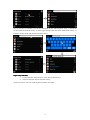
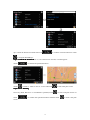
Step1: Touch Search Menu>Address Book to enter “Address Book
Book”” screen
You can select a destination by the following ways: 1) Scroll the list and select the desired
destination; 2) Touch page turning button and select the desired destination.
Tips: When the record is empty, “Address Book” screen displays “No Record”.
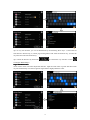
Step2: Select a Address Book record among results and touch
to enter “Route Plan
Plan””
or check Address Book location on map
screen
screen,or
More operation details for “Route Plan” please refer to chapter 4.
3.4.6.
Select a destination in Recent Destinations
You can select a destination from Recent Destinations and navigate KudosMap7+.
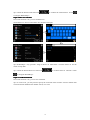
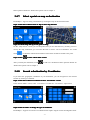
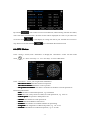
Step1: Touch Search Menu>Recent Destinations to enter “Recent Destinations
Destinations”” screen
You can select a destination by the following ways: 1) Scroll the list and select the desired
destination; 2) Touch page turning button and select the desired destination.
Tips: When the record is empty, “Recent Destinations” screen displays “No Record”.
Step2: Select a Recent Destinations record among results and touch
Plan
Plan”” screen
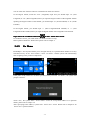
In “Recent Destinations List” screen, you could:
a) Select one Recent Destinations record;
b) Check Recent Destinations location on map;
c) Delete one Recent Destinations record.
20
to enter “Route